
If you want to show delivery estimate based on customer location in Shopify, the best options are Shopify's built-in automated delivery dates, a location-aware app, or custom theme code. In practice, the right choice depends on whether you need simple country-level messaging, state or region-specific estimates, or advanced multi-warehouse logic.
I've worked with a lot of Shopify merchants on shipping UX, and this is one of those features that has a direct effect on conversion. When shoppers can see a realistic ETA before they buy, they are less likely to hesitate, less likely to contact support, and less likely to feel misled after checkout.
In this guide, I'll show you how to set up location-based delivery estimates in Shopify, when Shopify's native tools are enough, and when an app like Delivery Timer makes more sense.
Why should you show delivery estimates based on customer location?
Location-based delivery estimates improve trust and conversion because they show shoppers a more accurate arrival window before they place an order. A customer in London and a customer in rural Scotland should not always see the same ETA, and international shoppers definitely should not.
From my experience building Shopify apps, vague shipping messaging like "ships in 3-5 days" often creates more friction than clarity. Customers want a date, or at least a realistic range, and they want it to reflect where they are, what they are buying, and when they are ordering.
Shopify itself has invested heavily in delivery expectations over the last few years, which tells you how important this has become. Shopify's own help docs now cover fulfilment time and delivery dates and automated delivery dates, because delivery transparency is now a core part of the buying journey.
If you also want to show shipping messaging earlier in the funnel, I've covered that separately in how to show shipping on the product page in Shopify. That pairs very well with ETA messaging.
Can Shopify show delivery estimates based on customer location natively?
Yes, Shopify can show delivery estimates natively in some cases, but it is not the perfect solution for every store. Native delivery dates are best for eligible stores that want automated estimates based on Shopify's shipping and fulfilment data.
Shopify's built-in feature is called automated delivery dates. According to Shopify, it predicts specific delivery dates using your fulfilment history and shipping performance. That means it can be very useful if your store has stable shipping operations and you're in a supported region.
However, native Shopify delivery dates come with limits. Eligibility depends on plan, fulfilment history, region, and setup, and many merchants still want more control over country-specific rules, state-level messaging, cut-off times, blackout dates, or product-specific exceptions.
In other words, Shopify's native option is worth checking first, but it will not replace a specialist ETA app for every use case.
When is Shopify's native delivery date feature enough?
Shopify's native feature is enough when your shipping setup is relatively standard and you mainly want accurate estimates at checkout or in supported surfaces. It works best for stores with predictable fulfilment and fewer custom rules.
- Best for: straightforward domestic shipping setups
- Less ideal for: complex regional logic, multi-warehouse handling, or highly customised product-page messaging
- Worth checking first: stores already using Shopify shipping settings cleanly
If your requirement is specifically to show estimates on the product page, cart, or with custom wording by region, you'll usually need an app or custom code.
What is the best way to show delivery estimate based on customer location in Shopify?
The best way is usually a dedicated app because it gives you more control over location rules, display placement, and delivery logic. For most merchants, that is the fastest path to a reliable setup without editing theme files or maintaining custom scripts.
For the use case in this article, I would usually recommend starting with Delivery Timer. It's designed specifically for showing estimated delivery messaging on the storefront, and one of the most useful features is its geolocation zone support.

I've seen merchants use this to show one estimate for the UK, another for mainland Europe, and another for the US or rest of world. That is much closer to how real fulfilment works than showing the same blanket promise to every visitor.
How do I show delivery estimates based on the customer's location with Delivery Timer?
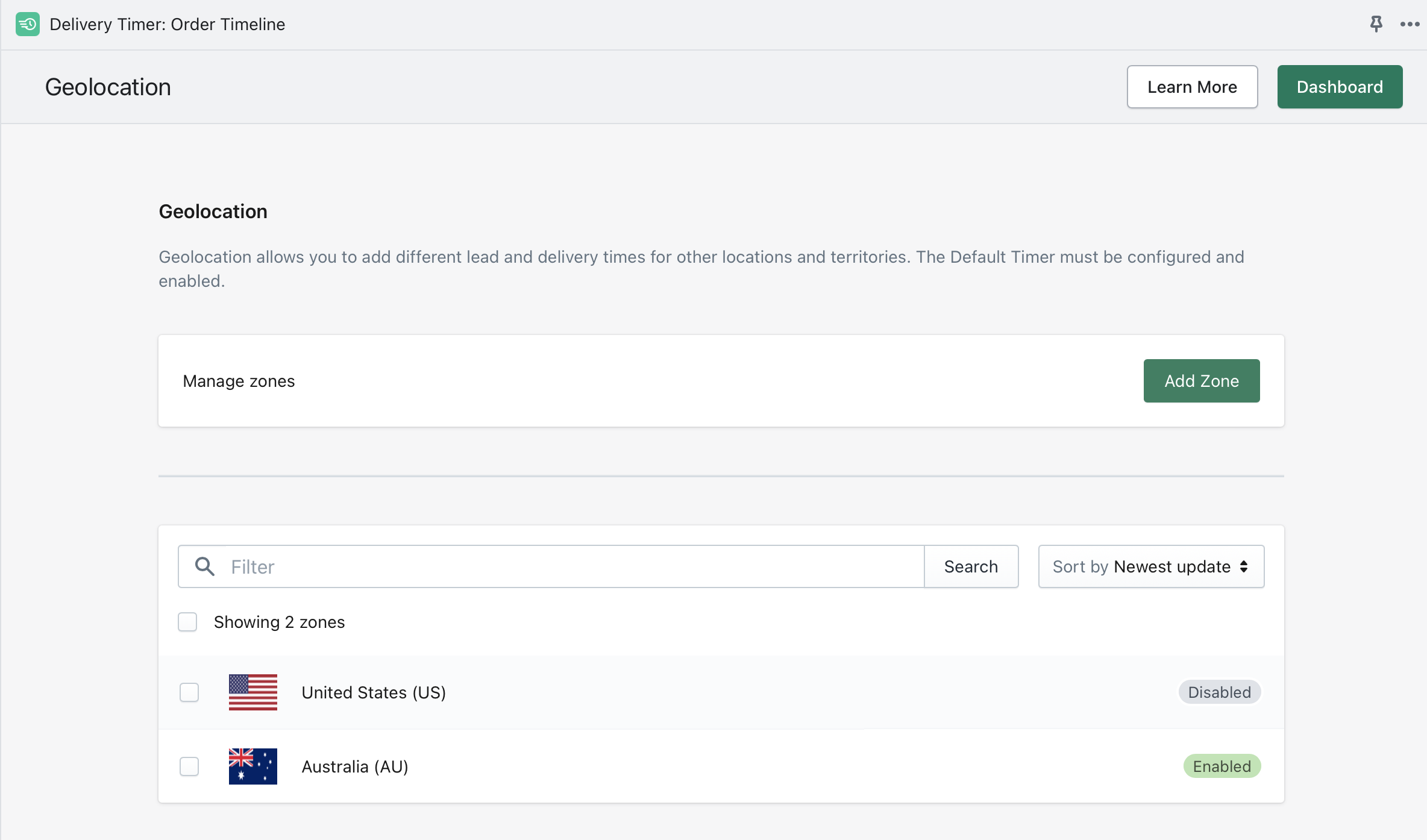
You can show location-based delivery estimates with Delivery Timer by creating geolocation zones and assigning different lead times or delivery windows to each zone. This lets you tailor ETA messaging by country or region without hard-coding rules into your theme.
The basic setup is simple. You install Delivery Timer, choose where the timer should appear, then configure location-specific rules using its geolocation settings.
- Install the app from the Shopify App Store.
- Choose the display position such as the product page, near the add to cart button, or another prominent area.
- Create geolocation zones for the countries or regions you want to target.
- Assign different delivery windows or lead times to each zone.
- Set cut-off times if you want today's order deadline to affect the displayed estimate.
- Preview on desktop and mobile to make sure the wording is clear and believable.
- Test with VPN or regional simulation so you can confirm the message changes correctly by visitor location.
In my experience, the biggest mistake merchants make here is being too aggressive with the promise. It is better to show a slightly conservative estimate that you can beat than an optimistic one that creates complaints.
How does Delivery Timer's geolocation zone feature work?
Delivery Timer's geolocation zone feature works by grouping visitors into predefined countries or regions and showing the delivery estimate assigned to that zone. That means you can display different ETAs without needing the customer to manually choose their location first.
Within the app, you can configure custom geolocation zones for specific countries and regions. For example, you might create one zone for the UK, one for Europe, one for North America, and one for everywhere else. Each zone can then have its own lead time, delivery range, or timing message.
This is particularly useful if your couriers, warehouses, or customs times vary by destination. It is also useful if you want to account for local fulfilment delays without changing your whole shipping setup in Shopify.
LaunchTip also has a knowledge base article on setting up geolocation zones for Delivery Timer, which is worth following if you want a more app-specific walkthrough.
What are the benefits of highlighting location-based delivery estimates?
The main benefits are better conversion, fewer support tickets, and more realistic customer expectations. When shoppers see a delivery message that matches their location, the store feels more trustworthy and better organised.
-
Tailored customer experience
Different regions have different shipping realities. A location-aware ETA gives customers a more relevant promise, which improves confidence at the point of purchase. In my experience, this matters most for international stores and brands with mixed domestic and overseas fulfilment.
-
Lower pre-sales friction
Many support queries start with some version of "When will this arrive?" If your product page already answers that question clearly, you reduce hesitation and help customers self-serve.
-
More accurate fulfilment expectations
Customers care more about reliability than speed alone. A believable estimate helps protect trust, especially if you sell products with variable dispatch times or use multiple suppliers.
-
Better operational alignment
When your storefront messaging matches your real shipping zones, your support and fulfilment teams spend less time correcting assumptions. That becomes even more important as order volume grows.
If you run local delivery as well as shipping, you may also want to read the best apps for offering local delivery options on Shopify. Local delivery often needs a different ETA strategy from standard shipping.
Which apps can show delivery estimate based on customer location in Shopify?
Several Shopify apps can do this, but they vary in how much control they offer over regions, states, products, and fulfilment locations. The best app depends on whether you need simple ETA banners or more advanced delivery logic.
Based on the current app landscape and merchant use cases, these are the main options worth looking at:
| App | Best for | Location logic | Notes |
|---|---|---|---|
| Delivery Timer | Best for simple, conversion-focused ETA messaging | Country or region rules via geolocation zones | Strong fit for product-page delivery estimates and cut-off style messaging |
| ArrivesBy - Delivery Date ETA | Stores wanting a polished Built for Shopify option | Personalised estimates by location, product, and stock | Free plan available and visible product-page focus |
| Estimated Delivery Date Plus | Stores needing region, state, or zone-based estimates | Regions, states, zones | Useful for merchants with more granular shipping rules |
| S: Estimated Delivery Date ETA (Omega) | Stores needing rules by location and product category | Customer location plus product rules | Good if ETAs vary heavily by catalogue segment |
| Store Pickup + Delivery (Zapiet) | Best for multi-location and local delivery setups | Postcode, distance, location rules | 14-day free trial and strong operational depth |
| Order Delivery Date | Stores offering scheduled delivery or pickup | Location-based custom dates and times | 60-day free trial noted in some seasonal promotions |
| SM Estimated Delivery Date ETA | Stores needing country, province, or state-level rules | Country, province, state | Supports working days, holidays, cut-off times, and multiple placements |
If your store has multiple warehouses and complex routing, an app like Zapiet often makes more sense than a simple ETA banner. If your main goal is conversion on the product page, Delivery Timer or ArrivesBy will usually be the first places I'd look.
How does Delivery Timer compare with other Shopify ETA apps?
Delivery Timer is strongest when you want a clean, fast way to show estimated delivery messaging on the storefront without overcomplicating operations. It is especially useful for merchants who want location-based display rules and clear cut-off messaging.
| Criteria | Delivery Timer | ArrivesBy | Zapiet |
|---|---|---|---|
| Primary use case | ETA messaging on storefront | Personalised delivery date display | Operational delivery and pickup management |
| Location-based estimates | Yes | Yes | Yes |
| Multi-location complexity | Strong | Moderate | High |
| Product-page visibility | Strong | Strong | Less conversion-first |
| Best fit | Best for most small to plus-sized stores | Best for merchants wanting Built for Shopify polish | Best for advanced fulfilment setups |
I say this as someone who builds apps for Shopify merchants: the best app is rarely the one with the longest feature list. It is the one that matches your fulfilment reality and is easy for your team to maintain.
Can I do this without an app?
Yes, you can show delivery estimates without an app, but only for simpler setups. A custom-code approach can work if you just need basic country-level logic and you're comfortable editing your Shopify theme.
There are tutorials that use Liquid and JavaScript to show a message like "Get it by Thursday" based on visitor IP or selected country. For example, some implementations show a temporary "Calculating..." message before replacing it with a date based on regional rules.
The trade-off is maintenance. Once you start needing working days, cut-off times, holiday exclusions, product-specific logic, or state-level rules, custom code becomes much harder to manage than an app.
If you are editing theme code anyway, make sure your broader shipping messaging is consistent. You may find these guides useful too: how to show estimated delivery date on your Shopify store and adding text next to shipping method on the shipping page in Shopify.
When should you avoid the custom-code route?
You should avoid custom code if your shipping logic changes often or if multiple people manage the store. The more exceptions you have, the more fragile a code-only solution becomes.
- Multiple warehouses
- Different ETAs by product type
- State or province-level rules
- Holiday calendars and blackout dates
- Frequent shipping policy changes
- Need for non-technical staff to update settings
For those cases, an app is usually more reliable and cheaper over time than maintaining custom logic.
How do I choose the right ETA setup for my store?
The right setup depends on your shipping complexity, sales geography, and where you want the estimate to appear. Most stores fall into one of three buckets: simple, growing, or operationally complex.
| Store type | Recommended approach | Why |
|---|---|---|
| Single-country store with simple shipping | Shopify native or Delivery Timer | Fast to launch and easy to maintain |
| International store with different regional ETAs | Delivery Timer or similar ETA app | Better control over country and region messaging |
| Multi-warehouse or local delivery operation | Zapiet or advanced delivery app | Handles routing, postcode logic, and prep times |
My general advice is to start with the simplest solution that still reflects reality. If your current setup is manageable with zones and cut-off times, don't jump straight into a heavyweight delivery operations app.
What should you include in a good delivery estimate message?
A good delivery estimate message should be specific, believable, and easy to scan. The message should help the customer make a buying decision in a few seconds.
Strong ETA messaging usually includes:
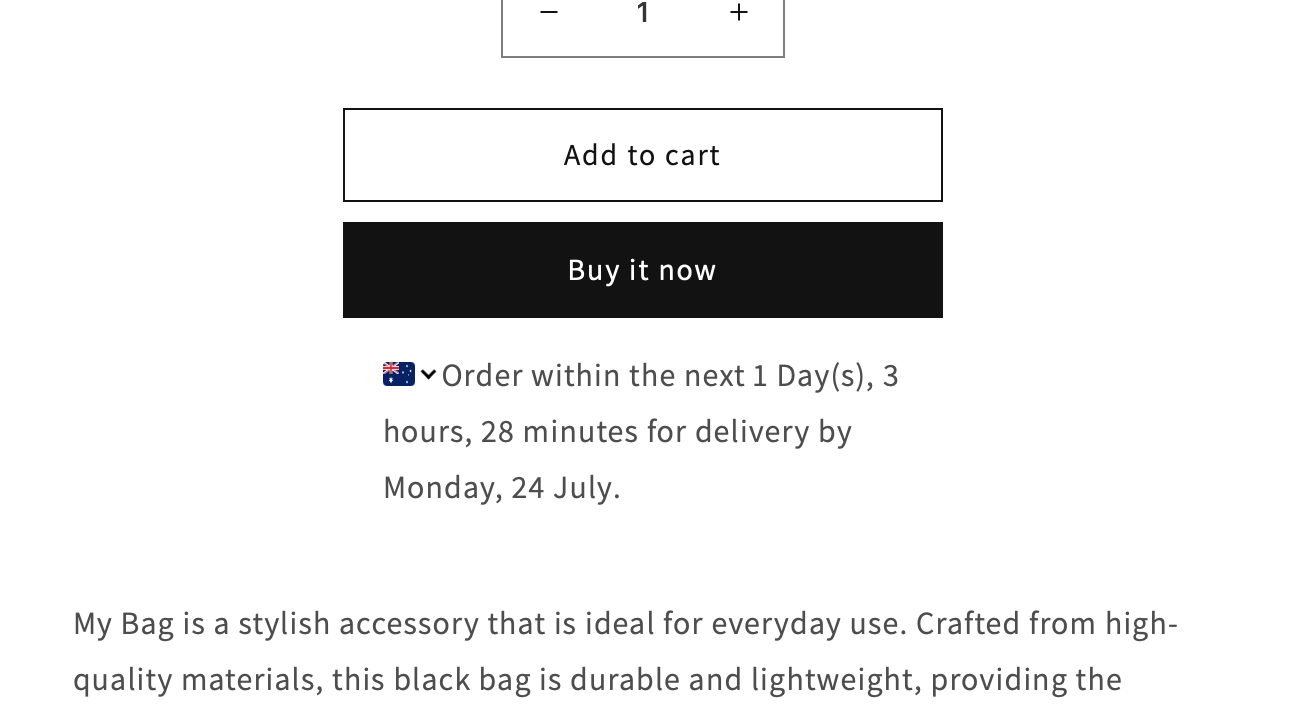
- An estimated date or range such as "Get it by Tuesday, 16 April"
- A cut-off cue such as "Order within 2h 14m"
- Location relevance where possible
- Working-day logic rather than naive calendar dates
- Clear exclusions if weekends or holidays are not counted
What you want to avoid is overpromising. In testing, I generally prefer a slightly conservative date that keeps customer confidence high. That is especially true if you rely on third-party fulfilment or cross-border shipping.
If long shipping times are a challenge in your niche, this may also help: how to manage long AliExpress shipping times on Shopify.
How do I test location-based delivery estimates properly?
You should test by region, device type, and page template before going live. A location-based ETA is only useful if it consistently shows the right message in the right place.
- Test multiple countries or regions using a VPN or location simulation tool.
- Check mobile first because that is where layout issues often appear.
- Test different products if your catalogue has varying fulfilment times.
- Verify cut-off behaviour before and after your daily dispatch deadline.
- Review weekends and holidays to make sure dates do not look unrealistic.
- Compare the storefront promise with actual fulfilment performance after launch.
In my experience, the final step is the most important. If your app says one thing and your operations do another, the feature becomes a liability instead of a conversion boost.
Is showing different content by country possible elsewhere in Shopify?
Yes, Shopify can show different content by country in several ways, including localisation, market settings, apps, and theme logic. Delivery estimates are just one example of location-aware merchandising.
This matters because shoppers increasingly expect stores to adapt to their region. That can mean currency, shipping messaging, delivery timelines, and even product availability. If you're already localising the shopping experience, ETA messaging fits naturally into that strategy.
For example, if you are changing prices or currencies by market, you may also want to read how to auto change currency based on customers location in Shopify.
What is my recommendation for most Shopify merchants?
For most merchants, the best option is to use a dedicated ETA app with geolocation support rather than relying purely on native Shopify features or custom code. It gives you more control, faster setup, and fewer maintenance headaches.
If your goal is specifically to show delivery estimate based on customer location in Shopify on the product page, I would start with Delivery Timer. It is a practical fit for merchants who want to display clear, location-aware delivery messaging without turning the project into a development task.
If your operation is more complex, especially with local delivery or multiple fulfilment locations, then it is worth looking at more advanced tools like Zapiet or other delivery scheduling apps. And if your store is simple and eligible, Shopify's own automated delivery dates are worth testing first.
The key is not just adding an ETA widget for the sake of it. The key is showing a promise that is accurate, location-aware, and credible enough to increase conversions rather than create support problems later.