
Shopify conversion rate optimisation is the process of improving your store so a higher percentage of visitors actually buy. In 2026, that means focusing on speed, product page clarity, mobile UX, trust signals, checkout friction, and smarter personalisation rather than random design tweaks.
In my experience building Shopify apps and reviewing hundreds of merchant stores, the biggest CRO wins rarely come from flashy redesigns. They come from fixing the boring but high-impact stuff first: slow pages, weak product pages, confusing navigation, poor mobile layouts, and missing trust cues. If you get those right, everything else performs better, including your ads, email, SEO, and upsells.
If you are already investing in traffic, this guide will help you turn more of that traffic into revenue. If you are not yet getting many visits, you should still use this as a practical checklist so you do not build conversion problems into your store from day one.
What is conversion rate optimisation on Shopify?
Conversion rate optimisation, or CRO, is the practice of increasing the percentage of store visitors who complete a desired action. For most Shopify merchants, that action is a purchase, but it can also include adding to cart, starting checkout, joining an email list, or using site search.
The formula is simple. If your store gets 1,000 visitors and 20 orders, your conversion rate is 2%. If you improve that to 3% without increasing traffic, you have increased orders by 50% from the same number of visitors.
This is why CRO matters so much. For a store with 10,000 monthly visitors, moving from the Shopify average of around 1.4% to 5% could mean going from roughly 140 orders to 500 orders. That is a huge revenue difference without spending more on acquisition.
What is a good Shopify conversion rate in 2026?
A good Shopify conversion rate in 2026 is generally above 2.5%, while 3.2% to 5%+ puts you in top-performer territory. The average Shopify store still converts at roughly 1.4%, so context matters.
I would not obsess over one universal number, because conversion rate varies by traffic source, product type, price point, geography, device, and repeat customer mix. A low-ticket consumables brand with strong repeat purchase behaviour will usually convert better than a high-consideration furniture store. A warm email campaign will usually convert better than cold paid social traffic.
| Conversion rate | How I would interpret it | Typical next step |
|---|---|---|
| Under 1.5% | Below average for many Shopify stores | Audit speed, product pages, trust, and checkout first |
| 1.5% to 2.5% | Decent baseline, but clear room to improve | Focus on mobile UX, merchandising, and funnel leaks |
| 2.5% to 3.2% | Strong performance for many stores | Run structured testing and improve AOV alongside CVR |
| 3.2% to 5%+ | Top-performing range | Refine personalisation, retention, and profit efficiency |
One more thing merchants often miss: a 2.5% conversion rate can be excellent if your average order value and margins are healthy. CRO is not about chasing vanity metrics. It is about profitable conversion growth.
Is conversion rate optimisation right for your store yet?
Yes, but the way you approach it depends on your traffic volume. If you have very little traffic, you should focus on foundational CRO rather than formal A/B testing.
In the original version of this article, I mentioned needing enough traffic before you can properly test changes. That is still true. If your store has only had a few hundred visits, you can absolutely improve obvious issues, but you should be careful about making big strategic conclusions from tiny sample sizes.
As a rule of thumb, once you are getting at least 1,000 visits per month, you can start spotting clearer patterns in behaviour. If you are running paid traffic, CRO becomes even more important because every friction point means you are effectively paying for visitors who bounce.
If you need help improving revenue per visitor after the click, I would also read How to Maximize Revenue from Your Shopify Product Pages and How to Create Shopify Cart Drawer Upsells That Boost AOV.
How do I optimise my Shopify conversion rate in the right order?
The best way to optimise your Shopify conversion rate is to work from highest-impact bottlenecks first. Start with analytics, then fix speed, mobile usability, product pages, trust, checkout, and only then move into advanced personalisation and testing.
This is where many stores go wrong. They install more apps, change button colours, or add urgency widgets before fixing the core shopping experience. In my experience, that usually makes the store slower and less trustworthy, not more persuasive.
- Measure your funnel - sessions, add to cart rate, checkout rate, purchase rate.
- Audit speed and mobile UX - especially product and cart pages.
- Improve product page persuasion - images, copy, reviews, delivery clarity.
- Reduce trust gaps - policies, contact info, returns, social proof.
- Simplify checkout - express payments, fewer distractions, clear costs.
- Add personalisation and upsells carefully - only where they support the purchase journey.
- Test one meaningful change at a time - and measure outcomes properly.
How do I benchmark and diagnose conversion problems on Shopify?
You should benchmark your store by looking beyond the final conversion rate. The most useful CRO diagnosis comes from analysing where visitors drop off between landing page, product page, cart, checkout, and purchase.
Inside Shopify Analytics, review metrics like sessions, bounce rate, add-to-cart rate, reached checkout rate, and conversion rate by device and channel. Then compare mobile versus desktop. I often find stores that look fine overall, but mobile converts dramatically worse because the page is cluttered, slow, or hard to use.
Use tools like Google PageSpeed Insights, GA4, and session recording tools such as Hotjar or Lucky Orange. Heatmaps and recordings are especially useful because they show whether people are rage-clicking, abandoning forms, or missing key information.
| Funnel metric | What a weak number often means | What to check first |
|---|---|---|
| Add to cart rate | Product page is not persuasive enough | Images, price clarity, reviews, shipping, CTA |
| Checkout started rate | Cart friction or surprise costs | Cart design, delivery estimate, discount box, trust |
| Checkout completion rate | Payment or form friction | Express pay, guest checkout, fees, mobile fields |
| Mobile conversion rate | Usability or speed issues on smaller screens | Theme layout, sticky CTA, tap targets, page weight |
How important is site speed for Shopify conversions?
Site speed is one of the most important conversion factors on Shopify. More than 40% of shoppers abandon sites that take longer than 3 seconds to load, and even a 1-second delay can hurt conversions.
This is one of the most consistent patterns I see when reviewing stores. Merchants install too many apps, upload oversized images, add autoplay videos, and then wonder why paid traffic does not convert. A slow store does not just rank worse and feel worse. It literally costs sales.

How do I improve Shopify speed without breaking my theme?
The safest way to improve speed is to remove unnecessary weight before touching code. Start with image compression, app cleanup, and reducing third-party scripts.
- Compress large images and upload modern formats where supported.
- Remove unused apps fully, including leftover theme code where relevant.
- Avoid excessive sliders and popups on mobile.
- Cut down tracking scripts that are no longer needed.
- Use Shopify's built-in performance tooling and test templates individually.
If you want a realistic view of what actually matters here, read The Hidden Truth About Shopify Speed Optimization Scams. I wrote that because too many merchants are sold meaningless speed scores instead of genuine user experience improvements.
How do I optimise my Shopify homepage for conversions?
Your homepage should quickly explain what you sell, who it is for, and why shoppers should trust you. It should guide visitors into collections or products in as few clicks as possible.
One point from the original article still absolutely holds up: homepage sliders are often overused. Most people only see the first slide, especially on mobile. If your most important message is hidden in slide three, it may as well not exist.
- Lead with one clear value proposition above the fold.
- Use a strong primary CTA such as Shop Bestsellers or Shop New In.
- Highlight trust quickly with review counts, shipping promise, or returns policy.
- Feature bestsellers or key collections instead of generic banners.
- Show social proof if you have it, especially UGC or customer photos.
If you offer free delivery, say it clearly. If you have a delivery deadline, make it visible. For stores where delivery certainty matters, tools like Delivery Timer can help communicate urgency and expectation more clearly.
How do I improve product page conversion on Shopify?
Product pages are where most conversion wins happen. The best Shopify product pages remove doubt, answer objections, and make the next step obvious.
Research consistently shows that stores using 4 or more product images perform better, and user-generated content can lift conversions by around 25%. In my experience, the biggest product page mistakes are thin copy, weak imagery, hidden delivery information, and reviews placed too far down the page.
What should every high-converting Shopify product page include?
Every high-converting product page should include clear media, benefit-led copy, visible trust signals, delivery information, and a friction-free add-to-cart area. If any of those are missing, conversion usually suffers.
- 4+ high-quality images showing different angles and real-world context.
- Video or 360 views where product detail matters.
- Benefit-led descriptions instead of manufacturer copy.
- Size charts, material details, or FAQs for objection handling.
- Reviews and ratings near the CTA, not buried at the bottom.
- Clear shipping and returns info before the customer commits.
- Sticky add to cart on mobile if your theme supports it well.
If you sell products where social proof matters, Lumo Reviews can help surface customer feedback more effectively. If your products require custom notes or personalisation, NoteDesk can reduce order confusion by collecting clearer customer input.
For a deeper product-page-specific playbook, read How to Maximize Revenue from Your Shopify Product Pages.
How do I make Shopify navigation and search convert better?
Good navigation helps shoppers find products in 2 to 3 clicks. Good search helps high-intent visitors skip browsing entirely and get to the right product faster.
This is underrated. I have seen stores with great products and decent traffic underperform simply because collections were confusing, filters were missing, or search was poor. If someone cannot find what they want quickly, they do not keep trying. They leave.
- Use clear collection names based on how customers shop, not internal terminology.
- Add filters such as size, colour, price, material, and availability.
- Use breadcrumbs on product and collection pages.
- Review site search queries to identify product demand and content gaps.
- Promote bestsellers within collections to reduce decision fatigue.
If search terms repeatedly show no results, that is valuable conversion data. It may reveal missing products, poor tagging, or naming problems that are quietly costing you sales.
How do I improve mobile conversion rates on Shopify?
To improve mobile conversion rates, simplify the experience aggressively. Mobile shoppers need fast loading, easy thumb navigation, clear CTAs, readable content, and minimal form friction.
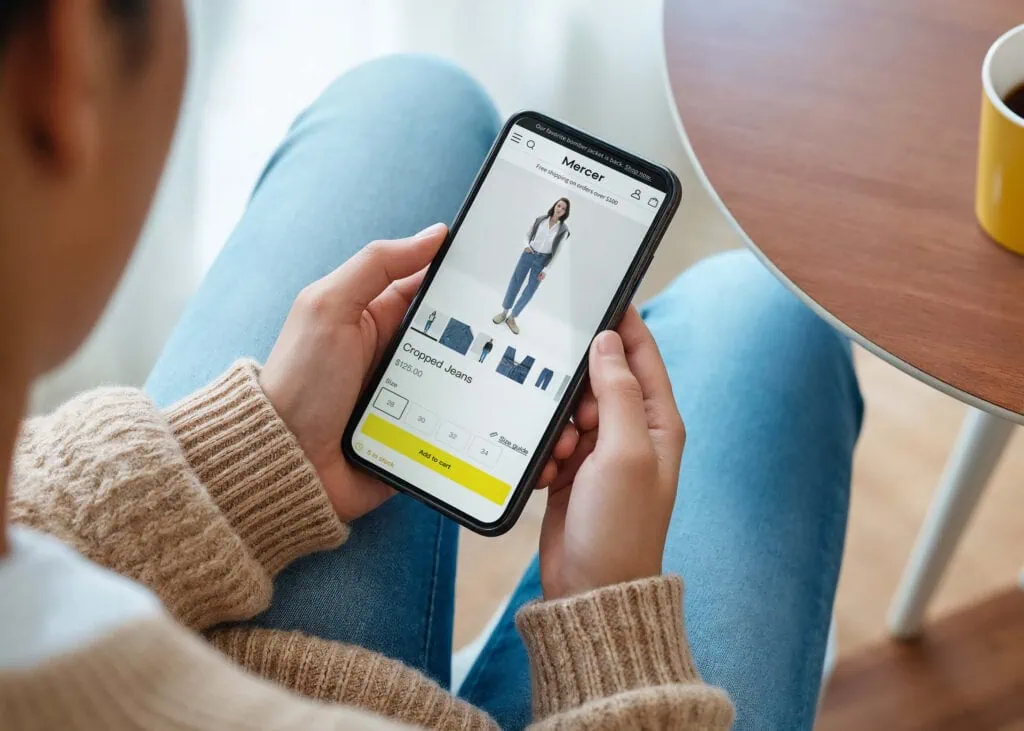
Many Shopify stores look good on desktop previews but feel awkward on a real phone. In my experience, mobile CRO is often the fastest route to revenue because so much ecommerce traffic now comes from mobile devices.

- Keep menus short and prioritise top categories.
- Use large tap targets for buttons, swatches, and quantity controls.
- Make text readable without zooming.
- Use sticky add to cart where it improves usability.
- Support Shop Pay, Apple Pay, and Google Pay for faster checkout.
- Test every key template on a real device, not just in theme preview.
How do I build trust and reduce hesitation?
Trust is built by making your store feel legitimate, transparent, and low-risk. Shoppers convert better when they can quickly verify who you are, what happens after purchase, and what recourse they have if something goes wrong.
Trust signals are especially important for newer brands, higher-priced products, and cold traffic. I would prioritise these before adding gimmicky urgency widgets.
- Visible reviews and testimonials
- Clear shipping and returns policies
- Contact details and support information
- Secure payment icons and recognised payment methods
- Real product photography and UGC
- FAQ sections that answer common objections
Accessibility also affects trust and usability. If your store is hard to navigate, confusing to read, or difficult to use with assistive technology, that can hurt conversion as well as increase legal risk. Read Website Accessibility Lawsuits: What Every Shopify Merchant Needs to Know in 2026 for the practical side of that.
How do I reduce checkout abandonment on Shopify?
The best way to reduce checkout abandonment is to remove surprises and make payment fast. Guest checkout, express payment methods, transparent costs, and fewer steps all help more shoppers complete their purchase.
Cart and checkout friction is where a lot of stores leak revenue. A customer has already decided they want the product. Your job is not to re-sell them at that point. It is to stay out of the way.
What checkout improvements matter most?
The most important checkout improvements are express pay, cost transparency, and fewer distractions. Anything that adds uncertainty or effort will usually lower completion rate.
- Enable Shop Pay, Apple Pay, Google Pay, and PayPal.
- Show delivery costs early where possible.
- Allow guest checkout.
- Use persistent carts so shoppers do not lose progress.
- Keep discount logic clean to avoid confusion or code-hunting behaviour.
If discounting is part of your strategy, make sure it does not create margin problems or weird checkout behaviour. This guide may help: How to Stop Double Discounts on Shopify.
Should I use upsells and cross-sells to improve conversion rate?
Yes, but only when they support the buying journey rather than interrupt it. The best upsells and cross-sells increase average order value without making the purchase feel harder.
As someone who builds Shopify upsell apps, I have a strong opinion here: most upsell implementations are too aggressive. If your cart drawer turns into a casino of offers, it can hurt conversion. If it suggests one relevant add-on at the right moment, it can work brilliantly.
For cart and post-purchase offers, Kartify and SellUp are worth considering depending on your setup. The key is relevance, not volume.
You can also read How to Upsell on Shopify in 2026, How to upsell on Shopify leveraging AI, and How to Cross-Sell Matching Variants for more tactical advice.
How does personalisation affect Shopify conversion rates?
Personalisation can increase conversions by roughly 15% to 20% when used well. The best personalisation helps shoppers discover relevant products, messages, and offers based on behaviour or context.
This can be as simple as showing different product recommendations based on collection viewed, or as advanced as using quizzes, segmented email flows, and behavioural targeting. The important part is that it feels helpful, not creepy or random.
- Show related or frequently bought together products
- Tailor popups by traffic source or cart value
- Use quizzes for product discovery
- Segment email and SMS flows based on browsing and purchase behaviour
If you want a quiz-led approach, Quizive is useful for guided product recommendations. For more on AI-led merchandising and conversion support, read AI-powered upsells: the future of ecommerce conversion and How to Optimize Your Shopify Store for AI Shopping Agents.
What should I A/B test on Shopify first?
The best first A/B tests are changes with a clear hypothesis and meaningful business impact. Start with product page headlines, add-to-cart sections, trust placement, media order, and cart messaging.
I would avoid testing tiny cosmetic changes too early. Button colour tests make for good social media posts, but they are rarely where the big gains are. Test the things that change understanding, motivation, or friction.
| What to test | Why it matters | Example hypothesis |
|---|---|---|
| Product title and subtitle | Improves clarity and value perception | Benefit-led headline will increase add to cart rate |
| Media order | Changes first impression | Lifestyle image first will outperform plain packshot |
| Review placement | Builds trust before action | Showing star rating near CTA will improve conversion |
| Cart drawer copy | Reduces hesitation | Delivery reassurance will increase checkout starts |
Run tests long enough to get meaningful data, and avoid changing multiple major things at once. Otherwise you will not know what actually caused the result.
What are the most common Shopify CRO mistakes?
The most common Shopify CRO mistakes are adding too many apps, copying competitors blindly, ignoring mobile, hiding key information, and making decisions without data. These are much more common than merchants think.
- Using too many popups that interrupt browsing
- Slow themes overloaded with scripts
- Weak product pages with generic descriptions
- No visible returns or shipping info
- Overcomplicated navigation
- Testing too many changes at once
- Optimising conversion rate but ignoring profitability
In my experience, stores usually do not need more persuasion. They need less friction and more clarity.
What is a practical 30-day Shopify CRO plan?
A practical 30-day CRO plan starts with auditing your funnel and fixing obvious friction points. Then you improve your most important templates and begin testing the highest-impact hypotheses.
- Week 1 - Audit analytics, speed, mobile UX, and funnel drop-off points.
- Week 2 - Improve homepage messaging, navigation, collection filters, and trust elements.
- Week 3 - Rework top product pages with better media, copy, reviews, and delivery clarity.
- Week 4 - Optimise cart and checkout, then launch one or two meaningful tests.
If you do nothing else this month, do these three things: speed up your store, improve your top 10 product pages, and reduce checkout friction. For most merchants, those changes will outperform any trendy CRO hack.
What tools and apps help most with Shopify conversion optimisation?
The best CRO tools help you understand behaviour, improve trust, and increase revenue per visitor without cluttering the experience. You do not need dozens of apps. You need a small stack that solves real problems.
| Need | Recommended tool or app | Best for |
|---|---|---|
| Performance auditing | Google PageSpeed Insights | Diagnosing speed bottlenecks |
| Behaviour analysis | Hotjar or Lucky Orange | Heatmaps and session recordings |
| Reviews | Lumo Reviews | Social proof on product pages |
| Cart upsells | Kartify | Cart drawer conversion support |
| Post-purchase upsells | SellUp | Increasing AOV after purchase intent |
| Product discovery quiz | Quizive | Personalised recommendations |
| Order notes and custom input | NoteDesk | Reducing confusion on customised orders |
| Delivery messaging | Delivery Timer | Urgency and expectation setting |
Just be careful not to solve every problem with another app. Every install has a cost in complexity, and sometimes in speed too.
How to optimise your conversion rate on Shopify in 2026
The best way to optimise your conversion rate on Shopify in 2026 is to focus on faster pages, clearer product merchandising, better mobile UX, stronger trust signals, simpler checkout, and measured testing. Most stores do not need a full redesign. They need a more disciplined conversion process.
If I were starting from scratch today, I would first benchmark the funnel, then improve the top product pages and mobile experience, then layer in smarter upsells and personalisation. That order consistently produces better results than chasing isolated hacks.
And if your traffic is growing from AI search as well as Google, make sure your store content is structured to support both discovery and conversion. These two guides will help: How to Get Your Shopify Store into ChatGPT and How to Optimize Your Shopify Store for AI Shopping Agents.