
Vous voulez un gain rapide pour augmenter la valeur moyenne des commandes dans votre boutique Shopify ? Votre tiroir de panier est l’endroit idéal pour proposer des upsells au bon moment. Les acheteurs voient ce qu’ils s’apprêtent à acheter : vous pouvez donc ajouter des offres pertinentes et des suggestions « fréquemment achetés ensemble » qui paraissent naturelles.
Les marchands Shopify peuvent mettre en place des upsells dans le tiroir de panier via la personnalisation du thème ou des applications spécialisées, avec des compromis importants entre contrôle, facilité de configuration et fonctionnalités.
Dans le guide qui suit, nous allons passer en revue les options. C’est parti.
Comprendre les upsells dans le tiroir de panier sur Shopify
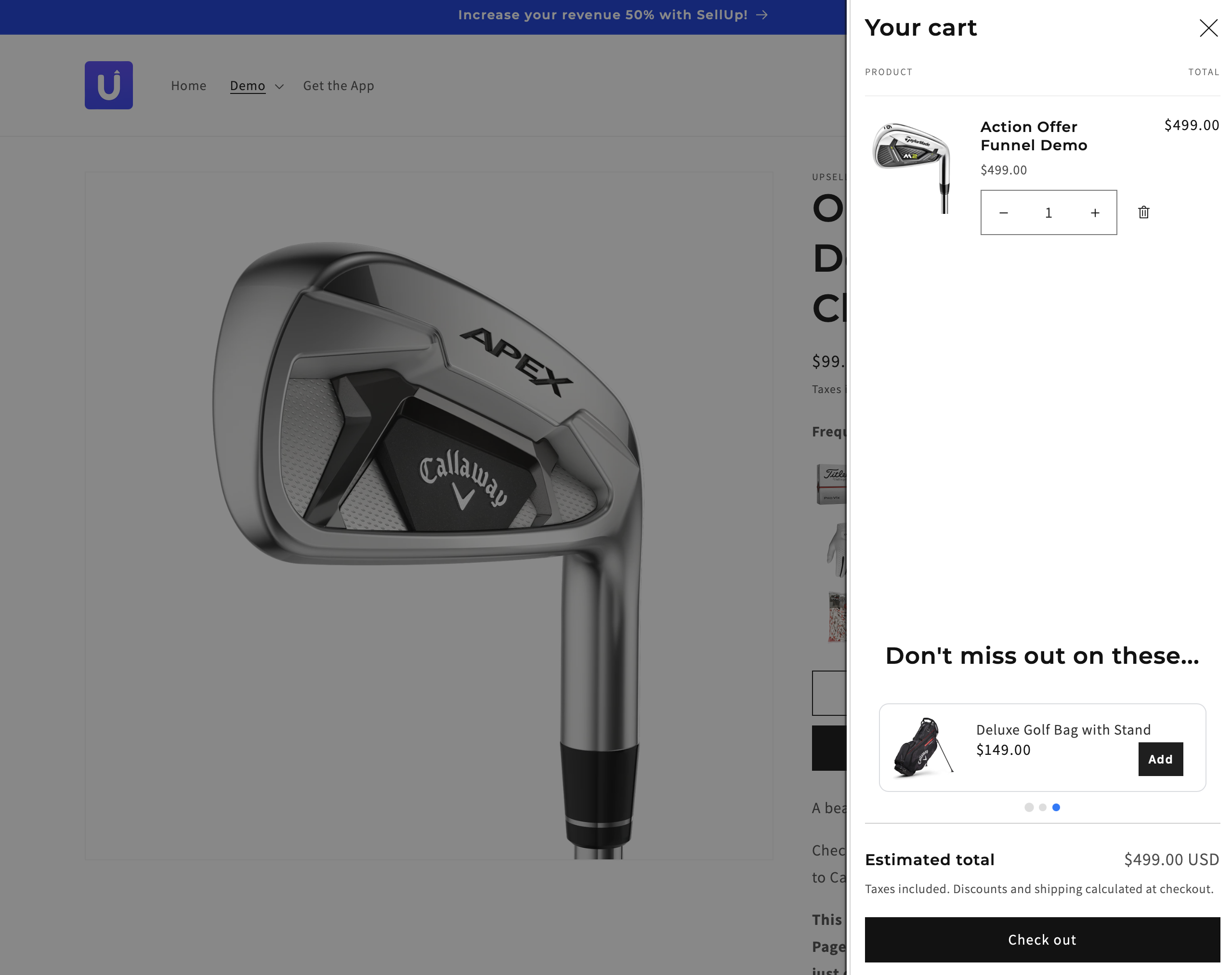
Les upsells dans le tiroir de panier affichent des recommandations ciblées à l’intérieur d’un panneau de panier coulissant, pendant que les acheteurs vérifient leurs articles. Cette expérience de tiroir de panier d’upsell Shopify garde les acheteurs sur les pages produit et augmente la valeur moyenne des commandes grâce à des offres complémentaires et des lots « fréquemment achetés ensemble ».
Les upsells dans le tiroir de panier peuvent fonctionner sur plusieurs emplacements : page produit, panier, paiement et page de remerciement. Des offres générées par l’IA se lancent en 60 secondes et s’alignent sur votre thème pour une identité de marque fluide. Les analyses de performance suivent les vues et les conversions et facilitent l’itération.
Les utilisateurs mobiles profitent du tiroir de panier Shopify, car il permet de modifier rapidement le panier sur petit écran sans rechargement de page. La personnalisation du design renforce la confiance envers la marque et soutient une UX cohérente.
Bonnes pratiques pour les upsells dans le tiroir de panier Shopify
- Placez les offres dans des emplacements à forte intention, comme le tiroir de panier ou le paiement, si vous optimisez les décisions en phase de conversion.
- Faites correspondre les recommandations au contexte du panier (variantes, catégories, fourchettes de prix) si vous visez la pertinence.
- Limitez le nombre d’offres simultanées pour réduire les frictions si vous gérez la charge cognitive.
- Communiquez le bénéfice en une ligne (upgrade, remise ou cadeau) si vous recherchez une compréhension immédiate.
- Proposez des actions de refus claires, comme « Ignorer » ou « Non merci », si vous protégez le parcours d’achat.
- Structurez les mises en page selon l’objectif : vertical pour parcourir, horizontal pour des grilles compactes, ou carrousel pour un focus unique, si vous gérez l’espace.
- Suivez les vues, les clics et le chiffre d’affaires des upsells dans les analytics si vous faites des tests A/B.
- Alignez polices, couleurs et badges sur les tokens de marque si vous maintenez la confiance et la cohérence.
Cas d’usage courants
- Mettre en avant des produits complémentaires (chargeurs, coques, recharges) pour les articles du panier.
- Créer des lots « fréquemment achetés ensemble », par exemple appareil photo + carte SD + sac.
- Inciter à atteindre des seuils avec une barre de livraison gratuite ou une échelle de remises pour augmenter la valeur du panier.
- Afficher des add-ons sur la page de remerciement pour capter l’intention post-achat.
- Configurez des recommandations alimentées par l’IA pour sélectionner automatiquement des ventes croisées dans votre catalogue si vous voulez un déploiement rapide.
- Personnalisez les designs pour correspondre à l’identité de la boutique dans le tiroir de panier et les badges si vous protégez la cohérence visuelle.
- Vérifiez la compatibilité avec les derniers thèmes Shopify avant de publier si vous voulez éviter les conflits de mise en page.
- Utilisez les analyses de performance pour comparer des emplacements (panier vs paiement) si vous répartissez le trafic.
Avantages de la mise en place d’upsells dans le tiroir de panier
- AOV plus élevé : présentez des produits complémentaires ou premium dans le tiroir de panier d’upsell Shopify et déclenchez des achats additionnels au moment de l’intention, selon les recommandations d’implémentation et les résultats observés par les marchands dans les ressources du secteur.
- Meilleure expérience : gardez les acheteurs sur les pages produit avec un tiroir de panier coulissant et réduisez les frictions grâce à une visibilité instantanée, comme documenté pour les patterns UX des cart drawers.
- Parcours plus rapide : évitez les redirections de page et conservez l’élan pendant les étapes de paiement, ce qui réduit les interruptions lors de la vérification de l’achat.
- Pertinence accrue : faites correspondre les offres d’upsell au contexte du panier avec les handles et titres produits issus des paramètres de votre thème, afin de garder des recommandations personnalisées et opportunes.
- Insights actionnables : suivez les vues, les acceptations et le chiffre d’affaires des upsells du tiroir de panier, puis itérez sur les produits et les mises en page grâce aux analyses de performance.
- Design fluide : alignez le module d’upsell avec l’identité de la boutique et les derniers thèmes Shopify pour un système visuel cohérent.
- Adéquation stratégique : utilisez le tiroir de panier pour des upsells à faible engagement (accessoires ou protection d’expédition), et déplacez les bundles complexes vers la page panier complète pour plus de clarté
Méthodes pour ajouter des offres d’upsell au tiroir de panier
Ajoutez des upsells dans le tiroir de panier sur Shopify via le code du thème ou des applications. Choisissez le code pour le contrôle, choisissez les apps pour la rapidité et les analytics.
Utiliser la personnalisation du thème Shopify
Modifiez votre thème pour injecter un upsell ciblé dans le tiroir de panier.
- Sauvegardez votre thème si vous prévoyez de modifier le code en production.
- Ouvrez Boutique en ligne > Thèmes > Actions > Modifier le code.
- Localisez snippets/cart-drawer.liquid ; si votre thème utilise un autre snippet, trouvez le fichier minicart en inspectant le DOM du tiroir de panier.
- Créez des paramètres de thème pour upsell_product_handle et upsell_title.
- Parcourez les articles du panier pour trouver le handle ; si l’article d’upsell existe, ne l’affichez pas.
- Ajoutez ce bloc Liquid au-dessus du conteneur drawer__footer.
{% assign cart_contains_upsell = false %}
{% for item in cart.items %}

{% if item.product.handle == settings.upsell_product_handle %}

{% assign cart_contains_upsell = true %}

{% endif %}

{% endfor %}

{% unless cart_contains_upsell %}

<div class="drawer__upsell">

<h3><strong>{{ settings.upsell_title }}</strong></h3>

{% assign upsell_product = all_products[settings.upsell_product_handle] %}

{% render 'card-product',

card_product: upsell_product,

quick_add: 'standard',

horizontal_class: true,

horizontal_quick_add: true

%}

</div>

{% endunless %}- Ciblez l’affichage selon le contexte du panier : si le panier contient le produit X, affichez le produit Y.
- Ajoutez un minimum de CSS pour l’espacement et la typographie si le tiroir doit être aligné visuellement.
- Écoutez les mises à jour du panier via le JS du thème pour rafraîchir le tiroir si l’upsell est ajouté dynamiquement.
- Testez sur desktop et mobile si votre thème utilise des tiroirs différents selon les breakpoints.
Exploiter les applications et intégrations Shopify
Utilisez des apps d’upsell pour ajouter rapidement des offres dans le tiroir de panier, avec un ciblage et des analytics intégrés. Certaines apps remplacent le panier natif du thème, ce qui peut poser problème. Pour une expérience cohérente, privilégiez les apps qui ajoutent la fonctionnalité à votre thème existant plutôt que de remplacer des composants.
- Installez une app d’upsell de tiroir de panier native depuis le Shopify App Store, par exemple SellUp.
- Créez une campagne Cart Upsell dans le tableau de bord de l’app si l’app regroupe les offres sous Cart Offers.
- Sélectionnez des produits et des règles, par exemple recommandations Shopify, SKUs spécifiques, le moins cher du panier, le plus cher du panier, vue récente.
- Personnalisez les styles pour correspondre à votre thème si vous voulez une UI cohérente.
- Activez l’offre et vérifiez le comportement côté front, puis surveillez les performances dans les analytics de l’app.
| Méthode | Description | Compétences techniques requises | Flexibilité | Coût |
|---|---|---|---|---|
| Personnalisation du thème (Liquid) | Modifier cart-drawer.liquid pour afficher un upsell conditionnel | Oui | Élevée avec des conditions personnalisées | Gratuit, hors développement |
| Applications Shopify | Configurer des upsells dans le tiroir de panier via l’interface de l’app et les analytics | Minimales | Élevée avec une logique préconfigurée | Plans payants, paliers gratuits |
Mettre en place des upsells natifs dans le panier avec SellUp
SellUp propose une solution complète d’upsells dans le tiroir de panier, qui s’intègre parfaitement à votre thème existant sans remplacer la fonctionnalité native de panier latéral.
Fonctionnalités clés pour les upsells dans le tiroir de panier
SellUp transforme votre tiroir de panier en moteur de revenus grâce à des recommandations alimentées par l’IA et un ciblage précis. L’app crée des upsells visibles et parfaitement intégrés, qui correspondent au design de votre boutique tout en conservant l’expérience native de tiroir de panier de votre thème.
Mettez en place des ventes croisées et des upsells alimentés par l’IA via Product Recommendations AI, qui fonctionne le mieux pour les boutiques ayant 3+ mois d’historique de commandes. Pour les boutiques plus récentes, sélectionnez manuellement des produits par défaut à afficher dans votre panier.
Créez des upsells de panier personnalisés en fonction du contenu précis du panier. Ils sont prioritaires sur les recommandations par défaut et se masquent automatiquement si les clients ont déjà les produits suggérés dans leur panier.
Processus de configuration
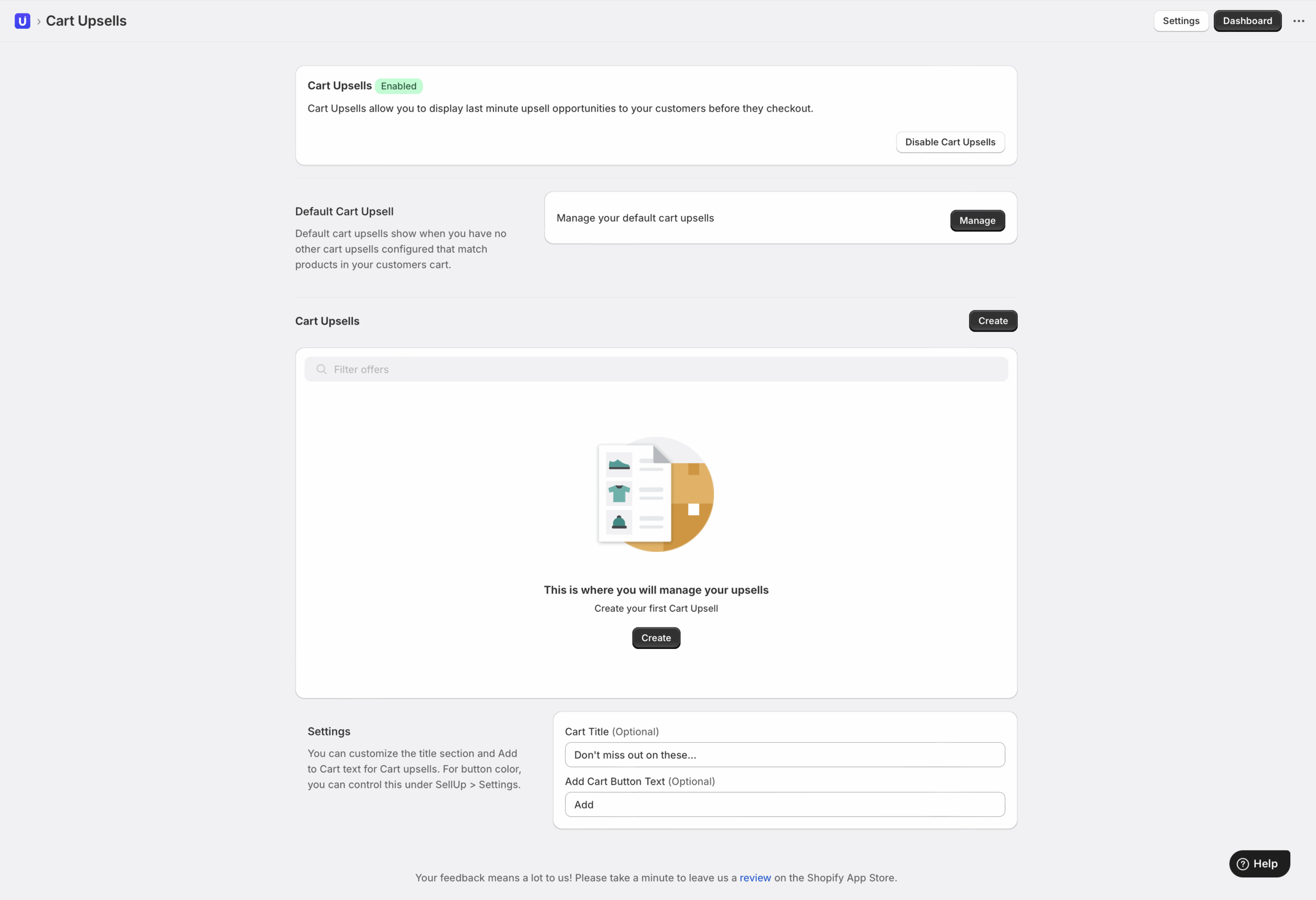
Accédez à Cart Upsells depuis le tableau de bord SellUp pour configurer vos offres.
Configurez des upsells de panier par défaut qui s’affichent dans toute la boutique, sauf si des règles personnalisées les remplacent. Ajoutez plusieurs emplacements produits avec le bouton plus pour élargir les recommandations.
Créez des upsells de panier personnalisés avec des conditions de déclenchement spécifiques basées sur le contenu du panier. Ces offres ciblées affichent une pertinence et des taux de conversion plus élevés.
Personnalisez l’affichage avec des remplacements de titre optionnels (par défaut : « Vous pourriez aimer ceci ») et un texte de bouton « Ajouter au panier » personnalisé pour correspondre à votre ton de marque.
Avantages de l’intégration au panier
SellUp conserve le tiroir de panier latéral natif de votre thème tout en ajoutant une puissante fonctionnalité d’upsell. L’intégration garde votre panier existant propre et fonctionnel, sans remplacement ni modifications majeures.
Suivez les performances via la suite d’analytics intégrée de SellUp pour surveiller les taux de vue des upsells, les taux de conversion et le revenu incrémental généré par les offres du tiroir de panier.
Activez le toggle des cart upsells pour afficher les recommandations sur votre page panier et dans le tiroir natif, créant ainsi des opportunités d’upsell cohérentes tout au long du parcours client.
Conclusion
Avec la bonne approche, votre tiroir de panier peut devenir un puissant levier de revenus. Choisissez la méthode qui correspond à vos compétences techniques et à vos ressources : que ce soit du code de thème sur mesure ou une solution via une app dédiée.
Misez sur la pertinence, maintenez des temps de chargement rapides et assurez-vous que l’expérience paraisse native à votre marque. Testez de manière systématique, mesurez les résultats et itérez à partir des données de performance. Avec une optimisation continue, votre tiroir de panier passera d’une simple étape de paiement à un générateur de profit fiable.