If you’re a Shopify merchant, you’ve probably received countless messages promising to boost your store’s speed to 90+ PageSpeed scores overnight for just $50-200. Before you hand over your hard-earned money, you need to know the truth: most of these “speed optimization” services are elaborate scams that can actually harm your business.
How These Speed Optimization Scams Really Work
The Fake Script Injection Method
Here’s what happens when you fall victim to these scams:
Malicious code gets injected into your theme. These scripts are designed to detect when popular speed testing tools like Google PageSpeed Insights, GTMetrix, or Lighthouse are running on your site.
The scripts manipulate test results. When a speed test is detected, the code temporarily blocks apps, images, or scripts just long enough to fool the testing tool into showing impressive scores of 90+.
Your real visitors see no improvement. While your PageSpeed score looks amazing, actual customers experience the same slow loading times as before because the “optimization” only works during tests.
Example on a theme:
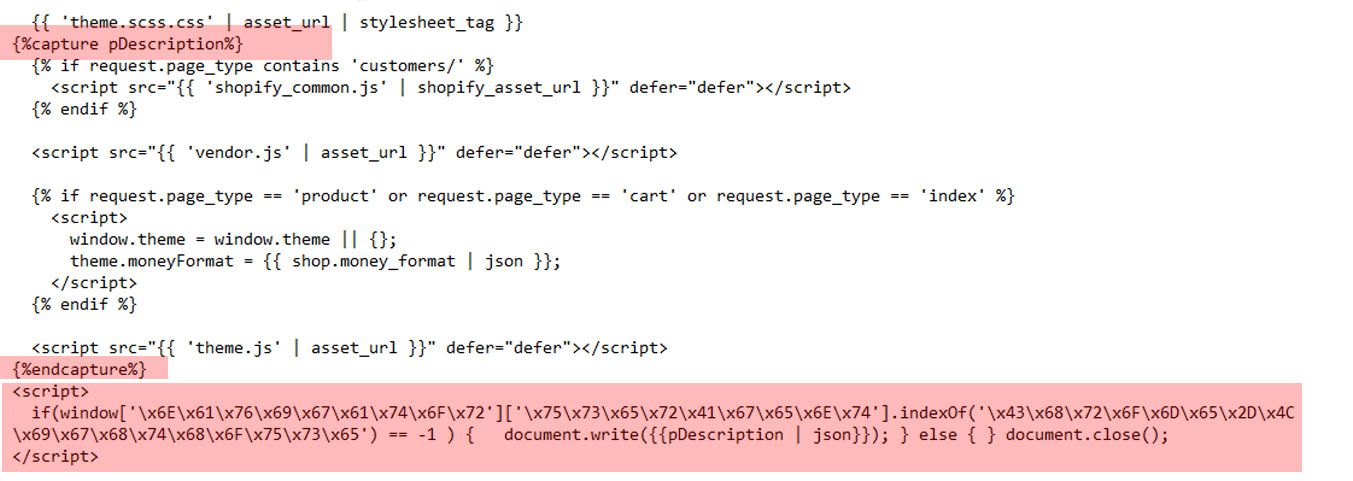
Temporary Boosts That Don’t Last
The most frustrating part? These fake optimizations don’t actually improve your store’s performance:
- The scripts don’t address underlying speed issues
- If the injected code breaks or gets removed, your scores return to their original state
- Your conversion rates won’t improve because real users aren’t experiencing faster load times
Hidden Security Risks
Some unscrupulous sellers go beyond fake speed scripts and inject genuinely harmful code:
- Hidden spam links that can hurt your SEO
- Tracking scripts that compromise user privacy
- Secret product collections for irrelevant keywords
- Backdoors that give scammers ongoing access to your store
Warning Signs of Speed Optimization Scams
Protect yourself by watching for these red flags:
Too-Good-to-Be-True Promises
- “Guaranteed 90+ PageSpeed score in 24 hours”
- Extremely low prices ($50-200) for what should be complex optimization work
- Claims that no other changes to your store are needed
Suspicious “Evidence”
- Sellers only show before/after PageSpeed screenshots
- No real user testing data or Core Web Vitals improvements
- Reluctance to explain their optimization methods
- 5-star reviews that seem generic or fake
Post-Service Red Flags
- Your site “feels” the same speed to you and customers
- PageSpeed scores jump dramatically but other metrics don’t improve
- The seller demands ongoing monthly payments if you change themes
How to Check if You’ve Been Scammed
If you’ve already paid for speed optimization, here’s how to verify if the work was legitimate:
Inspect Your Theme Code
- Go to your Shopify admin and navigate to Online Store > Themes
- Click “Actions” > “Edit code” on your active theme
- Search for files named “social meta-tags.js” or containing “metatags“
- Look for suspicious scripts at the end of these files
Example code:
document.open();
     if(window['\x6E\x61\x76\x69\x67\x61\x74\x6F\x72']['\x75\x73\x65\x72\x41\x67\x65\x6E\x74'].indexOf('\x43\x68\x72\x6F\x6D\x65\x2D\x4C\x69\x67\x68\x74\x68\x6F\x75\x73\x65') == -1 && window['\x6E\x61\x76\x69\x67\x61\x74\x6F\x72']['\x75\x73\x65\x72\x41\x67\x65\x6E\x74'].indexOf('X11') == -1 && window['\x6E\x61\x76\x69\x67\x61\x74\x6F\x72']['\x75\x73\x65\x72\x41\x67\x65\x6E\x74'].indexOf('GTmetrix') == -1) {document.write({{pDescription | json}});}  else{
     document.write("

.

");}document.close();
Run Comparative Speed Tests
- Test your site with different tools (PageSpeed Insights, GTMetrix, Lighthouse in Chrome DevTools)
- Use real user monitoring tools instead of just synthetic tests
- Check Shopify’s built-in speed report, which measures actual customer experiences
Get a Second Opinion
If you’re not technically savvy, paste any suspicious code into AI tools like ChatGPT and ask if it’s legitimate speed optimization or a scam script.
Legitimate Ways to Actually Improve Your Shopify Store Speed
Focus on What Really Matters
Before obsessing over PageSpeed scores, remember that even major sites like Apple.com score poorly on these tests. What matters most is how your site actually performs for real users.
Proven Speed Optimization Strategies
Optimize Your Images
- Compress images before uploading them to your store
- Use appropriate file formats (WebP when possible)
- Implement lazy loading for images below the fold
Minimize App Usage
- Remove unused apps that add unnecessary code
- Choose lightweight apps over feature-heavy alternatives
- Regularly audit your installed apps
Choose Quality Themes
- Invest in well-coded themes from reputable developers
- Avoid cheap themes from questionable sources
- Ensure your theme is regularly updated
Limit Custom Fonts
- Use system fonts when possible
- Minimize the number of font weights and styles
- Load fonts efficiently
When to Hire Professional Help
If you need genuine speed optimization, look for:
- Shopify Partners or Experts with verifiable case studies
- Agencies that focus on Core Web Vitals improvements, not just PageSpeed scores
- Developers who explain their methods transparently
- Services that offer real user experience improvements
What to Do if You’ve Been Scammed
Immediate Actions
- Document the scam – Take screenshots of the fake scripts and communications
- Remove malicious code – Either do it yourself or hire a legitimate developer
- Request a refund – Contact the platform where you hired the service
- Leave honest reviews – Warn other merchants by leaving detailed reviews
Reporting the Scam
- Report the seller to the freelancing platform
- Contact customer support with evidence of the fraudulent work
- Consider reporting to relevant authorities if money was stolen
The Bottom Line: Focus on Real Performance
Instead of chasing perfect PageSpeed scores, focus on metrics that actually impact your business:
- Real user experience – How fast does your site feel to actual customers?
- Core Web Vitals – Google’s metrics for actual user experience
- Conversion rates – Are customers completing purchases?
- Bounce rates – Are visitors staying on your site?
Remember, a site that loads quickly for real users will naturally perform well in legitimate speed tests. Don’t let scammers exploit your desire for a faster store – invest in genuine optimization that benefits your customers and your bottom line.
Final Thoughts
Speed optimization scams prey on merchants’ legitimate desire to improve their stores. By understanding how these scams work and focusing on real performance improvements, you can protect your business and actually enhance your customers’ shopping experience.
Before hiring anyone for speed optimization, ask yourself: Does this seem too good to be true? If the answer is yes, trust your instincts and look elsewhere. Your store and your wallet will thank you.