
Tiered discounts in Shopify let you reward customers for spending more or buying more units, usually by unlocking a better deal at each threshold. In practice, the two main methods are native Shopify discounts and discount apps, and the right choice depends on how much automation and on-site merchandising you need.
In my experience building Shopify apps and working with merchants on conversion problems, tiered discounts are one of the simplest ways to lift average order value without redesigning the whole store. They work especially well when the incentive is easy to understand, clearly displayed, and tested against your margins.
If you are also working on upsells more broadly, I would pair this guide with How to upsell on Shopify in 2026 and How to Create Shopify Cart Drawer Upsells That Boost AOV.
What are tiered discounts in Shopify?
Tiered discounts are discounts that increase as the customer reaches a higher quantity or spend threshold. A typical example is 10% off at £50, 15% off at £100, and 20% off at £150.
This pricing strategy is designed to encourage larger baskets, move more stock, and make the next purchase threshold feel achievable. You will also hear it described as volume discounts, quantity breaks, or spend-based discount tiers depending on the setup.
There are two common types:
- Cart value tiers - for example, spend £100 and get 10% off
- Quantity tiers - for example, buy 10 units and get 15% off
For many stores, this is a cleaner tactic than blanket discounting because it protects margin better. Instead of giving everyone the same offer, you only increase the discount when the customer gives you a bigger order in return.
Why should you use tiered discounts on Shopify?
Tiered discounts increase order size by giving shoppers a reason to add one more product or reach the next spend target. When implemented well, they can improve conversion rate, AOV, and perceived value at the same time.
Recent ecommerce guidance and merchant case studies consistently show that clear spend incentives can lift conversions, and the research behind modern discounting trends points to meaningful gains in the 20-30% range when offers are communicated well. I would not treat that as a guaranteed result, but I have seen enough Shopify stores benefit from simple threshold logic to take it seriously.
Here is why merchants keep using them:
- Higher average order value - customers add extra items to unlock the next tier
- Better stock movement - useful for slow-moving products or seasonal lines
- Clearer promotion structure - easier to understand than a messy stack of codes
- Useful for B2B and wholesale - especially quantity-based pricing
- Can support loyalty or VIP campaigns - when combined with customer segments
If your store already uses upsells, bundles, or cart goals, tiered discounts fit neatly into that wider strategy. For related ideas, see How to Cross-Sell Matching Variants and How to Maximize Revenue from Your Shopify Product Pages.
How do I create tiered discounts in Shopify?
You can create tiered discounts in Shopify using native discount codes or automatic discounts, or by using a third-party app for more advanced logic and better front-end display. The best native route is fine for simple campaigns, while apps are better for volume pricing tables, progress bars, and more complex rules.
Shopify has improved its discount tools a lot since the early versions of this article. You are no longer limited to a very basic workaround. Today, most merchants can implement functional tiered offers natively, but the exact experience still depends on whether you want manual code entry, automatic application, or visual quantity-break widgets.
Before you build anything, decide which structure you want:
- Spend-based: Spend £50, get 10% off. Spend £100, get 15% off.
- Quantity-based: Buy 5, get 5% off. Buy 10, get 10% off.
- Segment-based: VIP customers get different tiers from regular shoppers.
- Product-specific: Discount applies only to selected products or collections.
What is the difference between native Shopify discounts and apps?
Native Shopify discounts are best for simple tiered offers with minimal setup. Apps are better when you need stronger merchandising, more flexible rules, or a cleaner customer experience on the product and cart pages.
In my experience, merchants often start native, then move to an app once they realise the discount itself is only half the job. The other half is showing the tiers clearly, preventing confusion, and making the offer feel worth chasing.
| Option | Best for | Pros | Cons |
|---|---|---|---|
| Native discount codes | Simple campaigns on any Shopify plan | No app required, quick to set up, flexible targeting | Manual code entry, weaker front-end display, more friction |
| Automatic discounts | Spend or quantity thresholds without coupon entry | Auto-applies at checkout, cleaner UX, easier for shoppers | Can still be limited for advanced tier logic or on-page presentation |
| Discount apps | Stores wanting tables, progress bars, bundles, and advanced conditions | Better merchandising, stronger customisation, often faster to test | Monthly cost, app dependency, possible overlap with other promo tools |
How do I create tiered discounts with Shopify discount codes?
Discount codes are the simplest no-app method for tiered discounts. You create one code per tier, set the minimum spend or quantity, and then communicate those thresholds clearly on your storefront.
This method works on standard Shopify plans and is still useful if you want full control over when the customer applies the discount. The trade-off is obvious: customers must enter the code manually, which creates friction and can reduce uptake.
How to create discount codes for each tier
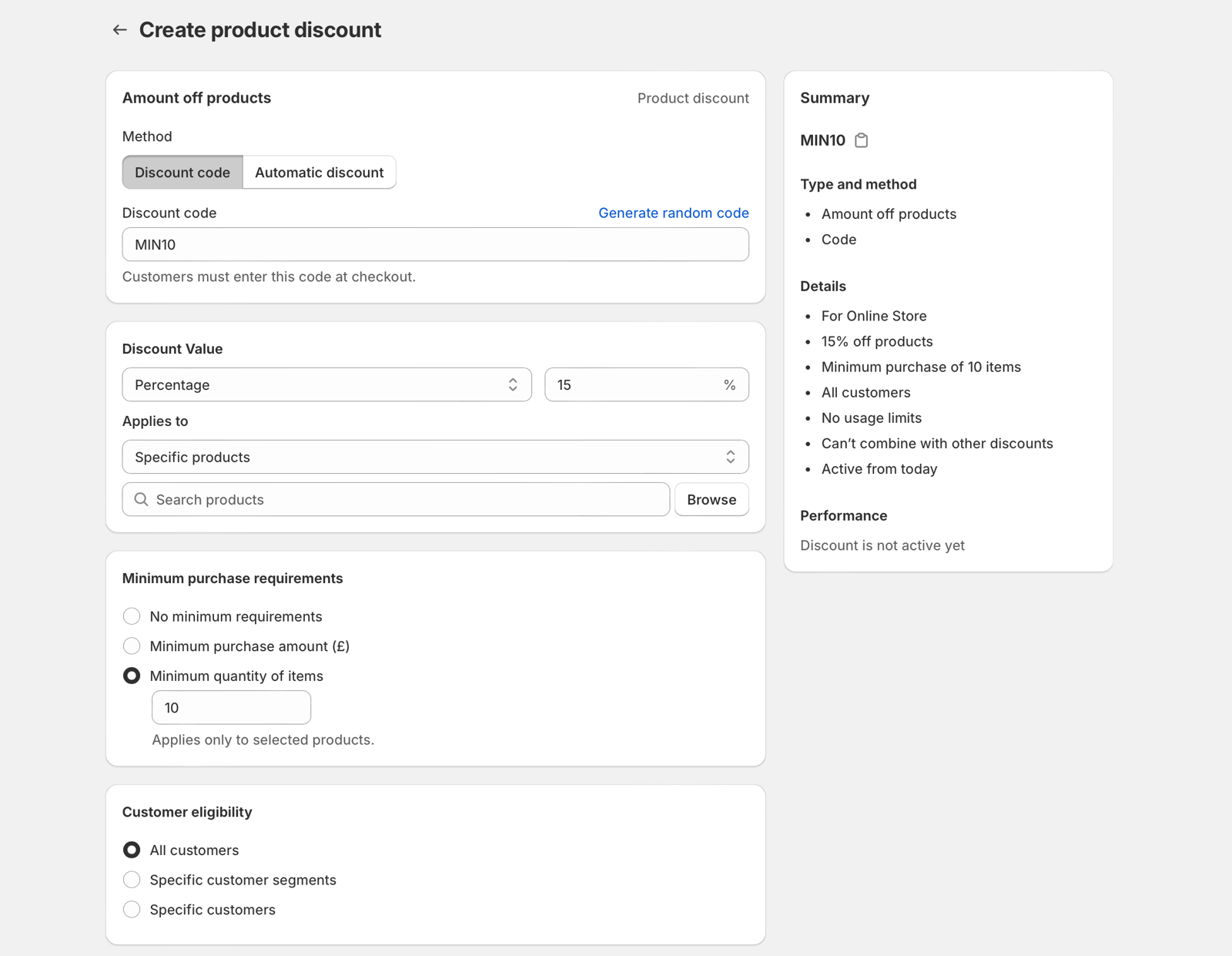
Create a separate discount code for each tier and define the threshold for each one. For example, you might set TIER10 for orders over £100 and TIER20 for orders over £150.
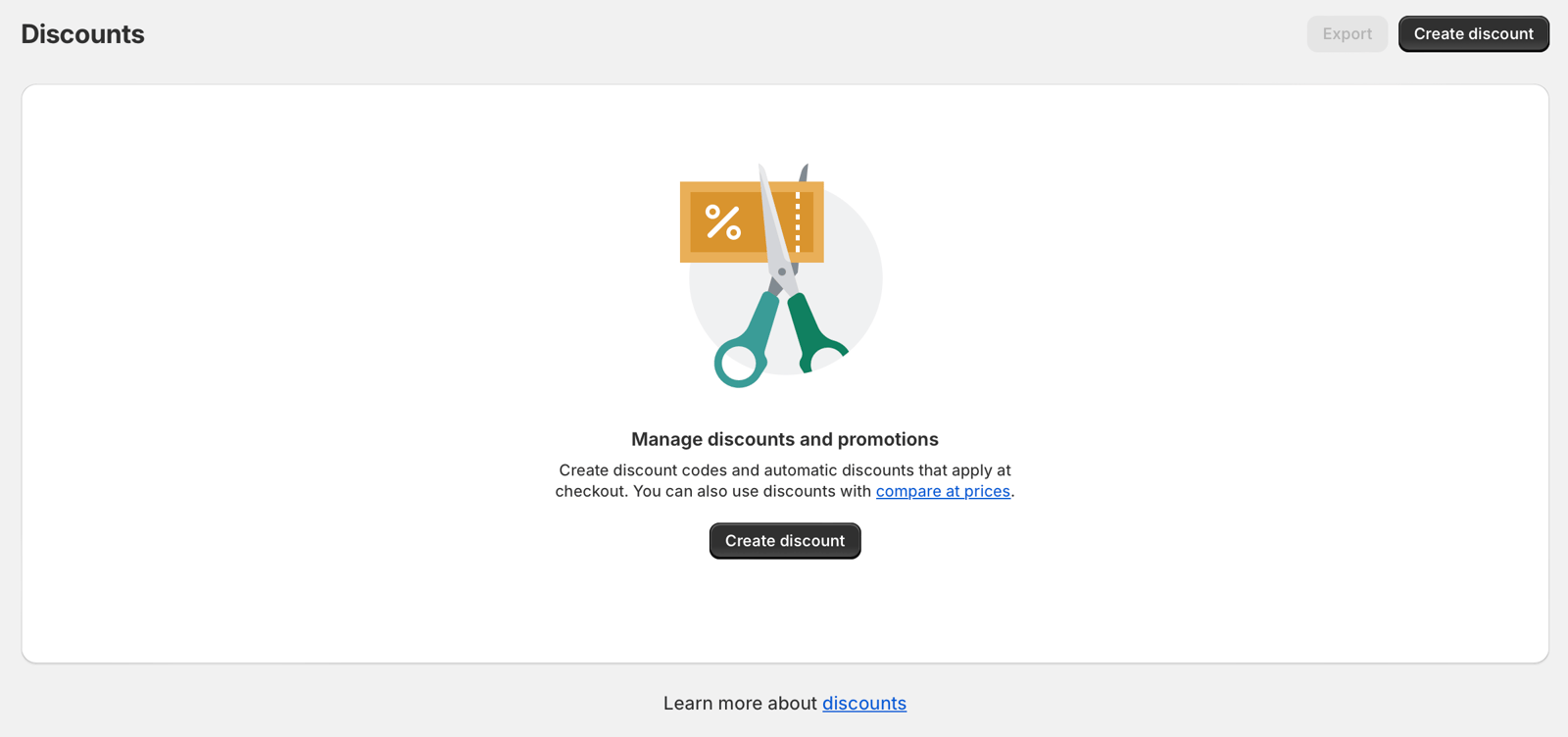
- In your Shopify admin, go to Discounts.
- Click Create discount.
- Select Discount code.
- Choose the type, such as Amount off products or Amount off order.
- Enter your code name, such as TIER10.
- Set the discount value, for example 10% off.
- Under conditions, set the minimum purchase amount or minimum quantity.
- Choose whether it applies to specific products, collections, or the whole order.
- Set any customer eligibility, usage limits, and active dates.
- Save the discount and repeat for each additional tier.
A practical example would look like this:
| Tier | Trigger | Discount | Code |
|---|---|---|---|
| Tier 1 | Spend £100+ | 10% off | TIER10 |
| Tier 2 | Spend £150+ | 15% off | TIER15 |
| Tier 3 | Spend £250+ | 20% off | TIER20 |
This is still a basic but workable approach if you do not want another app in your stack. It works best when you pair it with a simple pricing table, product page message, or cart banner so customers know the offer exists before they reach checkout.
You can build that message into your theme, or use a lightweight custom section. If you are editing storefront content, even a simple HTML table can do the job. Just make sure it is mobile-friendly and not hidden beneath tabs nobody opens.
What are the limitations of discount-code tiers?
The main limitation is friction. Customers have to notice the code, remember it, and enter the correct one at checkout.
There are a few other constraints worth knowing:
- Manual entry reduces redemption compared with automatic discounts
- Customers may try the wrong code and get confused
- Multiple promotions can clash if your discount strategy is messy
- It is harder to create a polished product-page quantity-break experience
Shopify also has discount combination rules and platform limits that can affect how offers stack. If your store already runs compare-at pricing and coupon campaigns, read How to Stop Double Discounts on Shopify before launching a new tiered offer.
How do I create tiered automatic discounts in Shopify?
Automatic discounts are the best native option if you want Shopify to apply the highest eligible tier without requiring a code. This creates a smoother customer experience and is usually better for conversion than asking shoppers to type in coupon codes.
This is the biggest practical update since the original version of this article. Many merchants still assume Shopify cannot handle tiered discounts natively, but for straightforward spend-based or quantity-based offers, automatic discounts are now a realistic built-in method.
Step-by-step: setting up automatic discount tiers
Create one automatic discount per threshold and make sure the rules do not conflict. Shopify will generally apply the best eligible discount when the cart meets the conditions.
- Go to Shopify admin > Discounts.
- Click Create discount.
- Select Automatic discount.
- Choose the discount type, such as Percentage off or Amount off.
- Set the eligibility rule, such as minimum quantity or minimum purchase amount.
- Example Tier 1: 5% off at 5 items.
- Duplicate the discount for Tier 2 and change it to 10% off at 10 items.
- Duplicate again for Tier 3 and change it to 15% off at 15 items.
- Restrict the discount to specific products, collections, or customer segments if needed.
- Test the discount in a live theme preview or development store before publishing.
A spend-based example would be:
- Spend £50 - get 10% off
- Spend £100 - get 15% off
- Spend £150 - get 20% off
For many DTC stores, this is the best no-app setup because it removes coupon friction. The customer just shops, reaches the threshold, and gets the reward automatically.
Can I use automatic discounts for VIP customers or segments?
Yes, in many cases you can target customer segments by creating the relevant segment first and then assigning discount eligibility accordingly. This is useful for VIPs, wholesale-lite programmes, or loyalty campaigns.
I have seen merchants use this to reward repeat buyers without advertising the same deal to everyone. It is a smart middle ground between public promotions and full-blown B2B pricing logic.
If customer segmentation is central to your store, you may also want to review How to Manage Shopify Customer Data Without Losing Sales and Best CRM for Shopify in 2025.
When should you use an app for tiered discounts?
Use an app when native discounts are not enough for the customer experience or promotion logic you want. If you need quantity-break tables, cart progress bars, bundle-like offers, or more flexible rule combinations, an app is usually the better option.
In my experience, the biggest reason merchants install a discount app is not the discount engine itself. It is the front-end presentation. A visible tier table on the product page can outperform a hidden back-end discount because shoppers understand the savings before they hesitate.
Apps also help when you want:
- Volume discount tables on product pages
- Cart progress bars that show the next reward threshold
- Free gift or free shipping milestones
- More advanced combinations than native tools allow
- Faster setup without theme custom work
This matters even more if you care about cart UX. I have written more about this in How to Create Shopify Cart Drawer Upsells That Boost AOV and AI-powered upsells: the future of ecommerce conversion.
What are the best Shopify apps for tiered discounts?
The best Shopify tiered discount apps are the ones that combine reliable discount logic with clear on-site merchandising. Based on the apps referenced in this post, the strongest options are Multiscount, P: Quantity Breaks & Discounts, and Volume Discounts - Dealeasy.
I always recommend checking three things before installing any discount app: theme compatibility, checkout behaviour, and how the offer is displayed on mobile. Those three factors matter more than a long feature list.
| App | Best for | Strengths | Link |
|---|---|---|---|
 Multiscount |
Stackable and tiered order discounts | Up to 12 order discount tiers, supports volume discounts, free gifts, shipping incentives | View app |
 P: Quantity Breaks & Discounts |
Bulk discounts and quantity breaks | Built for Shopify, volume pricing, BOGO deals, flexible campaigns | View app |
 Volume Discounts - Dealeasy |
Quantity tiers plus cart incentives | Built for Shopify, quantity breaks, bundles, free shipping bars, free gift progress messaging | View app |
These are all valid options, but they suit different stores. If you want a simple quantity-break layout on product pages, I would start with P: Quantity Breaks & Discounts. If you want broader promotional mechanics and cart goal messaging, Volume Discounts - Dealeasy is often a stronger fit. If you need more layered order-tier logic, Multiscount is worth a look.
What is the best method for your store?
The best method depends on complexity. If your offer is simple, use native discounts. If your offer needs stronger merchandising or advanced rules, use an app.
| Store situation | Best method | Why |
|---|---|---|
| Small store running one simple spend-based offer | Automatic discounts | Best for small stores that want less friction and no app cost |
| Store wants coupon-led campaigns promoted by email or influencers | Discount codes | Useful when you want customers to enter a code manually |
| Store needs product-page pricing tables or quantity breaks | App | Worth it for clearer merchandising and higher visibility |
| B2B, VIP, or advanced segmented pricing logic | App or Shopify Plus custom logic | Native tools may not be enough for more complex cases |
If you are on Shopify Plus, there are also more advanced custom routes depending on your stack and checkout needs. But for most merchants reading this, the decision is really between automatic discounts and an app with better UI.
How should you display tiered discounts on your storefront?
The best tiered discount offer is easy to see before checkout. If shoppers only discover the discount at the end of the journey, you lose much of the motivational effect.
This is where many stores underperform. They set up the discount correctly, but they do not sell the offer properly. I have seen stores hide a strong volume incentive in a tiny line of text under the add-to-cart button, then wonder why uptake is poor.
Good display options include:
- Product-page quantity tables
- Cart drawer progress bars
- Sticky cart messages showing the next threshold
- Collection page badges for eligible products
- Announcement bars during promotional periods
If you want search visibility as well as conversion improvements, make sure these offers are also reflected in structured, readable page content. That helps both users and AI shopping agents understand your pricing. For that angle, see How to Optimize Your Shopify Store for AI Shopping Agents and How to Get Your Shopify Store into ChatGPT.
What mistakes should you avoid with Shopify tiered discounts?
The biggest mistakes are poor margin planning, confusing thresholds, and weak communication. Tiered discounts can increase revenue, but they can also train customers to wait for deals if you use them carelessly.
Here are the mistakes I see most often:
- Setting tiers too close together so the next step does not feel meaningful
- Offering discounts that wipe out margin, especially on already discounted products
- Not excluding low-margin collections such as heavy or fragile items
- Forgetting mobile UX when displaying pricing tables
- Running overlapping promotions that confuse customers or stack badly
- Not testing checkout behaviour before sending traffic
As a rule, every tier should feel like a genuine reward, but not such a deep cut that it damages profitability. If your margins are tight, consider using free shipping or a free gift as one of the tiers instead of increasing the percentage discount every time.
How do I test whether tiered discounts are working?
Measure AOV, conversion rate, units per order, and margin before and after launching your tiers. The goal is not just more sales, but better profit per session.
When I test promotional mechanics, I look at four core metrics first:
- Average order value - are customers actually reaching the thresholds?
- Conversion rate - does the offer help more visitors buy?
- Units per transaction - especially important for quantity tiers
- Net margin - are you making more after discounts, not just before them?
Also compare where the offer is shown. A product-page volume table may perform differently from a cart-only progress bar. In some stores, using both works well. In others, it feels noisy and lowers trust.
If site speed is a concern when adding promotional apps, read The Hidden Truth About Shopify Speed Optimization Scams so you can evaluate performance claims more critically.
Can you combine two discounts on Shopify?
Sometimes, yes, but it depends on your discount settings and the type of discounts involved. Shopify allows certain discount combinations, but not every tiered setup should be stackable.
This question appears in People Also Ask for good reason. Merchants often assume more combinations equal more conversions, but in practice, uncontrolled stacking can destroy margin very quickly. I usually recommend keeping tiered discounts simple and intentional.
Before allowing combinations, ask:
- Can this stack with compare-at pricing?
- Can this stack with free shipping codes?
- Will affiliates or email campaigns introduce extra codes?
- Does the final discount still leave enough margin?
If you want a safer setup, let the customer receive the single best eligible tier automatically rather than mixing multiple discounts together.
Final thoughts on creating tiered discounts in Shopify
The simplest answer is this: use automatic discounts if you want a native, lower-friction setup, and use an app if you want stronger on-site presentation or more advanced logic. Discount codes still work, but they are now the more manual option rather than the default recommendation.
In my experience building for Shopify merchants, the stores that get the best results are not necessarily the ones with the most complex tier structure. They are the ones that make the offer obvious, credible, and worth chasing. Keep your tiers simple, test them properly, and make sure the next reward feels achievable.
If you want to push AOV further after setting this up, I would next look at How to Upsell Subscription Products on Shopify and How to upsell on Shopify leveraging AI.