

If you want to combine multiple products into product sets on Shopify, the best method depends on what you are actually trying to achieve. In most cases, you will either merge separate products into one listing with variants, create a bundle product, or show linked products together on one product page.
That distinction matters because Shopify merchants often use the phrase "product set" to mean very different things. In my experience building Shopify apps and helping merchants structure offers, the wrong setup usually creates problems with inventory tracking, SEO, fulfilment, or customer confusion later on.
This guide is a full rewrite of our original article, updated for how Shopify works now. I am also factoring in what is currently ranking, including Shopify's own Combined Listings documentation, community discussions about merging products, and the newer app-based workflows merchants are actually using today.
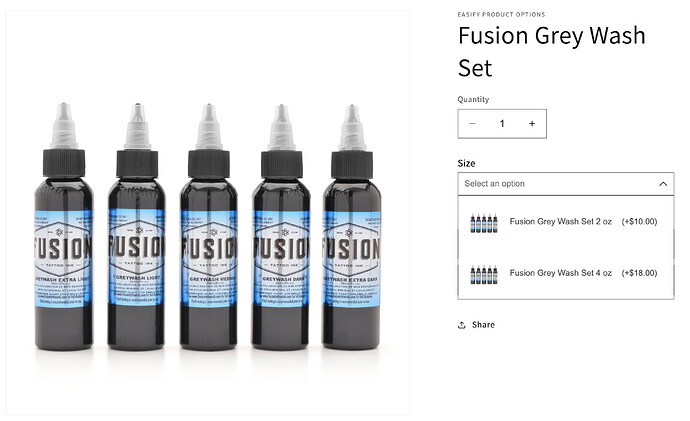
What does it mean to combine multiple products into product sets on Shopify?
Combining multiple products into product sets on Shopify means presenting two or more products as one offer, one listing, or one buying experience. The exact setup can range from a true bundle to a merged variant listing to a curated kit.
The terminology gets messy. Merchants say product sets, bundles, kits, combined listings, and sometimes even merged products interchangeably. They overlap, but they are not always the same in Shopify admin.
- Product sets usually mean a grouped offer sold together, such as a skincare starter set.
- Bundles usually mean multiple products sold as one purchase, often with a discount.
- Kits usually mean products packaged together for a use case, such as a camera accessory kit.
- Combined listings usually mean separate products shown as one parent listing with selectable options.
- Merged products with variants usually mean consolidating separate listings into one product in Shopify.
If your goal is to increase average order value, improve product discovery, or clean up a messy catalogue, product sets can work very well. If your goal is simply to merge duplicate products with different colours or sizes, you may not need a bundle at all.
What is the best way to combine products on Shopify?
The best way to combine products on Shopify depends on whether the products should remain separate behind the scenes. For simple size or colour consolidation, native variants are usually best. For separate child products with their own details, Combined Listings or a specialist app is usually better.
Here is the quick rule I use when advising merchants:
| Goal | Best method | Best for | Main limitation |
|---|---|---|---|
| Merge duplicate products into one listing | Native Shopify variants | Products differing by size, colour, material | Only up to 3 options per product |
| Show separate products as one listing | Shopify Combined Listings | Plus or enterprise merchants | Plan and theme eligibility apply |
| Sell multiple products as one offer | Shopify Bundles | Kits, starter packs, gift sets | Not the same as merging listings |
| Bulk merge many products | CSV or Matrixify | Large catalogues | Requires careful data handling |
| Create a variant-like experience from separate products | Rubik Combined Listings or similar app | Stores needing swatches and separate product data | App dependency |
In my experience, the biggest mistake is choosing a bundle app when you actually need a catalogue consolidation tool. Those are different jobs.
Can I combine multiple products into one listing using Shopify variants?
Yes, you can combine multiple products into one listing using Shopify variants if the products are really just variations of the same core item. This is the simplest and most reliable option for most standard stores.
Shopify's built-in variants work well when products differ by attributes like size, colour, style, or material. Each variant can have its own SKU, barcode, price, and inventory.
This method is especially useful if you currently have separate product pages for what should obviously be one product. I still see stores with one listing for "Black T-Shirt", another for "White T-Shirt", and another for "Blue T-Shirt". That setup often weakens conversion and spreads reviews, traffic, and authority across too many URLs.
How do I merge products into one Shopify product with variants?
To merge products into one Shopify product with variants, create a new master product or choose the best existing one, then add variant options and move the relevant data across. This works best when the products share the same core description and buying intent.
- Choose the product that should become the main listing.
- In Shopify admin, go to Products and open that product.
- Go to the Variants section and click Add variant.
- Add an option name such as Colour, Size, or Style.
- Enter option values separated by commas.
- Assign each variant its own price, SKU, barcode, and inventory.
- Upload variant-specific images where needed.
- Redirect old product URLs to the new merged product URL if you are deleting old listings.
If you are consolidating existing live products, do not just delete the old pages and hope for the best. Set up 301 redirects so you preserve traffic and avoid broken links. If SEO matters to you, that step is not optional.
We have covered related conversion considerations in How to Maximize Revenue from Your Shopify Product Pages. A cleaner product structure nearly always helps merchandising as well as search performance.
When should I not use variants?
You should not use variants when the products have meaningfully different descriptions, galleries, URLs, or merchandising needs. If each option needs its own rich product page, native variants can become limiting.
For example, if you sell a sofa in multiple fabrics and each fabric needs its own gallery, detailed copy, and landing page, a basic variant setup may feel too restrictive. This is exactly where Combined Listings or an app-based linked product approach makes more sense.
What is Shopify Combined Listings and who is it for?
Shopify Combined Listings is Shopify's native way to connect separate products into one enhanced storefront listing. It is designed for merchants who want a variant-like experience while keeping each child product as a distinct product in the catalogue.
According to Shopify's documentation, a combined listing has a parent product and multiple child products. Customers see shared options such as colour or model on the storefront, but each child product can still retain details that ordinary variants cannot, such as its own title, description, URL, or image gallery.
This is a strong solution for fashion, furniture, and other catalogues where each option is substantial enough to deserve its own product data. It also aligns closely with what many merchants in Shopify Community threads are actually looking for when they say they want to "merge products".
You can read Shopify's official documentation here: Combined Listings help guide and install the app here: Shopify Combined Listings.
What are the limitations of Shopify Combined Listings?
The main limitation is that Combined Listings is not available to every merchant. Shopify states that eligibility requires a Plus or enterprise commerce plan, use of the Online Store sales channel, and a compatible theme.
That means this is not the default answer for most small and mid-sized stores. If you are not on Plus, you will likely need to use variants, bundles, or a third-party app instead.
If you are considering Plus mainly for catalogue complexity, it is worth reading When to Upgrade Your Store to Shopify Plus. Combined Listings can be useful, but it should not be the only reason you upgrade.
How do I create a product set or bundle on Shopify?
To create a product set or bundle on Shopify, use a bundle app if you want customers to buy multiple separate products together as one offer. This is different from merging products into one variant listing.
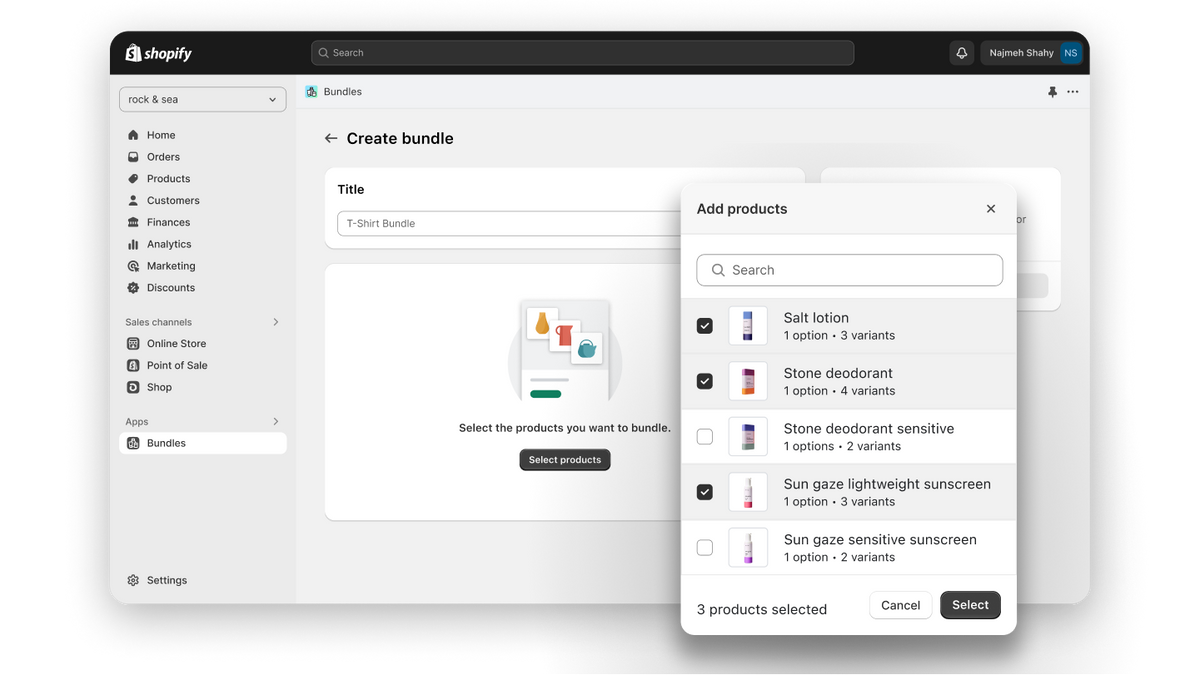
For true bundles, the most obvious native option is Shopify Bundles. It is Shopify's own app and is a sensible starting point for simple fixed bundles or multipacks.
Bundles are ideal when your goal is to increase AOV, encourage cross-sells, or create a more compelling offer. In my experience, merchants often see better take-up when the bundle solves a clear problem, such as "starter kit", "travel set", or "complete the look", rather than just lumping random products together.
This also overlaps with upselling strategy. If that is part of your goal, you might also want to read How to Upsell on Shopify in 2026 and How to Create Shopify Cart Drawer Upsells.
What is the difference between a bundle and a combined listing?
A bundle sells multiple products together in one purchase. A combined listing presents separate products as selectable options within one product experience.
That is the simplest way to think about it:
- Bundle = buy A + B + C together.
- Combined listing = choose one option from connected products.
- Variant merge = convert several similar listings into one actual Shopify product.
If you mix these up, you can end up with the wrong app, messy inventory, and a storefront that does not match customer expectations.
What apps can help combine multiple products into product sets on Shopify?
The best Shopify apps for combining products depend on whether you want to merge, bundle, or link products. There is no single best app for every use case.
Based on current research and what merchants are using, these are the main options worth knowing:
| App | Best for | Key strength | App Store link |
|---|---|---|---|
| Merges | Merging up to 100 products into one | Fast product consolidation workflow | View app results |
| Matrixify | Bulk catalogue restructuring | CSV-style import/export control | Matrixify |
| Rubik Combined Listings | Variant-like linked listings | Keeps separate product data and inventory | View app results |
| Shopify Bundles | Product sets and kits | Native Shopify bundle workflow | Shopify Bundles |
| Easify Product Options | Linking products as options | Flexible product option setup | Easify Product Options |
Matrixify is the one I see recommended most often when merchants need to restructure a large catalogue in bulk without manually editing hundreds of listings. If you are comfortable with spreadsheets and careful imports, it is extremely powerful.
Shopify Bundles is the easiest place to start if your need is straightforward bundle creation rather than product merging. If you need a storefront experience that looks like one product but preserves separate child products, that is where tools like Rubik Combined Listings come in.
Can I combine products in bulk using CSV?
Yes, you can combine Shopify products in bulk using CSV, but it is best suited to merchants who are comfortable working with product data. This method is powerful, but it is also the easiest way to make a mess if you rush it.
The basic workflow is simple:
- Export your products from Shopify as a CSV.
- Use Excel or Google Sheets to consolidate rows into the desired product structure.
- Map handles, titles, options, SKUs, images, and variant values carefully.
- Reimport the cleaned CSV into Shopify.
- Check storefront display, inventory, and redirects immediately after import.
This approach is often mentioned in Shopify Community threads because it works when merchants have many separate products that need consolidating. But I would only recommend it if you have a backup, clear data rules, and time to test.
If you are dealing with hundreds or thousands of products, an app like Matrixify is usually safer and more flexible than trying to do everything with Shopify's standard CSV import alone.
What are the advantages of product sets, bundles, and merged listings?
The main advantage of combining products on Shopify is that it can improve conversion rate, average order value, and catalogue clarity. Done well, it makes buying easier.
The original version of this article was right about one big thing: creating product sets gives you more opportunities to sell more in a single transaction. That is still true. In fact, it is even more relevant now because merchants are under more pressure to improve efficiency in paid acquisition.
When a store increases AOV, it can usually afford higher customer acquisition costs while staying profitable. That is why bundles and product sets are not just a merchandising trick. They are often a margin and growth lever.
- Higher AOV through sets, kits, and multi-item offers
- Cleaner navigation when duplicate products are merged
- Better customer experience when options are easier to compare
- Stronger merchandising on product pages and collections
- Potential SEO gains when authority is consolidated into fewer better pages
In my experience, the strongest results come when the set is built around a clear buying intent. A "starter set" for beginners usually performs better than an arbitrary discounted grouping.
What are the disadvantages or risks?
The main risks are inventory complexity, broken SEO signals, and poor data migration. There are plenty of benefits, but there are definitely disadvantages if the setup is careless.
Inventory is the first issue. If you create a manual bundle as a separate product without proper component tracking, you can oversell items that are also sold individually. This is one reason bundle and inventory apps exist.
SEO is the second issue. If you merge or delete products without redirects, you can lose rankings, backlinks, and indexed pages. If page structure matters to your growth, read The Hidden Truth About Shopify Speed Optimisation Scams as well, because catalogue clean-up and technical quality often go hand in hand.
The third issue is analytics confusion. If you merge listings badly, you can distort product performance history and make merchandising decisions harder. I always recommend exporting current product data before any major restructure.
How do I choose the right method for my store?
Choose the method based on whether the products are truly variations, truly bundles, or truly separate products that just need a unified storefront experience. That one decision will save you a lot of time.
| If your situation is... | Use this |
|---|---|
| Same product, different colours or sizes | Native variants |
| Separate products sold together as one offer | Shopify Bundles or a bundle app |
| Separate products that should appear as one listing | Combined Listings or a linking app |
| Large-scale catalogue cleanup | CSV or Matrixify |
| Need custom option logic without coding | App like Easify Product Options |
If you are a smaller merchant, start with the simplest setup that preserves good inventory control. Complexity tends to compound on Shopify. The more apps and custom logic you introduce, the more carefully you need to test theme compatibility, checkout behaviour, and reporting.
What is my recommended process before merging or bundling products?
Before combining any products on Shopify, audit your catalogue, define the goal, and protect your existing data. A little prep work prevents hours of cleanup later.
- List the products involved and identify whether they are variants, bundles, or linked products.
- Export your product data before making structural changes.
- Choose the main URL you want to keep for SEO and paid traffic.
- Check inventory logic so component stock stays accurate.
- Map redirects from any old product pages you plan to remove.
- Test the storefront on mobile, desktop, and collection pages.
- Review product page UX so the new structure is actually clearer for customers.
This might sound obvious, but many merchants skip step one and start with the app instead of the strategy. The app should follow the business goal, not define it.
If your main goal is to improve merchandising and increase basket size, also look at How to Cross-Sell Matching Variants and How to Upsell on Shopify Leveraging AI.
Should I manually create a separate set product?
Yes, you can manually create a separate set product on Shopify, and for some stores it is still a perfectly valid option. It works best when the set is marketed as its own standalone offer with its own SKU.
This was one of the better points in the original article, and it is still relevant. You can create a new product called something like "Starter Set" or "Gift Box", assign it a unique SKU, and sell it as a dedicated product page.
The catch is inventory. If the set contains products that are also sold individually, you need a way to sync stock accurately. Without that, manual set products can create overselling issues very quickly.
For stores selling made-to-order, personalised, or operationally complex products, a manual set product can still be the cleanest solution. It is particularly useful when the bundle has unique packaging, photography, or fulfilment rules.
This also overlaps with operational workflows we have written about in How to Add a Rush Order or Production Option to Your Shopify Store and How to Track Customized Orders in Shopify.
Final thoughts on combining multiple products into product sets on Shopify
The best method is the one that matches your catalogue structure and customer buying behaviour. For simple consolidation, use variants. For true kits and sets, use bundles. For separate products that need one polished storefront experience, use Combined Listings or a specialist app.
In my experience building Shopify apps, merchants get the best results when they simplify the buying journey first and worry about technical elegance second. Customers do not care whether your setup is called a bundle, kit, or combined listing. They care that it is easy to understand, easy to buy, and accurately fulfilled.
If you are cleaning up a large catalogue, take your time. Back up your data, test thoroughly, and treat redirects and inventory as first-class tasks rather than afterthoughts. That is the difference between a tidy product restructure and a month of avoidable cleanup.