
If you are searching for the best Shopify app to manage customers and orders, my short answer is this: NoteDesk is the strongest option if you need customer context, order tracking, internal collaboration, tasks, and automations in one place. In my experience building Shopify apps, most stores do not actually need a bloated enterprise CRM. They need a practical system that helps the team track customer issues, stay on top of orders, and never miss follow-ups.
That gap shows up fast once a store starts growing. Shopify gives you customer profiles and order records, but it does not fully solve the day-to-day operational mess of who is handling this order, what happened with this customer last time, or which task needs doing before the order ships. That is where a purpose-built app can make a huge difference.

What is the best Shopify app to manage customers and orders?
The best Shopify app to manage customers and orders is NoteDesk for merchants who want CRM-style visibility, task management, order notes, team collaboration, and workflow automation inside Shopify. It is especially strong for stores that need to coordinate customer service, fulfillment, and operations without losing context.
I say that as someone who works closely with Shopify merchants and sees the same problem over and over. A lot of stores start with Shopify's built-in tools, then hit a wall when order volume increases, staff members get involved, and customer requests become harder to track. At that point, the issue is not just data. The issue is operational follow-through.

NoteDesk is built around a very practical need: manage customers, orders, tasks, notes, reminders, and automations from one operational layer. That matters if your team is juggling special shipping requests, VIP customers, subscription issues, fraud checks, wholesale orders, inventory exceptions, or post-purchase support.
Why do Shopify stores struggle to manage customers and orders?
Shopify stores struggle because customer information, order actions, and team communication often live in separate places. Once that happens, mistakes become expensive and support quality drops.
In early-stage stores, this usually starts with simple workarounds. Someone leaves a note in Slack. Someone else adds a tag in Shopify. A third person remembers to follow up later, except sometimes they do not. Over time, that creates missed tasks, duplicate replies, late shipments, and frustrated customers.
Here are the most common pain points I see:
- No clear owner for a customer issue or order exception
- Order notes are scattered across inboxes, chat tools, and spreadsheets
- VIP or repeat customers are not handled consistently
- Fulfillment teams miss special instructions such as gift notes, address changes, or hold requests
- Support agents cannot see the full history of previous conversations and actions
- Manual follow-up tasks are easy to forget during busy periods
- Inventory or custom order issues are not escalated properly
This is why the best solution is usually not just a basic CRM or a shipping app. It is a tool that connects customer records, order context, team workflows, and reminders.
How does NoteDesk help manage customers and orders better?
NoteDesk helps by turning customer and order management into a trackable workflow. Instead of relying on memory or disconnected tools, you can create tasks from orders, attach notes to customers, automate actions, and keep the whole team aligned.
The core value of NoteDesk is that it plugs the operational gap between Shopify's customer data and the real work your team needs to do. That includes CRM-style customer tracking, order-specific task management, and internal collaboration that stays tied to the actual order.
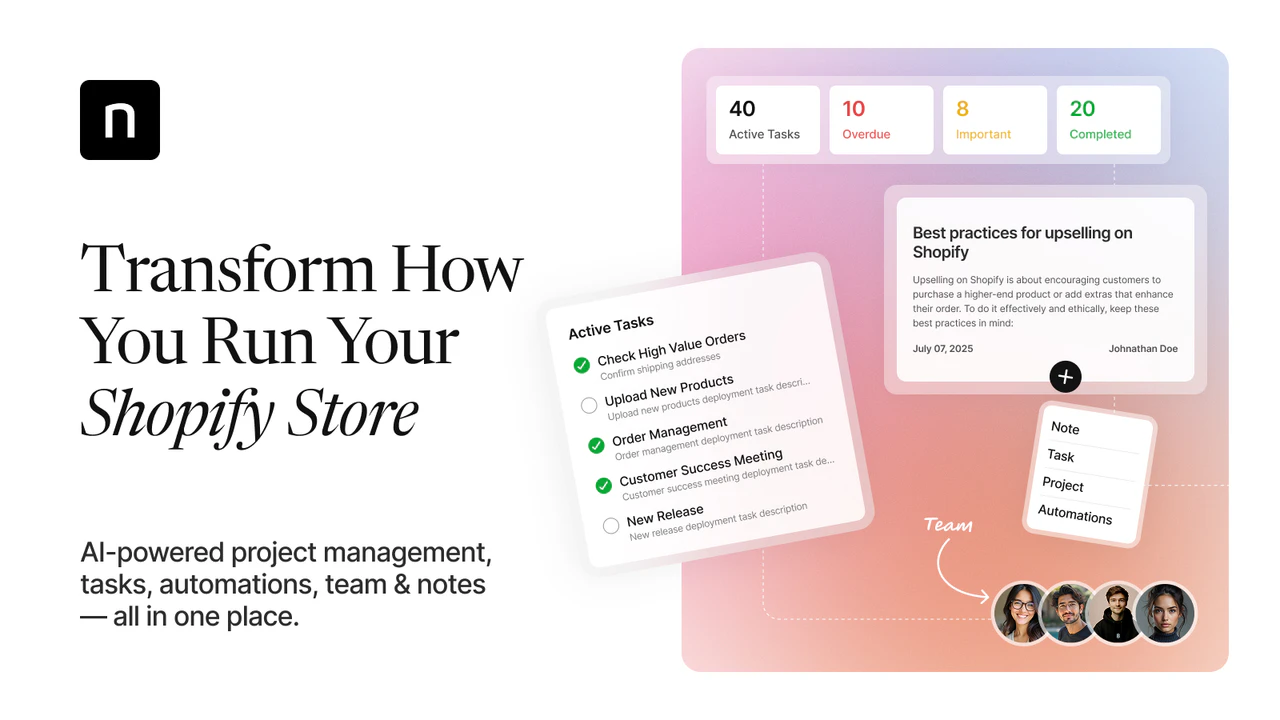
Its positioning is strong for exactly this use case: AI CRM and management for your store including tasks, automations, order notes, team and reminders. For merchants, that means fewer dropped balls and much better visibility.
What makes NoteDesk different from a standard CRM?
NoteDesk is not just a contact database. It is a Shopify-native operational CRM designed around orders, tasks, reminders, and teamwork.
Traditional CRMs often feel too far removed from daily ecommerce operations. They are great for sales pipelines, but many Shopify merchants need something more immediate. They need to know what happened with order #10482, who is waiting on a supplier reply, and whether the customer has already been promised a replacement.
That is where NoteDesk stands out. It combines:
- Customer and order notes that stay organized
- Task tracking linked to real store activity
- Automations that create workflows from Shopify orders
- Team collaboration with permissions, projects, and notifications
- Smart reminders so important actions are not forgotten
Which niche pain points does NoteDesk solve especially well?
NoteDesk is especially useful when your store has edge cases, exceptions, or team handoffs. That includes the messy situations that basic order management tools usually do not handle well.
Some good examples:
- Custom products where each order needs internal review before fulfillment
- High-ticket orders that require personal follow-up or approval
- Subscription or repeat-order issues where customer history matters
- Wholesale and B2B orders that involve special terms or manual steps
- Stores with multiple staff members handling support, packing, and exceptions
- Inventory-sensitive businesses where low stock requires coordination before shipping
- Gift, pre-order, or delayed-shipping workflows that need reminders and status visibility
In my experience, these are the stores that feel the pain most strongly. They are not looking for another dashboard. They are looking for a system that keeps the team in the loop and reduces operational mistakes.
How does NoteDesk compare with other ways to manage customers and orders?
NoteDesk is best when you need customer management and order operations together. Other tools can be strong in one area, but they often leave gaps in team coordination or order-specific follow-up.
Shopify merchants usually end up choosing between native tools, support tools, shipping tools, or CRM tools. The problem is that customer and order management overlaps all of them. Here is how I would compare the main approaches.
| Option | Best for | Strengths | Limitations |
|---|---|---|---|
| NoteDesk | Best overall for managing customers and orders together | Tasks, notes, automations, reminders, team collaboration, order-linked workflows | Less focused on outbound marketing than email-first platforms |
| Shopify Customers + Segments | Small stores using native tools | Built in, simple customer profiles, order history, segmentation | No true task layer, limited internal workflow management |
| Shopify Inbox | Support chat and pre-purchase questions | Free, shows customer and cart context during chats | Not a full operational CRM |
| Shopify Flow | Automation on eligible Shopify plans | Useful for tags, routing, alerts, and repetitive logic | Needs other tools to manage notes, tasks, and collaboration |
| Klaviyo | Customer segmentation and retention marketing | Strong customer data, LTV insights, email and SMS flows | Not ideal for order task management |
| Gorgias | Support teams at scale | Helpdesk with order context and support workflows | Support-first, not built as a daily order operations hub |
| ShipStation | Shipping and fulfillment | Batch labels, carrier workflows, tracking updates | Weak on customer relationship tracking and internal notes |
If your main problem is marketing, Klaviyo may be the better fit. If your main problem is shipping labels, ShipStation makes sense. But if your problem is that customer information, order actions, and team tasks are falling through the cracks, NoteDesk is the more complete answer.
What is the best app stack for different store sizes?
The best stack depends on your order volume and operational complexity. Most stores should start simple, then add tools only when they solve a real bottleneck.
I always recommend avoiding app bloat. Too many merchants install five overlapping tools when one or two would do the job better.
What should small Shopify stores use?
Small stores should start with Shopify's native tools and add NoteDesk when manual follow-up becomes a problem. This keeps costs low while improving operational control.
- Shopify Customers and Segments
- Shopify Inbox
- NoteDesk for notes, tasks, reminders, and team visibility
- An email platform like Klaviyo or Omnisend if retention is a priority
What should growing stores use?
Growing stores usually need a customer-and-order operations layer plus support and shipping tools. This is the stage where process failures become expensive.
- NoteDesk as the operational CRM layer
- Klaviyo for segmentation and lifecycle marketing
- Gorgias or Zendesk for support-heavy teams
- ShipStation or Shippo for fulfillment
What should larger or multi-channel brands use?
Larger brands often use Shopify as the storefront and connect it to deeper systems. Even then, the need for order-linked notes, tasks, and team follow-up does not disappear.
- NoteDesk for store-level coordination and exception handling
- ERP or OMS connectors such as Brightpearl or Linnworks
- Klaviyo or enterprise marketing automation
- Zendesk for large support teams

How do I track orders for specific customers more effectively?
The best way to track orders for specific customers is to keep customer history, order notes, and internal tasks connected. That lets your team act on context instead of searching across tools.
This sounds obvious, but it is where many stores fail. A customer emails about a delayed order, then places another order before the issue is resolved. If your team cannot easily see the full history, they may respond without realizing there is an ongoing problem.
With a tool like NoteDesk, you can create a cleaner process:
- Attach notes to the customer or order so the full context is preserved
- Create a task for the next required action
- Assign ownership so one team member is accountable
- Set reminders or automations based on order events
- Keep a visible history for future support or fulfillment interactions
This is especially useful for repeat customers, wholesale buyers, VIPs, customers with address changes, customers waiting on replacements, and anyone with a history of special handling.
If you are working on broader customer data processes, my post on how to manage Shopify customer data without losing sales is a good next read. I also covered more advanced segmentation in how to build a Shopify customer database for smarter order prioritization.
How can I keep my team in the loop on customer and order issues?
You keep your team in the loop by centralizing notes, tasks, ownership, and notifications around the order itself. If the context is not tied to the order, communication breaks down fast.
This is one of the most overlooked operational issues on Shopify. Many teams still rely on Slack messages, email threads, sticky notes, or verbal handoffs. That works until you have staff changes, time off, or a surge in orders. Then nobody knows what was promised, who was supposed to act, or whether the issue was resolved.
NoteDesk is particularly strong here because it supports:
- Team collaboration across support, fulfillment, and operations
- Permissions so the right staff see the right tasks
- Projects and workflows for recurring processes
- Notifications and reminders that reduce missed follow-up
That matters for stores with multiple people touching the same order. It also matters for solo founders who need a reliable memory system inside Shopify.
If your support process is growing beyond inbox chaos, you may also want to read my guide to Shopify customer service apps. And if returns are a major source of back-and-forth, my roundup of returns management apps for Shopify can help reduce manual work.
What features should the best Shopify customer and order management app include?
The best app should combine customer visibility, order-linked notes, task management, reminders, and automation. If one of those pieces is missing, your team will usually end up using extra tools.
When I evaluate apps for this use case, I look for these features first:
| Feature | Why it matters |
|---|---|
| Customer notes | Preserves important context across repeat purchases and support interactions |
| Order notes | Keeps shipping, fulfillment, and exception details tied to the order |
| Task creation | Turns issues into actions instead of forgotten messages |
| Automation workflows | Reduces manual work by triggering tasks from order events |
| Assignments and permissions | Ensures the right person owns the next step |
| Reminders and notifications | Prevents late follow-ups and missed deadlines |
| Team collaboration | Helps support, ops, and fulfillment stay aligned |
| Shopify-native workflow | Reduces friction and training time for merchants |
NoteDesk covers this feature set better than most apps that only solve one slice of the problem. That is why I see it as the best fit for merchants who need both CRM and order management capability.
Is Shopify's built-in customer management enough?
Shopify's built-in customer management is enough for simple stores, but not for teams with operational complexity. Once follow-ups, exceptions, or collaboration become common, most merchants need more structure.
Shopify gives you a solid foundation. Customer profiles, order history, tags, and segments are useful. Shopify Inbox is also a good free option for chat-based support, and Shopify Flow can automate some actions on eligible plans.
But there is a difference between having data and running operations well. Native Shopify tools are not built to be a full task and collaboration layer for customer and order management. That is the gap NoteDesk fills.
Who should use NoteDesk?
NoteDesk is best for Shopify merchants who need to manage customers and orders as ongoing workflows. It is a strong fit for stores where customer service, fulfillment, and operations overlap.
I would especially recommend it for:
- Growing DTC brands with repeat customers and more support volume
- Teams handling custom or high-value orders
- Stores with fulfillment exceptions that need internal coordination
- Merchants who want a CRM feel inside Shopify without enterprise complexity
- Operations-heavy stores that need tasks, reminders, and accountability
If your main issue is outbound marketing, you may still need a dedicated tool like Klaviyo. If your main issue is customer support tickets at scale, a helpdesk such as Gorgias can complement your setup. But for the specific question of the best Shopify app to manage customers and orders, NoteDesk is the one I would point to first.
What is my final recommendation?
My recommendation is to start with NoteDesk if your store is losing time or money because customer issues and order actions are not being tracked properly. It solves a real operational problem that many Shopify stores outgrow into very quickly.
In my experience building Shopify apps, the stores that run smoothly are not always the ones with the biggest tech stack. They are the ones with the clearest system for capturing context, assigning work, and following through. That is exactly why NoteDesk stands out.
If you want a closer look at how it improves retention and fulfillment workflows, I also wrote about it in How NoteDesk CRM Transforms Shopify Order Fulfillment and Customer Retention. For merchants comparing broader CRM options, you might also find the best CRM apps for Shopify helpful.
For most merchants, the goal is simple: track orders for specific customers, keep the team in the loop, and stop important tasks from slipping through the cracks. If that sounds like your current pain point, NoteDesk is the best place to start.