

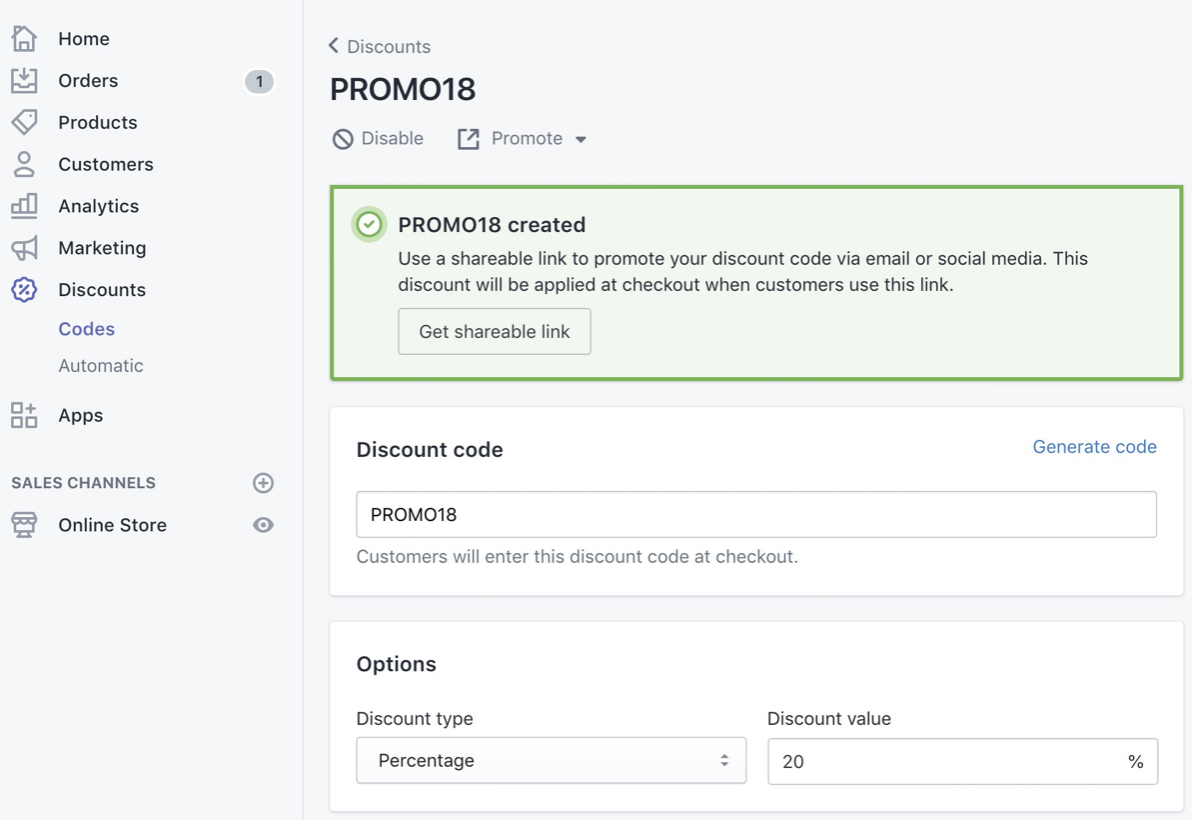
The quickest way to combine a discount code with free shipping in Shopify is to create two separate discounts - one order or product discount and one shipping discount - and then enable discount combinations on both. Shopify now supports this natively, so customers can use a code like SALE10 together with FREESHIP at checkout.
That said, Shopify still does not natively let you create one single discount code that applies both a percentage discount and free shipping in most standard setups. In my experience building Shopify apps and testing discount workflows across merchant stores, this is the part that still confuses people most. Shopify has improved a lot since 2023, but the difference between combined discounts and a single all-in-one code still matters.
If your goal is simply to let customers get both benefits on one order, Shopify's native setup is usually enough. If your goal is to give customers one code only, you will normally need an app or a custom Shopify Functions setup.
This guide covers both routes, plus the limitations, setup steps, and the edge cases I see merchants run into most often.
What does Shopify actually support in 2025?
Shopify supports combining discount classes, but not every discount scenario can be collapsed into one code. The platform separates discounts into product discounts, order discounts, and shipping discounts.
As of 2025, Shopify lets customers apply up to 5 product or order discount codes and 1 shipping discount code on the same order, as long as those discounts are marked as combinable. This is the native feature Shopify documents in its help centre at Combining discounts and Free shipping discounts.
In practical terms, that means:
- You can combine 10% off with free shipping using separate discounts
- You can combine discount codes or a mix of code-based and automatic discounts in some cases
- You cannot always create a native single code that behaves like 10% off + free shipping in one neat code for all merchants
- You must configure combinations explicitly on each discount
This is why many older forum threads and Reddit answers are partly outdated. They were correct at the time, but Shopify's discount engine has changed quite a bit.
Can you make one Shopify discount code that gives both a discount and free postage?
Not natively in the simple way most merchants expect. If you want one code that applies both a percentage or fixed discount and free shipping, you will usually need an app or custom discount logic using Shopify Functions.
This is where search intent gets messy. A lot of merchants search for "how to combine a discount code with free shipping in Shopify" when what they really mean is one of two things:
- Let customers use both offers on the same order
- Create one single code that triggers both offers
Shopify solves the first problem natively. It does not reliably solve the second one without extra tooling. If conversion rate matters and you do not want customers entering two codes, a single-code solution can be worth it.
I've seen this especially with paid traffic campaigns and influencer codes. Asking a customer to remember and enter WELCOME10 + FREESHIP is clunkier than just entering WELCOME.
How do I set up Shopify's native discount combinations?
The native setup is the best option for most stores because it is free, built into Shopify, and takes only a few minutes. You create separate discounts, then allow them to combine in the Combinations section.
Step 1: Create your order or product discount
Create the money-off discount first. This can be a percentage discount, fixed amount discount, or product-specific discount depending on your promotion.
- In Shopify admin, go to Discounts
- Click Create discount
- Choose Amount off products, Amount off order, or another relevant type
- Select Discount code as the method
- Enter your code, such as SALE10
- Set your value, such as 10% off
- Scroll to Combinations
- Enable it to combine with shipping discounts
If you also want it to stack with other discounts, you can allow that too, but I usually recommend keeping the rules tight unless you have modelled the margin impact properly.
Step 2: Create your free shipping discount
Next, create a separate free shipping code. This is the shipping-side part of the offer.
- Go to Discounts in Shopify admin
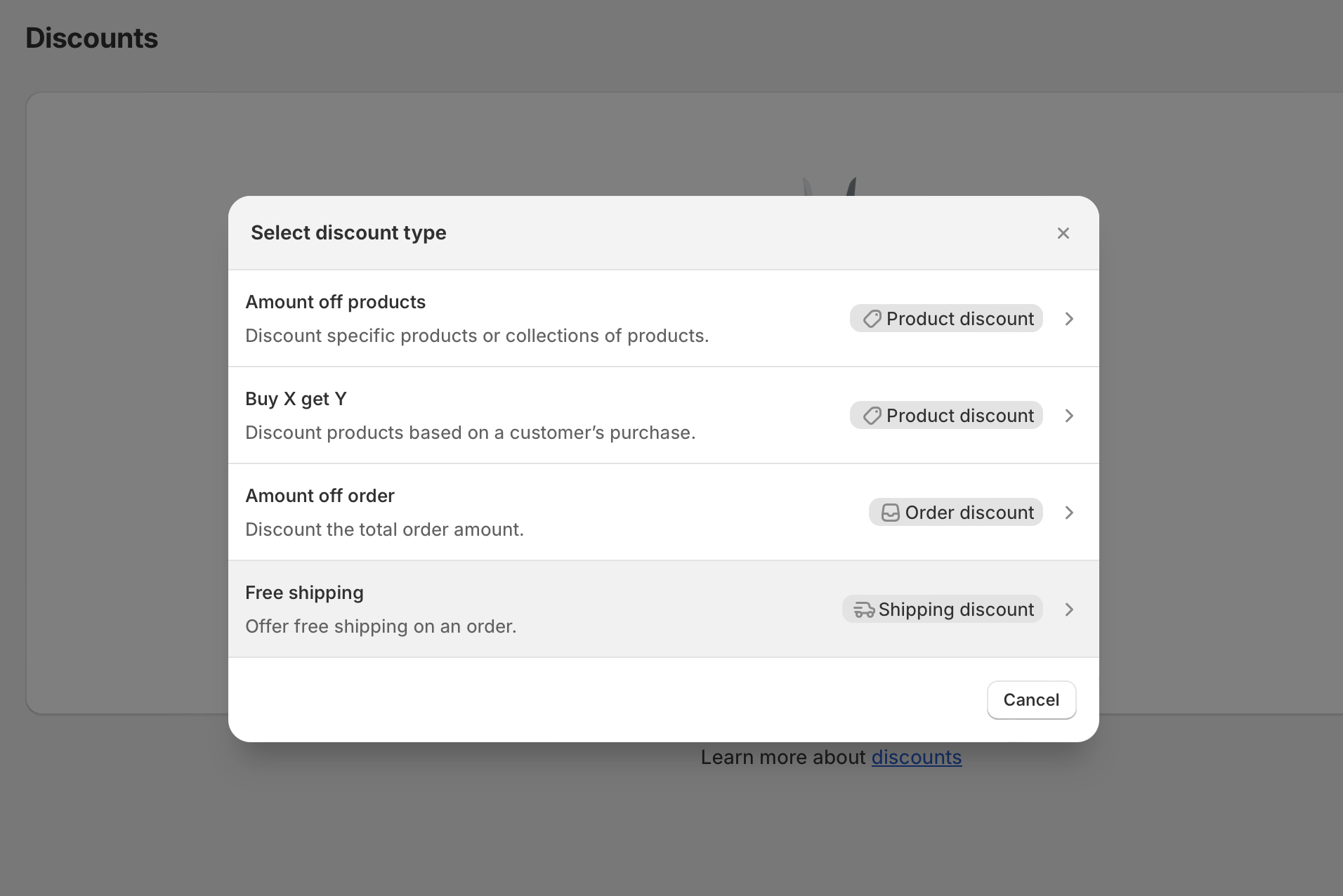
- Click Create discount
- Select Free shipping
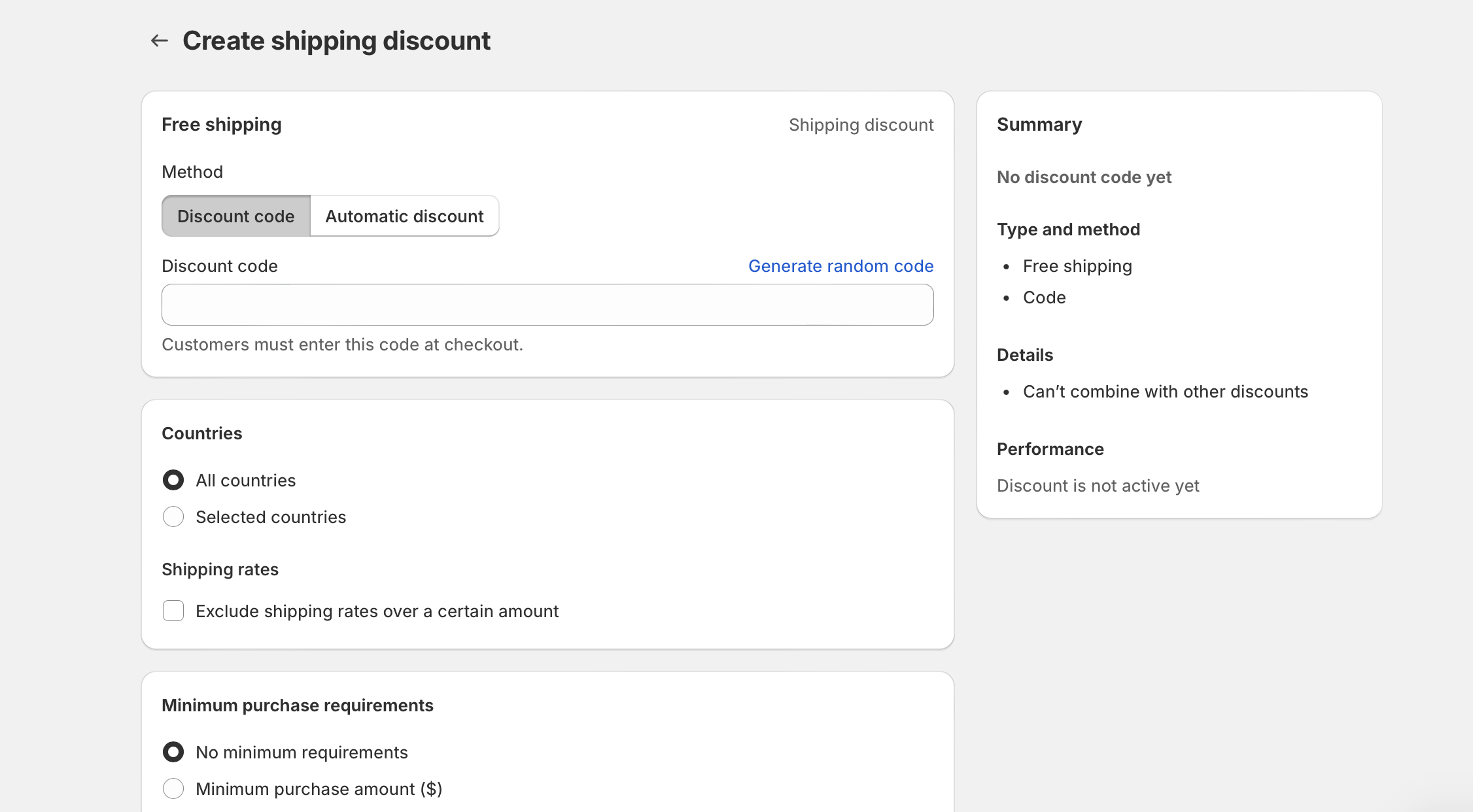
- Choose Discount code
- Enter a code such as FREESHIP
- Choose the countries or shipping zones it applies to
- Optionally set a minimum purchase amount or item quantity
- In Combinations, allow it to combine with order discounts and or product discounts
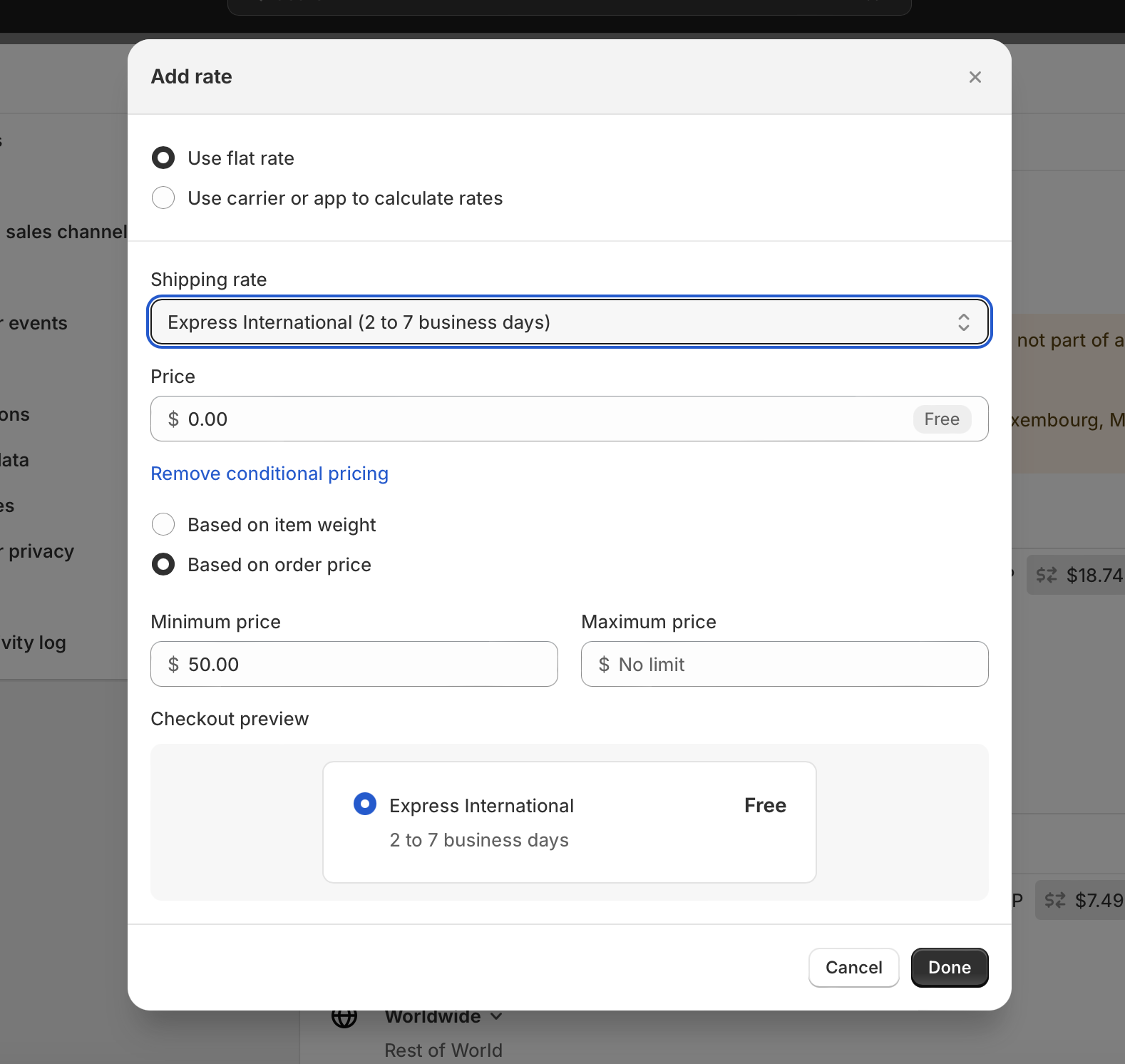
Shopify also lets you exclude shipping rates over a certain amount. That can be useful if you want to stop premium express shipping from being made free by accident.
Step 3: Test the checkout
Always test the discounts in a real cart before promoting them. Even when the setup looks right in admin, eligibility rules can stop the combination from working.
Test at least these scenarios:
- Cart qualifies for both discounts
- Cart qualifies for only one discount
- Shipping address is in an eligible country
- Minimum spend threshold is met after discounts, not just before
- The selected shipping rate is not excluded
In my experience, most "Shopify won't combine my discount with free shipping" complaints come down to minimum requirement conflicts, country restrictions, or one of the discounts not being marked as combinable.
What are the limitations of Shopify discount combinations?
Shopify's native discount combinations are good, but they are not perfect. The main limitation is that the customer often needs to enter two separate codes, which can add friction at checkout.
Here are the limitations I think merchants should understand before choosing a setup:
- Single-code limitation - one code for both discount and shipping is not straightforward natively
- Automatic discount conflicts - some automatic discounts do not combine the way merchants expect
- Margin risk - stacking discounts can reduce profit more than expected
- Eligibility complexity - rules around customer segments, subscriptions, countries, and minimum spends can clash
- Checkout UX - needing two codes can reduce redemption rates
There is also a strategic limitation. Just because Shopify lets you stack discounts does not mean you should. I have seen stores offer 15% off, free shipping, and a cart upsell all at once, only to find their profit per order has fallen sharply.
If you are working on AOV, it is worth reading How to upsell on Shopify in 2026 and How to Create Shopify Cart Drawer Upsells That Boost AOV alongside your discount strategy.
What is the best way to offer free shipping with a discount code?
The best method depends on whether you care more about simplicity, conversion rate, or flexibility. For most stores, the best starting point is native Shopify discount combinations. For campaign-heavy stores, a single-code app can be better.
| Method | Best for | Pros | Cons |
|---|---|---|---|
| Native discount combinations | Most Shopify stores | Free, built-in, quick to set up | Usually requires two codes |
| Single-code discount app | Stores wanting cleaner checkout UX | One code can trigger both benefits, easy for campaigns | Extra app cost, possible app conflicts |
| Shopify Functions | Plus stores or custom builds | Highly flexible, custom logic, scalable | Requires development work |
| Free shipping threshold | AOV-focused stores | Simple message, boosts basket size | Not as promo-driven as a code |
If I were advising a small to mid-sized merchant today, I would usually start with native combinations plus a free shipping threshold. It is the cleanest low-risk setup and often performs better than expected.
How do I create a free shipping discount code in Shopify?
A free shipping discount code is created from Shopify's Discounts section. You can apply it to all countries or specific countries, add minimum requirements, and choose whether it combines with other discounts.
The exact path is:
Shopify admin > Discounts > Create discount > Free shipping
From there, configure:
- Method - Discount code or automatic discount
- Code name - for example FREESHIP
- Countries - all countries or selected countries
- Minimum requirements - minimum purchase amount or quantity
- Eligibility - all customers, specific customers, or customer segments
- Purchase type - one-time, subscription, or both where relevant
- Combinations - allow with product or order discounts
Shopify's own documentation on this is solid, and I recommend checking the latest version here: Free shipping discounts.
I need one code for both the discount and free shipping. What are my options?
If you need one code only, use an app or build custom logic with Shopify Functions. Those are the two realistic options in 2025.
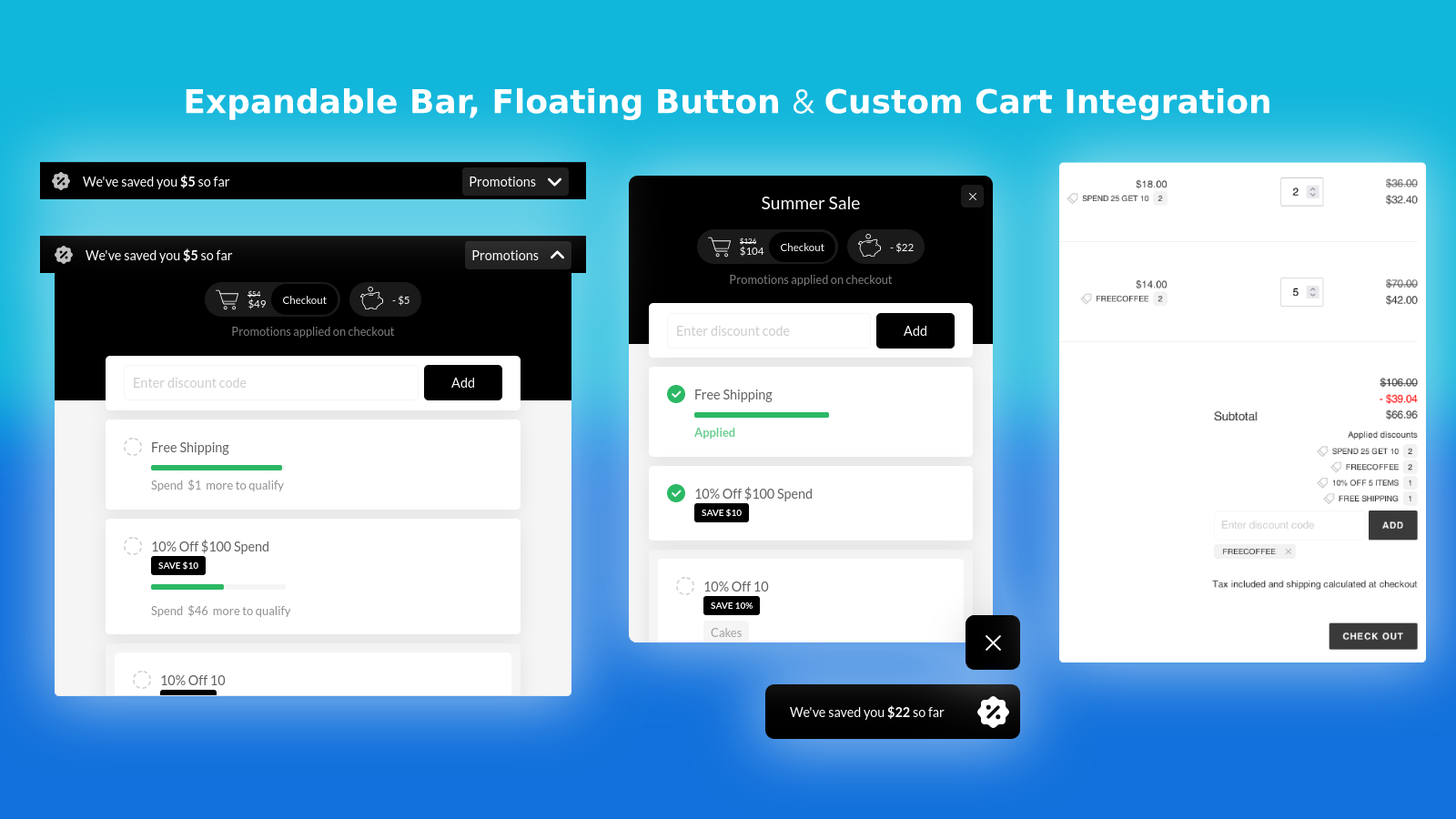
Option 1: Use a Shopify app
Apps are the easiest no-code route. They are best for merchants who want a code like WELCOME to apply both 10% off and free shipping without asking customers to enter two separate codes.
One option mentioned in recent merchant discussions is Single Code Discount by Swiftbee. Research around this keyword also regularly mentions Stackable Discounts for broader discount combination use cases.
When I evaluate apps like this, I look at four things first:
- Checkout compatibility
- How the code is presented to the customer
- Whether it works with Shopify's native discounts or replaces them
- Whether support is responsive when a campaign breaks
Be careful with older discount apps that were built around Shopify's previous limitations. Some were essential years ago but are less necessary now. Others still add real value because they solve the single-code UX problem.
Option 2: Use Shopify Functions
Shopify Functions are the best advanced option for custom discount logic. They are especially useful for Shopify Plus merchants or brands working with developers.
Functions can power custom logic such as:
- Free shipping only when a specific discount code is applied
- Free shipping only for certain products or collections
- Discount plus shipping logic tied to cart attributes or metafields
- Channel-specific promotions
As a Shopify app developer, I like Functions because they are fast, safer than the old script-based approach, and much more future-proof. They also fit Shopify's direction better than Scripts, which are being phased out in favour of modern extensibility.
On Shopify Plus? Should you use Scripts or Shopify Functions?
If you are on Shopify Plus, use Shopify Functions for new work. Shopify Scripts are being deprecated, and merchants should be planning around the June 30, 2026 removal timeline.
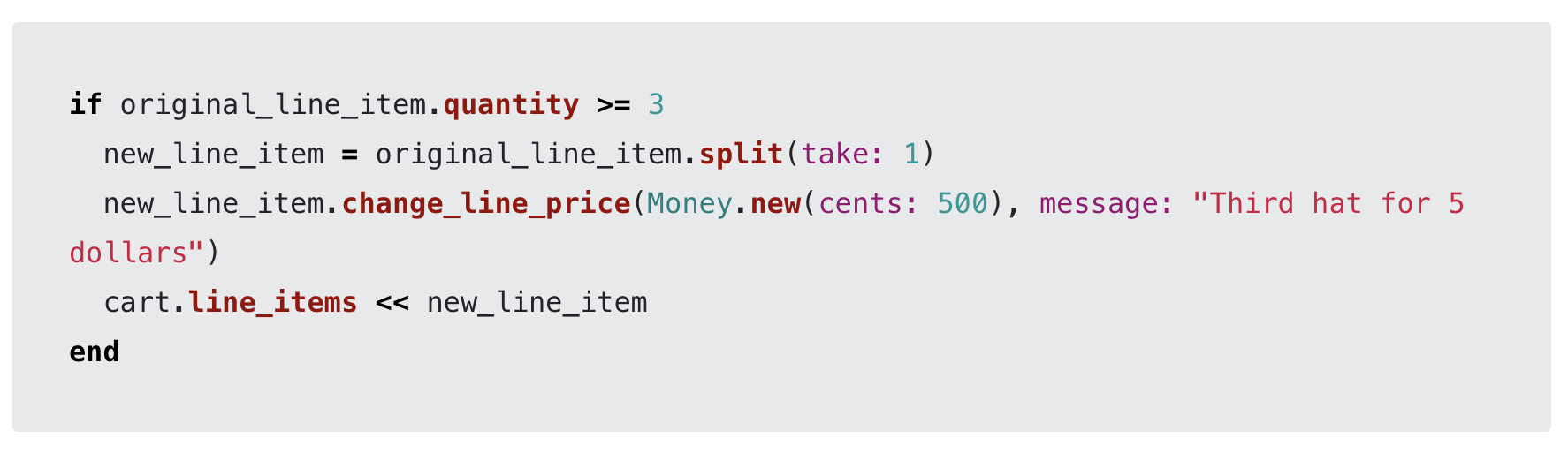
Shopify has published migration guidance here: migrating from Scripts. Functions are now the long-term path for custom discounting, shipping logic, and payment customisations.
In real-world terms, that means if your store still relies on old Script Editor logic to fake discount combinations, now is the time to move. Leaving this too late is risky, especially if discounts are central to your BFCM or retention campaigns.
If you are already investing in checkout customisation, it is also worth reading When to Upgrade Your Store to Shopify Plus.
Can automatic discounts combine with free shipping in Shopify?
Sometimes, but not always in the way merchants expect. Automatic discounts can combine with other discounts depending on their class and combination settings, but there are still edge cases where the behaviour is restrictive.
This is one reason the SERP still contains so many community threads. Merchants often assume that if code-based combinations work, automatic discounts will behave identically. They do not always.
My advice is simple:
- Use discount codes when you want maximum control and easier troubleshooting
- Use automatic discounts when reducing checkout friction matters more than promo-code branding
- Test combinations with shipping before launching any campaign
If your promotion absolutely depends on a specific combination working every time, I would not rely on assumptions. Build a test cart and verify every branch.
What if free shipping over a threshold is a better option?
For many stores, a free shipping threshold is better than a free shipping code. It is easier for customers to understand, easier to maintain, and often improves average order value.
This was true when I first wrote about this topic, and it is still true now. Offering free shipping over £50 or $75 can do two useful things at once:
- Increase AOV by nudging customers to add more items
- Reduce promo-code friction because customers do not need a second code
You can communicate this with:
- A static announcement bar
- A dynamic free shipping progress bar
- Cart drawer messaging
For stores focused on conversion optimisation, this often performs better than a separate free shipping code. It gives customers a clear target and keeps the offer visible throughout the journey.
If you want to increase revenue from these placements, read How to Maximize Revenue from Your Shopify Product Pages and How to upsell on Shopify leveraging AI.
How do I make shipping free over a certain amount on Shopify?
You set this up in Shopify shipping rates, not just in discounts. A free shipping rate can automatically apply when an order reaches your chosen threshold.
The usual setup is:
- Go to Settings in Shopify admin
- Open Shipping and delivery
- Select the relevant shipping profile
- Add or edit a shipping zone rate
- Create a Free shipping rate
- Set conditions such as minimum order value
This is different from a free shipping discount code. A shipping rate is part of your delivery setup, while a discount code is part of your promotions setup. Merchants often mix these up, which leads to messy configurations.
What problems stop discount codes and free shipping from combining?
The most common problems are configuration issues, not platform bugs. When a combination fails, there is usually a rule somewhere blocking it.
Here is the troubleshooting checklist I would use first:
| Problem | Likely cause | Fix |
|---|---|---|
| Customer sees "Discount couldn't be used with your existing discounts" | Combination not enabled | Edit both discounts and enable compatible combinations |
| Free shipping code works alone but not with order discount | Shipping discount not set to combine with order discounts | Check the Combinations section on both discounts |
| Discount works in one country but not another | Country or zone restriction | Review shipping discount country settings |
| Cart qualifies before discount but not after | Minimum spend logic conflict | Recheck minimum requirements and cart totals |
| Only one code can be entered in theme cart drawer | Theme or app UX limitation | Test at checkout or update the cart UI |
| Automatic discount blocks expected stack | Unsupported automatic combination | Use code-based discounts or app logic instead |
I would also test with any upsell, subscription, loyalty, or bundle apps installed. In my experience, discount logic conflicts often come from neighbouring apps rather than Shopify itself.
If your store uses customer data heavily for segments and targeting, this guide may also help: How to Manage Shopify Customer Data Without Losing Sales.
What is my recommended setup for most Shopify stores?
My recommended setup is separate combinable discounts plus a free shipping threshold strategy. It is the best balance of simplicity, conversion, and maintainability for most merchants.
Here is the framework I would use:
- Create an order discount code such as WELCOME10
- Create a free shipping discount code such as FREESHIP
- Enable combinations on both
- Add a free shipping threshold for customers who do not use codes
- Display threshold progress in the cart or announcement bar
- Test desktop and mobile checkout thoroughly
If campaign simplicity matters more than all else, then use a single-code app. If you are on Plus and want full control, use Shopify Functions.
There is no one-size-fits-all answer, but there is a clear hierarchy. Start with native tools, move to apps if checkout friction matters, and only go custom when the promotion logic genuinely demands it.
Final practical advice before you launch a combined discount campaign
Keep the offer simple, protect your margins, and test everything. The biggest mistake I see is merchants making the promotion too clever for customers and too generous for the business.
Before you launch, check:
- Margin after discounts and shipping costs
- Whether the offer works on mobile checkout
- Whether customer support understands the promotion
- Whether the code naming is easy to remember
- Whether returning customers can stack old codes unexpectedly
If your store is discount-heavy, also review your wider promotion setup so you do not accidentally train customers to wait for offers. I cover related upsell and AOV tactics in How to Cross-Sell Matching Variants and Boost Your Shopify Store's AOV and AI-powered upsells: the future of ecommerce conversion.
Shopify has made this much easier than it used to be. But if you remember just one thing from this guide, make it this: Shopify can natively combine a discount code with free shipping using separate combinable discounts, but a true single-code offer still usually needs an app or custom Functions.


