
Black Friday and Cyber Monday are still the biggest sales weekend of the year for most Shopify stores, but the merchants who win are rarely the ones who start planning in mid-November. In my experience building Shopify apps and watching merchant stores through peak trading periods, the best BFCM results come from boring preparation, ruthless testing, and clear offers rather than last-minute panic.
Shopify merchants generated $11.5 billion in sales during BFCM 2024, with more than 76 million consumers buying from Shopify-powered brands. That scale is a huge opportunity, but it also means your store is competing in a much noisier environment. If your site is slow, your discounts are confusing, or your support is unprepared, shoppers will leave in seconds.
This guide keeps the original six-tip structure, but I have updated it for how merchants actually prepare for BFCM now. I have also included the practical checks I would run myself on any Shopify store before traffic spikes.
How do I prepare my Shopify store for Black Friday / Cyber Monday?
The best way to prepare your Shopify store for BFCM is to plan promotions early, optimise speed and checkout, audit inventory, prepare customer support, and test every app and discount. A strong BFCM setup should be finished at least 1-2 weeks before Black Friday, not on the day itself.
Search results for this topic now favour comprehensive preparation guides, not just marketing ideas. So below, I am focusing on the six areas that actually affect revenue: offers, urgency, promotion visibility, paid traffic, email, and operational readiness.
1. How do I create a Black Friday sale page that actually converts?
The best Black Friday sale page is simple, fast, mobile-friendly, and impossible to misunderstand. Shoppers should know within a few seconds what the offer is, when it ends, and which products are included.
The original advice to create an awesome sale page is still spot on. I would just make it much more structured in 2025. Instead of a generic banner and a messy collection page, build a dedicated BFCM landing page with clear offer blocks, product groupings, FAQs, and delivery expectations.
In my experience, merchants often overcomplicate BFCM pages. They stack popups, spinning wheels, announcement bars, and multiple discount messages on top of each other. That usually hurts conversion. One strong offer beats five confusing ones.
Here is what I would include on a high-converting Shopify BFCM page:
- A clear headline such as “Black Friday: Up to 30% Off Bestsellers”
- A visible end date and time
- Collection links by category so shoppers can browse quickly
- Top-selling products above the fold
- Shipping and returns information specific to the sale period
- FAQ content covering discount codes, dispatch times, and exclusions
- Mobile-first design, because smartphone shopping dominates BFCM traffic
Shopify can handle heavy traffic well, but your theme, images, scripts, and app stack still matter. Before BFCM, compress oversized images, remove sections you do not need, and test your landing page on slower mobile connections. If you are worried about performance, read our guide on Shopify speed optimisation scams so you do not waste money on meaningless promises.
It is also worth launching your sale messaging earlier than you think. Many merchants now start teasing offers 30-45 days before BFCM. That matches how customers shop now. They research early, compare prices, and often buy before the official day if the offer is strong enough.
What should be on a BFCM sale page checklist?
A BFCM sale page checklist should cover offer clarity, speed, navigation, trust, and mobile usability. If any one of those is weak, your paid traffic becomes more expensive and less effective.
| Element | What to check | Why it matters |
|---|---|---|
| Headline | States exact discount or deal | Reduces confusion immediately |
| Timer or deadline | Shows when the offer ends | Creates urgency without guesswork |
| Collections | Products grouped clearly | Makes browsing faster |
| Mobile layout | Buttons, images, and text easy to use on phones | Most BFCM traffic is mobile |
| Trust info | Shipping, returns, support details visible | Reduces hesitation at checkout |
| Page speed | Compressed images and fewer unnecessary scripts | Improves conversion and ad efficiency |
2. How do countdown timers help during Black Friday and Cyber Monday?
Countdown timers help when they communicate real deadlines, such as same-day dispatch cut-offs or sale end times. The best countdown timers increase urgency without feeling fake or spammy.
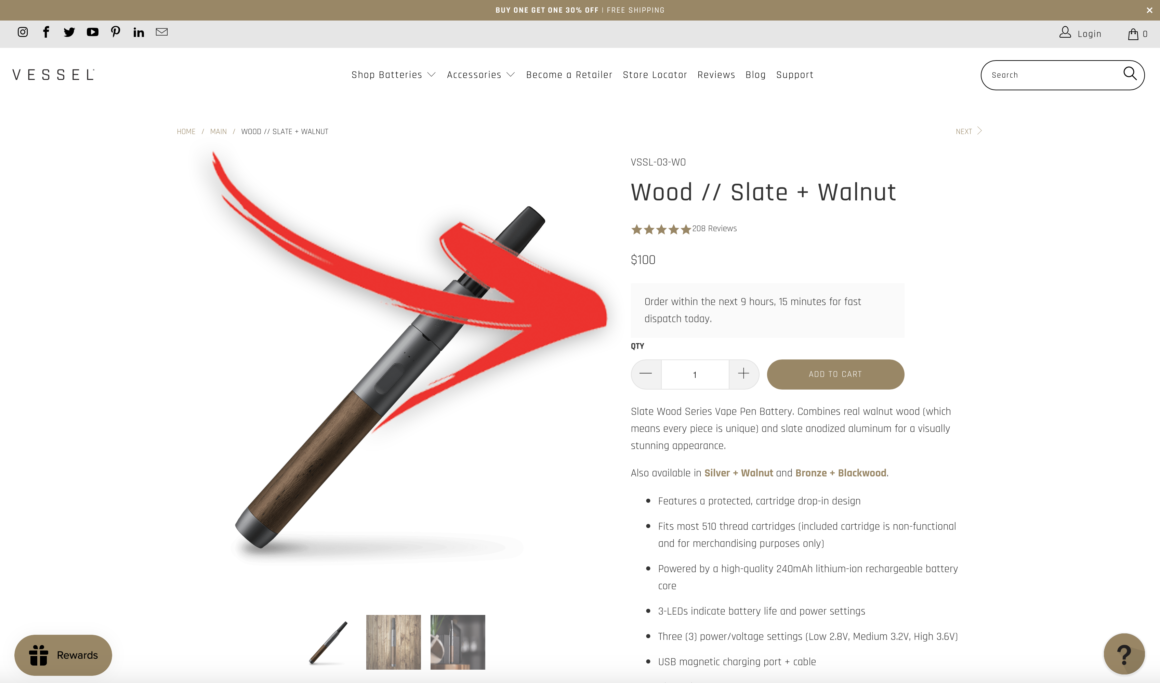
I still like countdown timers for BFCM, especially when they are tied to operations rather than pure hype. For example, showing “Order within 2 hours for dispatch today” is much more credible than a random timer that resets every visit. Customers are savvy now, and they can spot manufactured urgency quickly.
Delivery Timer is a practical option here because it focuses on estimated delivery and dispatch messaging. That is especially useful during BFCM, when shoppers are already thinking ahead to gifts, deadlines, and whether an order will arrive in time.
When I have tested urgency messaging on Shopify product pages, the best-performing versions usually combine a delivery estimate, a dispatch cut-off, and a simple stock cue. They answer the customer’s practical question: “If I buy this now, what happens next?” That is far more persuasive than vague scarcity.
Use timers in these places:
- Product pages under the Add to Cart button
- Cart drawer to reinforce shipping cut-offs
- BFCM landing pages for sale deadlines
- Announcement bars for storewide end times
Just keep it consistent. If your product page says one deadline and your cart says another, support tickets will spike. During BFCM, customer service volume can hit 3-5x normal levels, so clarity matters.
If you also want to increase basket size while urgency is high, pair delivery messaging with a sensible cart offer. Our guides on Shopify cart drawer upsells and how to upsell on Shopify cover that in more detail.
3. How do I get Black Friday coupon codes in front of customers without creating chaos?
The best way to promote BFCM coupon codes is to keep the offer structure simple and show it consistently across your site, email, and social channels. Too many overlapping codes create confusion, support tickets, and abandoned carts.
The original post was right that social media is a useful channel for coupon visibility. But in 2025, the bigger issue is not visibility alone. It is coupon management. If customers see different codes in ads, emails, popups, and influencer posts, they start testing combinations and asking why one code does not work with another.
I recommend choosing one of these three BFCM offer structures:
- Automatic discount for the cleanest customer experience
- One sitewide code if you need attribution or channel control
- Tiered spend offer such as spend £50, save 10% / spend £100, save 15%
What I would avoid is stacking sitewide codes, collection-specific codes, influencer codes, and free shipping codes all at once unless you have tested every possible combination. Shopify discount logic can get messy fast, and BFCM is not the time to discover edge cases.
Movo can help surface promotions in a compact way, especially if you want to display free shipping thresholds, offers, and incentives without cluttering the page.

That said, the biggest BFCM pricing mistake is still the same: do not inflate prices before the sale just to make the discount look bigger. It damages trust, and in some markets it can create compliance issues too. Customers compare prices more aggressively than ever, and many are already sceptical of Black Friday claims.

If you use compare-at pricing or multiple discount layers, make sure you are not accidentally creating double-discount scenarios. We covered that problem in our guide to stopping double discounts on Shopify.
What is the best BFCM discount strategy for Shopify?
The best BFCM discount strategy is the one customers can understand instantly and your team can support easily. Simple beats clever during high-volume sales periods.
| Strategy | Best for | Pros | Cons |
|---|---|---|---|
| Automatic sitewide discount | Most stores | Low friction, fewer support questions | Less flexible for channel tracking |
| Single coupon code | Email and ad campaigns | Easy to measure | Customers can mistype or forget it |
| Tiered spend discount | AOV growth | Encourages larger baskets | Needs clear messaging |
| Bundle offer | Complementary products | Great for margin control | More setup work |
| Free shipping threshold | Low-mid AOV stores | Simple incentive | Can hurt margin if threshold is too low |
4. How should I use Facebook and paid ads before BFCM?
The best BFCM paid ad strategy is to warm audiences before the weekend, then retarget aggressively when the offer goes live. If you wait until Black Friday itself to build demand, you will usually pay more for worse traffic.
The original recommendation to use Facebook Ads still holds up, although I would broaden that to Meta ads generally, plus any paid channel where you already have proven performance. BFCM is not the time to test an entirely new acquisition strategy from scratch.
In my experience, the most reliable paid traffic plan for Shopify merchants looks like this:
- 4-6 weeks before BFCM - build audiences with product education, reviews, and lead capture
- 2-3 weeks before BFCM - tease the sale, push wishlist behaviour, and grow retargeting pools
- BFCM week - switch to direct response creatives with the actual offer
- During BFCM - focus budget on best-performing products, bundles, and warm audiences
Ad costs usually rise sharply as competition increases. That means your landing pages, creative, and checkout flow matter even more. If your site converts poorly, paid traffic becomes brutally expensive during BFCM.
I would also make sure your ads match the on-site experience exactly. If the ad says “Up to 40% off selected lines”, do not send people to a page where the first thing they see is a different discount. Message mismatch destroys trust quickly.
For stores focused on boosting average order value during paid traffic spikes, I would also review your post-click upsell flow. Our articles on AI upsells and maximising product page revenue are useful here.
5. How do I use email marketing effectively for Black Friday and Cyber Monday?
Email is still one of the highest-ROI BFCM channels because it reaches warm audiences who already know your brand. The best BFCM email campaigns build anticipation before the event, then send clear, timed offers during the sale window.
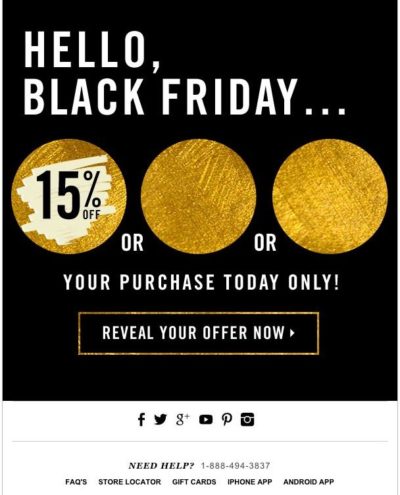
I would never rely on a single Black Friday email. The stores that do best usually run a sequence. That might include a teaser email, VIP early access, launch announcement, last-chance reminder, and Cyber Monday extension or final call.
The inbox is crowded during BFCM, so your subject line matters a lot. But relevance matters even more. A personalised email sent to the right segment usually outperforms a generic blast. If you have customer data on product interest, past orders, or spend level, use it.
Here are some subject line styles that still work well:
- You’ve got early access to 50% off selected products
- Black Friday starts now: your VIP link is inside
- Ends tonight: free shipping on every order
- Your saved items are now on sale
- Last chance before Cyber Monday ends
The bigger email opportunity during BFCM is segmentation. I would split campaigns by:
- VIP customers for early access
- Browsers who did not buy for product reminders
- Past purchasers for complementary products
- High-AOV customers for premium bundles
- Subscribers who have never bought for an entry offer
Also review your transactional emails before BFCM. Order confirmations, shipping updates, and support replies get opened far more than promotional campaigns. If those messages are unclear, you create avoidable customer service work. If you are improving your customer data and segmentation at the same time, our article on managing Shopify customer data without losing sales is worth reading.
6. What operational checks should I do before BFCM starts?
The most important BFCM preparation happens behind the scenes: checkout testing, app audits, support planning, and inventory checks. These tasks are not glamorous, but they prevent the revenue leaks that hurt most during peak traffic.
This is the section many older BFCM guides miss, and it is where I see merchants get caught out. A beautiful sale page will not save you if your discount code fails at checkout or your fulfilment team cannot keep up.
How do I test my Shopify checkout before Black Friday?
You should test your entire checkout flow on desktop and mobile, with real products, real discount scenarios, and multiple payment methods. Every checkout error during BFCM directly costs revenue.
At a minimum, test these:
- Discount codes apply correctly
- Automatic discounts do not conflict with codes
- Shipping rates calculate correctly for key regions
- Shop Pay and other payment methods work as expected
- Tax and duty settings are correct where relevant
- Cart upsells do not break checkout logic
Shop Pay can reduce checkout time significantly, which is one reason it is so valuable during BFCM. Fast checkout matters even more when shoppers are comparing multiple stores at once.
Should I remove Shopify apps before BFCM?
Yes, if you have apps installed that you do not need, remove or disable them before BFCM. Unused apps can slow your storefront and create script conflicts right when traffic is highest.
I would review every active app in Shopify admin and ask three questions:
- Do I need this app during BFCM?
- Does it affect storefront speed or cart behaviour?
- Have I tested it recently?
Pay special attention to countdown timers, announcement bars, popups, free shipping bars, review widgets, and upsell apps. These are all useful tools, but they can clash if you layer too many together. If you are using AI shopping optimisation as part of your broader store setup, see how to optimise your Shopify store for AI shopping agents.
How do I prepare customer support for BFCM?
You should expect 3-5x normal support volume during BFCM and prepare accordingly. The easiest win is updating your FAQ and support macros before the rush starts.
I would prepare answers for:
- When will my order ship?
- Can I combine discount codes?
- Do sale items qualify for returns?
- What happens if an item sells out?
- Do you ship internationally?
If you have live chat, add automated responses for common BFCM questions. If you do not, at least make your contact page and FAQ easy to find. Faster answers mean fewer abandoned carts.
Why is inventory auditing so important before Black Friday?
A final inventory audit prevents overselling, stockouts, and disappointed customers. You should do it about one week before BFCM, then check bestsellers again daily during the sale.
My advice is to identify your top 20 percent of products by expected demand and watch them closely. Set low-stock alerts, prepare alternative product recommendations, and make sure sold-out messaging points customers to similar items instead of ending the journey.
Scarcity can improve conversion when it is genuine. A simple “Only 6 left” message is effective if it reflects real stock. Fake scarcity is not worth the trust damage.
What is the best BFCM preparation timeline for Shopify merchants?
The best BFCM timeline starts 6-8 weeks before Black Friday and becomes more operational as the date gets closer. The earlier you lock in offers and testing, the calmer the final week will be.
| Time before BFCM | Priority tasks |
|---|---|
| 6-8 weeks | Plan offers, forecast inventory, review last year’s data, map email and ad campaigns |
| 4-5 weeks | Build sale page, prepare creatives, start audience warming, update FAQs |
| 2-3 weeks | Test checkout, verify discounts, audit apps, optimise mobile UX, schedule emails |
| 1 week | Final inventory audit, support briefing, shipping checks, QA all landing pages |
| 1-2 days | Final test orders, confirm tracking, monitor analytics, keep messaging consistent |
What are the biggest mistakes Shopify stores make during Black Friday and Cyber Monday?
The biggest BFCM mistakes are starting too late, running confusing discounts, ignoring mobile UX, and failing to test checkout. These issues are far more common than platform outages.
From what I have seen across Shopify stores, these are the most damaging mistakes:
- Launching promotions without testing them
- Sending paid traffic to slow or cluttered pages
- Using too many apps and widgets at once
- Not preparing support for shipping and discount questions
- Forgetting about mobile checkout
- Running discounts that kill margin
If you fix those, you are already ahead of a surprising number of stores.
What should I focus on most if I am short on time?
If you are short on time, focus on checkout testing, mobile speed, one clear offer, inventory checks, and email to your warm audience. Those five actions usually produce the biggest impact fastest.
BFCM success does not require a huge team or a fancy tech stack. It requires a store that is easy to buy from, an offer people understand, and operations that can cope when sales arrive. That is the real preparation work.
If you want to push revenue further once the basics are sorted, I would then look at cart upsells, post-purchase offers, and product page optimisation. But get the fundamentals right first.