
If you want to know how to notify a customer when an item is back in stock on Shopify, the short answer is this: collect interest while the product is sold out, then trigger an email or SMS alert automatically when inventory returns. You can do that with a native Shopify setup using Shopify Forms and Shopify Flow, or with a dedicated back-in-stock app that handles the whole process for you.
In my experience building Shopify apps, this is one of the easiest wins for recovering lost revenue. A sold-out product page does not have to be a dead end. If a shopper is motivated enough to check an unavailable item, they are already showing buying intent, and back-in-stock alerts help you capture that intent before it disappears.
This guide covers how back-in-stock notifications work on Shopify, the best ways to set them up in 2026, when to use Shopify Flow vs an app, and how to improve conversion once the product is available again.
How do I notify a customer when an item is back in stock on Shopify?
The best way to notify a customer when an item is back in stock is to show a "Notify me when available" form on sold-out products, store the customer's email and product preference, then send an automatic alert when inventory is replenished. For most merchants, an app is the fastest route. For leaner setups, Shopify Forms plus Shopify Flow can work well.
There are really three practical options on Shopify:
- Manual collection and manual follow-up using a form or contact method
- Native automation using Shopify Flow and Shopify Forms
- Dedicated back-in-stock apps that add the button, collect signups, and send alerts automatically
If you only get the occasional stockout, manual follow-up can be enough. But if you restock popular variants regularly, automation is usually worth it very quickly.
Why should I notify customers when products are back in stock?
You should notify customers because sold-out traffic still has value. Back-in-stock alerts turn missed demand into future orders, and in many stores they are one of the most straightforward ways to recover revenue that would otherwise be lost.
When I have looked at Shopify stores with recurring stock issues, the pattern is usually the same. Merchants spend money on SEO, paid ads, social traffic, and email, then let a sold-out page end in frustration. A simple notification form changes that by giving the customer a reason to come back.
There are a few clear benefits:
- Recover lost sales from shoppers who were ready to buy
- Measure demand for specific products, sizes, or colours
- Prioritise purchasing and replenishment based on real customer interest
- Improve customer experience instead of forcing people to keep checking manually
- Build a high-intent audience for future launches and related offers
This is especially useful for stores selling apparel, limited drops, handmade products, seasonal goods, and any catalogue where variant-level stockouts are common.
What is the best way to set up back-in-stock alerts on Shopify?
The best setup depends on your store size and workflow. Apps are best for speed, automation, and variant-level alerts. Shopify Flow is best if you want a low-cost native setup and are happy to build the logic yourself.
Here is how I would compare the main approaches.
| Method | Best for | Pros | Cons |
|---|---|---|---|
| Manual form + manual email | Very small stores with low stockout volume | Simple, no complex setup, full control | Time-consuming, easy to miss requests, not scalable |
| Shopify Forms + Shopify Flow | Merchants who want a native Shopify solution | No dedicated app required, flexible automation, good for custom workflows | More setup work, less polished UX, may need testing for edge cases |
| Dedicated back-in-stock app | Most growing Shopify stores | Fast to launch, automated alerts, variant support, analytics | Monthly cost, another app in your stack |
For most merchants, I would call a dedicated app the best balance of speed and reliability. For developers, technical merchants, or stores trying to minimise app spend, Shopify Flow is a solid alternative.
Can I do back-in-stock notifications natively in Shopify without an app?
Yes, you can create a native workflow using Shopify Forms to collect interest and Shopify Flow to trigger notifications when stock becomes available. It is not as plug-and-play as a specialist app, but it can work well if you are comfortable configuring automations.
This matters because search results increasingly mention app-free or native options. And to be fair, Shopify merchants do ask for this a lot. The usual goal is to avoid adding another app just for one feature.
A basic native setup looks like this:
- Add a form to sold-out product pages to collect the customer's email
- Store the product or variant reference alongside the signup
- Create a Shopify Flow that watches for inventory changes
- Trigger an email when the product becomes available again
- Optionally tag customers or export data for future campaigns
You can learn more about Flow in Shopify's official documentation at Shopify Flow. If customer data handling is part of your setup, my guide on how to manage Shopify customer data without losing sales is also worth reading.
The trade-off is that you have to build and test more of the experience yourself. That includes the form UX, the data structure, and how you prevent multiple customers being alerted for stock that is too limited.
How does a native Shopify Flow setup usually work?
A native Flow setup usually works by collecting customer emails on the product page and then sending an automated message when inventory changes from unavailable to available. The logic is straightforward, but the implementation needs care.
One useful concept here is the stock multiplier or notification cap. Some dedicated tools let you control how many customers are notified based on available inventory, which helps avoid the situation where 50 people get alerted for 3 units. If you build the workflow yourself, you need to think through this manually.
That is one reason many merchants still choose an app. Native is possible, but possible and convenient are not always the same thing.
What should a good back-in-stock notification system include?
A good back-in-stock system should include a clear signup button, variant-level tracking, automated delivery, and basic reporting. The best tools also support branding, low-stock controls, and multiple channels like email and SMS.
When I test apps in this category, I look for a few essentials:
- Variant-level alerts for size, colour, or style-specific stockouts
- Easy storefront placement on sold-out products
- Automated email notifications with custom branding
- Optional SMS or push notifications
- Analytics showing signups, sends, and recovered sales
- Notification throttling or stock-based send limits
- Exportable subscriber data for remarketing
If you care about conversion, the signup experience matters more than many merchants realise. The button should be obvious, fast, and reassuring. If the customer has to hunt for it, your opt-in rate drops.
Which Shopify apps are best for back-in-stock notifications?
Two solid options are AMP Back in Stock | PreOrder and Back in Stock Alerts. Both help you collect customer interest and automatically notify shoppers when products return, but they suit slightly different needs.
I am not a fan of recommending a dozen near-identical apps just to pad out a list. It is usually more helpful to compare a couple of credible options and explain who each one is best for.
| App | Best for | Key features | App Store |
|---|---|---|---|
| AMP Back in Stock | PreOrder | Stores wanting multi-channel alerts | Email, SMS, push alerts, variant-level notifications, free and paid plans | View app |
| Back in Stock Alerts | Stores wanting customisable notifications and analytics | Automated alerts, branding options, low-stock notices, exportable customer lists | View app |
Is AMP Back in Stock | PreOrder a good choice?
AMP Back in Stock | PreOrder is a good choice if you want a more automated setup with email, SMS, and push notifications. It is especially useful for stores with frequent stockouts and lots of product variants.

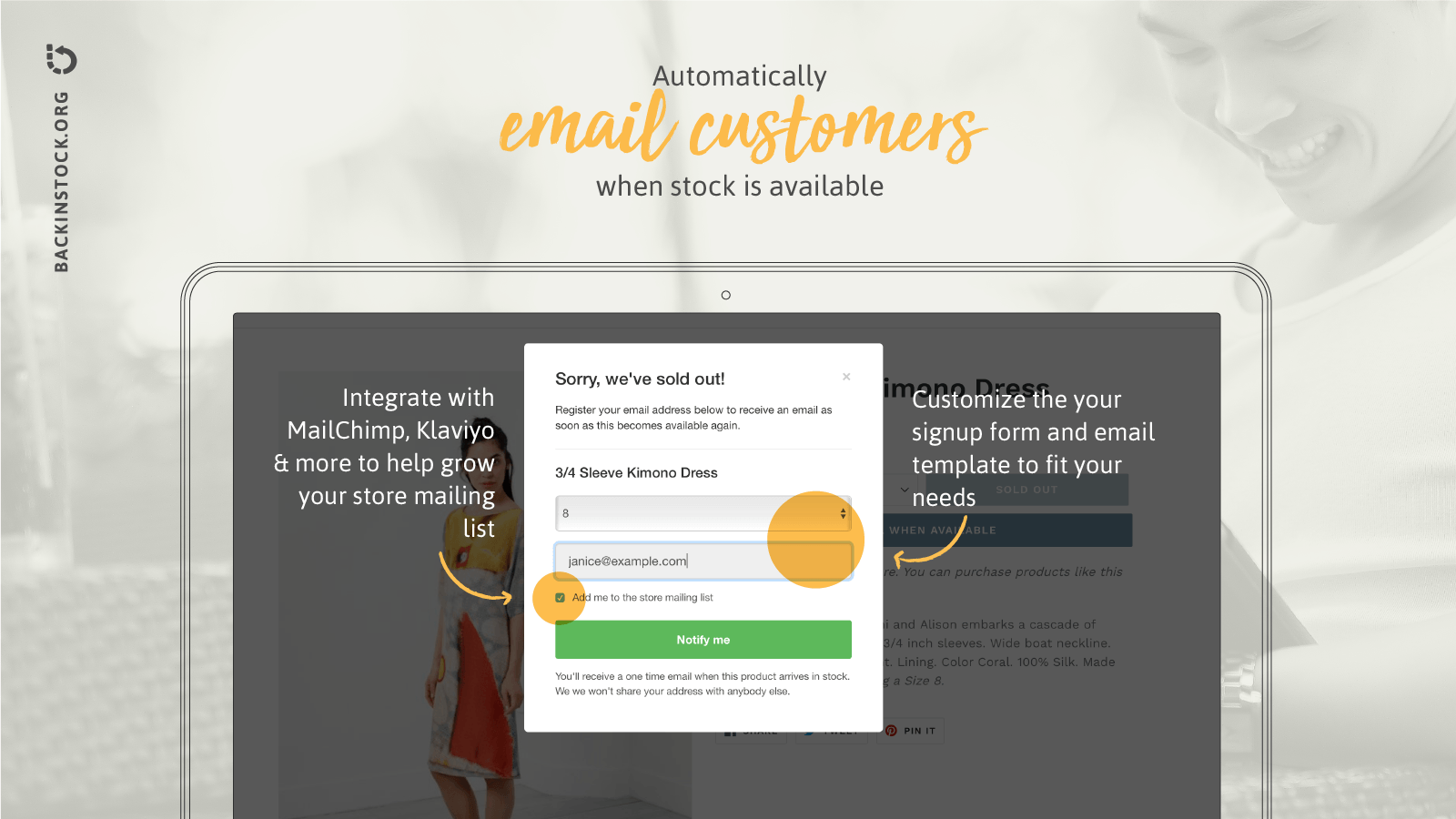
AMP Back in Stock | PreOrder allows customers to sign up for alerts when a product comes back into stock. The big advantage is that it works at a product variant level, so shoppers can request alerts for the exact size or colour they wanted.
That detail matters. If someone wanted a medium in blue, a generic restock message for the whole product is not always enough. In my experience, variant-specific alerts produce better engagement and better conversion because the message is more relevant.
The app also supports automated alerts via email, SMS, and push, which is useful if your audience is mobile-heavy or you run fast-moving launches. For many stores, that is a more complete setup than trying to patch together several tools.
Is Back in Stock Alerts a good alternative?
Back in Stock Alerts is a good alternative if you want automated notifications, straightforward setup, and the ability to customise templates and review analytics. It is a practical option for merchants who want more visibility into demand.
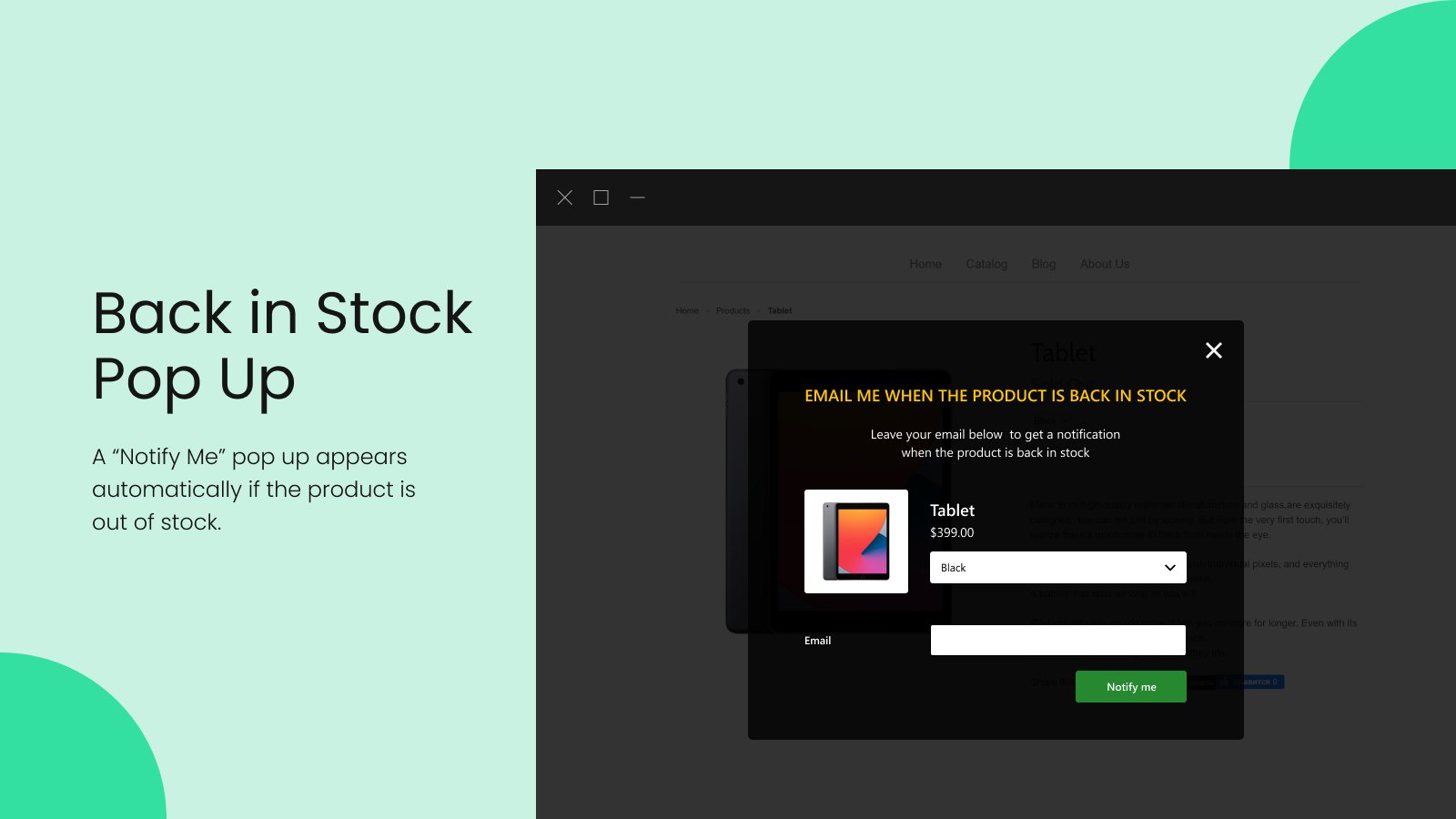
Back in Stock Alerts gives customers a simple pop-up or form to join the waitlist for a sold-out item. Once the product is available again, notifications are sent automatically, which removes the manual burden from your team.
One feature I like is the ability to customise email templates so the alerts match your brand. Another is the ability to export customer lists, which can be useful if you want to build campaigns for similar products through email or paid social.
Some merchants also use this sort of data to spot demand patterns. If one SKU keeps generating lots of back-in-stock requests, that is often a sign you should reorder faster, raise safety stock, or feature alternatives more prominently.
How do I choose between Shopify Flow and a back-in-stock app?
Choose Shopify Flow if you want a native, lower-cost setup and are happy configuring automations. Choose a dedicated app if you want faster deployment, better UX, and less maintenance.
Here is the decision framework I usually use:
- Use Shopify Flow if you are comfortable with workflows, tags, and custom logic
- Use an app if you want the feature live quickly with minimal technical work
- Use an app if variant-level alerts are important to your business
- Use Flow if your stockout volume is modest and you want to keep your app stack lean
- Use an app if you want analytics and multi-channel alerts out of the box
In practical terms, most established merchants prefer the app route because it saves time. Time matters. If a tool costs a monthly fee but prevents missed sales and support overhead, it often pays for itself.
How do I increase conversions from back-in-stock notifications?
To increase conversions, send alerts quickly, make the message specific, and ensure the landing page is ready to convert. A back-in-stock email only works if the customer clicks through to a product page that feels trustworthy and friction-free.
This is where many merchants lose the benefit. They set up the alert, then forget the rest of the funnel. I would focus on these areas:
- Send the alert immediately when stock is available
- Mention the exact product or variant in the message
- Use a clear call to action back to the product page
- Add urgency carefully if stock is genuinely limited
- Optimise the product page for speed, clarity, and trust
- Offer relevant upsells or alternatives once the shopper returns
If you want to improve the destination page, read my guides on how to maximise revenue from your Shopify product pages and how to create Shopify cart drawer upsells that boost AOV.
And if you are already thinking beyond the restock email itself, this is a natural place to layer in upsells. A shopper returning with strong purchase intent is often highly receptive to a relevant add-on.
Should I upsell after a back-in-stock alert?
Yes, you should usually test upsells after a back-in-stock alert, as long as they are relevant and do not distract from the main purchase. The customer came back for a specific item, so the priority is to help them buy it quickly, then present a sensible extra.
For that, my own app SellUp can help you show product page, cart, and post-add-to-cart upsells without overcomplicating the journey.

If you want to learn more about upsell strategy, these guides are useful next reads:
- How to upsell on Shopify in 2026
- How to upsell on Shopify leveraging AI
- How to cross-sell matching variants and boost your Shopify store's AOV
- AI-powered upsells: the future of ecommerce conversion
What should I include in a back-in-stock email or SMS?
A good back-in-stock message should include the product name, a direct link back to the item, and a clear call to action. If stock is limited, you can mention that, but only if it is true.
Keep the message simple. This is not the time for a long newsletter. It is a transactional-intent message, and clarity wins.
Here is a simple email structure:
- Subject line: Your item is back in stock
- Opening: The product you asked about is now available
- Body: Mention the exact item or variant
- CTA: Shop now
- Optional: Limited stock note if inventory is genuinely low
For SMS, go even shorter. The goal is to drive an immediate click, not explain everything.
Example: Good news - the Black Linen Shirt in Medium is back in stock. Order here: yourstore.com/products/example
How do I avoid common back-in-stock notification mistakes?
The most common mistakes are sending alerts too late, not tracking variants properly, and alerting more customers than you have stock for. These issues hurt trust and reduce the value of the whole system.
The biggest pitfalls I see are:
- No variant support, which leads to irrelevant notifications
- Poor button placement on sold-out pages
- Manual processes that get forgotten during busy periods
- Over-notifying when stock is very limited
- Weak product pages after the customer returns
- No consent or poor data handling for future marketing use
If you are collecting customer details, make sure your forms and messaging are clear about what the customer is signing up for. That is good practice for trust and useful from a compliance point of view too.
Can back-in-stock alerts help with inventory planning?
Yes, back-in-stock alerts can help with inventory planning because they show real demand at the SKU or variant level. They are not just a sales recovery tool. They are also a demand signal.
If 200 shoppers ask for a restock on one size and only 8 ask for another, that tells you something your standard sales report may not show clearly enough. I have seen merchants use this data to improve purchasing, merchandising, and even product development.
You can also combine this with broader operational workflows. If your store handles custom orders or complex fulfilment, you may find my article on tracking customised orders in Shopify helpful for thinking through automation more broadly.
What is my recommended setup for most Shopify stores?
My recommended setup for most Shopify stores is a dedicated back-in-stock app with variant-level alerts and automated emails, paired with a well-optimised product page and a light upsell strategy. It is the most practical option for merchants who want results without building everything themselves.
If you are very early-stage, a manual method can work for a while. If you are more technical and want to minimise app spend, a native Shopify Forms + Shopify Flow workflow is a credible option. But for most growing stores, automation through a specialist app is the easiest and most dependable route.
The reason is simple. Back-in-stock alerts are one of those features that sound small, but they touch storefront UX, customer data, inventory logic, and messaging. A good app removes a lot of friction.
Frequently asked questions about back-in-stock notifications
These are the questions merchants most often ask when setting this up on Shopify. The short answers below are written to be directly useful if you are comparing options quickly.
How do customers get notified when a product is back in stock?
Customers get notified by signing up on a sold-out product page, usually through a Notify me button or form. When the item is restocked, the store sends an automatic email, SMS, or push notification.
Does Shopify have a built-in back-in-stock notification feature?
Shopify does not offer a fully polished built-in feature in the same way specialist apps do, but you can create a native solution using Shopify Forms and Shopify Flow. Many merchants still prefer apps because setup is faster and the customer experience is better.
Is email or SMS better for back-in-stock alerts?
Email is usually the default choice because it is easy to implement and cost-effective. SMS can perform very well for urgent restocks and fast-selling products, but it needs stronger consent handling and usually costs more.
Should I notify everyone at once when stock returns?
Not always. If stock is limited, it is smarter to control how many customers are notified based on available inventory. This reduces disappointment and prevents oversubscription.
Can I use back-in-stock data for marketing?
Yes, in many cases you can use the data to understand demand and build campaigns for related products, as long as your consent and data handling are clear. Export features in some apps make this easier.
Final thoughts on how to notify a customer when an item is back in stock
If you are serious about recovering missed sales, back-in-stock notifications are worth setting up properly. The core workflow is simple: collect interest, track the right product or variant, and send the alert the moment stock returns.
For most Shopify merchants, I would start with either AMP Back in Stock | PreOrder or Back in Stock Alerts. If you prefer a native route, explore Shopify Flow and build the process around Shopify Forms.
And once you are bringing those shoppers back, do not waste the opportunity. Make sure the product page converts, the checkout journey is smooth, and your upsells are relevant. That is where the real revenue lift shows up.