
If you are searching for the best free Shopify email templates, the short answer is this: Shopify’s own built-in templates are the best free starting point for most merchants, while tools like Yotpo, Tabular, Mailmodo, Designmodo, and OrderlyEmails are better if you want more design flexibility or a more polished brand experience.
I have worked with Shopify stores for years and I build apps in this ecosystem myself, so I have seen the same pattern again and again. Merchants obsess over campaign emails, but often ignore their transactional emails like order confirmations, shipping updates, and customer account messages. That is a mistake, because these emails usually get far higher open rates than promotional emails and they shape how trustworthy your brand feels after the sale.
In this guide, I will show you which free Shopify email template options are actually worth using, what each one is best for, how Shopify’s native email templates compare with external tools, and when it makes sense to pay for a premium app instead of forcing a free setup too far.
What are the best free Shopify email templates right now?
The best free Shopify email templates right now are Shopify’s built-in templates for simplicity, Yotpo for volume and variety, and Tabular for customisation. If you specifically want better-looking transactional emails inside Shopify, OrderlyEmails is still one of the best-known options, although it is not fully free in the long run.
The search intent behind this keyword has changed a bit over the last couple of years. People no longer just want a downloadable HTML file. They want responsive templates, drag-and-drop editing, brand consistency, and ideally something that works with Shopify without breaking liquid variables.
That is why I think it helps to split the landscape into two groups:
- Marketing email templates for newsletters, welcome flows, abandoned cart emails, launches, and promotions
- Shopify notification templates for order confirmation, shipping confirmation, refund emails, local delivery updates, and account notifications
A lot of articles mix these together, but in practice they are different jobs. One is about selling. The other is about post-purchase trust and customer experience.
Does Shopify have free email templates built in?
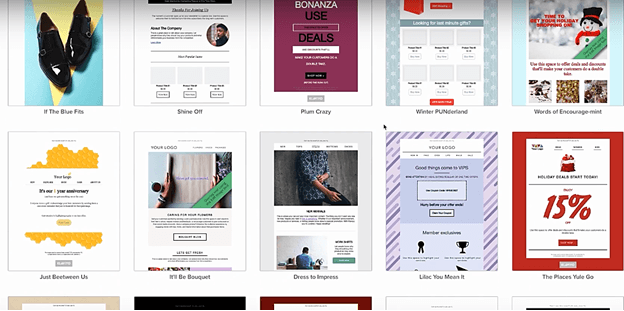
Yes, Shopify has free email templates built in. Shopify Messaging and Shopify Email now provide over 100 customisable free templates for common ecommerce email use cases, and Shopify admin also includes editable notification templates under Settings > Notifications.
This is the first place I tell merchants to look because it is already in your stack. There is no extra app to install, no sync issues, and no learning curve around product data, discount blocks, or customer variables. For many stores, especially newer ones, native beats fancy.
These are found in your Shopify Admin under Settings > Notifications.
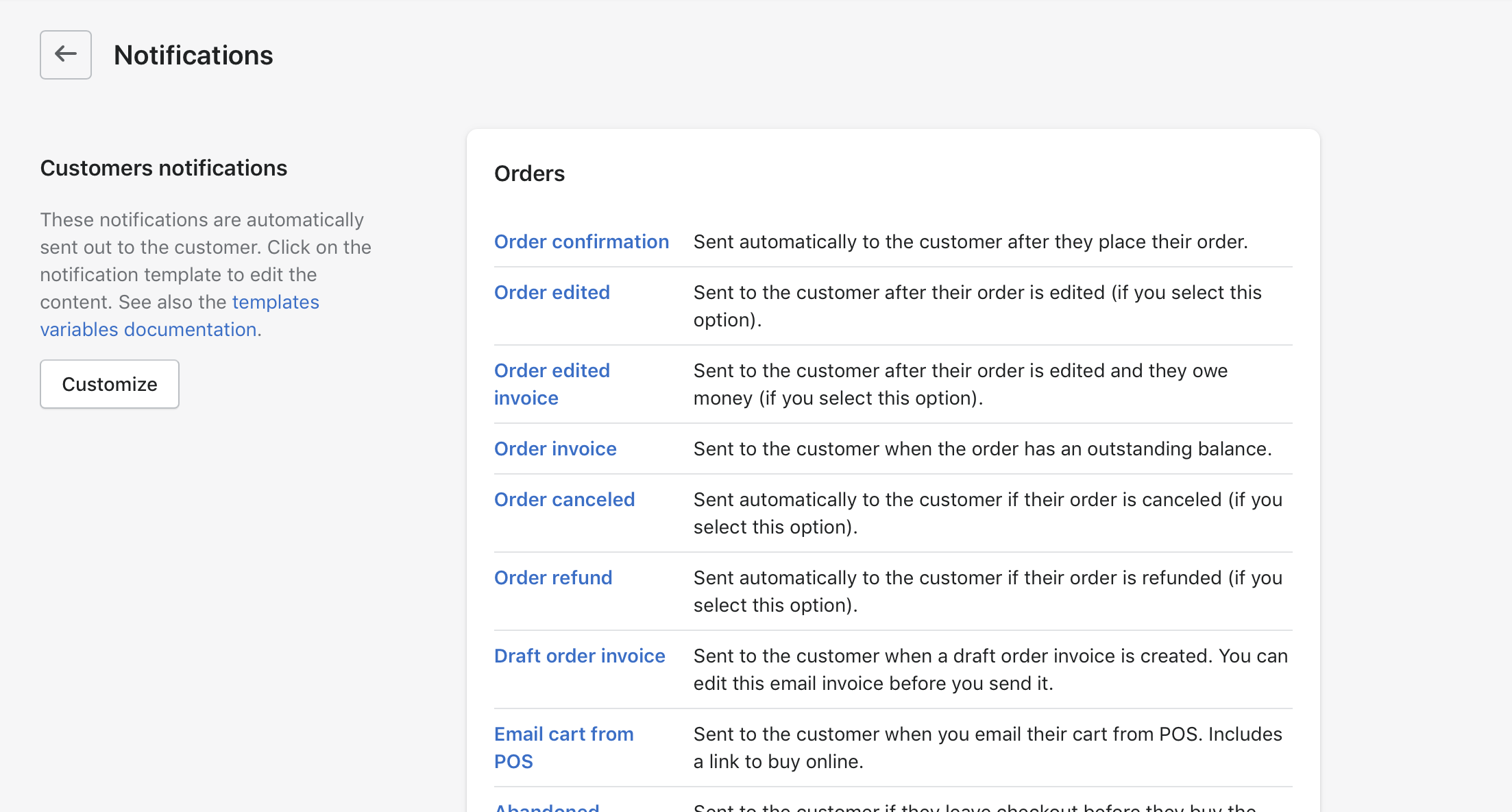
Shopify has historically kept its default notification templates quite plain. That is not laziness. It is because they need to work across almost every store setup, theme style, language, and order flow. In their default form, they are neutral, reliable, and unlikely to break.
As your brand matures, though, those defaults can start to feel generic. In my experience building Shopify apps, this is usually the point where merchants want emails that feel more aligned with their storefront, packaging, and overall customer journey.
What is the difference between Shopify notification templates and marketing email templates?
Shopify notification templates are operational emails triggered by store events, while marketing email templates are promotional emails sent in campaigns or automations. You should not treat them as the same thing.
Notification templates include emails like:
- Order confirmation
- Shipping confirmation
- Out for delivery
- Refund processed
- Local pickup ready
- Customer account welcome
Marketing templates include emails like:
- Welcome emails
- Abandoned cart emails
- Back in stock emails
- Product launch emails
- Black Friday campaigns
- Newsletters
This matters because the best tool depends on the job. If you want to improve your order confirmation and shipping emails, you need something that works well with Shopify notification variables and order data. If you want a high-converting abandoned cart sequence, you may be better off with a dedicated email platform.
If you are also working on increasing basket value, I would pair your email work with stronger onsite offers too. We have covered that in How to upsell on Shopify in 2026 and How to Create Shopify Cart Drawer Upsells That Boost AOV.
What are the best free Shopify email template tools compared?
The best free Shopify email template tools vary by use case. Shopify is best for native simplicity, Yotpo is best for template volume, Tabular is best for flexible editing, and OrderlyEmails is best for polished transactional emails if you are open to paying later.
Here is the comparison I would use if I were choosing today.
| Tool | Best for | Free offering | Main limitation | Verdict |
|---|---|---|---|---|
| Shopify Email and Notifications | Native Shopify use | 100+ free templates | Less design flair than specialist tools | Best free starting point for most stores |
| Yotpo | Campaign variety | 300+ free responsive templates | Best value comes inside broader platform usage | Best for template variety |
| Tabular | Flexible customisation | Free customisable templates | Less Shopify-native than built-in options | Best for hands-on custom builders |
| Mailmodo | Quick inspiration | 8 free Shopify templates | Smaller library | Good for ideas and niche examples |
| Designmodo | Visual design | Free professionally designed templates | May require adaptation to your workflow | Good for design-led brands |
| OrderlyEmails | Transactional email polish | Free to install, 40+ templates | $99/year for theme access | Worth it for serious brand presentation |
No single option is perfect for everyone. The best choice depends on whether you care most about price, speed of setup, brand design, or deep Shopify integration.
Which free Shopify email templates are best for beginners?
The best free Shopify email templates for beginners are Shopify’s built-in templates. They are already connected to your products, branding, and store data, which means there is less room for setup mistakes.
When I test tools in the Shopify ecosystem, I always ask one simple question: how easy is it for a non-technical merchant to get from zero to something usable? Shopify’s native options score highly here because they remove so much friction. You can customise colours, logos, sections, and messaging without worrying about sync or deliverability setup in the same way you would with a more complex external stack.
For a small store or a founder doing everything themselves, that matters a lot. Done and live beats perfect and unfinished.
What is the best free option for branded Shopify notification emails?
The best free option for branded Shopify notification emails is usually Shopify’s own editable notification templates, but the best premium upgrade is OrderlyEmails. If your current emails feel too plain, this is the first upgrade path I would consider.
Looking to improve the look of your outbound Shopify email templates? These are the email notifications that are sent by your store with the most common ones being Order Confirmation and Shipping Confirmation.
These are fairly basic by default for all stores. Shopify has taken this approach for a very good and simple reason. In their default form, they are applicable to any shop theme by being default and neutral. When a merchant is first getting started, these are not the most critical aspects that need overhauling.
However, once your store grows, having notification emails that are clean, on-brand, and consistent with the rest of your customer experience becomes more important. I have seen merchants spend thousands on theme tweaks and packaging inserts while still sending generic-looking order emails. That mismatch is surprisingly common.
One of the reasons OrderlyEmails remains popular is that it focuses on this exact problem. It gives merchants a cleaner visual layer for the emails customers are most likely to open.

At the time of writing, OrderlyEmails is free to install, includes 40+ templates, and is listed at $99/year for full email theme access. That is not free forever, so I would not call it the best free option overall. But if you care about post-purchase presentation, it is still one of the strongest specialist tools in this category.
How do I choose the best free Shopify email templates for my store?
You should choose based on the type of emails you need, your technical comfort level, and whether you need native Shopify compatibility or broader marketing features. The wrong tool is usually the one that solves a different problem from the one you actually have.
Here is the framework I recommend.
| If you need... | Best option | Why |
|---|---|---|
| Simple branded emails with no extra apps | Shopify built-in templates | Fastest setup and fully native |
| Lots of campaign layouts | Yotpo | 300+ free templates and ecommerce focus |
| Custom builder freedom | Tabular | Good balance of visual editing and custom HTML |
| Better-looking transactional emails | OrderlyEmails | Built specifically for Shopify notifications |
| Inspiration for niche campaigns | Mailmodo or Designmodo | Useful pre-built examples and layouts |
My honest advice is not to overcomplicate this. If you are under pressure to improve emails this week, start with Shopify’s native tools. If you outgrow them, upgrade intentionally.
How do I install or customise Shopify email notification templates?
Installing or customising Shopify email notification templates is usually a copy-and-paste job, but you should always test carefully before publishing changes. Transactional emails are not the place for sloppy edits.
Changing your templates can seem a bit daunting at first but it is actually quite simple. In many cases, it boils down to some copy and paste, plus a bit of logo, colour, and wording refinement.
- Go to Shopify Admin > Settings > Notifications
- Choose the notification you want to edit, such as Order confirmation
- Preview the current email before changing anything
- Duplicate or save your existing code somewhere safe
- Paste in your revised HTML or edit the template carefully
- Use Shopify preview and test send features
- Check the result on mobile and desktop
First, I suggest checking out Shopify’s guide on email notification templates here. There is also usually documentation included when you download or buy third-party templates.
One thing I have learned from building for Shopify merchants is that email edits often fail in boring ways, not dramatic ones. A logo is too wide. A button colour has poor contrast. A liquid variable is removed accidentally. A mobile layout looks fine in Gmail but odd in Outlook. That is why testing matters more than design ambition.
If email branding is part of a wider retention strategy for you, it is also worth tightening up your customer data and segmentation. We have covered that in How to Manage Shopify Customer Data Without Losing Sales and Best CRM for Shopify in 2025.
What should a high-converting Shopify email template include?
A high-converting Shopify email template should be mobile-friendly, brand-consistent, easy to scan, and built around a single clear action. Good email design is usually more about clarity than decoration.
Whether you are working on a campaign email or a transactional one, I recommend including:
- A recognisable logo at the top
- Clear hierarchy with headings and spacing
- One primary CTA rather than five competing buttons
- Readable font sizes on mobile
- Strong contrast for accessibility
- Useful order details where relevant
- Support links or contact details for reassurance
- Product recommendations or next-step prompts where appropriate
For transactional emails, the goal is not to turn every message into a hard sell. The goal is to make customers feel informed and confident. If you can add a tasteful cross-sell or referral prompt without distracting from the email’s main purpose, great. If not, skip it.
That same principle applies across conversion optimisation in general. You can read more in How to Maximize Revenue from Your Shopify Product Pages and How to Cross-Sell Matching Variants and Boost Your Shopify Store’s AOV.
Are free Shopify email templates good enough for serious brands?
Yes, free Shopify email templates can be good enough for serious brands, but only if you customise them properly. Free does not have to look cheap. Generic does.
This is where many merchants get it wrong. They assume the problem is the template itself, when the real problem is that they never adapted it to their brand. A solid free template with your logo, colours, tone of voice, and better spacing can outperform a premium template that still feels generic.
That said, there is a ceiling. If you have a strong brand identity, a large customer base, or a team running segmented lifecycle campaigns, you will probably hit the limits of free tools eventually. At that point, paying for a better editor or a specialist app is usually sensible.
What are the best alternatives to free Shopify email templates?
The best alternatives to free Shopify email templates are paid Shopify apps and email platforms that offer more advanced editing, automation, and support. The main reason to pay is not just prettier emails. It is usually speed, control, and reliability.
Is OrderlyEmails worth it?
Yes, OrderlyEmails is worth it if your priority is better-looking Shopify notification emails without heavy custom coding. It is not worth it unless you actually care about the customer experience after checkout.
A great app called OrderlyEmails allows you to upgrade your emails with a polished design system and a one-app workflow. For stores that want a cleaner order confirmation and shipping confirmation experience, it is a very practical option.
It is also one of the few tools in this niche that merchants recognise quickly, which matters if you ever hand your store over to staff or agencies later.
What about Klaviyo or other email editors?
Klaviyo is better for marketing automation than for basic Shopify notification editing. If your goal is flows, segmentation, and revenue attribution, it is a stronger fit than a simple template library.

You can check out Email Editor by Klaviyo if you are already in the Klaviyo ecosystem. For merchants who want broader email and SMS capability, it often makes more sense to build around a platform like this rather than stitch together multiple smaller tools.
There is also the app listing referenced as Email Editor, which may be relevant depending on the stack you already use. In general, I would choose the platform that matches your existing retention setup rather than chasing templates alone.
If you are comparing CRM and email stack choices more broadly, these guides should help: Free CRM Apps for Shopify and HubSpot vs Salesforce vs Klaviyo for Shopify.
What mistakes should I avoid with Shopify email templates?
The biggest mistakes are overdesigning the email, breaking liquid variables, ignoring mobile, and forgetting that transactional emails need clarity first. Fancy emails that confuse customers are worse than plain emails that work.
- Do not remove important order details just to make the layout cleaner
- Do not hide support information in transactional emails
- Do not paste random HTML without testing
- Do not overload emails with upsells after checkout
- Do not ignore accessibility such as contrast and readable text sizes
- Do not assume desktop preview equals mobile quality
Accessibility is particularly overlooked in email design. If your colours are hard to read or your buttons are too small, that is not just a conversion issue. It is a usability issue. Our guide on website accessibility for Shopify merchants is relevant here too.
So what is my honest recommendation?
My honest recommendation is to start with Shopify’s built-in free email templates, customise them properly, and only move to a paid tool if you hit a real limitation. For most stores, that is the smartest path.
If you need broad campaign variety, look at Yotpo or Tabular. If you want better-looking Shopify notification emails specifically, OrderlyEmails is still one of the strongest specialist options. If you are already running lifecycle marketing through a platform like Klaviyo, staying within that ecosystem can be the cleanest move.
Want to give your Shopify email notification templates a nice clean overhaul with a smart, clean and refreshing look? Once you add your store logo, even modest improvements can make your store look much more professional and make your communication more memorable for customers.
Please note: if you are editing templates manually, make backups before changing anything. If you need hands-on implementation help, Shopify Partners, freelancers, or agencies can help with setup and testing.