
Shortening Shopify URLs for social media is the easiest way to make your links cleaner, easier to remember, and more trackable. In practice, the best option depends on whether you want a quick free link, a branded short URL, or campaign-level analytics inside Shopify.
I have worked on Shopify stores and apps long enough to see the same pattern repeatedly: merchants spend time polishing creatives, captions, and offers, then share a clunky product URL full of handles, collections, and tracking parameters. That hurts click-through rate, looks messy in bios and Stories, and makes offline sharing much harder than it needs to be.
In this guide, I will show you how to shorten Shopify URLs for sharing on social media, when to use Shopify redirects versus a third-party shortener, which Shopify apps are worth considering, and the mistakes I would avoid if I were setting this up for a store today.
Why should you shorten Shopify URLs for social media?
You should shorten Shopify URLs for social media because shorter links are easier to share, easier to trust, and easier to track. They also look more professional in posts, bios, DMs, SMS campaigns, and printed materials.
Long Shopify URLs are not always ugly, but they are often impractical. A typical product link can include a long product handle, variant parameters, UTM tags, collection paths, and discount data. On mobile, that can look intimidating, and on social platforms where attention is scarce, cleaner links usually win.
There is also a usability angle. Instagram captions still do not make standard links clickable, so if someone has to remember or manually type a URL, a shorter version has a much better chance of being used. The same logic applies to TikTok bios, YouTube descriptions, podcast mentions, QR code campaigns, and influencer shout-outs.
In my experience building Shopify apps, merchants often focus on shortening links for aesthetics alone. The bigger win is actually measurement. If each creator, campaign, or channel gets its own short link, you can analyse clicks, orders, and revenue by source instead of guessing what worked.
What is the best way to shorten Shopify URLs?
The best way to shorten Shopify URLs depends on your use case. For one-off links, use Bitly or TinyURL. For ongoing marketing, use a Shopify app with analytics. For simple branded shortcuts on your own domain, use Shopify URL redirects.
Here is the simple version I give merchants:
- Use Bitly or TinyURL if you need a fast free short link in under a minute.
- Use Shopify URL redirects if you want a memorable path on your own domain such as yourstore.com/sale.
- Use a Shopify app if you want tracking, QR codes, discount links, influencer attribution, or campaign reporting.
If you are running paid social, influencer campaigns, or regular email and SMS promotions, I would not stop at basic redirects. You will almost always want analytics and attribution, because those are what turn short links from a convenience feature into a marketing asset.
How do I shorten a Shopify URL with a free third-party tool?
The quickest way to shorten a Shopify URL is to copy your store or product link and paste it into a tool like Bitly or TinyURL. This is the best option for occasional sharing when you do not need Shopify-specific reporting.
Popular tools include Bitly and TinyURL. Both are well-known, easy to use, and suitable for simple social media posts or one-off campaigns.
- Copy the Shopify URL you want to share.
- Open Bitly or TinyURL.
- Paste in the long URL.
- Generate the short link.
- If available, customise the back half of the URL to something memorable.
- Use that short link in your bio, Story, post, email, or QR code.
This works well for creators, small stores, and merchants testing a quick promotion. The downside is that generic short domains can look less branded, and free plans often limit analytics or customisation.
If you want a stronger branded presence, it is usually better to create short links on your own domain or use a Shopify app that supports branded short URLs. That tends to improve trust, especially for stores that rely on repeat traffic from Instagram, TikTok, or creator partnerships.
How do I shorten Shopify URLs natively with Shopify redirects?
You can shorten Shopify URLs natively by creating URL redirects in your Shopify admin. This lets you turn a long product or collection URL into a shorter path on your own domain.
This is one of the most overlooked methods because it is not a traditional shortener in the Bitly sense. But for many merchants, it is enough. If your product URL is long and you want to share yourstore.com/summer or yourstore.com/gift, redirects are a clean solution.
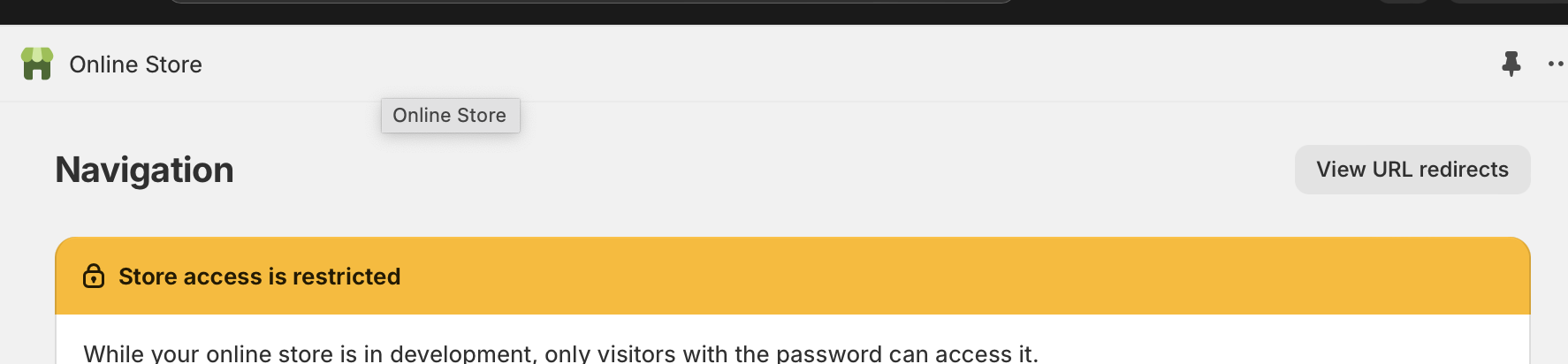
- Log in to Shopify admin and go to Content or Online Store depending on your admin layout, then open Navigation.
-
Open URL redirects from the navigation area.
-
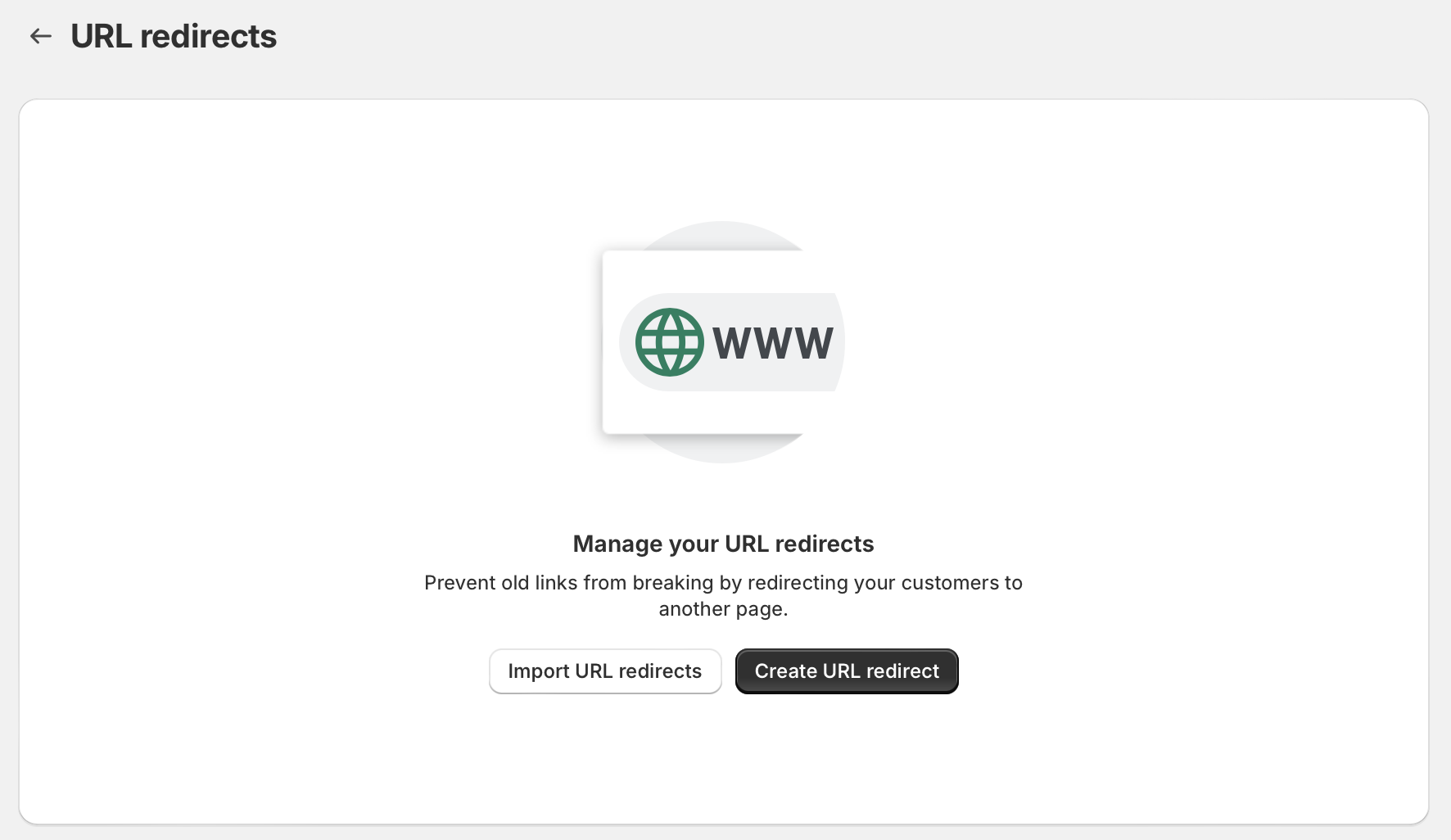
Create a new redirect and enter your short path in the Redirect from field.
-
Paste the destination URL into the Redirect to field. This can be a product page, collection, blog post, landing page, or even a cart link.
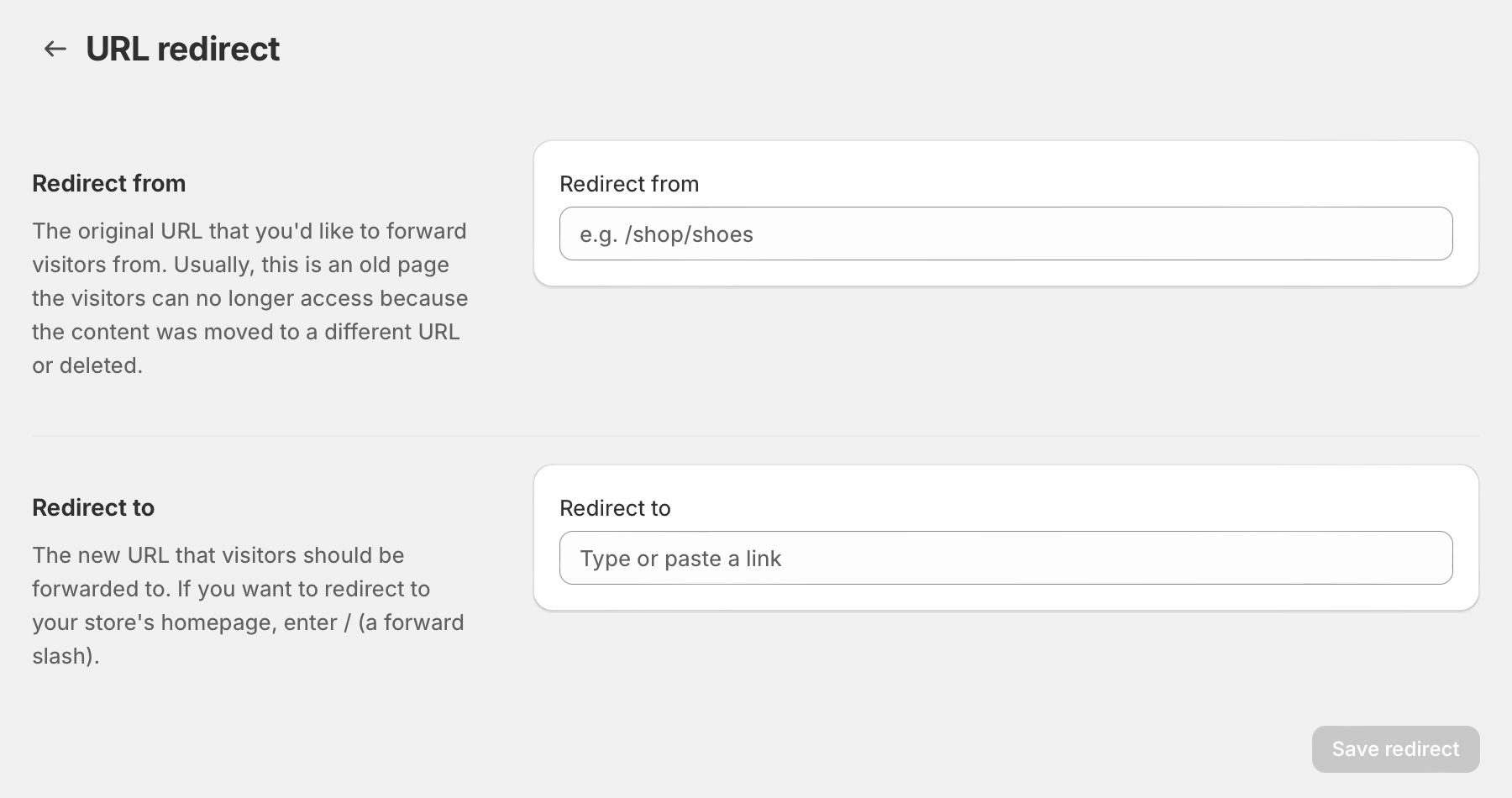
- Save the redirect and test it on mobile and desktop.
For example, you could redirect /offer to a discounted collection, or /kit to a curated bundle page. If you are also working on custom cart links, LaunchTip has a more specific guide on how to create a unique URL to add a product to the Shopify cart.
The main limitation is that Shopify redirects are not a full analytics platform. They are excellent for simple branded shortcuts, but they do not give you the same campaign insights as specialist apps. Still, for social bios, print materials, and memorable vanity URLs, they are very effective.
If you are migrating pages or changing old campaign links, redirects are also useful from an SEO perspective. We have a separate guide on setting up 301 redirects when moving to Shopify if that is part of your project.
Can I shorten the actual Shopify product URL itself?
Yes, but only to a limited extent. You can shorten the product handle in Shopify, but that changes the page URL rather than creating a separate short link.
For example, if your product URL is based on a long title like short-sleeve-organic-cotton-t-shirt-in-ocean-blue, you can edit the product handle to something shorter such as ocean-blue-tee. That will make the product URL cleaner, but it is not the same as creating a campaign-friendly short link.
To do this, edit the product in Shopify, scroll to the search engine listing preview, and change the URL handle. Be careful though. If the product is already indexed or linked externally, you should create a redirect from the old URL to the new one. Otherwise, you risk broken links and lost traffic.
I usually recommend this for long-term URL hygiene, not for social campaigns. If your goal is social sharing, redirects or a dedicated app are usually the better tool. If you want more control over URL structure generally, see our guide on how best to create custom URLs on Shopify.
What are the best Shopify URL shortener apps?
The best Shopify URL shortener apps are the ones that combine short links with tracking, branding, and campaign flexibility. For most merchants, that means choosing between ShortLink, SnipIt, and Berry URL Shortener & Tracking.
When I compare Shopify apps, I care less about the headline feature list and more about whether the app helps a merchant answer practical questions. Which Instagram Story drove sales? Which influencer generated clicks but no purchases? Which SMS link had the highest conversion rate? The right shortener app should make those answers easy to find.

| App | Best for | Key strengths | App Store |
|---|---|---|---|
| ShortLink - URL Short & Track | Best for marketing teams and attribution | Trackable short links, branded links, campaign reporting, social and influencer use cases | View app |
| URL Shortener - SnipIt | Best for simple link generation | Quick short links, imports store pages, integrates with common shortener workflows | View app |
| Berry URL Shortener & Tracking | Best for branded links and store-level tracking | Branded short URLs, click analytics, order and revenue tracking, campaign measurement | View app |
How good is URL Shortener - SnipIt?
URL Shortener - SnipIt is a simple option for merchants who want fast short links without much setup. It is useful if your main goal is converting long Shopify URLs into shorter shareable links.

URL Shortener - SnipIt is often one of the first apps merchants find for this job, and that makes sense. It is geared around taking long links and making them shorter quickly. For stores that just want a cleaner URL for a product, collection, or blog post, that simplicity can be a plus.
That said, I would look carefully at whether its reporting and workflow match your needs. If you are running serious creator or paid campaigns, you may want deeper attribution. But if you want a lightweight starting point, it is a reasonable app to test.
Is ShortLink - URL Short & Track the best choice for campaign tracking?
Yes, ShortLink is one of the strongest options if tracking matters as much as shortening. It is particularly useful for social, email, SMS, and influencer campaigns where you want to connect clicks to orders.
ShortLink - URL Short & Track stands out because it is built around more than aesthetics. It is designed for merchants who want to create links for social media, affiliate campaigns, email, and promotional offers while still seeing what happens after the click.
In practical terms, that means you can use separate links for creators, channels, or offers and compare performance. For stores spending real money on traffic, that is usually where the ROI comes from. Better attribution leads to better decisions, and better decisions usually beat prettier links alone.
What about Berry URL Shortener & Tracking?
Berry URL Shortener & Tracking is a strong option for merchants who want branded links and clearer revenue attribution. It is especially useful if you want to connect link activity to orders and sales outcomes.
Berry URL Shortener & Tracking focuses on the commercial side of short links rather than just the cosmetic side. If your store is asking which links bring in orders, revenue, and campaign value, that is the right direction to think in.
I like this category of tool for merchants who have outgrown generic shorteners. Once you are juggling multiple promotions, discount paths, and social channels, having everything inside Shopify with store-specific reporting is usually worth more than the monthly fee.
Which method should you choose?
Choose third-party tools for speed, Shopify redirects for branded simplicity, and Shopify apps for analytics and scale. The right answer depends on how often you share links and how seriously you track marketing performance.
| Method | Best for | Pros | Cons |
|---|---|---|---|
| Bitly or TinyURL | One-off social posts | Fast, easy, often free | Less branded, limited Shopify context |
| Shopify URL redirects | Branded shortcuts on your own domain | Clean, native, no extra app needed | Limited analytics |
| Shopify shortener apps | Ongoing campaigns and attribution | Tracking, custom aliases, QR codes, campaign insights | Usually paid beyond basic usage |
If I were advising a newer store, I would start with Shopify redirects plus Bitly. If I were advising a store running influencer seeding, paid social, or regular SMS drops, I would move straight to a dedicated Shopify app.
What are the best practices for shortening Shopify links?
The best practices are to keep links branded, readable, trackable, and specific to each campaign. A short link should make your marketing easier to analyse, not harder.
- Use human-readable aliases such as /summer, /gift, or /creatorname instead of random strings.
- Create separate links per channel so you can compare Instagram, TikTok, email, SMS, and influencer traffic.
- Avoid changing live campaign links once they are already distributed.
- Test every link on mobile before publishing. Most social traffic is mobile-first.
- Use reputable tools only to protect trust and link integrity.
- Pair short links with UTM logic when your reporting stack depends on Google Analytics or ad platform attribution.
One thing I see merchants get wrong is using the same short link everywhere. That makes reporting muddy. If five channels all use one URL, you lose clarity fast. It is much better to create a slightly different link for each placement, even if all of them land on the same page.
Another practical tip is to make sure the destination page is actually optimised. A shorter link will not save a weak landing page. If you are sending traffic into product pages or checkout flows, it is worth reviewing our guides on optimising Shopify checkout and improving Shopify conversion rate.
How do short Shopify URLs help on different social platforms?
Short Shopify URLs help differently on each platform, but the common benefit is cleaner sharing and better attribution. They are especially useful where space is limited or where users need to remember the link.
How do short links help on Instagram?
On Instagram, short links are easier to remember and cleaner in bios, Stories, and creator content. They are particularly useful because standard caption links are still not the main route for clickable traffic.
For Instagram, I usually recommend a branded path that is simple enough to say aloud or remember after seeing it once. Something like yourstore.com/new performs better in spoken or visual formats than a full product URL with parameters.
How do short links help on TikTok?
On TikTok, short links work well in bios, comments, creator briefs, and ad destination testing. They also make it easier to map campaign performance by creator or content angle.
If you are working with multiple creators, give each creator a unique short URL. That makes post-campaign analysis much cleaner and avoids relying only on coupon code usage.
How do short links help on X, email, and SMS?
On X, email, and SMS, short links save space and reduce visual clutter. They also look more intentional, which can improve trust and click behaviour.
SMS is where I often see the biggest practical improvement. Long links can look spammy, wrap awkwardly, or eat into message space. A short branded URL is usually the better experience.
What mistakes should you avoid when shortening Shopify URLs?
The biggest mistakes are using untrusted shorteners, failing to track by channel, and sending traffic to weak landing pages. Short links help distribution, but they do not fix poor campaign setup.
- Do not use suspicious shortening tools that may hurt trust or break later.
- Do not use one link for every campaign if attribution matters.
- Do not forget redirects when changing actual product handles.
- Do not ignore branding if your audience is seeing the link before clicking.
- Do not send paid traffic to generic pages when a focused landing page would convert better.
In my experience, the worst setup is a store that shortens links beautifully but never reviews performance. If you are going to create custom links, make them earn their keep. Use them to learn which products, creators, and offers deserve more budget.
How do I share my Shopify store more effectively on social media?
The most effective way to share your Shopify store on social media is to combine short links with channel-specific landing pages, clear offers, and proper tracking. A clean URL is helpful, but it works best as part of a wider conversion strategy.
For example, if you are promoting a product launch, you might create one short link for Instagram Stories, one for TikTok creators, and one for your email list. Each could land on a slightly different page or carry different parameters, letting you compare both traffic quality and revenue.
You should also make sure your store pages are fast and easy to navigate. If social traffic lands on a slow page, shortening the URL will not save the session. If performance is an issue, our guide on how to speed up your Shopify theme is a good next step.
Final thoughts on shortening Shopify URLs for social media
Short Shopify URLs are not just about neatness. When done properly, they improve shareability, trust, and campaign measurement.
If you only need the occasional short link, use Bitly or TinyURL. If you want a clean branded shortcut on your own domain, use Shopify redirects. If you care about clicks, orders, and channel attribution, test a dedicated Shopify app such as ShortLink - URL Short & Track, URL Shortener - SnipIt, or Berry URL Shortener & Tracking.
That is the setup I would use today for a merchant who wants to look more professional on social media and make smarter decisions from the traffic they generate. Shorter links are easy to create. Useful short links are the real goal.