

If you want to create custom URLs on Shopify, the short answer is this: you can customise URL handles for products, collections, pages, and blog posts, and you can create URL redirects for vanity links. What you cannot do is completely rewrite Shopify's core URL structure such as removing /products/ or building a fully custom hierarchy like /department/category/product-name.
That distinction matters because a lot of merchants search for "custom URLs" when they actually mean one of three different things: changing a page slug, creating a short branded link, or setting up a redirect from an old URL. In my experience building Shopify apps and helping merchants fix broken storefront journeys, most URL problems are solved by using the right one of those three options rather than trying to force Shopify into a URL structure it simply does not support.
If you're migrating platforms, cleaning up SEO, or creating campaign links for social media, this guide will show you exactly what is possible, what is not, and the best way to do it without hurting rankings or customer experience.
What does "custom URLs on Shopify" actually mean?
On Shopify, "custom URLs" usually means either editing a URL handle or creating a URL redirect. Shopify allows some URL customisation, but it does not allow full control over every folder and path in your store.
For example, you can change a product URL from /products/blue-shirt to /products/navy-linen-shirt. You can also create a vanity redirect such as /summer-sale that points to a collection or landing page. But you cannot usually change Shopify's fixed system paths like /products, /collections, or /pages.
This is one of the most misunderstood parts of Shopify SEO. Merchants often come from WordPress, Magento, or custom builds where URL structures are much more flexible. Shopify is opinionated by design, which keeps things simpler technically, but it also means your customisation options are narrower.
Can you fully customise URL structure in Shopify?
No, Shopify does not let you fully customise the entire URL structure of your store. Core folders are fixed, and that includes paths like /products/, /collections/, /pages/, and /blogs/.
So if your ideal structure is something like domain.com/department/category/brand/item-name/, Shopify will not support that natively. Even on Shopify Plus, this limitation remains. I've seen merchants spend weeks trying to recreate enterprise-style URL hierarchies, only to end up with fragile workarounds that create more SEO and maintenance issues than they solve.
What Shopify does let you control is the part after the fixed folder. That means the handle or slug can be edited for many content types. This is usually enough for SEO and usability, provided you choose clear, concise, keyword-relevant handles.
Which parts of a Shopify URL can you change?
You can change the handle of many store resources. The fixed folder before it usually stays the same.
Here is the practical breakdown:
| Content type | Example default URL | What you can change | What stays fixed |
|---|---|---|---|
| Product | /products/blue-shirt | blue-shirt | /products/ |
| Collection | /collections/summer-sale | summer-sale | /collections/ |
| Page | /pages/about-us | about-us | /pages/ |
| Blog post | /blogs/news/how-to-style-linen | blog handle and article handle | /blogs/ |
| Policy pages | /policies/privacy-policy | Limited control | System path |
For most stores, this level of control is perfectly adequate. Search engines care far more about clarity, relevance, crawlability, and internal linking than whether your product sits under a deep custom folder structure.
How do I change a product, collection, or page URL in Shopify?
You change a Shopify URL by editing the page's handle in the Search engine listing preview. This is the best option when you want a cleaner, more keyword-focused URL rather than a separate redirect path.
I generally recommend starting here before creating vanity redirects. If the destination page itself should have a better URL, edit the handle first. Redirects are useful, but a clean native URL is better than relying on extra hops.
- Open your Shopify admin.
- Go to the relevant section, such as Products, Collections, or Online Store > Pages.
- Click the item you want to edit.
- Scroll to Search engine listing preview.
- Click Edit website SEO.
- Update the URL and handle field.
- Save your changes.
If the page already existed at a previous URL, Shopify will often prompt you to create a redirect automatically. In most cases, you should accept this. It helps preserve rankings, backlinks, and customer bookmarks.
If you're restructuring a lot of URLs during a migration, also read our guide on setting up 301 redirects when moving to Shopify. It covers the migration side of this in more detail.
How do I create a vanity URL or custom redirect in Shopify?
You create a vanity URL in Shopify by adding a URL redirect. This lets you send visitors from a short or memorable path like /gift or /instagram to any valid destination on your store.
This is especially useful for campaigns, QR codes, podcasts, print materials, or influencer links. In my experience, vanity redirects are one of the easiest low-effort wins for improving attribution and making links easier to remember.
- Log in to Shopify admin.
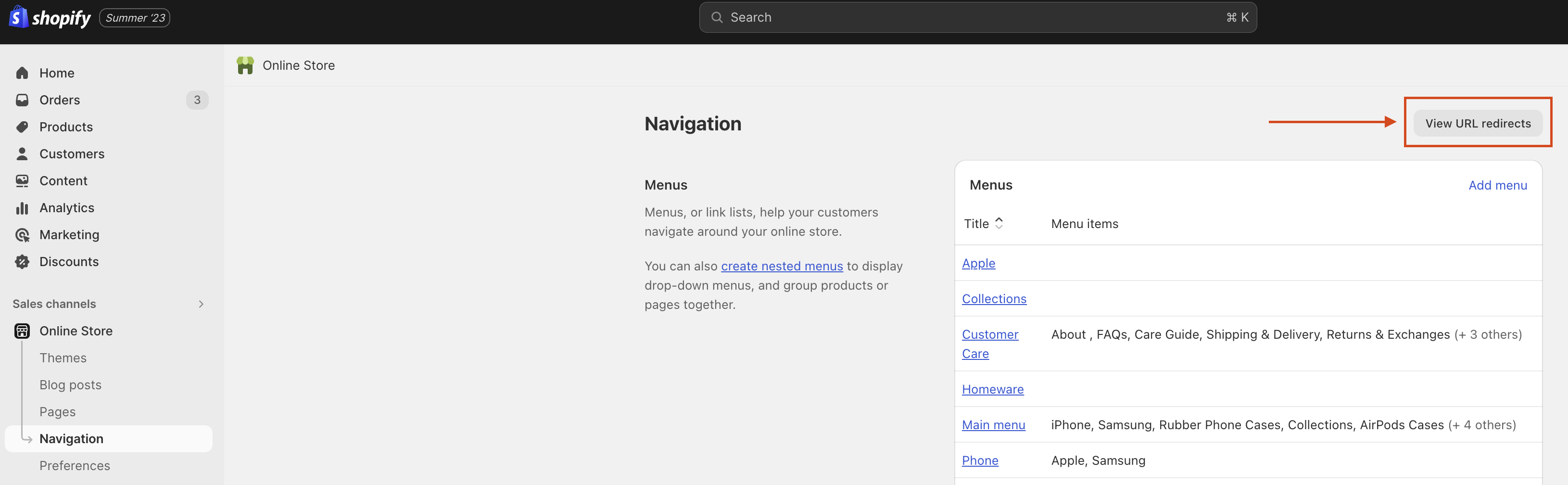
- Go to Content > Menus or, in some admin views, Online Store > Navigation.
- Click URL redirects.
- Click Create URL redirect.
- In Redirect from, enter the short path you want, such as /summer.
- In Redirect to, enter the destination, such as /collections/summer-sale.
- Save the redirect and test it in your browser.
For SEO purposes, these are treated as 301 permanent redirects when used for moved content. That is generally the right choice when an old URL should permanently point somewhere new.
If you want campaign links that are easier to share on Instagram, TikTok, or printed packaging, our post on how to shorten Shopify URLs for sharing on social media is a useful next step.
What URL redirects are not allowed in Shopify?
Shopify does not allow redirects from certain reserved or fixed paths. The most important limitation is that you cannot redirect active Shopify system URLs that already belong to core storefront functions.
According to Shopify's documentation, you cannot redirect URLs beginning with /apps, /application, /cart, /carts, /orders, /services, or /shop. You also cannot redirect fixed Shopify paths like /products, /collections, or /collections/all in the way many merchants expect.
There are also practical limitations. A redirect only works from a broken or unused path. If the source URL already resolves to a live page, Shopify will not simply override it with a redirect. This catches merchants out all the time when they try to make a vanity URL that clashes with an existing resource.
- Reserved prefixes: /apps, /application, /cart, /carts, /orders, /services, /shop
- Fixed Shopify paths: /products, /collections, /collections/all
- Existing live pages: redirects generally work only from broken or inactive URLs
- Customer account menus: URL redirects are not supported in every account-related context
If a redirect is not working, the first thing I check is whether the source path is already claimed by a page, collection, app proxy, or Shopify system route.
How many URL redirects can Shopify handle?
Shopify supports a large number of redirects, but published limits can vary by plan and by Shopify documentation updates. Historically, Shopify has supported up to 100,000 redirects on standard plans and much higher limits on Shopify Plus.
I've also seen more recent third-party references mention lower figures such as 5,000 redirects. Because Shopify updates admin interfaces and platform limits over time, I strongly recommend checking the latest official documentation here: Shopify URL redirects help guide.
In practical terms, most small and mid-sized stores will never hit the limit. If you are migrating a large catalogue or a content-heavy site, bulk import via CSV is the feature that matters most.
Can I bulk import Shopify redirects?
Yes, Shopify lets you import and export redirects by CSV. This is the fastest way to manage redirects at scale.
For replatforming projects, this is essential. When I work with stores moving from WooCommerce, Magento, or BigCommerce, I strongly prefer preparing a redirect sheet before launch rather than fixing 404s after Google has already crawled the new site.
- Export existing redirects to audit what is already in place
- Import redirects in bulk during a migration or major URL cleanup
- Filter and sort redirects in admin to review recent changes
- Delete in bulk if you need to tidy up outdated rules
If you're changing domains or moving from another platform, pair this with our guide on Shopify 301 redirects during migration.
What is the best URL structure for Shopify SEO?
The best Shopify URL structure is short, descriptive, keyword-relevant, and stable. You do not need a complicated hierarchy to rank well.
In my experience, merchants often overestimate how much URL structure alone affects SEO. A cleaner slug helps, but it will not compensate for weak collection copy, poor internal linking, duplicate content, or slow pages. Shopify's fixed structure is not ideal for every SEO purist, but it is rarely the reason a store fails to rank.
Here are the URL best practices I recommend:
- Keep handles short and avoid unnecessary filler words
- Use hyphens, not underscores
- Include a primary keyword where natural
- Avoid changing URLs repeatedly
- Do not stuff handles with multiple repeated terms
- Make URLs readable to humans, not just search engines
For example, /products/womens-black-linen-midi-dress is better than /products/product-928373-black-dress-sale-cheap. The first is clear. The second looks autogenerated and untrustworthy.
For broader SEO improvements, our guide on adding breadcrumbs to Shopify is worth reading too. Breadcrumbs help reinforce site structure even when URL hierarchy is limited.
Should I use redirects or change the actual URL handle?
The best choice depends on your goal. If the page itself should permanently have a better URL, change the handle. If you want an extra short, memorable, or campaign-specific path, use a redirect.
This is the easiest way to think about it:
| Scenario | Best option | Why |
|---|---|---|
| You want a cleaner product URL | Edit the handle | The destination URL itself becomes better |
| You changed a page slug and need the old one to work | 301 redirect | Preserves SEO value and bookmarks |
| You want a short campaign link like /gift | URL redirect | Easy to share and track |
| You want to remove /products/ from all product URLs | Not possible natively | Shopify system path is fixed |
If you are unsure, ask yourself one question: Should customers see this as the main permanent URL? If yes, edit the handle. If no, create a redirect.
How do custom URLs affect Shopify SEO?
Custom URLs affect Shopify SEO mainly through clarity, continuity, and crawlability. A good URL can improve relevance and user trust, while a bad migration or missing redirect can wipe out rankings surprisingly quickly.
When I tested store migrations in the past, the biggest SEO losses rarely came from handle wording alone. They came from broken URLs, missing redirects, orphaned pages, and changed internal links. That is why URL management should be treated as part of your wider SEO system, not a one-off admin task.
Here is what matters most:
- 301 redirects preserve link equity better than letting old pages 404
- Consistent handles reduce duplicate and confusing URLs
- Readable URLs improve click confidence in search and social
- Stable URLs are better than constantly optimising tiny wording changes
Shopify also handles canonical tags on many filtered and duplicate-like storefront states, which helps reduce some common platform SEO issues. Still, you should always test important URLs after making changes.
How do I test whether a Shopify custom URL or redirect works?
You should test every URL change live in your browser and in Search Console if the page matters for SEO. A redirect that exists in admin is not enough. You need to confirm it resolves correctly.
My basic testing checklist is simple and catches most issues:
- Open the old URL in an incognito browser window.
- Confirm it lands on the correct final page.
- Check that there is one clean redirect, not multiple chained redirects.
- Make sure the destination page returns 200 OK.
- Update internal links so they point to the new URL directly.
- Inspect important pages in Google Search Console.
If you want a quick technical check, tools like httpstatus.io or Redirect Checker are handy. I use them regularly when debugging redirect chains after theme or navigation changes.
Can I create custom product variant URLs on Shopify?
Not in a fully native, SEO-clean way. Shopify variant URLs usually rely on query parameters or variant IDs, not custom human-readable slugs.
There are theme and JavaScript workarounds that can make variant selection feel more readable, and some developers create custom front-end paths like /products/shirt/red-large. But in most cases, these are presentation-layer solutions rather than true native URL structures. I would be cautious about implementing them unless you have a very specific use case and a developer who understands canonicalisation properly.
For most merchants, the better approach is to optimise the main product handle, use variant swatches well, and make sure the selected variant updates cleanly on the page.
What are the best use cases for vanity URLs on Shopify?
The best use cases for vanity URLs are campaigns, offline marketing, influencer links, and memorable shortcuts. They are simple to set up and genuinely useful when you want people to type or remember a link.
Here are examples I like:
- /sale pointing to a seasonal collection
- /gift pointing to a gift guide or bundle page
- /instagram pointing to a featured landing page
- /returns pointing to your returns policy or portal
- /wholesale pointing to a trade enquiry page
If you are using custom links to prefill carts or send shoppers to specific product combinations, you may also want our guide on creating unique URLs to add a product to the Shopify cart. That is slightly different from redirects, but it is often what merchants are really looking for when they ask about custom URLs.
What mistakes should I avoid when creating custom URLs on Shopify?
The biggest mistakes are changing URLs without redirects, creating redirect chains, and obsessing over URL structure while ignoring bigger SEO issues. Clean URLs help, but they are not magic.
These are the errors I see most often:
- Changing handles after a page has earned backlinks and forgetting the redirect
- Using long keyword-stuffed slugs that look spammy
- Creating multiple redirects in sequence instead of one direct rule
- Linking internally to old redirected URLs instead of updating links
- Trying to hack around Shopify's fixed paths with brittle code
- Launching migrations without a redirect map
One practical rule I follow is this: if a URL is already indexed, linked to, or used in ads, treat any change as an SEO task, not just a content edit.
What is the best way to create custom URLs on Shopify?
The best way to create custom URLs on Shopify is to use handle edits for permanent URL improvements and URL redirects for vanity links, old URLs, and campaign shortcuts. That is the most reliable, SEO-safe approach for nearly every store.
Shopify does not support fully custom URL hierarchies, and for most merchants that is fine. Focus on what actually moves the needle: clear handles, proper 301 redirects, strong internal linking, and consistent testing. In my experience, that gets better results than chasing a perfect URL architecture Shopify was never built to support.
If you're planning a larger storefront clean-up, combine URL improvements with conversion work too. Our guide on how to optimise your Shopify conversion rate is a good companion read, because cleaner navigation and landing-page intent often matter just as much as the URL itself.
For official platform guidance, Shopify's own documentation on creating and managing URL redirects is still the best reference point for current admin steps and limitations.