
A Shopify waiting list feature lets customers register interest in a sold out or coming soon product so you can notify them when it becomes available. Shopify does not include this natively, so the best way to add one is usually with a specialist app or a custom form-based setup.
In my experience building Shopify apps, merchants often use the terms waiting list, waitlist, notify me, and back in stock alerts interchangeably. They are not always exactly the same, but in practice they solve the same commercial problem: stop losing demand when customers cannot buy right now.
If you are launching a product, gating access to a limited release, or collecting interest before stock lands, this guide will show you the best ways to implement it properly on Shopify in 2026.
What is a waiting list feature on Shopify?
A waiting list feature on Shopify is a form or app-based workflow that lets shoppers join a queue for a product that is sold out, not yet released, or available only to selected customers. Once stock is available, you can send alerts by email, SMS, or both.
This can be as simple as replacing the Add to Cart button with a Join the waiting list button on out-of-stock products. It can also be more advanced, with variant-level signups, referral waitlists, priority access, and batched invitations for limited drops.
Brands use waitlists for three main reasons. First, they recover otherwise lost demand. Second, they create scarcity and anticipation. Third, they give you a cleaner signal of product demand before you commit to inventory.
How do I create a waiting list feature for Shopify?
The best way to create a waiting list feature for Shopify is to install a third-party app, place its widget on the relevant product or landing page, and customise the messaging and notification flow. A custom setup is possible, but it takes more work and is usually only worth it for very specific use cases.
Most merchants should start with an app because it handles the fiddly parts for you: form capture, customer consent, variant tracking, automated notifications, and theme integration. If you want a no-code route that matches what searchers are looking for, this is the fastest path.
- Choose whether your waitlist is for sold out products, coming soon launches, or exclusive access.
- Install a waitlist or back-in-stock app from the Shopify App Store.
- Enable the widget on the products or pages you want.
- Customise the button text, form fields, and email or SMS templates.
- Test the signup flow on desktop and mobile.
- Trigger notifications when inventory is added or when you manually release access.
If your goal is specifically pre-launch demand capture, a dedicated landing page can work better than only showing a widget on the product page. That is especially true if the product is not yet visible in your catalogue.
When should you use a Shopify waitlist instead of pre-orders?
A Shopify waitlist is best when customers cannot buy yet or when you want to control access. Pre-orders are better when you are happy to take payment now for fulfilment later.
This distinction matters. If you already know stock is coming and you are comfortable taking orders in advance, a pre-order setup will usually generate revenue faster. If you are still validating demand, managing uncertainty, or releasing in batches, a waitlist is often safer.
For stores that want to accept paid reservations, I would also read our guide on how to setup pre-orders for your Shopify store. I have seen merchants confuse the two models and end up with the wrong customer expectations.
| Use case | Waitlist | Pre-order |
|---|---|---|
| Sold out product | Excellent fit | Possible, but not always ideal |
| Coming soon launch | Excellent fit | Good if fulfilment date is known |
| Take payment immediately | No | Yes |
| Create exclusivity | Very strong | Moderate |
| Gauge demand before stock | Very strong | Less flexible |
What is the easiest way to add a waiting list to Shopify?
The easiest way to add a waiting list to Shopify is with a dedicated app that inserts a Notify Me or Join Waitlist button on product pages. This is the route I would recommend for most merchants because it is fast, low-risk, and easy to test.
Based on the current app landscape and the research data, the common setup flow looks like this:
- Install the app and approve permissions.
- Choose whether the button appears on all sold out products or only selected products.
- Enable variant-level tracking if your products have multiple sizes or colours.
- Customise the widget text, colours, and confirmation messages.
- Set up email, SMS, or both for notifications.
- Test what happens when stock returns.
Many apps now also support pre-order products, which is useful if you want one tool to cover both scenarios. If your theme is performance-sensitive, test the app carefully and make sure scripts are loaded cleanly. If you need help on that side, our guide on how to async load or defer a JS file in Shopify is worth bookmarking.
Which Shopify waitlist apps are worth considering?
The best Shopify waitlist app depends on whether you need simple back-in-stock alerts, launch waitlists, or exclusive invite-only access. For most stores, I would shortlist apps based on variant support, notification channels, and how well the widget blends into your theme.
Below are the apps mentioned in the source material and research. I have included them because they are relevant to the keyword and current search intent.
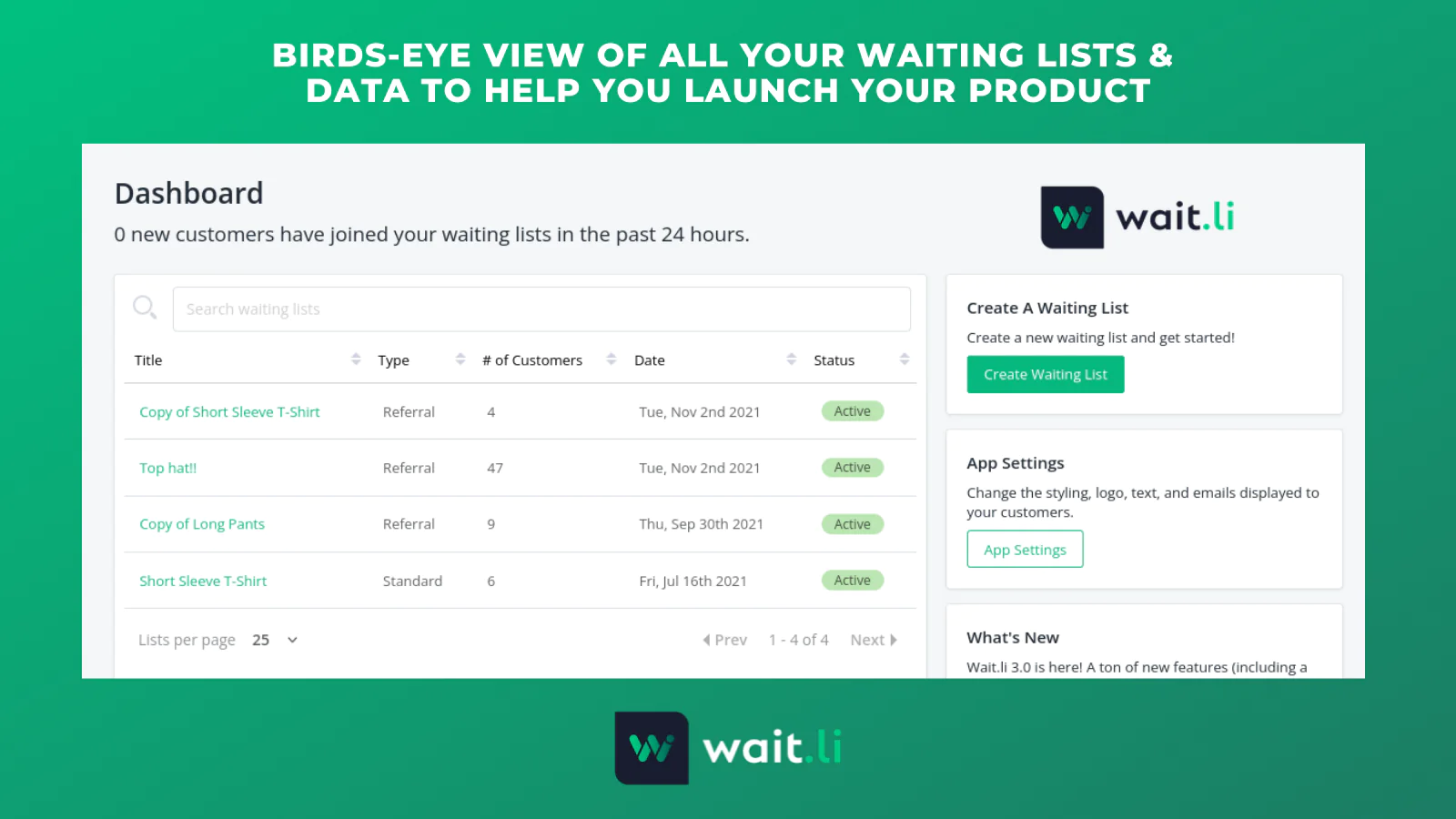
Wait.li
Wait.li is best suited to stores that want a more launch-oriented waitlist with an emphasis on exclusivity and referral-driven growth. It is a stronger fit for hype-led drops than a basic back-in-stock button.

What stood out to me is the ability to activate customers one by one or in batches. That is genuinely useful if you are trying to control inventory release or create tiered access. You can view the app here: Wait.li.
Restock Alert & Waitlist - Mini
Restock Alert & Waitlist - Mini appears aimed at stores that want a lightweight alert workflow for out-of-stock products. This type of app is typically better for operational restock alerts than for launch-day exclusivity.

If your main objective is recovering sales from sold out variants, this category of app can be very effective. App listing: Restock Alert & Waitlist - Mini.
WaitWise
WaitWise is another option for stores that need customer signup and notification flows around product availability. It is worth reviewing if you want to compare interface, pricing, and notification controls against other tools.

As always with this category, I would verify how it handles variants, theme compatibility, and automation before installing. App listing: WaitWise.
Stock Notify Pro
Stock Notify Pro is more obviously positioned around stock notifications and back-in-stock use cases. If your waitlist need is primarily operational rather than promotional, this is the kind of app I would compare closely.
For stores with lots of variants and frequent restocks, a stock-focused tool can be the most practical route. App listing: Stock Notify Pro.
| App | Best for | Strength | Link |
|---|---|---|---|
| Wait.li | Product launches and exclusivity | Referral waitlists and batched access | View app |
| Restock Alert & Waitlist - Mini | Out-of-stock recovery | Simple waitlist capture | View app |
| WaitWise | General product waitlists | Alternative app option to compare | View app |
| Stock Notify Pro | Back-in-stock alerts | Operational restock notifications | View app |
How do I set up a waitlist app on a Shopify product page?
To set up a waitlist app on a Shopify product page, install the app, enable its widget for the relevant products, customise the form, and test the notification flow. In most cases, you can get a basic version live in 15 to 30 minutes.
Here is the workflow I usually recommend to merchants:
- Install the app from the Shopify App Store and open it in admin.
- Choose display rules such as all sold out products, tagged products, or selected products only.
- Enable variant support so customers can waitlist a specific size or colour.
- Edit the button text to match your offer, such as Join Waitlist, Notify Me, or Get Early Access.
- Customise emails and SMS, including subject line, sender details, and confirmation copy.
- Test with a real product on mobile and desktop before publishing.

If the app uses app embeds or theme blocks, the setup is usually cleaner with Online Store 2.0 themes. If it injects scripts into the storefront, keep an eye on page speed and conflicts with your product form or cart drawer.
For stores that are heavily optimised for speed, I also recommend reviewing whether third-party scripts are lazy loaded where possible. Our post on how to easily add lazy loading to your Shopify store covers some of the trade-offs.
Can I build a Shopify waiting list without an app?
Yes, you can build a Shopify waiting list without an app, but it is usually a manual or semi-custom solution. It makes sense if you need total control, want to avoid recurring app fees, or are building a highly branded launch flow.
The original article mentioned using Shopify Draft Orders, and that is still a valid idea in certain cases. I would not call it the easiest method, but it can work for invite-only launches or concierge-style sales.
Option 1: Simple form plus customer tags
A basic no-app setup is to create a Shopify form or external form, collect emails, and tag customers in Shopify. When the product is ready, you email the tagged segment using Shopify Email or your ESP.
This is cheap and flexible, but it lacks the polish of a proper waitlist app. You usually do not get variant-level tracking, automatic notifications, or a native product-page widget without extra work.
Option 2: Draft Orders for controlled access
Draft Orders work best when you want to invite customers manually and send them a checkout link only when stock is available. This is useful for limited releases, wholesale-style access, or high-ticket products where personal communication matters.
The downside is scale. Once you get beyond a small list, this becomes operationally messy unless you automate parts of it with Shopify Flow or external tooling.
Option 3: Custom landing page waitlist
A custom landing page is ideal for coming soon campaigns where the product is not yet public. You can embed a form from a waitlist platform or email tool and route signups into Klaviyo, Mailchimp, or another CRM.
This approach is often better for launch marketing because it gives you more room for storytelling, social proof, FAQs, and referral incentives. It also aligns well with the search intent around Shopify waitlist landing pages and coming soon pages.
What should a high-converting Shopify waitlist include?
A high-converting Shopify waitlist should explain what the customer gets, when they will hear from you, and why joining is worth it. The best-performing waitlists are simple, specific, and low-friction.
When I test product page widgets and launch pages, these elements usually matter most:
- Clear CTA such as Join the Waitlist or Get Early Access
- Reason to join such as limited release, early pricing, or first access
- Low number of fields - email only often converts best
- Variant selection for size, colour, or bundle preference
- Consent language for email or SMS marketing
- Trust signals such as expected launch timing or stock limits
If you are selling a product with strong launch appeal, adding a countdown, social proof, or a referral incentive can materially lift signups. Just do not overcomplicate the page. A waitlist is a commitment-lite action, so friction kills it quickly.
How do I notify customers when stock is available again?
You notify customers when stock is available again by triggering automated email, SMS, or push alerts through your waitlist app. The strongest setups send alerts as soon as inventory is replenished and link directly back to the correct product or variant.
Some apps let you segment notification delivery by priority level, location, or customer type. That is useful if stock is limited and you want to release access in waves rather than emailing everyone at once.
For merchants focused specifically on restock alerts, we have a dedicated guide on how to notify a customer when an item is back in stock on Shopify. That article goes deeper into the back-in-stock side of this problem.
A good notification email should include:
- The product name and variant
- A direct buy now link
- Any urgency, such as limited stock
- A reminder of why they joined the list
- Brand-consistent copy and sender details
How can you use a waitlist for a coming soon product launch?
A waitlist is one of the best ways to launch a coming soon product on Shopify because it captures demand before stock arrives. It also gives you a measurable audience to warm up with email, SMS, and launch content.
This is where the strategy gets more interesting than a simple back-in-stock button. For launch campaigns, I usually recommend a dedicated landing page plus a product page widget if the product is already visible.
A strong launch waitlist flow looks like this:
- Create a coming soon page with your value proposition and signup form.
- Explain the launch timing as clearly as possible.
- Offer a reason to join now, such as early access or a launch-day bonus.
- Send an immediate confirmation email.
- Warm the list up with product education, UGC, or behind-the-scenes updates.
- Release access in one go or in batches depending on stock levels.
If you want to combine urgency with operational clarity, a delivery estimate can help too. For stores shipping launch inventory on a known timeline, I have seen good results pairing waitlists with transparent fulfilment messaging and tools like Delivery Timer style experiences.
What mistakes should you avoid with Shopify waitlists?
The biggest Shopify waitlist mistakes are collecting interest without a follow-up plan, ignoring variants, and making the signup form too complicated. A waitlist only works if it leads to a timely and relevant notification.
Here are the issues I see most often:
- No variant support - customers sign up for a product, but the alert is useless because their size is still unavailable
- Poor mobile UX - the popup is awkward or hidden below the fold
- Weak copy - there is no clear incentive to join
- Overusing scarcity - if every product is exclusive, nothing feels exclusive
- No consent handling - especially risky for SMS
- No analytics - you cannot tell which products generate the most demand
In my experience, the best merchants treat waitlists as a demand signal, not just a lead capture gimmick. If 500 people join a waitlist for one variant and 12 join another, that should influence your purchasing and merchandising decisions.
Is a Shopify waiting list worth it for small stores?
Yes, a Shopify waiting list is often worth it for small stores because it helps recover missed revenue and validate demand without major development work. For lean teams, it is one of the simplest ways to turn stockouts and launches into a list-building opportunity.
It is particularly effective if you sell products with repeat demand, limited runs, or variable stock availability. Jewellery, apparel, seasonal products, and creator-led brands tend to benefit a lot from this model because customer intent is often high at the point of product discovery.
If your catalogue is broad and you restock frequently, a basic back-in-stock setup may be enough. If your brand relies on anticipation, community, or drops, a more specialised app like Wait.li will usually make more sense.
What is my recommended approach for most Shopify merchants?
For most Shopify merchants, my recommendation is simple: use an app first, validate demand, and only build a custom setup if you outgrow the app model. That gets you live quickly and avoids wasting development time on a feature that already exists in the ecosystem.
If your use case is sold out products, start with a back-in-stock or waitlist app and keep the form friction low. If your use case is a coming soon launch, create a dedicated landing page, collect signups, and consider referral mechanics or staged access.
And if you need something more bespoke, such as a fully branded invite-only flow tied into customer tags, Draft Orders, or post-purchase journeys, then a custom build can absolutely work. I just would not start there unless your requirements are unusual.
For stores building a broader retention setup around product demand and customer communication, it is also worth thinking about what happens after purchase. Our post on how to easily send automatic review requests in Shopify in 2026 is a good next read if you want to extend the customer journey.
Used well, a waitlist is not just a workaround for missing stock. It is a demand capture system, a launch tool, and a conversion asset that can make your Shopify store feel far more intentional.