
A Build a Box feature in Shopify is usually best created with a dedicated bundle app, not with Shopify’s native product setup alone. If you want customers to mix and match products, see live pricing, unlock discounts, and build gift boxes or custom bundles without friction, a purpose-built app is the most practical route in 2026.
In my experience building Shopify apps and working with merchants on conversion-focused storefront features, Build a Box is one of the most effective bundle formats for increasing average order value without making the offer feel pushy. It works especially well for snacks, beauty, coffee, pet products, candles, stationery, gift hampers, and any category where customers value choice.
This guide covers what a Shopify Build a Box feature is, why it works, how to set it up step by step, and which apps are worth considering. I will also cover common mistakes, UX tips, and when a simpler bundle or upsell setup may actually be the better option.
What is a Build a Box feature in Shopify?
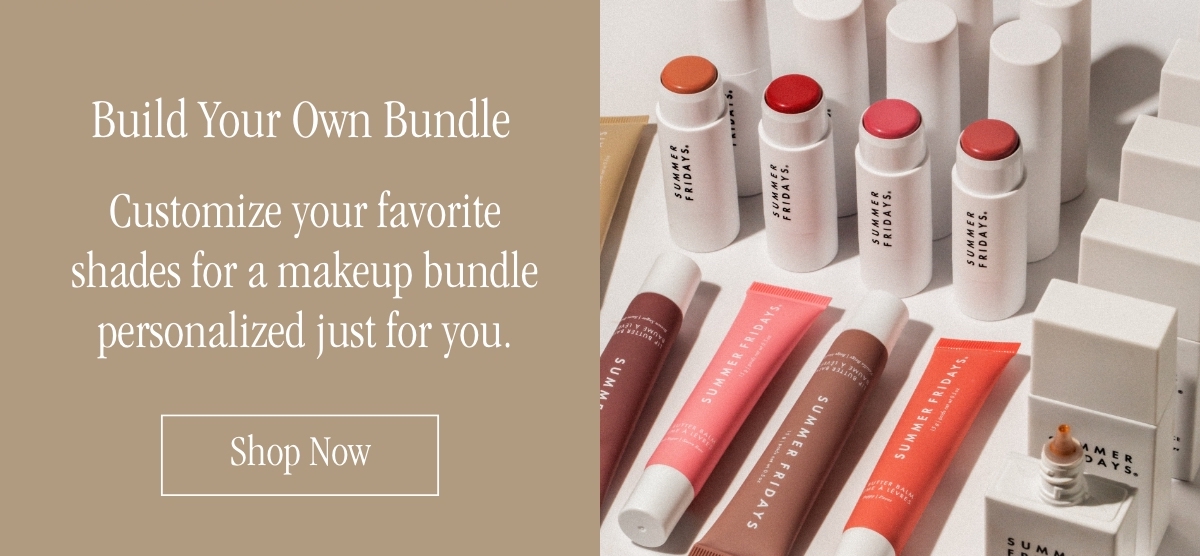
A Shopify Build a Box feature lets customers create their own bundle from a set of products you choose. Instead of buying a fixed bundle, shoppers can mix and match items within rules like minimum quantity, maximum quantity, or category-based steps.
A simple example is a snack brand offering a box where the customer picks 6 bars from 20 flavours. A more advanced version might be a gift box flow with steps like choose your box, pick 4 products, add a card, and add gift wrap.
That flexibility is why Build a Box performs so well. Customers feel like they are designing something personal, and that usually leads to higher perceived value and bigger baskets.
Why do Shopify merchants use Build a Box offers?
Shopify merchants use Build a Box offers because they can increase AOV, improve conversion rates, and make gifting or replenishment easier. The format gives shoppers control while still guiding them towards a higher-value purchase.
When I have analysed stores using bundle and upsell mechanics, the best-performing offers usually make buying easier rather than simply cheaper. Build a Box does both. It reduces the effort of choosing individual products one by one, while also making the customer feel they are getting a curated deal.
- Higher average order value - customers often add more items to complete the box
- Better customer experience - shoppers get choice without needing a fully custom quote or manual process
- Stronger gifting appeal - ideal for birthdays, seasonal offers, and corporate gifting
- More control over merchandising - you decide which products, collections, or variants qualify
- Useful for moving stock - slower sellers can be included alongside bestsellers
Personalisation continues to matter. McKinsey has long reported that better personalisation can materially lift revenue, and in eCommerce that shows up clearly in bundle builders, gift sets, and guided product selection. Custom bundle flows feel more relevant than generic discounts.
Can you create a Build a Box in Shopify without an app?
Technically, yes, but practically, not well for most stores. You can piece together a basic version using variants, line item properties, theme customisations, or separate products, but it usually becomes hard to manage and brittle at scale.
Shopify has improved its bundling capabilities, and the Shopify Bundles documentation is worth reading. But for a true Build a Box experience with guided steps, live progress, dynamic discounts, mix-and-match logic, and clean UX, I still recommend using a dedicated app.
If you are just starting out and still setting up the basics of your store, read How to Build a Shopify Store from Scratch in 2026 first. A Build a Box offer works best once your product structure, collections, and fulfilment process are already tidy.
What is the best way to create a Build a Box in Shopify in 2026?
The best way is to install a bundle builder app, create a guided bundle flow, set clear quantity rules, apply a visible discount, and test the experience on mobile before publishing. That is the shortest reliable path for most merchants in 2026.
Based on current app capabilities and what is ranking in search, the winning setup usually includes:
- A dedicated bundle app with visual builder support
- A clear box structure such as choose 3, choose 6, or choose 1 from each category
- Visible savings shown during the build flow
- Progress indicators so shoppers know how many items remain
- Live price updates to reduce uncertainty
- Mobile-friendly selection because most stores will get substantial mobile traffic
Competitors ranking well for this topic are leaning heavily into step-by-step setup, and rightly so. Search intent here is practical. Merchants do not just want theory. They want to know exactly how to launch it.
How do I set up a Build a Box in Shopify step by step?
To set up a Build a Box in Shopify, install a bundle app, create a new bundle, choose the products or collections, define the selection rules, add discounts, customise the page, then test and publish. The exact menus vary by app, but the workflow is broadly the same.
1. Choose the right bundle structure first
Start with the offer, not the app. Decide what the customer is building and what rules should apply before touching any settings.
Common structures include:
- Pick X items for a fixed price - for example, 6 chocolates for $24
- Pick X items and get a percentage off - for example, choose 5 and save 15%
- Step-based gift box - choose box, choose products, add message, add extras
- Category-led bundle - choose 1 cleanser, 1 serum, 1 moisturiser
- Subscription-style refill box - recurring mix-and-match bundles where supported
In my experience, simpler offers convert better. If this is your first launch, avoid building a flow with too many branches or too many product choices.
2. Install a Build a Box or bundle builder app
Shopify does not provide a full native Build a Box experience out of the box, so you will usually need an app from the Shopify App Store. Choose one that supports your bundle logic, theme, and inventory requirements.
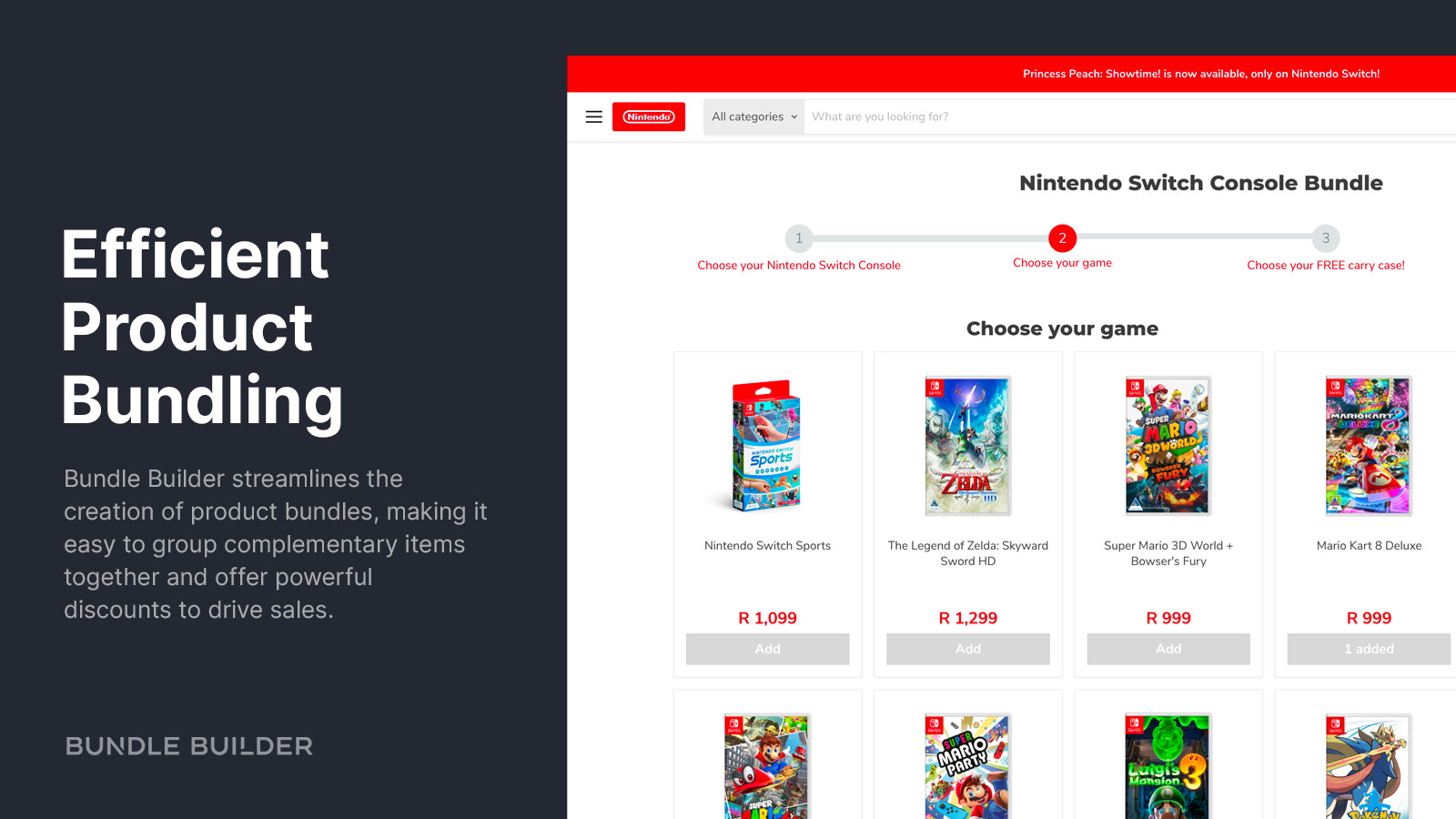
Good options include Bundle Builder and Boxi: Bundle Builder & BYOB. I have included a comparison later in this guide to help you choose.
3. Create the bundle and name it clearly
Your bundle name should explain the offer in plain English. Customers should understand it instantly without needing extra context.
Good examples include:
- Build Your Own Protein Box
- Create Your 6-Pack of Coffee Pods
- Build a Gift Box in 3 Steps
- Mix & Match Skincare Set
A clear name also helps with merchandising, paid ads, and internal site search.
4. Add products or collections for each step
Most apps let you assign products or collections to each bundle step. This is where you decide what the customer can choose from.
Keep each category focused. Current guidance from ranking competitor content is sensible here: 5 to 10 options per category is often enough. Too much choice can reduce conversions, especially on mobile.
If you are creating a mix-and-match flow, you may also want to read our guide on creating mix and match bundles for Shopify. A lot of the same merchandising logic applies.
5. Set minimum and maximum quantity rules
Quantity rules are what make the builder feel structured rather than chaotic. They tell the customer what is required and stop invalid bundle combinations.
Examples:
- Choose exactly 4 items
- Choose at least 3 and up to 6
- Choose 1 item from each category
- Limit premium products to 1 per box
This matters operationally too. If you have packaging constraints, weight limits, or shipping box sizes to think about, rules can prevent fulfilment headaches later. For the logistics side, our post on assigning boxes for shipping to products on Shopify is a useful companion.
6. Configure the discount logic
The discount should be easy to understand and easy to justify. If customers cannot quickly see the value, the builder becomes work rather than a deal.
Most bundle apps support one or more of these:
- Percentage discount - for example, 10% off
- Fixed amount off - for example, $5 off
- Fixed bundle price - for example, any 6 for $24
- Tiered discounts - choose 3 save 10%, choose 5 save 20%
- Free gift unlocks - spend or select enough items to add a bonus product
I usually prefer fixed bundle pricing or clear tiered discounts because they are easier for customers to understand at a glance. If you want to explore discount ladders more broadly, see our guide to creating tiered discounts in Shopify.
7. Customise the page design and UX
The best Build a Box pages are simple, visual, and reassuring. Customers should always know what step they are on, how many items they have selected, and what the current total is.
Make sure your page includes:
- Strong product images
- Progress bar or item counter
- Live price updates
- Clear savings message
- Search, sort, or filters if the range is larger
- Mobile-optimised buttons and cards
A banner image around 1200 x 800px is a common recommendation in app guides and works well for hero sections. If your theme allows it, I also like adding trust cues nearby such as delivery timing, review snippets, or gift messaging details.
8. Test the full flow before publishing
Never publish a bundle builder without testing the storefront flow yourself. Test it on desktop and mobile, and complete at least one real checkout if possible.
Check for:
- Inventory syncing correctly
- Discounts applying as expected
- Products adding to cart in the right format
- Shipping rates behaving properly
- Order data being readable for fulfilment staff
In my experience, the biggest issues are rarely visual. They are usually inventory edge cases, confusing discount logic, or cart behaviour that breaks on certain themes.
What are the best Shopify apps for Build a Box?
The best Shopify Build a Box apps are the ones that match your bundle logic, theme setup, and operational needs. There is no single best app for every merchant, but a few options stand out for most stores.
| App | Best for | Strengths | Potential drawback |
|---|---|---|---|
| Easy Bundle Builder | Gift boxes and subscriptions | Build-your-own bundles, subscriptions, free gifts, custom layouts | Feature depth can mean more setup decisions |
| Boxi: Bundle Builder & BYOB | Visual box builder UX | Step-by-step workflow, visual editor, custom fields, multilingual support | May require more design tweaking for perfect brand fit |
Easy Bundle Builder
Easy Bundle Builder is a good fit for merchants who want an all-round bundle app with support for subscriptions and gift-style offers. It has become a popular option for stores that want both flexibility and speed.

Easy Bundle Builder supports fixed-price bundles, discounted bundles, bundle subscriptions, free gifts, and real-time inventory sync. If your Build a Box idea overlaps with recurring orders or curated gifting, it is worth a close look.
Merchants often mention that support matters with bundle apps, and I agree. Build flows can touch inventory, carts, discounts, and fulfilment all at once, so responsive support is not a nice-to-have.
Boxi: Bundle Builder & BYOB
Boxi is best for merchants who want a visual, guided Build a Box experience with strong presentation control. It is especially suitable for gift boxes, hampers, cookie boxes, and personalised bundles.

Boxi: Bundle Builder & BYOB offers a step-by-step workflow, visual editor, custom fields, and support for 15 languages. If your brand relies heavily on gifting or presentation, that visual control can make a real difference.
For stores selling custom gift sets, this style of app can be more intuitive than a generic bundle widget. If that is your use case, our article on creating custom gift sets in Shopify is also relevant.
Which Build a Box app should you choose?
Choose the app based on your bundle complexity, not just its feature list. The best app for a simple snack box is not necessarily the best app for a multilingual gift hamper store.
| If you need... | Best fit |
|---|---|
| Subscriptions plus build-your-own bundles | Easy Bundle Builder |
| Gift box presentation and step-by-step visual flow | Boxi |
My advice is to shortlist two apps, install them on a development theme, and test the same bundle concept in both. Ten minutes of real testing is worth more than an hour of feature comparison.
What makes a Build a Box page convert well?
The best Build a Box pages are easy to understand, visually guided, and explicit about value. If the offer feels complicated, conversion drops quickly.
Here are the principles I would prioritise:
- Lead with the offer - for example, Build Your Own 6-Pack and Save 15%
- Show progress clearly - customers should know how many items remain
- Display savings in real time - make the deal obvious
- Use strong product imagery - especially for food, beauty, and gifting
- Keep category choice tight - avoid overwhelming shoppers
- Optimise for mobile first - tap targets, sticky CTA, fast loading
This overlaps with broader conversion work too. If you want to improve the rest of the purchase journey around your bundle page, our guide on how to optimise your conversion rate on Shopify is worth reading.
What mistakes should you avoid when creating a Build a Box in Shopify?
The most common mistakes are too much choice, unclear pricing, weak mobile UX, and not testing fulfilment properly. Most Build a Box failures are execution problems, not strategy problems.
- Too many options - 30 choices per step sounds generous but often hurts conversion
- Confusing discounts - if the customer needs to calculate savings, the offer is too complex
- No progress indicator - shoppers abandon when they are unsure what to do next
- Poor mobile layout - cramped cards and hidden totals kill momentum
- Ignoring inventory logic - out-of-stock behaviour must be tested carefully
- Not considering packaging - the box still has to be packed and shipped efficiently
In my experience, merchants often spend too long tweaking colours and not enough time checking operational details. If the warehouse team cannot fulfil the order cleanly, the bundle is not finished.
What types of stores benefit most from Build a Box?
Build a Box works best for stores selling products with variety, gifting appeal, or repeat-purchase potential. It is less useful for highly technical products or items that need lots of compatibility checks.
Best-fit categories include:
- Snacks, sweets, tea, coffee
- Beauty and skincare
- Candles and home fragrance
- Pet treats and toys
- Stationery and craft supplies
- Gift hampers and seasonal boxes
- Supplements and wellness products
If you are mainly trying to increase order value on product pages rather than create a dedicated builder experience, a simpler upsell widget may be more effective. In that case, read our guides on Shopify upsell on the product page and how to upsell on Shopify.
How should you market a Build a Box offer?
Market a Build a Box offer as a convenient, personalised deal rather than just a discount. The strongest angle is usually choice plus value.
Good messaging examples:
- Create your perfect snack box
- Build a gift box in 3 easy steps
- Choose any 6 and save
- Mix, match, and personalise your set
I would promote it in:
- Homepage sections
- Collection banners
- Email campaigns
- Paid social ads
- Gift guides and seasonal landing pages
For many stores, Build a Box is not just a product page. It is a campaign asset. Around key periods like Christmas, Mother’s Day, Valentine’s Day, and BFCM, customisable bundles can become one of your highest-intent offers.
Is Build a Box better than fixed bundles?
Build a Box is better when customer choice matters. Fixed bundles are better when speed, simplicity, or merchandising control matters more. Both can work, and many stores should use both.
| Format | Best for | Main advantage | Main limitation |
|---|---|---|---|
| Build a Box | Personalisation, gifting, mix-and-match | High perceived value and flexibility | More setup and more UX complexity |
| Fixed bundle | Bestseller sets, routine kits, starter packs | Fast to buy and easy to fulfil | Less customer choice |
If you are deciding between the two, consider testing both. A fixed starter kit can work brilliantly for first-time buyers, while a Build a Box page can capture customers who want more control. We have covered adjacent strategies in our posts on product kits and bundle apps for Shopify.
Is a Build a Box feature worth adding to your Shopify store?
Yes, if your products suit bundling and you can keep the experience simple. For the right catalogue, Build a Box can be one of the best ways to increase average order value while improving the shopping experience.
In my experience, it is most worth it for stores with broad SKU variety, strong gifting demand, or customers who naturally want to mix flavours, scents, colours, or formats. It is less worth it unless you can clearly explain the value and fulfil the orders efficiently.
The key in 2026 is not just adding a bundle app and hoping for the best. The stores that win with Build a Box keep the offer focused, the page intuitive, and the savings obvious. Do that well, and you can create a bundle experience that is genuinely better than a standard product page.


