
Mix and match bundles let customers build their own product set from a pre-approved range, usually in exchange for a discount or value incentive. If you want a practical guide to creating mix & match bundles for your Shopify store, the short answer is this: Shopify Bundles is useful for fixed bundles, but for true customer-built bundles, you will usually need a dedicated third-party app.
In my experience building Shopify apps and working with merchants on conversion problems, custom bundle builders consistently improve average order value when the offer is simple, relevant, and easy to understand. They work especially well for stores selling products that naturally go together, such as snacks, skincare, jewellery, pet treats, stationery, and giftable products.
A classic example is an accessories store that lets shoppers choose a necklace, earrings, and bracelet to create their own set. Another is a food brand offering any 6 items for a fixed price. The customer gets more control, and you get a stronger basket size without relying entirely on blanket discounts.
What are mix and match bundles on Shopify?
Mix and match bundles are customisable bundles where the customer chooses products from a defined list rather than buying a fixed pre-set bundle. They are different from standard bundles because the final combination can vary from one shopper to the next.
For example, you might offer:
- Choose any 3 t-shirts for £60
- Build your own 6-pack from a drinks collection
- Pick 4 skincare minis and save 15%
- Create your own gift box from a curated set of products
Unlike a fixed bundle, this setup needs dynamic product selection, discount logic, and often component-level inventory tracking. That is exactly where Shopify's native options start to show their limits.
Why should you use mix and match bundles?
The main benefit of mix and match bundles is higher AOV without making the offer feel pushy. Customers feel like they are building something personalised, which tends to convert better than a generic upsell block.
From what I have seen across Shopify stores, the strongest benefits are:
- Higher average order value through multi-item purchases
- Better product discovery for slower-moving SKUs
- More perceived value than a simple sitewide discount
- Improved giftability for seasonal and curated offers
- Stronger conversion rates on complementary product ranges
This approach also helps if your acquisition costs are rising. When paid traffic is expensive, increasing basket size becomes one of the fastest ways to protect margin.
Can you create mix and match bundles with Shopify Bundles?
Not fully, in most cases. Shopify Bundles is a solid free app for fixed bundles and multipacks, but it is not the best fit for advanced customer-built mix and match experiences.

Shopify's own documentation confirms that Shopify Bundles is designed for fixed bundles and multipacks created from the admin. It is available on all Shopify plans and useful if you want a simple native setup without extra monthly cost.
However, if your goal is to let customers choose from a wider product pool, set custom bundle rules, or create a more guided bundle-building experience, a third-party bundling app is usually the better option.
What are the limitations of Shopify Bundles?
Shopify Bundles has real limitations for dynamic bundle building. It works best when the merchant defines the bundle in advance and the customer selects only from limited option structures.
Based on Shopify's current documentation, key limitations include:
- Fixed bundles up to 30 components
- Dynamic bundles up to 150 components
- Maximum of 3 options and 100 variants total per bundle
- Online Store and headless storefront support only
- Bundle order processing is based on individual item SKUs
Those limits are not necessarily a problem for every merchant. But if you are building a genuine choose-your-own-box or pick-any-X-products offer, they can become restrictive quickly.
If you want a native-first route for standard bundles, I have already covered that in How to Create Bundles Using the Native Shopify Bundles App. For more flexible bundle structures, apps are still the practical route.
What is the best way to create mix and match bundles on Shopify?
The best way is to use a dedicated bundle app, choose a narrow product set, define simple rules, and test the offer before scaling it. The setup is not difficult, but the details matter if you want the bundle to convert well and stay profitable.
Here is the process I recommend after seeing what works on real Shopify stores.
How do I create a mix and match bundle in Shopify step by step?
To create a mix and match bundle in Shopify, install a bundle app, choose eligible products, set quantity rules, apply a discount, customise the widget, and test the experience on mobile and desktop. That is the practical workflow most merchants should follow.
1. Choose the right bundle type first
Not every bundle should be a mix and match bundle. Use this format when customer choice is part of the value proposition.
Good fits include:
- Gift boxes
- Snack packs
- Beauty routines
- Jewellery sets
- Baby products
- Stationery bundles
- Build-your-own subscription starter packs
If you simply want to sell products together as one package, a fixed bundle or kit may be easier. If that is your use case, see How to Create Product Kits for Your Shopify Store in 2025.
2. Install a bundle app
You will usually need an app for proper mix and match functionality. Native Shopify tools are improving, but third-party apps still offer the best control over rules, presentation, and inventory behaviour.
The apps I would look at first for this use case are Bundler - Product Bundles and Simple Bundles & Kits. Both are established options with strong reputations for bundling workflows.
3. Select products strategically
The best mix and match bundles are curated, not endless. In most cases, 5 to 15 eligible products is a sensible range because it gives customers choice without creating decision fatigue.
When I test merchandising ideas, I usually recommend including:
- Bestsellers to make the offer attractive
- Slower-moving SKUs to improve product discovery
- Different price points to widen appeal
- New launches alongside proven products
- Complementary categories that feel natural together
A common mistake is adding too many weak products just to fill the bundle. That usually hurts conversion because the offer feels messy.
4. Set clear bundle rules
Customers should understand the offer in seconds. The strongest bundle messaging is concrete and specific.
Examples that tend to work well:
- Choose any 3 and save 10%
- Pick 4 items for £40
- Build your own gift box with 5 products
- Buy 6 from this collection and get the cheapest free
Keep the minimum and maximum quantities obvious. If customers need to think too hard about eligibility, conversion drops fast.
5. Decide how products become eligible
Your app should let you define eligibility by collection, manual selection, or exclusions. This is one of the most important setup choices because it affects maintenance later.
In practice, there are three common approaches:
- Only selected products - best for tight control
- A specific collection - best for easier ongoing management
- All products except selected ones - useful for broad catalogues with a few exclusions
If your catalogue changes often, collection-based rules are usually easier to manage over time.
6. Set the discount structure
The best discount structure depends on your margins and how premium you want the offer to feel. Percentage discounts are easy to understand, while fixed-price bundles can be stronger for merchandising.
Common discount formats include:
- Percentage off - for example, 15% off when choosing 4 items
- Fixed amount off - for example, £10 off when choosing 3 items
- Fixed bundle price - for example, any 6 for £30
- Tiered discounts - save more as customers add more items
If you want to build tiered offers, I recommend reading How to Create Tiered Discounts in Shopify: 2 Methods That Actually Work in 2026. It pairs well with mix and match campaigns.
7. Customise the bundle widget
The widget presentation matters more than most merchants expect. A clean, visual selector with obvious progress messaging can make a huge difference to completion rate.
At minimum, customise:
- Button text
- Colour styling to match your theme
- Product image size
- Selection progress, such as 2 of 4 chosen
- Mobile layout so the flow stays usable on smaller screens
In my experience, the best-performing widgets make the next step feel obvious. If shoppers are unsure whether they have completed the bundle, they often abandon it.
8. Test before you publish widely
Always test the bundle on product pages, cart, checkout logic, and mobile. The most common problems are not visual. They are usually discount conflicts, inventory issues, or confusing messaging.
I would test:
- Adding the exact minimum required quantity
- Adding more than the allowed maximum
- Mixing eligible and ineligible items
- Behaviour with other discount codes
- Inventory sync after a purchase
- Mobile usability on product and cart pages
A simple A/B test can also help. For example, compare Choose 4 items to get £10 off against Save 15% when you choose 4 items. Even when the economics are similar, one message often converts better.
Mix and match bundles vs fixed bundles: which should you use?
Use fixed bundles when simplicity matters most, and mix and match bundles when personalisation is the selling point. Neither is universally better. It depends on your catalogue and customer behaviour.
| Bundle type | Best for | Pros | Cons |
|---|---|---|---|
| Fixed bundle | Pre-defined sets, starter kits, routine bundles | Simple setup, clear offer, easier inventory logic | Less customer control |
| Mix and match bundle | Gift boxes, snacks, beauty, apparel, accessories | Higher personalisation, stronger engagement, broader appeal | More setup complexity, more inventory considerations |
| Multipack | Same-SKU volume offers | Easy to understand, good for repeat purchases | Limited discovery value |
| Kit or set | Operational bundles with tracked components | Useful for fulfilment and product organisation | Less flexible for customer-led choice |
If you are still deciding between formats, you might also find 5 of the Best Bundle Apps for Shopify in 2025 useful.
What are the best Shopify apps for mix and match bundles?
The best Shopify apps for mix and match bundles are the ones that balance flexibility, inventory handling, and ease of setup. For most merchants, Bundler and Simple Bundles & Kits are two of the safest places to start.
Bundler - Product Bundles
Bundler is one of the most accessible options for merchants who want flexible bundle types and straightforward setup. It is especially useful if you want to test bundle offers without a heavy implementation project.
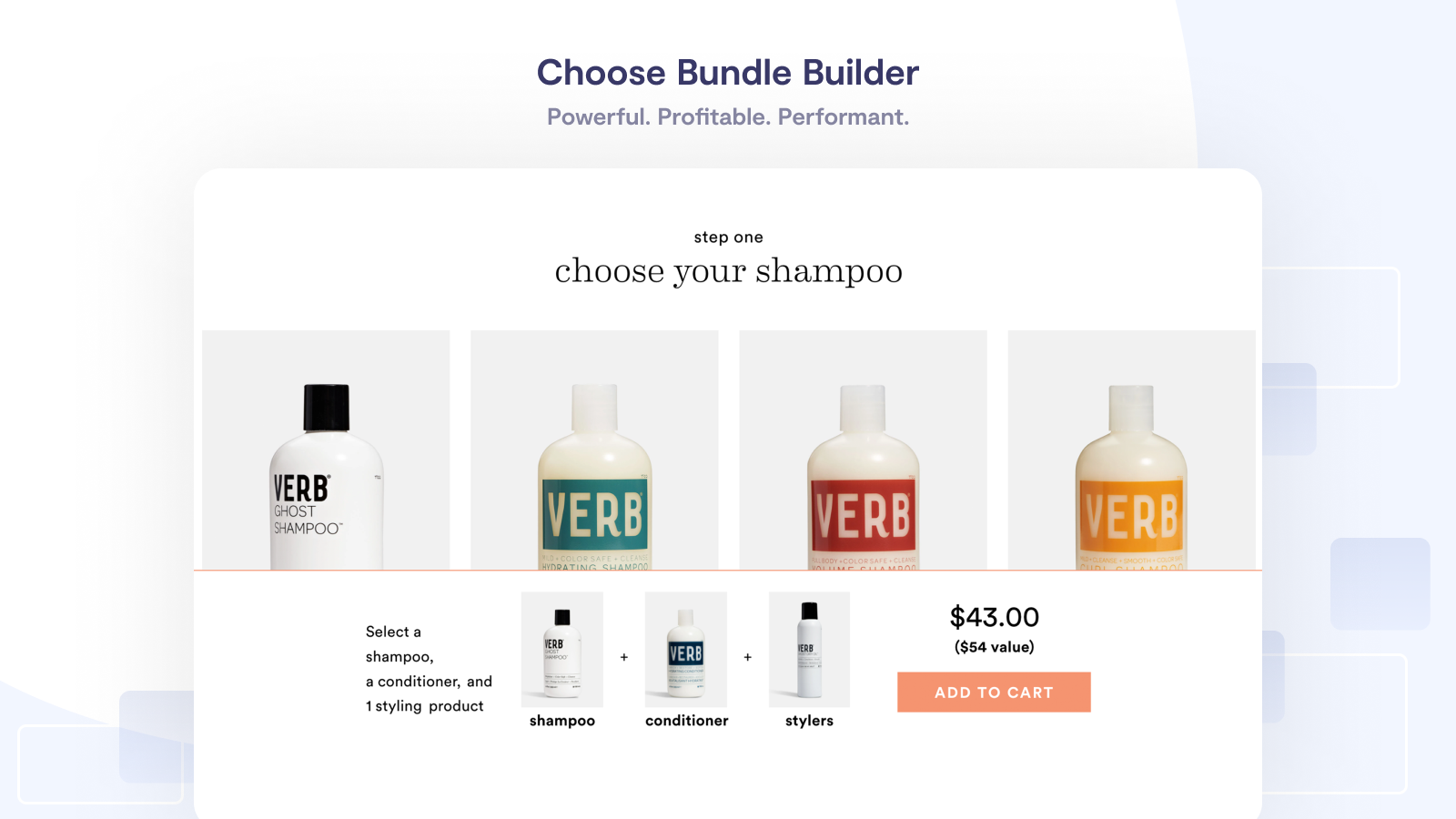
Bundler - Product Bundles has long been popular for mix and match bundles, classic bundles, quantity breaks, and tiered discounts. It is often a good fit for smaller and mid-sized stores that want flexibility without overcomplicating the storefront.
What I like about Bundler is that it is generally easy to understand from a merchant point of view. If your team wants to launch a bundle campaign quickly, it is one of the more practical options. Best for small to mid-sized stores that need a broad range of bundle mechanics in one place.
Simple Bundles & Kits
Simple Bundles & Kits is strong when inventory accuracy matters and your bundles need to map cleanly to component SKUs. It is particularly useful for stores with fulfilment complexity.
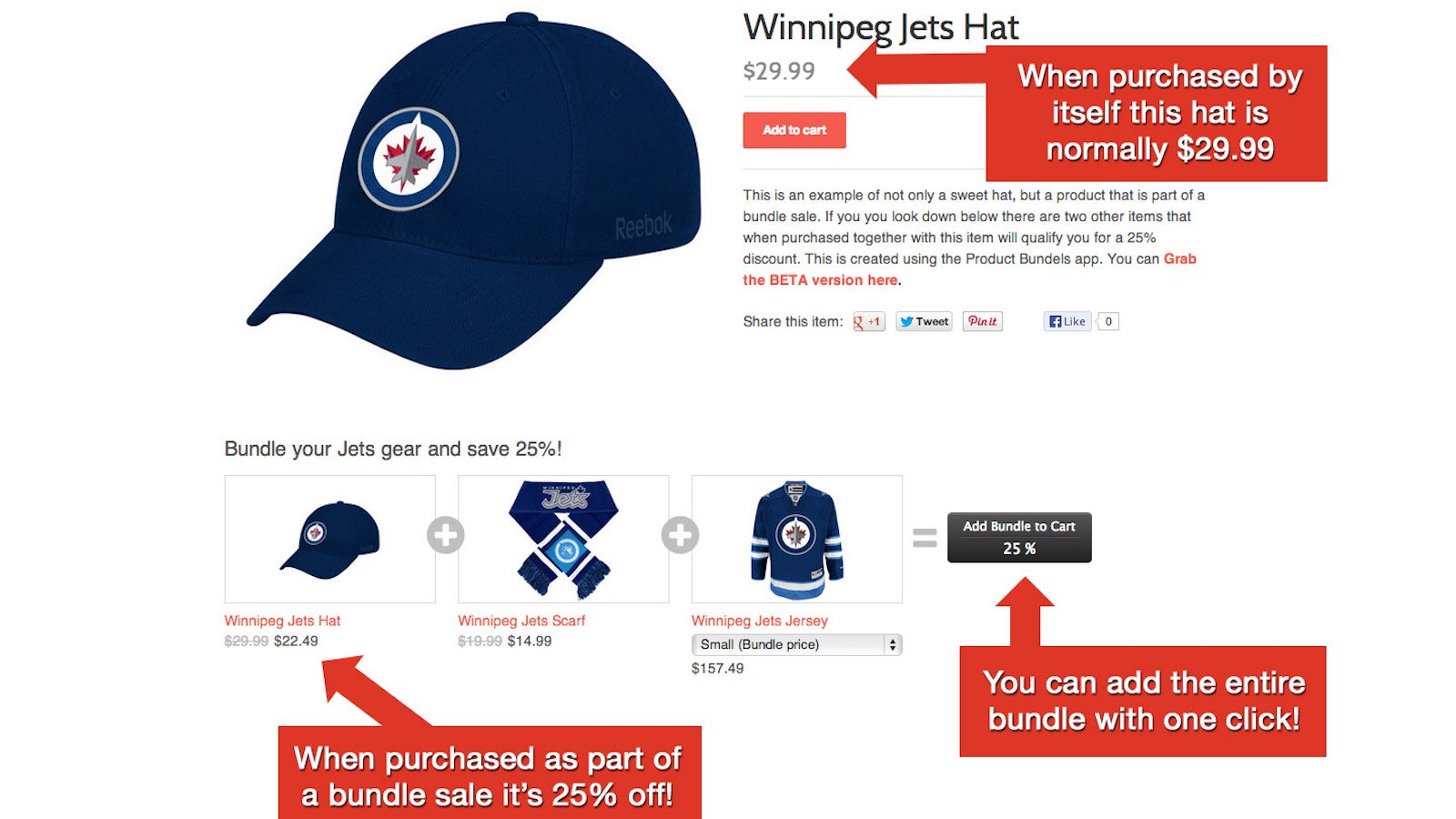
Simple Bundles & Kits is a strong choice if you care about component-level inventory tracking, bundle decomposition, and more operational control. That makes it attractive for merchants selling kits, curated sets, and custom bundles that need reliable stock handling.
In my experience, this type of app becomes more valuable as your operations get more complex. If stock accuracy and fulfilment logic are priorities, this is often the better long-term option.
Shopify Bundles
Shopify Bundles is best if you want a free first-party tool for fixed bundles and multipacks. It is not my first recommendation for advanced mix and match offers, but it is still worth considering for simpler use cases.

Shopify Bundles is free, native to Shopify, and convenient for merchants who want a low-friction way to create pre-defined bundles. If your store does not need a full bundle builder, this can be enough.
That said, for the keyword intent here, which is specifically about mix and match bundles, I would treat Shopify Bundles as a baseline rather than the final answer.
Which bundle app should you choose?
Choose the app based on your operational complexity, not just the feature list. The best app for a six-product gift box is not always the best app for a 2,000-SKU catalogue.
| App | Best for | Main strength | My verdict |
|---|---|---|---|
| Bundler - Product Bundles | General-purpose bundle offers | Flexible discount and bundle formats | Best for quick launches |
| Simple Bundles & Kits | Inventory-sensitive stores | Strong component tracking | Best for operational accuracy |
| Shopify Bundles | Fixed bundles and multipacks | Free and native | Best if you do not need full mix and match |
What products work best in mix and match bundles?
The best products for mix and match bundles are low-friction, complementary items with broad appeal. Customers should be able to combine them naturally without needing lots of education.
Strong categories include:
- Jewellery and accessories
- Food and drink
- Skincare and cosmetics
- Pet treats and toys
- Socks, underwear, and basics
- Stationery and craft supplies
- Gift products
If your products are highly technical, expensive, or specification-heavy, a guided upsell or product set can sometimes work better than a mix and match builder. In those cases, it may be worth looking at How to Combine Multiple Products into Product Sets on Shopify.
What mistakes should you avoid?
The biggest mistakes are overcomplicating the offer, including too many products, and ignoring margin. A bundle can look exciting in theory and still perform badly if the setup is confusing.
Here are the main issues I see:
- Too many choices leading to decision fatigue
- Weak discount messaging that customers do not instantly understand
- Poor mobile UX on the selection widget
- Low-margin products included without controls
- Discount stacking conflicts with other promotions
- No post-launch analysis of which products are actually selected
A smart tactic is to make sure your highest-margin or highest-converting items are prominently featured. You do not need to manipulate the offer, but you do need to protect profitability while keeping the bundle attractive.
How do you optimise mix and match bundles for more sales?
Optimisation comes from better merchandising, clearer messaging, and ongoing analysis of bundle behaviour. The first version of your bundle should be treated as a test, not a finished asset.
I would focus on these levers first:
- Reduce the number of eligible products if completion rates are low
- Test fixed-price vs percentage discount messaging
- Feature bestsellers first in the selector
- Show progress clearly, such as 3 of 4 selected
- Add the offer to collection pages or landing pages if product-page visibility is too low
- Track which combinations sell most often and turn winners into fixed bundles later
This last point matters a lot. In my experience, mix and match bundles are also a research tool. They show you what customers naturally want together, which can inform future fixed bundles, cross-sells, and merchandising.
If you want to expand beyond bundles and improve basket size more broadly, see How to Upsell on Your Shopify Store: 6 Methods.
Are mix and match bundles worth it for Shopify stores?
Yes, mix and match bundles are worth it for many Shopify stores, especially when products are complementary and margins are healthy. They are one of the better ways to increase AOV while giving customers a more interactive shopping experience.
They are most worth it if:
- You sell products that naturally go together
- You want to increase units per order
- You need a more value-led promotion than blanket discounts
- You want customers to discover more of your catalogue
They are not worth it unless you can keep the setup clear and profitable. If the bundle logic is messy, customers will not complete it and your team will not enjoy maintaining it.
Final thoughts on creating mix and match bundles in Shopify
The best mix and match bundles feel simple to the customer, even if the setup behind the scenes is more complex. That is the standard I would aim for.
If you are just getting started, begin with one tightly curated bundle offer, use a proven app like Bundler - Product Bundles or Simple Bundles & Kits, and monitor which products customers actually choose. If your needs are simpler, Shopify Bundles is still a useful free starting point.
From there, refine the offer, simplify the messaging, and treat bundle data as merchandising insight. That is usually where the real upside appears.
For merchants specifically building gift-style offers, I also recommend reading Creating Custom Gift Sets in Your Shopify Store: Best Apps, Setup Steps and Mistakes to Avoid.