
Cart upsells in Shopify are one of the simplest ways to increase average order value without sending shoppers back through the buying journey. In practical terms, you show a relevant extra product, upgrade, bundle, free gift threshold, or shipping incentive inside the cart or cart drawer while the customer is already ready to buy.
As a Shopify app developer, I have spent years building conversion tools for merchants and testing what gets used versus what gets ignored. In my experience, the cart is one of the highest-intent moments in the funnel, which is why a good cart upsell can outperform many product page widgets when it is implemented properly.
If you searched for How to Create Cart Upsells in Shopify: 2 Methods, the short answer is this: you have two main options. You can either use a dedicated Shopify app for speed, flexibility, and analytics, or you can build a custom solution with Liquid and JavaScript if you want more control and do not mind maintaining code.
This guide updates the original article with current best practices, realistic pros and cons, and the exact situations where each method makes sense.
What is a cart upsell in Shopify?
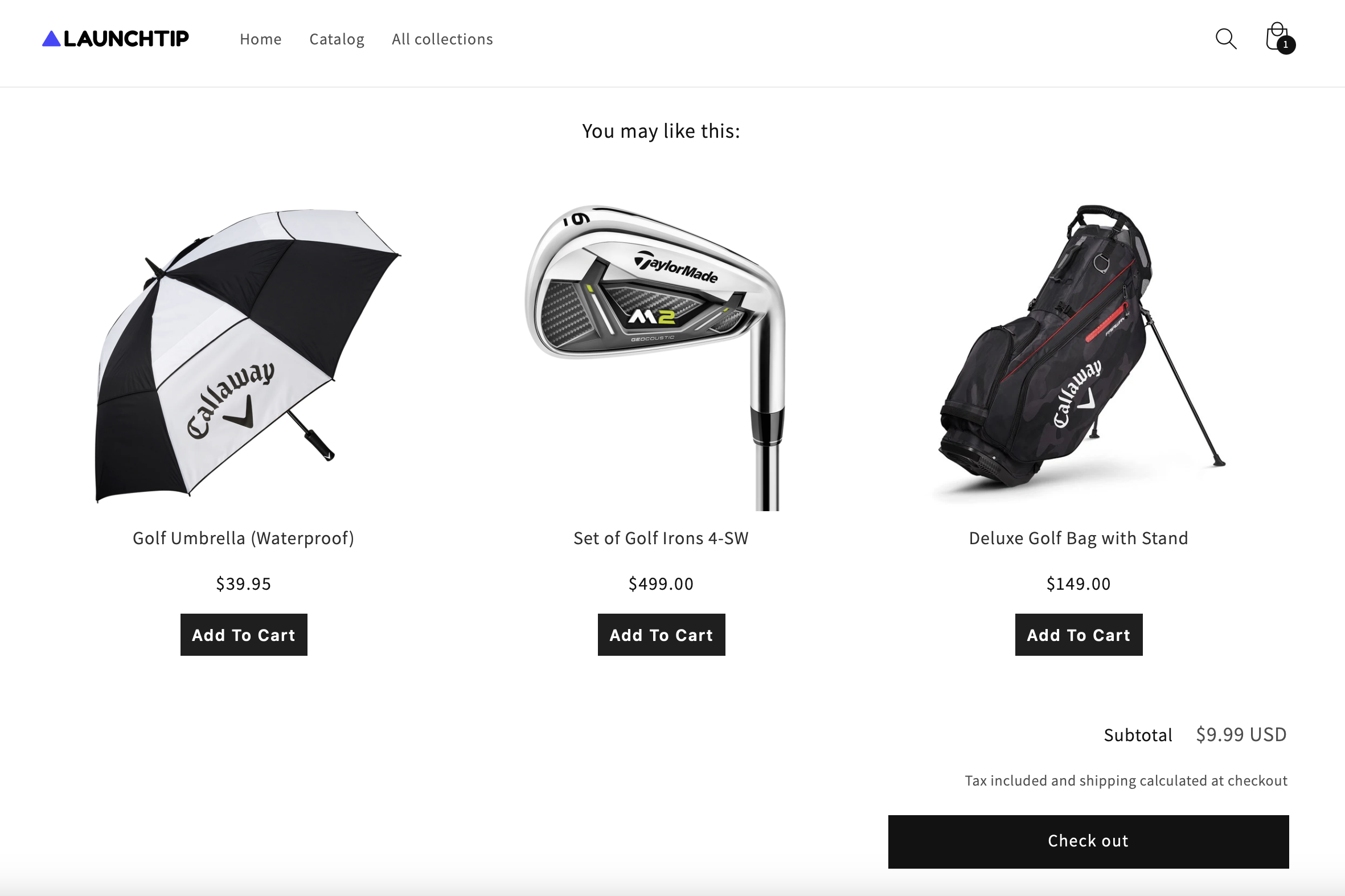
A Shopify cart upsell is an offer shown in the cart page or cart drawer that encourages the customer to add another product or choose a higher-value option before checkout. The goal is to increase AOV while keeping the path to purchase smooth.
Common cart upsells include complementary products, premium upgrades, free shipping thresholds, gift-with-purchase offers, and simple bundles. Unlike product page upsells, cart upsells work with live cart context, which means you can base the offer on what the shopper has already chosen.
That context matters. If someone has already added a phone case, showing a screen protector in the cart makes sense. If someone is £6 away from free shipping, a small add-on can be much more persuasive than a generic recommendation block.
Why should you upsell in the cart?
You should upsell in the cart because shoppers are already in buying mode. At this point, friction matters more than persuasion, so the best cart upsells are relevant, quick to add, and easy to dismiss.
Many ecommerce studies regularly cite product recommendations and upsell mechanics as capable of driving 10% to 30% revenue lifts when implemented well. I would not treat that as a guaranteed result for every store, but in my experience building Shopify apps, cart-stage offers often produce some of the fastest AOV gains because they appear so close to checkout.
Cart upsells also let you do things that are harder elsewhere in the journey:
- React to cart contents in real time
- Set spend thresholds for free shipping or gifts
- Promote low-friction add-ons that fit the current order
- Keep users in the cart drawer instead of sending them back to product pages
If you want a broader strategy beyond the cart, I have covered that in how to upsell on Shopify in 2026 and how to upsell products on Shopify.
What are the 2 methods to create cart upsells in Shopify?
The two main methods are app-based upsells and custom-coded upsells. Apps are faster and easier for most merchants. Custom code gives you more control but needs development time and ongoing maintenance.
Here is the quick comparison before I walk through each method in detail.
| Method | Best for | Pros | Cons |
|---|---|---|---|
| Dedicated app | Most Shopify merchants | Fast setup, no coding, rules and triggers, analytics, testing | Recurring monthly cost, some design limits depending on app |
| Custom code | Developers and highly customised stores | Full control, no app subscription, tailored UX | Harder to build, harder to maintain, no built-in analytics unless you add them |
For most stores, the app route is the better commercial decision. For stores with a developer in-house, unique cart behaviour, or strict performance and design requirements, custom code can still be the right move.
How do I create cart upsells in Shopify with an app?
Using an app is the easiest way to create cart upsells in Shopify. You install the app, choose where the offer appears, set the trigger rules, style the widget, and then track performance.
This is the route I usually recommend to merchants who want results quickly without touching theme code. A good upsell app can handle cart page offers, cart drawer offers, conditional logic, reward bars, and analytics in a way that is much faster than building everything from scratch.
Why is the app method usually the best option?
Apps are usually best because they reduce technical risk and speed up testing. Most stores do not need a fully bespoke upsell engine on day one. They need a working offer that can be launched this week and improved over time.
In my experience, merchants often underestimate the hidden cost of custom code. It is not just the initial build. It is also theme updates, compatibility issues, edge cases with subscriptions or bundles, and making sure the cart still behaves properly on mobile.
With an app, you can usually do the following out of the box:
- Show upsells in the cart drawer or cart page
- Trigger offers based on products, collections, cart value, or quantity
- Run gift-with-purchase and free shipping goals
- Test different offers and compare conversion rates
- Measure revenue generated by the upsell
What types of cart upsells can apps create?
Most modern upsell apps can create more than simple product recommendations. The best ones support several offer types so you can match the strategy to the basket.
These are the main cart upsell formats I see working well:
- Related product upsells - for example, batteries with electronics or straps with watches
- Upgrade offers - suggesting a larger size, premium version, or better-value pack
- Free shipping bars - showing how much more the customer needs to spend
- Gift with purchase - unlock a free item above a threshold
- Order goal discounts - spend more, save more incentives
- Quantity or bundle prompts - buy 2 or 3 for better value
If your focus is specifically the slide-out basket experience, this guide on Shopify cart drawer upsells goes deeper into placement and design choices.
How do I set up cart upsells with an app step by step?
The basic setup process is simple. Install the app, choose your placement, define your trigger, write the offer copy, and test it on desktop and mobile before publishing.
- Install a cart upsell app from the Shopify App Store.
- Choose the location - cart page, cart drawer, or both.
- Create the trigger rule - specific product, collection, cart total, or quantity.
- Select the upsell product or incentive - related item, upgrade, free gift, or threshold reward.
- Customise the design to match your theme branding.
- Test the add-to-cart behaviour and ensure the cart updates correctly.
- Track conversion rate and AOV lift after launch.
The biggest mistake I see is merchants launching generic offers. Relevance beats volume. One highly relevant add-on usually performs better than a cluttered list of random products.
Which app should I use for cart upsells?
The best app depends on how much control you need and where you want the upsell to appear. Some merchants want a lightweight cart add-on, while others want a broader upsell platform covering product pages, cart, and post-purchase.
The original version of this article linked to a generic app listing, which was not especially helpful. If you are researching the market, start in the Shopify App Store and compare apps that support cart drawer upsells, conditional logic, analytics, and theme compatibility. A few merchants also use page-builder style tools to create custom cart experiences, though that is a slightly different use case.
One app URL provided in the source data is App, though it is not a dedicated cart upsell recommendation from me for this use case. I would treat it as a Shopify App Store example link rather than a best-in-class cart upsell choice.

For more focused app recommendations, I would also compare specialist options through the Shopify App Store and read recent reviews carefully. Look for evidence of active support, recent updates, and clear reporting on upsell revenue.
How do I create cart upsells in Shopify without an app?
You can create cart upsells without an app by editing your Shopify theme with Liquid and JavaScript. This usually involves adding an upsell container to the cart or cart drawer, using the Shopify Ajax API to detect cart contents, and rendering a relevant product recommendation.
This is the method mentioned in the original article, and yes, it can work well. But it is only a good fit if you are comfortable editing theme code and maintaining that logic over time.
What do I need before using the custom code method?
You need a theme backup, a compatible cart experience, and confidence working in Shopify theme files. If your cart is a side drawer, you also need to understand how that drawer updates via Ajax.
These prerequisites from the original article are still relevant:
- You must back up your theme
- Your theme should have a side drawer Ajax cart if you want drawer-based upsells
- You should be comfortable editing code
I would add two more modern requirements:
- Test on a duplicate theme first, never on your live theme
- Check app and theme conflicts, especially if you already use bundles, subscriptions, or cart customisation apps
What does the custom cart upsell build usually involve?
A custom build usually involves Liquid for markup and JavaScript for logic. Liquid outputs the upsell container and product references, while JavaScript handles cart detection, Ajax requests, and add-to-cart behaviour.
At a high level, the process looks like this:
- Add an upsell section to your cart template or cart drawer snippet
- Define the matching logic for which products should trigger which offers
- Use Shopify's Ajax Cart API to read the current basket and update the cart without a full page refresh
- Render the upsell product card with image, title, price, and add button
- Style the component so it matches your theme
- Track interactions in analytics if you want to measure performance properly
Useful documentation for this approach includes Shopify's developer resources and Ajax API references at shopify.dev and community discussions at Shopify Community.
What are the drawbacks of coding cart upsells yourself?
The custom method gives you control, but it is rarely maintenance-free. The most common issues are theme conflicts, static offer logic, and the lack of built-in testing or reporting.
This was also true in the original article. A code-based setup can be fixed rather than dynamic, especially if you hard-code which products map to which add-ons. It can also be limited to the cart drawer unless you separately build support for the full cart page, mobile layouts, and edge cases like sold-out variants.
From my own experience building Shopify apps, the hidden pain points usually show up later:
- Theme updates overwrite custom changes
- New apps interfere with cart events
- Mobile UX breaks first if the drawer gets crowded
- No analytics by default, so you cannot easily prove ROI
That is why I only recommend the custom route when there is a clear reason for it, not just to avoid a monthly app fee.
Which method is better for most Shopify stores?
For most Shopify stores, a dedicated app is the better method. It is faster to launch, easier to optimise, and far less likely to break when your theme or stack changes.
If you are a solo merchant, small team, or agency managing multiple stores, time-to-value matters. Getting an upsell live in a day and improving it with data is usually more profitable than spending days on a bespoke build that still needs maintenance.
| Store situation | Better choice | Why |
|---|---|---|
| New or growing store | App | Fast launch, low technical risk, easier testing |
| Non-technical merchant | App | No coding required |
| Highly customised theme | Custom code or app with dev help | May need bespoke cart logic |
| In-house developer available | Depends | Custom can work if maintenance is planned |
| Need analytics and testing quickly | App | Built-in dashboards and experimentation tools |
What makes a cart upsell convert well?
The best cart upsells are relevant, low-friction, and easy to accept in one click. A cart upsell should feel helpful, not like an interruption.
These are the principles I keep coming back to when testing upsell UX:
- Match the offer to the basket - complementary products beat random bestsellers
- Keep the price sensible - lower-ticket add-ons often convert best in-cart
- Use one clear CTA - do not make customers think
- Show the benefit quickly - protection, convenience, savings, or free shipping
- Do not overcrowd the drawer - too many widgets can hurt checkout intent
For example, if you sell skincare, a travel-size add-on or routine bundle can work very well. If you sell jewellery, care kits and gift packaging often make stronger cart offers than unrelated accessories. I cover niche examples in how to upsell jewellery on Shopify.
How do I measure whether my cart upsells are working?
You should measure cart upsells by AOV lift, upsell take rate, and revenue generated. If you only look at clicks, you can easily overestimate performance.
The key metrics I recommend tracking are:
- Upsell conversion rate - percentage of shoppers who accept the offer
- AOV increase - how much average order value rises after launch
- Revenue attributed to upsells - direct sales from accepted offers
- Checkout completion rate - make sure the upsell is not hurting final conversion
- Mobile versus desktop performance - cart drawers often behave differently by device
In my experience, the best sign of a healthy cart upsell is not just extra revenue. It is extra revenue without harming checkout progression. If your upsell gets clicks but increases abandonment, the implementation needs work.
If you want examples of how upsells can affect order value, see this internal case study on a 27% increase in AOV.
What are the most common mistakes with Shopify cart upsells?
The most common mistakes are irrelevance, overcomplication, and poor mobile design. A cart upsell should support checkout, not compete with it.
Here are the errors I see most often:
- Showing unrelated products just because they have high margins
- Offering too many choices in a small cart drawer
- Forcing a page reload instead of smooth Ajax behaviour
- Ignoring mobile spacing and tap targets
- Not testing with discounts, subscriptions, or bundles
- Skipping analytics so there is no proof of ROI
I would also avoid copying checkout-style urgency into the cart unless it is genuine. Fake scarcity and aggressive popups can reduce trust quickly.
Should I use cart page upsells or cart drawer upsells?
Cart drawer upsells usually convert better when they are fast and unobtrusive, while cart page upsells give you more space for richer offers. The best choice depends on your theme and how customers typically shop on your store.
If your theme already uses a slide-out drawer and customers often check out from there, then keeping the offer inside the drawer is usually the cleanest path. If your cart page gets heavy use, especially on desktop, you may have room for richer bundles, gift thresholds, or educational copy.
For many stores, the answer is not either-or. It is start with the drawer for simple add-ons and use the cart page for more detailed incentives if needed.
What is the best alternative to coding it yourself?
The best alternative to coding cart upsells yourself is a dedicated upsell app with cart-specific triggers and reporting. It costs more than DIY in pure subscription terms, but often less in total ownership cost.
As noted in the original article, merchants often focus on app cost and ignore return. That is the wrong way round. If an app costs a modest monthly fee but adds even a small amount of additional AOV consistently, it can produce a positive ROI very quickly.
That is especially true when the app gives you dynamic offers instead of fixed ones. Modern tools can support conditional logic, testing, reward bars, and personalisation, which are difficult to replicate well with a simple code snippet.
If you are comparing approaches, ask these questions first:
- Can I target offers by cart contents or value?
- Can I show offers in the cart drawer?
- Can I measure revenue generated?
- Will it survive theme updates?
- Is the mobile experience solid?
How should I choose my first cart upsell offer?
Your first cart upsell should be a simple, highly relevant add-on with an obvious benefit. Do not start with a complicated funnel if you have not yet validated basic offer fit.
My usual recommendation is to begin with one of these:
- A complementary accessory that naturally fits the main product
- A free shipping threshold if customers are often just below it
- A gift-with-purchase threshold if your margins allow it
- A low-cost protection or care add-on for products where it makes sense
Then give it at least a couple of weeks of clean data before changing too many variables. If you want more inspiration for offer types, I have a separate guide on creating product add-ons for Shopify.
Final thoughts on creating cart upsells in Shopify
The two methods that actually matter are using an app or building it yourself with code. Both can work, but they are not equal in effort, flexibility, or long-term maintenance.
If you are a merchant who wants the fastest path to better AOV, use an app. If you are a developer or have a genuinely bespoke requirement, custom code can be worth it, as long as you plan for maintenance and tracking.
Either way, the core principle is the same. Show a relevant offer at the moment of highest purchase intent without slowing checkout down. That is what makes cart upsells work.
And if you are serious about upselling beyond the cart, I would also read Shopify upsell on the product page and the best one-click upsell apps for Shopify to build a more complete strategy.