
If you need to restrict shipping countries on certain products or collections in Shopify, the best native method is to use shipping profiles together with shipping zones and Shopify Markets. This lets you allow a product to ship to some countries while blocking it from others, without hiding the product from your catalogue.
That is the short answer, but in practice there are a few important catches. In my experience building Shopify apps and helping merchants troubleshoot fulfilment logic, most stores get stuck because they configure the shipping profile correctly but forget that the destination also needs to be enabled in an active market. If either piece is missing, customers will not see shipping rates at checkout.
This guide covers the full setup, the limitations of Shopify's native tools, when you need an app, and how to communicate restrictions clearly so you reduce support tickets and abandoned carts.
What is the best way to restrict shipping countries on certain products or collections in Shopify?
The best way is to create a separate shipping profile for the relevant products and then only add the countries you want to serve inside that profile's shipping zones. If a customer's country is not included, Shopify will not show shipping options for that item at checkout.
This is currently the cleanest native approach and it is also what most of the top ranking Shopify Community answers recommend. It works well for product-level restrictions, for groups of items that belong together, and for common cases like batteries, perishables, oversized goods, hazmat-adjacent items, or brand licensing restrictions.
If you need to restrict by collection, postcode, PO box, state, or mixed-cart logic, native Shopify can become limiting quite quickly. That is where specialist apps become useful.
Can Shopify natively restrict shipping by product or collection?
Yes, Shopify can natively restrict shipping by product using shipping profiles. It does not natively offer perfect collection-based country restriction logic in the way many merchants expect, unless you assign the products in that collection to the relevant profile.
In other words, Shopify's native system is really product-based, not truly collection-rule-based. You can still make it work for collections by bulk-assigning all products in that collection to the same shipping profile, but it is not as dynamic as a dedicated rules engine.
That distinction matters. If your merchandising team regularly adds new products to a restricted collection, you need a process to ensure those products are also added to the right shipping profile. Otherwise, restrictions can quietly break.
How do shipping profiles, shipping zones and Shopify Markets work together?
Shipping profiles decide which products follow which shipping setup. Shipping zones decide which countries or regions are eligible for shipping rates. Shopify Markets decides where you are actively selling.
A customer can only check out successfully when all three layers line up. This is one of the biggest sources of confusion I see. Merchants often create the profile and zone correctly, but the country is not added to an active market, so the setup appears broken.
- Shipping profile - groups products under specific shipping rules
- Shipping zone - defines the countries or regions that can receive those products
- Shopify Markets - controls where your store actively sells and localises
If you are also working on broader shipping setup, you may find my guides on adding a new shipping carrier in Shopify and showing shipping on the product page useful alongside this one.
How do I restrict shipping countries on certain products in Shopify step by step?
To restrict certain products to selected countries, create a new shipping profile, assign the products to it, and then only add the countries you want to ship to. Customers outside those countries will not see shipping rates for those products at checkout.
Below is the process I recommend in 2026. The menu labels can shift slightly as Shopify updates the admin, but the workflow remains the same.
1. Create a new shipping profile
Create a dedicated profile for the restricted items. This keeps your logic clean and makes future troubleshooting much easier.
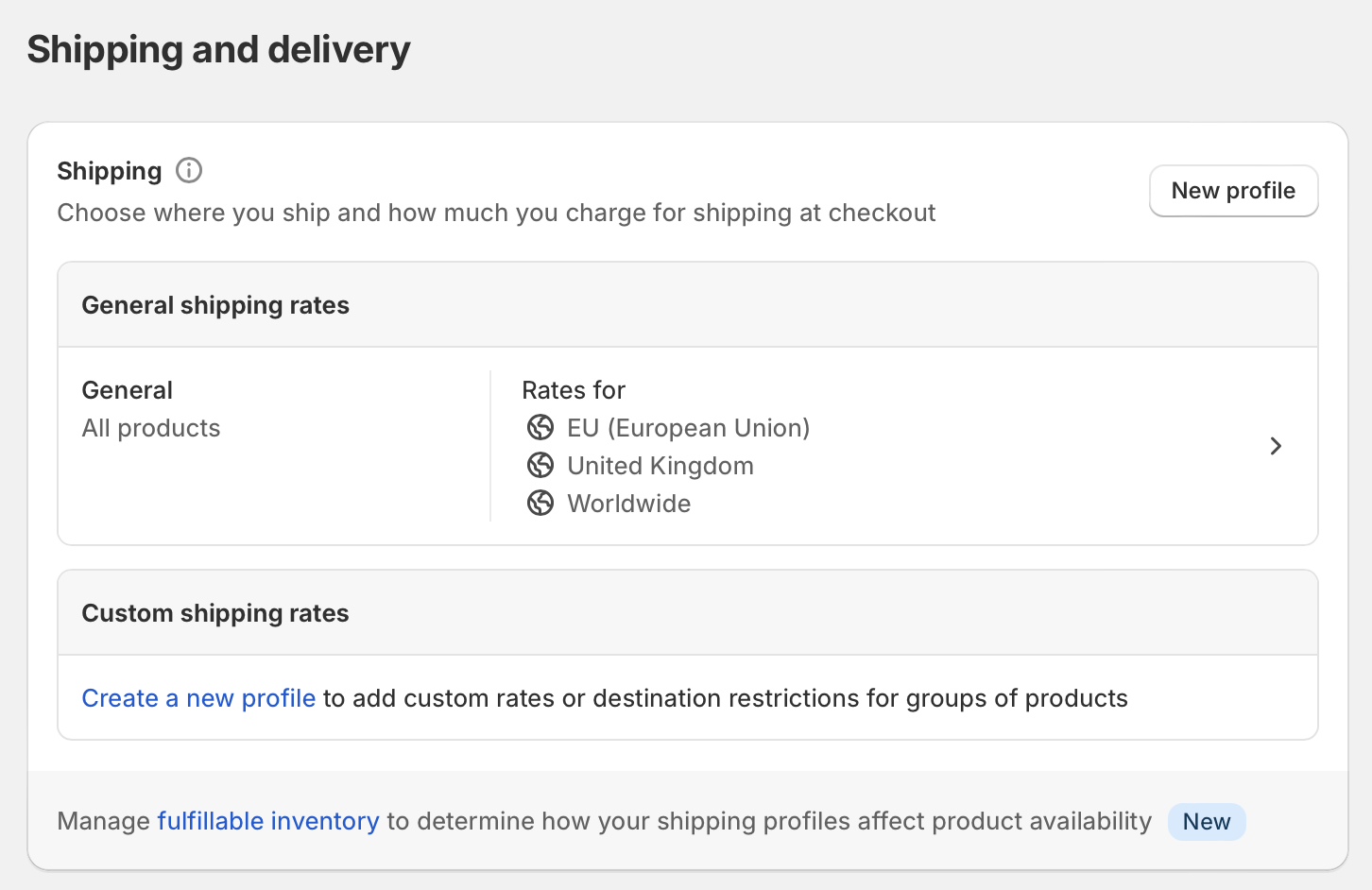
- In your Shopify admin, go to Settings > Shipping and delivery.
- In the Shipping section, click Create new profile.
- Give the profile a clear name such as EU only products, No US shipping, or Restricted cosmetics.
I strongly recommend naming profiles based on the actual rule rather than a vague internal label. When I test stores with five or more profiles, unclear naming is one of the top reasons merchants misconfigure rates later.
2. Add the relevant products
Assign the products that need country restrictions to this profile. Shopify applies the profile rules only to products inside it.
- Open the new profile
- Go to Products
- Use the search bar to add the relevant products
- If needed, use bulk editing from the product admin to manage larger groups
If you are trying to restrict an entire collection, the practical approach is to add all products in that collection to the profile. Just remember this is not truly automatic unless you maintain it as part of your merchandising workflow.
3. Create shipping zones for allowed countries only
Only include the countries or regions where those products are allowed to ship. Any country not included is effectively blocked.
- Inside the shipping profile, click Add shipping zone or Create zone
- Select the countries or regions you want to allow
- Add the relevant shipping rates for those destinations
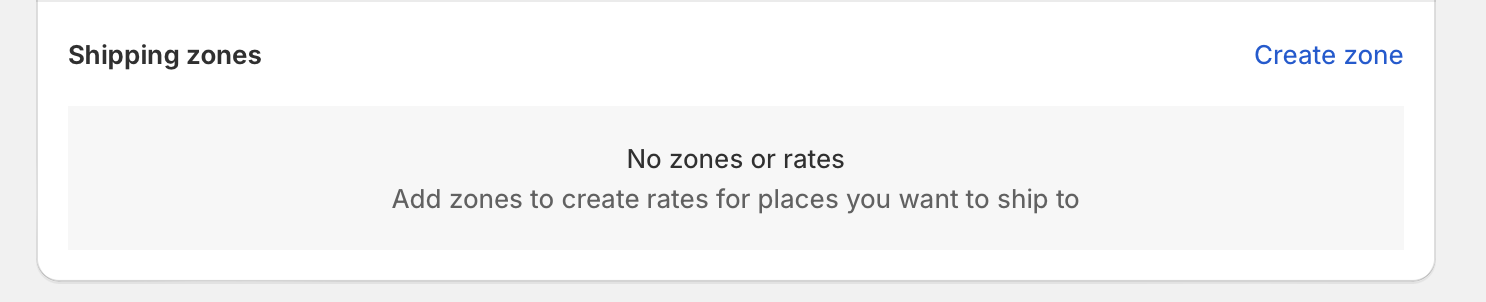
This is the key point many guides gloss over. You do not usually "block" countries one by one. Instead, you create a profile that only includes the approved destinations. Everyone else simply gets no shipping option.
4. Make sure those countries exist in Shopify Markets
The countries in your shipping zones also need to be included in an active market. If they are not, customers in those countries still may not be able to buy.
Go to Shopify Markets and confirm that the destinations you want are enabled. This matters more now than it did a few years ago because Markets has become central to international selling in Shopify.
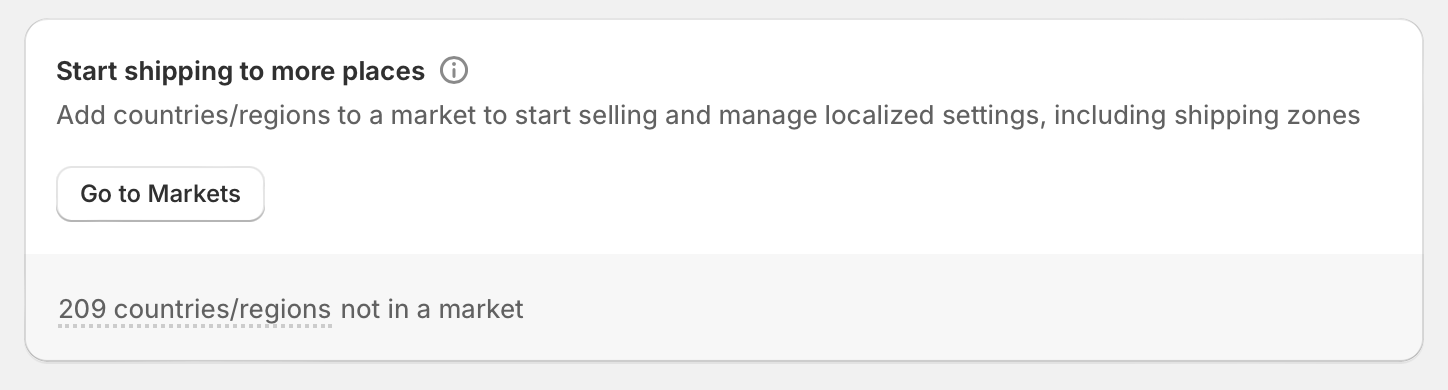
Important note: customers can only order products when the destination country is included in both a shipping zone and an active market. If one is missing, checkout will fail or no rates will appear.
5. Test the checkout properly
Always test with a real checkout flow before you consider the setup finished. Shipping restrictions are one of those areas where assumptions cause expensive mistakes.
- Use an incognito browser window
- Add a restricted product to cart
- Enter an address in an allowed country
- Repeat with a blocked country
- Test a mixed cart containing both restricted and unrestricted products
In my experience, mixed-cart testing is where problems usually surface. A product may be configured correctly on its own, but the checkout behaviour changes when unrestricted products are added alongside it.
What happens at checkout when a country is restricted?
When a customer tries to ship a restricted product to a country that is not in the product's shipping profile zone, Shopify will not show a valid shipping rate for that item. In many cases, the customer sees that shipping is unavailable for their address.
This is functional, but it is not always elegant. The customer may only discover the restriction late in the buying journey, which can hurt conversion and increase frustration. That is why I usually recommend pairing native restrictions with clearer messaging on the product page.
For example, if you sell time-sensitive or region-limited items, showing delivery information earlier can reduce confusion. My own app, Delivery Timer, is often used for this kind of expectation-setting.

It will not enforce shipping restrictions by itself, but it can help you communicate where you ship, how long delivery takes, and any product-specific limitations before the customer reaches checkout.
How do I restrict shipping by collection in Shopify?
Shopify does not have a true native collection-country restriction engine. The closest native workaround is to assign every product in that collection to a dedicated shipping profile with the allowed countries only.
This works well enough for stable catalogues. It is less reliable for fast-moving stores where products are added to collections frequently. In those cases, app-based rules are often safer because they can target collections directly rather than relying on profile assignment.
If your catalogue is becoming complex, it may also be worth reviewing adjacent product-control workflows such as how to hide product variants without deleting them and how to hide the add to cart button on specific products.
When do I need an app instead of Shopify's native shipping profiles?
You need an app when your restriction logic goes beyond simple country-level product rules. Apps are best for collection rules, postcode restrictions, checkout blocking with custom messages, and geo-based storefront visibility.
The native setup is usually enough for straightforward scenarios. But if you need to block a collection in Canada, allow one product only in Germany, exclude PO boxes, or show different content by visitor location, an app will save you time and reduce edge-case errors.
Based on the current app ecosystem and the SERP results, these are the main use cases where merchants outgrow native profiles:
- Collection-specific restrictions without manually assigning every product
- Country plus state or postcode logic
- Checkout blocking with a custom error message
- Geo-based hiding of products, prices, or sections
- More precise control over mixed-cart behaviour
What are the best Shopify apps for restricting products or collections by country?
The best app depends on whether you want to block checkout, hide products, or localise storefront content. There is no single winner for every use case.
Here are the options most relevant to this problem, including tools mentioned in your original article and recent SERP competitors.
| App | Best for | What it does | App Store |
|---|---|---|---|
| Locksmith | Hiding products, collections or pages by rule | Controls storefront access and visibility based on conditions such as customer or location logic | View app |
| Product & Section Blocker AGeo | Geo-blocking products or sections | Blocks or hides specific products, content sections, or pages by country or region | View app |
| Advanced Store Localization | Country-specific storefront experiences | Shows or hides content and products based on visitor location | View app |
| Delivery Timer | Communicating restrictions and delivery expectations | Shows delivery messaging on product pages to reduce confusion before checkout | View app |
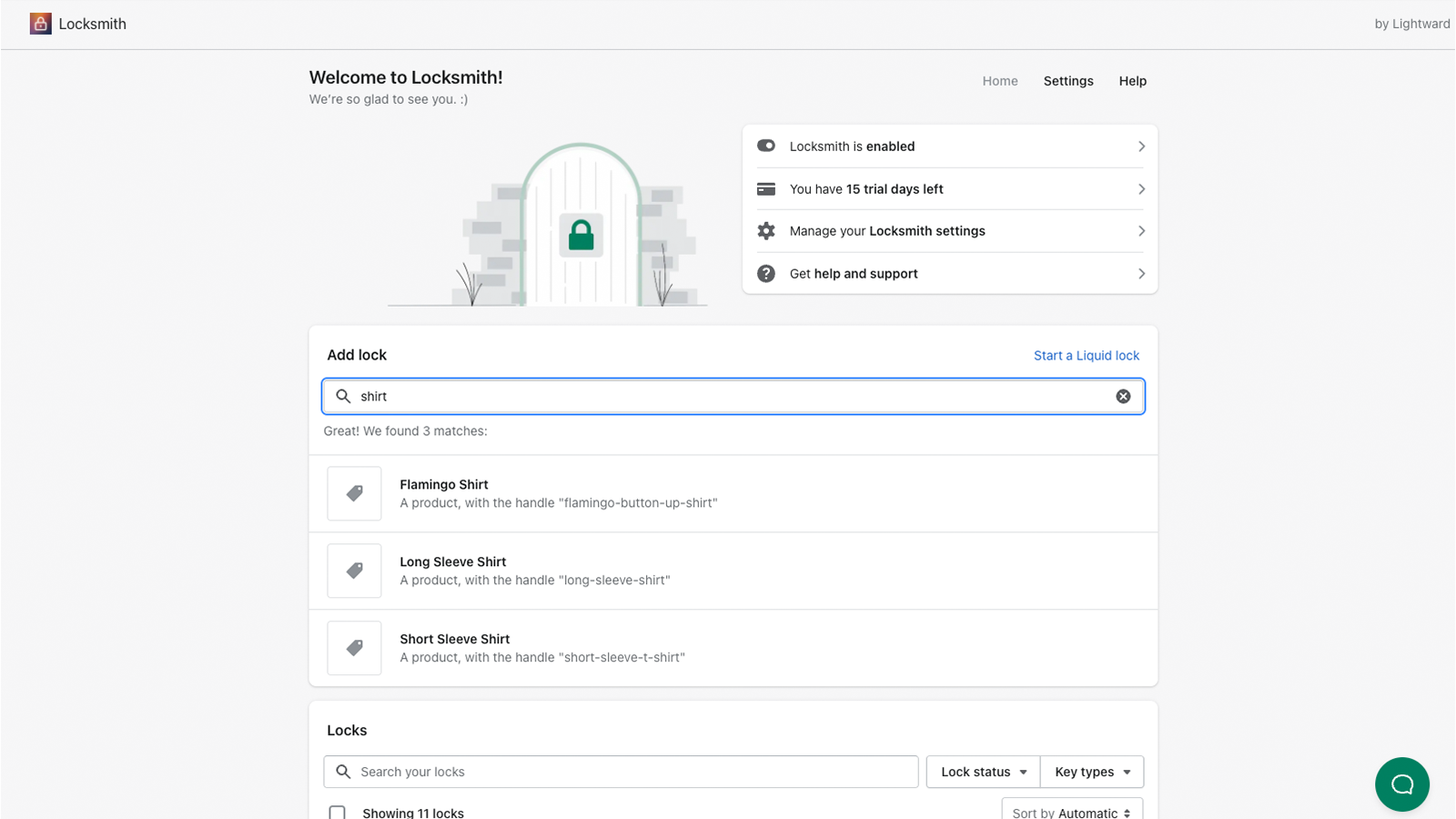
Locksmith
Locksmith is one of the best-known Shopify apps for controlling who can access what. It is best for merchants who want to hide products, collections, or pages from certain visitors rather than only blocking shipping at checkout.

In practice, this can create a cleaner customer experience because shoppers in restricted countries may never see the product in the first place. You can find it here: Locksmith.
Product & Section Blocker AGeo
Product & Section Blocker AGeo is designed for geo-based blocking of products and content. It is best for merchants who want location-specific visibility rules across more than just shipping.

If you need to hide a restricted product page from visitors in specific countries, this is closer to the job than native shipping profiles. App Store link: Product & Section Blocker AGeo.
Advanced Store Localization
Advanced Store Localization is useful when your goal is to tailor the storefront by geography. It is best for stores that need granular country-specific product or content visibility.

This can be a better fit than simple shipping restrictions if compliance, localisation, or regional merchandising is driving the requirement. You can view it here: Advanced Store Localization.
Other rule-based options
Some recent competitor content also references apps like Cart Lock and Better Shipping for more explicit country + product/collection checkout rules. If you need that type of logic, it is worth reviewing the relevant app store listings and testing against your exact cart scenarios.
I would still start with native profiles first. In many stores, that solves the problem without adding monthly app costs or extra moving parts.
Should I hide restricted products from customers in blocked countries?
Yes, in many cases you should. If a product cannot legally or operationally ship to a country, hiding it can create a better user experience than letting the customer discover the restriction at checkout.
That said, it depends on your business model. Some merchants prefer to keep products visible for SEO or catalogue completeness, then explain restrictions on the product page. Others would rather avoid any dead-end journeys. Both approaches can work.
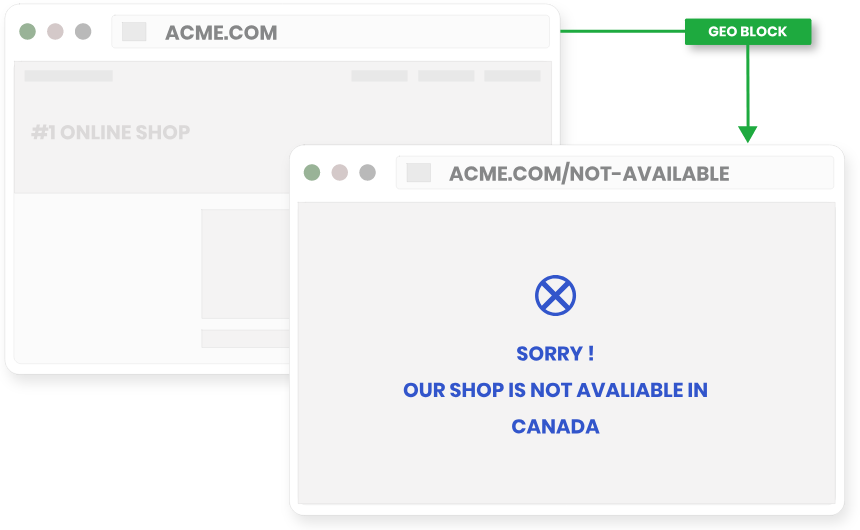
My general rule is simple:
- Hide the product if the restriction is permanent, legal, or obvious
- Show the product with clear messaging if the restriction is temporary, operational, or only affects a small percentage of customers
If you choose the second route, put the message somewhere impossible to miss. That might be a product page notice, shipping tab, cart note, or delivery estimate banner.
How can I clearly communicate shipping restrictions before checkout?
The best way is to state the restriction on the product page, in the cart, and ideally in your shipping policy too. Clear messaging reduces support tickets and prevents customers from feeling misled.
In my experience, merchants often focus on the technical block but forget the customer communication side. That is a mistake. A restriction that appears only at checkout can feel like a bug, even when it is configured correctly.
- Add a line to the product description such as Ships to UK and EU only
- Use a product page message or app block to display eligible destinations
- Link to your shipping policy
- Show estimated delivery ranges for supported regions
- Train support staff to explain restrictions consistently
If shipping visibility is part of your conversion strategy, see also my guide on how to show shipping on the product page in Shopify.
What are the main limitations of Shopify's native method?
The main limitation is that Shopify's native method is not highly granular. It works well for country-level product restrictions, but it does not give you advanced rule logic out of the box.
Here are the main limitations to be aware of:
| Limitation | What it means in practice |
|---|---|
| No true collection rules | You usually need to assign products manually to a shipping profile |
| Limited geographic granularity | Country and some regional logic is possible, but postcode-level rules usually need an app |
| No elegant storefront hiding | Customers may still see products they cannot buy unless you use another tool |
| Mixed-cart complexity | Orders containing restricted and unrestricted items can create confusing checkout outcomes |
| Maintenance overhead | New products must be assigned correctly or restrictions can fail silently |
If you need more advanced fulfilment logic generally, you may also want to read how to split orders into multiple shipments in Shopify and how to assign boxes for shipping to products on Shopify.
What is my recommended setup for most Shopify stores in 2026?
For most stores, I recommend starting with native shipping profiles, then adding clear product-page messaging, and only using an app if you need more granular or storefront-level restrictions. This keeps your setup simpler and easier to maintain.
Here is the framework I use when advising merchants:
- Use shipping profiles for product-specific country restrictions
- Confirm the countries are enabled in Shopify Markets
- Test single-product and mixed-cart scenarios
- Add front-end messaging so customers know the rule before checkout
- Use an app only if you need collection logic, geo-hiding, or postcode/state rules
This approach is usually the best balance of cost, control, and maintainability. It also aligns with what the current search results are actually trying to answer, while going further on the parts most merchants struggle with.
Common mistakes to avoid when restricting shipping countries in Shopify
The biggest mistakes are forgetting Markets, not testing mixed carts, and assuming collections are handled automatically. Avoiding these three issues will save you a lot of time.
- Forgetting Shopify Markets - the country must be in an active market as well as a shipping zone
- Adding products to the wrong profile - one misplaced product can create checkout issues
- Not updating new products - especially if you use collections as a workaround
- Only testing one address - always test allowed and blocked countries
- Ignoring communication - technical restrictions without messaging create poor UX
In my experience building Shopify apps, the stores that handle this best are not necessarily the most technical. They are the ones with the clearest operational process and the best customer-facing messaging.