

If you are searching for how to disable order confirmation in Shopify settings, the short answer is simple: you cannot turn off Shopify's order confirmation email from Settings on standard plans, and as of 2025, merchants are still reporting the same limitation across the Shopify ecosystem.
That is not just a missing toggle or a hidden setting. In practice, Shopify treats the order confirmation email as the customer's official purchase receipt, which is why it remains mandatory while other notifications, such as some shipping updates, can be disabled.
I've worked with Shopify stores for years and build apps in this ecosystem myself. When merchants ask me about duplicate emails from Shopify and tools like Klaviyo or Omnisend, this is one of the most common points of confusion. The admin makes it look like everything lives under Notifications, but not every notification is actually optional.
Can you disable the order confirmation email in Shopify settings?
No, Shopify does not provide a native setting to disable the order confirmation email. You can edit the template, but you cannot switch it off in the Shopify admin on normal plans, and recent community discussions suggest this still applies in 2025.
This is the key point most merchants need. If you go to Shopify Admin > Settings > Notifications > Customer notifications, you will see the Order confirmation template listed, but there is no disable toggle for it. You can customise the content, branding, logo, colours, and some messaging, but you cannot fully suppress the email from there.
That lines up with what Shopify merchants are still being told in community threads and help content. Some blog posts imply there is a hidden workaround in settings, but in my experience, those posts usually confuse order confirmation with shipping confirmation, delivery notifications, or abandoned checkout emails, which are different things entirely.
Why won't Shopify let you turn off order confirmation emails?
Shopify keeps order confirmation emails mandatory because they act as proof of purchase for the customer. In practical terms, Shopify sees this email as part receipt, part trust signal, and part transactional record.
That policy makes sense, even if it is frustrating when you are using a more advanced email platform. Customers expect a confirmation immediately after checkout. If they do not receive one, support tickets go up, chargeback risk can rise, and shoppers may assume the order failed.
In my experience building Shopify apps, transactional messages are treated very differently from marketing emails. Merchants often want complete control, but platforms like Shopify are cautious here because these messages are closely tied to the checkout experience and customer trust.
So while you might want to route everything through a third-party ESP, Shopify's default order confirmation remains protected. That is why the answer to this keyword is not a step-by-step toggle guide. It is really a clarification article: the setting does not exist.
Where is the order confirmation template in Shopify?
The order confirmation template is located in Settings > Notifications > Customer notifications. You can open and edit it, but you cannot disable it from that screen.
Here is the exact path most merchants need:
- Log in to your Shopify admin
- Click Settings
- Click Notifications
- Open Customer notifications
- Select Order confirmation
Once inside, you can preview the email, edit the liquid template, and update your branding. This is often enough if your real goal is not to disable the email completely, but to make it less repetitive, more on-brand, or better aligned with your Klaviyo or Omnisend flows.
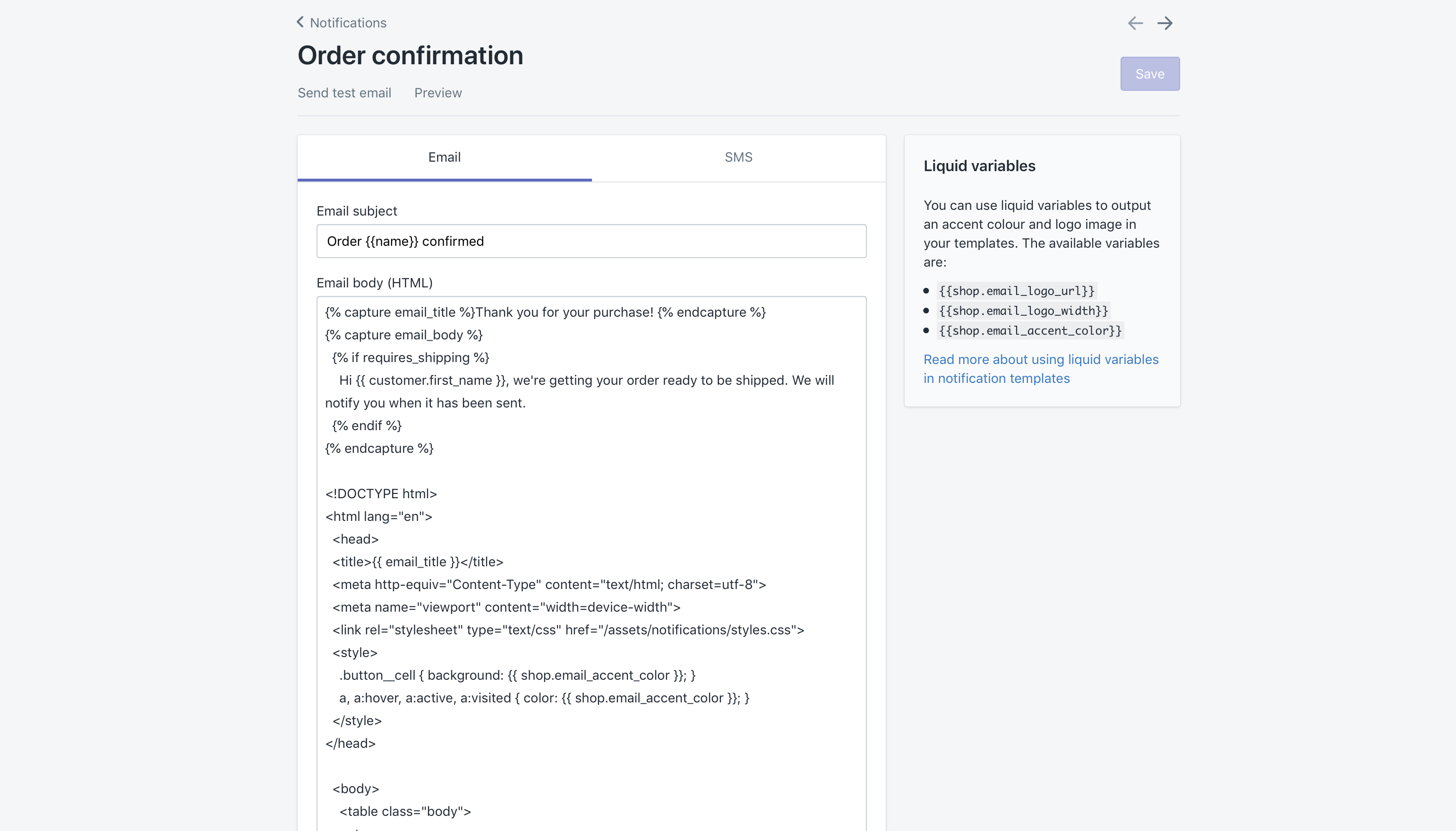
If you see toggles next to other notification types, that does not mean every notification behaves the same way. Shopify uses toggles selectively. The presence of a template in the list does not automatically mean it can be turned off.
Which Shopify notifications can you disable?
Some Shopify notifications can be disabled, but order confirmation is generally not one of them. Shipping-related emails are the most common examples of notifications you can switch off.
This matters because a lot of merchants come to this topic after connecting an email platform and wanting to avoid duplicate sends. In those cases, you usually need to disable the notifications that are actually optional, while leaving the mandatory order confirmation in place.
| Notification type | Can you disable it in Shopify? | Notes |
|---|---|---|
| Order confirmation | No | Usually mandatory as the customer's official transactional receipt |
| Shipping confirmation | Often yes | Can usually be toggled off in Notifications |
| Out for delivery | Often yes | Availability depends on setup and fulfilment flow |
| Delivered | Often yes | Can usually be disabled if you are replacing it with ESP flows |
| Abandoned checkout | Yes | Managed separately in checkout or marketing automation settings |
| Order cancelled | May be configurable | Depends on notification type and store setup |
If you are trying to prevent duplicate post-purchase emails, start by reviewing shipping confirmation, delivery emails, and abandoned checkout messages before you worry about order confirmation. That is usually where the real overlap happens.
Does Shopify Plus let you disable order confirmation emails?
Shopify Plus gives merchants more flexibility in some areas, but it still does not offer a simple native toggle to disable order confirmation emails. In 2025, recent merchant discussions still suggest there is no standard built-in suppression setting even on Plus.
This is one area where older articles have aged badly. A few posts still claim that Shopify Plus merchants can contact support and have order confirmations disabled. That may reflect older edge cases, support-led interventions, or misunderstandings around other notifications. Based on current research and what merchants are reporting more recently, you should not assume Plus gives you a guaranteed off switch.
What Plus does give you is more room for workflow logic, checkout customisation, and operational workarounds. For example, you may be able to use Shopify Flow for tagging, segmenting, or triggering app-based communications around the order lifecycle, but that is not the same as suppressing Shopify's own order confirmation email.
If you are on Plus and this is business-critical, it is still worth speaking to Shopify support or your Plus contact. Just go into that conversation knowing that the current default answer is still no native disable option.
What should you do if Shopify and Klaviyo are both sending emails?
The best approach is to keep Shopify's mandatory order confirmation, then disable overlapping optional notifications in Shopify or your email platform. Do not try to force a full replacement unless you are certain the transactional coverage remains intact.
This is the real-world problem behind most searches for this keyword. A merchant installs Klaviyo or Omnisend, enables post-purchase flows, and suddenly customers get two or three similar emails. That is bad for brand experience and can hurt trust.
In my experience, the cleanest fix is to map every customer email by stage. Decide which messages Shopify must own, which your ESP should own, and which ones should be turned off. If you skip that audit, you end up with duplicated confirmations, duplicated shipping notices, or gaps where nobody sends anything.
How do I reduce duplicate transactional emails?
Reduce duplicates by keeping Shopify's required order confirmation and disabling the optional notifications that your ESP is replacing. This usually means reviewing shipping and delivery notifications first.
- List every customer-facing transactional email currently being sent
- Check Shopify Admin > Settings > Notifications for optional toggles
- Review abandoned checkout settings separately
- Check your flows in Klaviyo or Omnisend
- Test with a real order before going live
Klaviyo's own help content makes this point clearly for Shopify users. The recommendation is to disable certain Shopify notifications right before enabling the corresponding flow so you do not create a sending gap. That is good advice, especially for stores doing daily volume.
If you are working on your broader retention setup, you may also want to read our guides on how to manage Shopify customer data without losing sales and the best CRM for Shopify.
What are the best workarounds if you cannot disable order confirmation?
The best workaround is not to remove the order confirmation, but to simplify it and let your email platform handle richer post-purchase messaging. You can also adjust the template so it feels less redundant.
There are a few practical options here, and most are better than trying to fight Shopify's default behaviour.
1. Edit the Shopify order confirmation template
You can customise the template's wording, branding, and layout. This is the most direct workaround available inside Shopify.
For example, you can shorten repetitive copy, remove promotional language, and make it clear that more detailed updates will follow in a branded email sequence. You can also add your logo and colour palette so the email feels intentional rather than generic.
If you need help editing Liquid or HTML/CSS, use a developer or a specialist familiar with Shopify notifications. This is one of those areas where small code mistakes can break formatting across devices.
2. Use your ESP for richer follow-up emails
Use Shopify for the essential receipt, then let your ESP handle education, cross-sells, delivery context, and brand storytelling. That split usually produces the best customer experience.
For example, keep Shopify's order confirmation as the immediate transactional email, then trigger a branded post-purchase sequence in Klaviyo or Omnisend a little later. That second email can include FAQs, shipping expectations, product care, subscriptions, or upsells.
If increasing AOV is part of the goal, our posts on how to upsell on Shopify in 2026, Shopify cart drawer upsells, and maximising revenue from product pages will help you turn post-purchase communication into revenue rather than noise.
3. Replace detail-heavy content with a lighter message where possible
Some merchants use a minimal Shopify confirmation and move the richer content into a branded thank-you or follow-up email. This does not disable the Shopify email, but it does reduce duplication.
Omnisend, for example, has documented approaches where Shopify's side is kept lightweight while the platform sends a more tailored thank-you message. This is often the best middle ground for stores that care deeply about brand presentation.
4. Audit fulfilment-triggered emails
If customers are complaining about too many emails, the real culprit is often fulfilment automation rather than the order confirmation itself. Shipping and delivery events can stack up quickly.
Check whether your store auto-fulfils line items, whether your 3PL triggers additional emails, and whether your ESP also sends dispatch updates. I have seen stores accidentally send three separate shipping-related emails for a single order while blaming the order confirmation for the clutter.
How do I customise Shopify order confirmation emails instead?
You can customise Shopify order confirmation emails by editing the notification template and brand settings in your admin. This is the best option for most merchants because full disabling is not available.
Start with these changes:
- Add your logo and brand colours
- Rewrite the intro copy so it sounds like your brand
- Remove unnecessary promotional clutter
- Add customer support contact details
- Set expectations for fulfilment and delivery timing
- Link to FAQs, returns, or account pages
This is especially useful for stores with customised or made-to-order products. If fulfilment is more complex, clarity in the order confirmation can reduce support tickets significantly. For that use case, our guides on tracking customised orders in Shopify and adding a rush order option to Shopify are worth a read.
If you want more design flexibility than Shopify's native template editor offers, you can browse tools in the Shopify App Store. Just be careful not to install an app that creates more email overlap than it solves.

Which apps are commonly used alongside Shopify notifications?
The most common tools merchants use here are Klaviyo and Omnisend. Both can improve post-purchase communication, but neither changes the fact that Shopify's native order confirmation is usually mandatory.
| App | Best for | What it helps with | Main limitation |
|---|---|---|---|
| Klaviyo | Advanced segmentation | Transactional flows, post-purchase journeys, customer data syncing | Does not natively remove Shopify's mandatory order confirmation |
| Omnisend | Simpler omnichannel automation | Email and SMS follow-ups, thank-you messaging, lifecycle campaigns | Still needs careful coordination with Shopify notifications |


When I test stores using these tools, the issue is rarely the app itself. The issue is notification ownership. If nobody decides which platform owns which message, the customer gets a messy experience.
What is the best setup for most Shopify stores?
The best setup for most stores is to keep Shopify's order confirmation, customise it, and let your ESP handle enhanced post-purchase communication. That gives you reliability without sacrificing branding.
For smaller stores, this is also the lowest-risk option. You avoid breaking a critical transactional message while still improving the customer journey. For larger stores, it creates a cleaner operational split between mandatory transactional email and marketing or lifecycle automation.
My rule of thumb is simple:
- Shopify handles the must-send receipt-style confirmation
- Your ESP handles richer education, reassurance, and follow-up
- Your team audits all shipping and fulfilment emails to prevent overlap
If you are growing quickly and hitting platform limits elsewhere, it may also be worth reviewing when to upgrade to Shopify Plus. Just do not upgrade purely because you think Plus will magically unlock an order confirmation off switch. That is not a reliable reason to move plans.
Common mistakes merchants make with Shopify order confirmations
The biggest mistake is assuming the order confirmation can be disabled just because it appears inside Notifications. The second biggest mistake is disabling the wrong emails and creating gaps.
- Confusing order confirmation with shipping confirmation
- Turning off optional notifications before testing ESP flows
- Leaving duplicate fulfilment emails active across multiple systems
- Over-customising the template without checking mobile rendering
- Assuming Shopify Plus changes the default rule
I would also add one more: merchants often optimise for what they want internally rather than what the customer needs. Customers want immediate reassurance that the order worked. A clear, fast confirmation email is still one of the most important trust signals in ecommerce.
So, how do you disable order confirmation in Shopify settings?
You do not, because Shopify does not currently offer a built-in setting to disable the order confirmation email. The practical alternative is to edit the template, keep it lean, and disable only the optional overlapping notifications elsewhere.
That may not be the answer merchants hope for, but it is the most accurate one based on current Shopify behaviour, recent community discussions, and what I continue to see across real stores. If your goal is to stop duplicate emails, focus on notification mapping, template customisation, and ESP coordination rather than chasing a toggle that is not there.
And if you are improving your store's wider customer journey, I would also recommend reading how to optimise your Shopify store for AI shopping agents and how to get your Shopify store into ChatGPT. Better communication and better discoverability usually go hand in hand.


