
A simple to-do and task app for your Shopify store is one that helps you turn day-to-day store work into clear, assignable actions inside Shopify Admin. In my experience building Shopify apps, the best options are not generic project tools. They are Shopify-native apps that connect tasks to orders, customers, products, refunds, and fulfilment workflows.
If you are still managing store operations with sticky notes, Slack messages, or a separate Trello board, things get missed. That is usually when merchants start looking for a proper task system. For most Shopify stores, NoteDesk and apps like Shopify Flow or Playbook solve different parts of the problem, but they are not interchangeable.
This guide explains what a Shopify task app should actually do, where NoteDesk fits, how it compares with other tools in the current market, and whether it is the right choice for your team in 2026.
What is a simple to-do and task app for a Shopify store?
A simple to-do and task app for Shopify is a tool that lets you create, assign, track, and complete operational work without leaving Shopify. The best ones attach tasks directly to store objects like orders, draft orders, customers, and products.
That sounds basic, but it matters a lot in practice. Generic task apps are fine for broad project management, but Shopify merchants usually need something more specific. They need to remember to chase a supplier, review a refund, confirm custom artwork, follow up on a delayed order, or check a suspicious order before dispatch.
When I have worked with merchants on workflow problems, the issue is rarely a lack of effort. It is usually a lack of visibility. Tasks live in inboxes, DMs, spreadsheets, or somebody's head, and that is where mistakes start.
- Order-linked tasks help teams act on specific purchases
- Customer-linked notes reduce support mistakes
- Assignment and due dates create accountability
- Automation reduces repetitive admin work
- In-admin visibility means less tab switching and fewer missed actions
If your store handles custom orders, pre-orders, fulfilment exceptions, B2B requests, or any kind of manual review process, a Shopify task app becomes much more useful very quickly.
Which Shopify app is best for simple tasks?
The best Shopify app for simple tasks depends on whether you want manual task management, workflow automation, or internal documentation. For merchants who want a dedicated Shopify-native to-do system, NoteDesk and ShopTasks are the strongest fits based on current search intent and app positioning.
Right now, the search results for this topic mix together task apps, automation apps, and general productivity advice. That creates confusion. Shopify Flow ranks highly because it is powerful and free, but it is not really a classic to-do list app. It is an automation builder.
By contrast, NoteDesk is designed around tasks, notes, projects, reminders, and operational follow-up inside Shopify. ShopTasks also looks strong for stores that want event-driven tasks from orders, refunds, inventory changes, and customer issues.
| App | Best for | Starting price | Main strength | Main limitation |
|---|---|---|---|---|
| NoteDesk | Store owners and teams needing tasks, notes, reminders, and project tracking in Shopify | Free plan available based on original LaunchTip coverage | Task management plus CRM-style notes and collaboration | Less suitable if you only want pure no-code automation |
| ShopTasks | Teams that want operational tasks auto-created from store events | $9.99/month or $80/year | Converts orders, refunds, inventory and issues into owned tasks | Less broad than a combined notes plus CRM workflow tool |
| Shopify Flow | Automation-heavy stores | Free | Excellent for automating repetitive actions | Not a dedicated to-do list or task board for people |
| Playbook | Internal SOPs, notes, and checklists | From $5/month | Useful for process documentation and repeatable checklists | Less operationally tied to live store events |
My view is simple. If you want a system your team can actually use daily inside Shopify, NoteDesk is one of the most relevant options. If you want logic-based automation with triggers and conditions, use Flow. If you want internal playbooks, use Playbook. They solve related but different problems.
How does NoteDesk help manage a Shopify store?
NoteDesk helps manage a Shopify store by centralising tasks, notes, reminders, projects, and team collaboration inside the Shopify admin. It is built for merchants who need operational control, not just generic productivity features.
That was the original promise of the app, and it is still the core value. The reason merchants like this kind of tool is that it reduces context switching. Instead of bouncing between Shopify, email, a spreadsheet, and a separate task tool, you keep the work closer to the store data itself.
In the original version of this article, we talked about using NoteDesk to create tasks, organise store needs, and manage projects. That is still relevant. What matters more today is that merchants expect these tools to support automations, team workflows, and customer or order context as standard.
NoteDesk is especially useful for stores dealing with:
- Custom or personalised orders
- Manual fulfilment checks
- Customer support follow-ups
- Inventory review tasks
- B2B and wholesale workflows
- Returns, replacements, and exception handling
Because the app is connected to Shopify workflows, it can act more like an operations layer than a basic checklist. That is why it often appeals to merchants who have outgrown simple notes apps but do not want a bloated external system.
What can you actually do with NoteDesk?
You can use NoteDesk to create tasks, assign work, organise projects, add notes to store records, and track operational follow-up from within Shopify. For many merchants, that covers the daily work that otherwise slips through the cracks.
Based on the original post and the latest research data, the most useful capabilities include task creation from orders, team collaboration, reminders, project management, and integrations with tools like Zapier and Make. That means it can fit into a wider stack without becoming isolated.
How do tasks inside Shopify improve day-to-day operations?
Tasks inside Shopify improve operations because they keep action items attached to the data that triggered them. That reduces missed follow-ups and speeds up team response times.
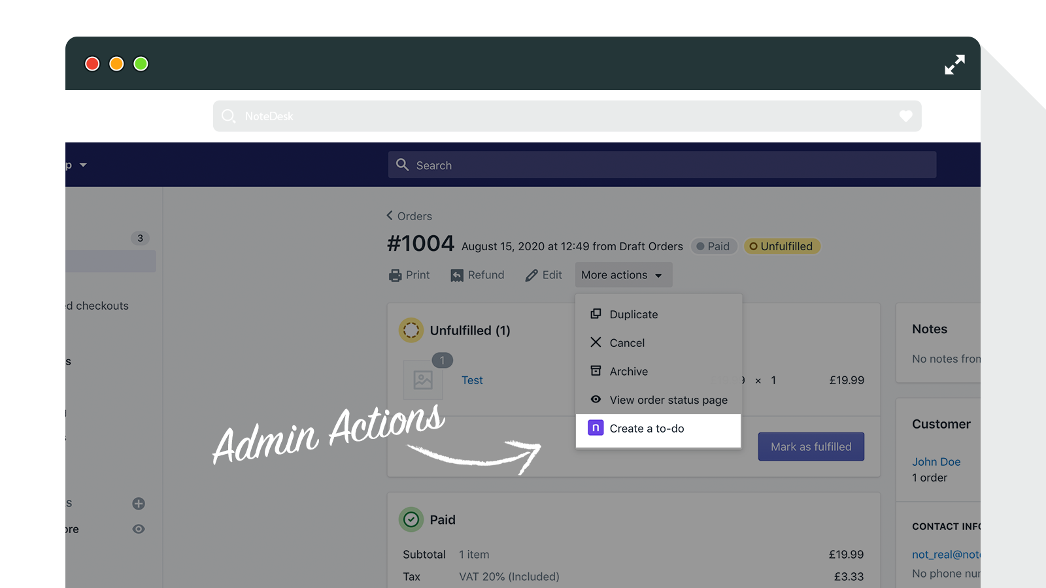
For example, if an order needs manual review, a task linked to that order is better than a message in Slack. If a VIP customer needs a callback, a note on the customer record is better than a line in a spreadsheet. This sounds obvious, but it is one of the biggest operational upgrades smaller merchants can make.
- Create one-off tasks for store admin work
- Assign tasks to team members with ownership
- Set reminders and priorities so urgent work is visible
- Attach notes to customers or orders for context
- Manage projects that involve multiple steps
- Automate task creation from order events or workflows
Can NoteDesk help with customer service and fulfilment?
Yes, NoteDesk can help with customer service and fulfilment because those are the parts of ecommerce where manual follow-up still matters. It is especially useful when a process cannot be fully automated.
In my experience, support and fulfilment teams often live in the grey area between automation and human judgement. A delayed parcel, a custom engraving request, a suspicious shipping address, or a stock issue all need someone to own the next step. That is where a task app earns its keep.
If this is a pain point for your store, you may also find our guides on tracking customised orders in Shopify and managing Shopify customer data without losing sales useful alongside a task app.
How is NoteDesk different from Shopify Flow?
NoteDesk is different from Shopify Flow because NoteDesk is built around human task management, while Flow is built around automation logic. One helps people organise work. The other helps software perform actions automatically.
This distinction matters because many search results blur the two together. Flow is excellent. It has a 4.7-star rating with 9,211 reviews on the Shopify App Store data provided, and for repetitive workflows it is often the right first install. But it does not replace a proper task app for teams who need visibility, accountability, and notes.
| Feature | NoteDesk | Shopify Flow |
|---|---|---|
| Manual task lists | Yes | No |
| Assign tasks to people | Yes | Limited, not task-centric |
| Order and customer notes | Yes | No, not as a core use case |
| Automation workflows | Yes, via app features and integrations | Yes, this is the core product |
| Best for non-technical teams | Yes | Depends on workflow complexity |
| Price | Varies, check app listing | Free |
If you are deciding between the two, ask a simple question. Do you need a system that tells your team what to do next, or a system that tells Shopify what to do automatically? Many growing stores eventually use both.
For more on automation-led selling, see our guides on how to upsell on Shopify leveraging AI and AI-powered upsells.
Is NoteDesk better than general task apps like Trello or Todoist?
For Shopify-specific operations, yes. NoteDesk is better than general task apps when your work needs to stay connected to store data, customer records, and order workflows.
Trello, Asana, ClickUp, and Todoist are all solid products. I use external tools myself for broader planning. But when a merchant wants to reduce fulfilment mistakes, improve customer handovers, or keep notes attached to a live order, generic tools create friction.
The real cost is not the subscription fee. It is the extra admin. Every time a team member has to copy an order number into another tool, search for context, or ask a colleague for background, you introduce delay and risk.
The best task app for a Shopify store is usually the one your team can use without leaving Shopify Admin.
That is why Shopify-native apps consistently win for operational use cases, even if they are less flashy than mainstream project management software.
Who should install NoteDesk?
NoteDesk is best for small to mid-sized Shopify teams that need clearer operational workflows, shared visibility, and less reliance on memory. It is also a good fit for solo founders who have too many moving parts to track manually.
In practice, I would recommend it most strongly for these merchant types:
- Custom product stores with approval or production steps
- Fulfilment-heavy brands managing exceptions and delays
- Customer service teams handling nuanced support requests
- Wholesale or B2B stores with manual account workflows
- Growing DTC brands where tasks are currently scattered across inboxes and chats
If your store is extremely simple and almost everything is automated, you may not need a dedicated task app yet. In that case, Shopify Flow might cover a lot of ground for free. But once humans are regularly involved in operational decisions, a task layer becomes much more valuable.
What are the biggest benefits of using a Shopify-native task app?
The biggest benefits are fewer missed actions, better team accountability, faster handovers, and cleaner store operations. Those benefits sound small individually, but together they can remove a surprising amount of daily friction.
When I test operational apps, I look for one thing above all: does the app reduce the number of places a merchant has to check each day? If the answer is yes, it usually improves consistency. And consistency is what keeps support quality, fulfilment speed, and internal communication from breaking as a store grows.
- You stop relying on memory. Critical follow-ups are recorded and visible.
- You create ownership. Someone is responsible for each task.
- You reduce internal confusion. Notes sit next to the relevant Shopify object.
- You speed up onboarding. New staff can see live workflows and history.
- You improve customer experience. Fewer requests slip through the cracks.
This is especially important if you are already investing in conversion and retention. There is no point optimising AOV if operational gaps then damage the customer experience. If that is your focus, also read how to maximise revenue from product pages and how to create Shopify cart drawer upsells.
How do I use NoteDesk effectively in a real Shopify workflow?
The best way to use NoteDesk is to build it around repeatable operational moments, not random one-off reminders. Start with the tasks your team forgets most often, then formalise them.
Here is the setup pattern I would use for most stores:
1. Identify recurring manual work
List the tasks that happen every week but are still managed informally. Think order exceptions, VIP customer follow-ups, stock checks, returns reviews, or manual fraud checks.
2. Create task categories
Group work into simple buckets like Fulfilment, Support, Inventory, Marketing, and Admin. This makes the app easier to scan and assign.
3. Attach tasks to Shopify records where possible
Context is everything. A task linked to a specific customer or order is more useful than a generic reminder with no reference point.
4. Use priorities and due dates sparingly
Not every task is urgent. If everything is marked high priority, nothing is. Reserve priority flags for genuinely time-sensitive work.
5. Add automation for predictable triggers
If the app or your integrations support it, auto-create tasks from common events. That could be high-value orders, tagged orders, refunds, or delayed fulfilment scenarios.
6. Review open tasks weekly
A task app only works if the team trusts it. A quick weekly review keeps the system clean and stops it becoming a graveyard of old reminders.
If you want to pair this with more advanced store automation, Make and Zapier are both useful options, and they were specifically mentioned in the latest research around NoteDesk integrations.
What should you look for before installing any Shopify task app?
You should look for Shopify Admin integration, task assignment, due dates, notes, automation options, and a clean interface. If an app cannot handle those basics well, it will not stick.
Merchants often choose the wrong app by focusing on feature count instead of daily usability. In reality, a task app succeeds when your team uses it every day without resistance.
| Checklist item | Why it matters |
|---|---|
| Works inside Shopify Admin | Reduces tab switching and training time |
| Supports assignments | Creates accountability across the team |
| Links to orders or customers | Keeps operational context attached to the work |
| Has reminders or due dates | Prevents forgotten follow-ups |
| Offers automation or integrations | Scales better as your workflows grow |
| Simple enough for non-technical staff | Improves adoption and consistency |
I would also check the app listing for recent reviews, update frequency, and support responsiveness. Operational apps sit close to your daily workflow, so reliability matters more than novelty.
Is NoteDesk worth installing for your Shopify store?
Yes, NoteDesk is worth installing if your store needs a straightforward way to manage tasks, notes, and internal follow-up inside Shopify. It is best for merchants who want practical operational structure without moving into an overly complex external system.
The original article focused on productivity, team management, and the app's free entry point. Those are still strong reasons to try it. What makes the app more compelling today is that the market has become clearer: merchants now understand the difference between automation tools, documentation tools, and task ownership tools.
That is why this keyword still has value. People searching for A Simple To-Do and Task App for Your Shopify Store usually do not want an enterprise ERP. They want a clean way to stop forgetting things, coordinate a team, and keep store operations under control.
If that sounds like your situation, install NoteDesk from the Shopify App Store and test it against one real workflow this week. Do not try to map your whole business on day one. Start with a single operational pain point and see if the app removes friction.
You can also explore more Shopify growth and operations content on LaunchTip, including the best CRM for Shopify, free CRM apps for Shopify, and when to upgrade to Shopify Plus.
How to get NoteDesk
You can get NoteDesk directly from the Shopify App Store. The fastest way to evaluate it is to install it, create a few real store tasks, assign one or two team members, and test whether it improves follow-through within the first week.
Install NoteDesk today and see whether a Shopify-native task system works better for your store than spreadsheets, inbox flags, or disconnected project tools.