

如何在 Shopify 上用一个按钮将多个产品加入购物车
作为 Shopify 店主,你一直在与数百位可能和你销售同款产品的卖家竞争。因此,你必须不断寻找让顾客购物更便捷的方法。
允许顾客通过一个按钮一次性将多个产品,甚至整个系列加入购物车,是简化购买流程的绝佳方式。Shopify 支持这样做吗?我们一起来看看。
如何通过代码将多个产品加入购物车
要将多个产品加入购物车,你可以使用 Shopify 的 Cart API。平台默认并不原生支持一次性添加多个产品,但有成熟可行的自定义方案。你可以使用带有“updates”输入项的订单表单,将其作为数量字段;或者使用现代的 /cart/add.js 端点并传入 items 数组。这里有一个你可以参考的 代码示例。
如果你不在集合(collection)页面上,请务必在订单表单中指定要使用的集合。
使用下面的 assign 语句,将 ‘your-collection-handle-here’ 替换为你的集合 handle:
{% comment %}
{% assign collection = collections.your-collection-handle-here %}
Use the assign statement outside of this comment block at the top of your template.
{% endcomment %}
{% paginate collection.products by 100 %}
<form action="/cart" method="post">
  {% if collection.products_count > 0 %}
    <div>
      <h1>{% if template contains 'page' %}{{ page.title }}{% else %}{{ collection.title }}{% endif %}</h1>
      <input type="submit" value="Add to the cart" />
    </div>
  {% else %}
    <h1>{% if template contains 'page' %}{{ page.title }}{% else %}{{ collection.title }}{% endif %}</h1>
  {% endif %}

  {% if template contains 'page' and page.content.size > 0 %}
    <div class="rte">
      {{ page.content }}
    </div>
  {% elsif collection.description.size > 0 %}
    <div class="rte">
      {{ collection.description }}
    </div>
  {% endif %}
  {% if collection.products_count > 0 %}
    <table>
      <tbody>
      {% for product in collection.products %}
        {% if product.available %}
          {% for variant in product.variants %}
            {% if variant.available %}
              <tr class="{% cycle 'pure-table-odd', '' %}">
                <td>
                  <a href="{{ variant.url | collection }}">
                    <img src="{{ variant.image | default: product.featured_image | img_url: 'small' }}" alt="{{ variant.title | escape }}" />
                  </a>
                </td>
                <td>
                  <a href="{{ variant.url | collection }}">
                   {{ product.title }}{% unless variant.title contains 'Default' %} - {{ variant.title }}{% endunless %}{% unless variant.sku == blank %} - {{ variant.sku }}{% endunless %}
                  </a>
                </td>
                <td>
                   {{ variant.price | money }}
                </td>
                <td style="text-align:right;">
                  <input name="updates[{{ variant.id }}]" onfocus="this.select()" class="quantity field" min="0" {% unless variant.inventory_management == blank or variant.inventory_policy == 'continue' %} max="{{ variant.inventory_quantity }}" {% endunless %} type="text" value="0" tabindex="1" />
                </td>
              </tr>
            {% endif %}
          {% endfor %}
        {% endif %}
      {% endfor %}
      </tbody>
    </table>
    <div>
      <input type="submit" value="Add to the cart" />
    </div>
  {% else %}
    <p>There are no products in this view.</p>
  {% endif %}
</form>
{% endpaginate %}
{% if collection.products_count > 0 %}
<script>
jQuery(function($) {
  $('table .quantity:first').focus();
  $('[max]').change(function() {
    var max = parseInt($(this).attr('max'), 10);
    var value = parseInt($(this).val(), 10) || 0;
    if (value > max) {
      alert('We only have ' + max + ' of this item in stock');
      $(this).val(max);
    }
  });
});
</script>
{% endif %}
另外,你也可以使用更现代的 Cart API 方案:通过 JavaScript 调用 /cart/add.js 端点,并传入包含 items 数组的请求,从而在一次请求中添加多个商品及其不同数量。
使用应用(App)
如果你不擅长写代码,也可以使用应用来让顾客一次性将多个产品加入购物车。这对 B2B 店铺、批发业务,以及提供产品组合(bundle)的商家尤其有用。
Shopify App Store 里有多种类型的应用可以实现这一目的。有些应用主打批量下单,提供 CSV 上传、数量规则等功能;另一些则专注于产品组合,支持自由搭配(mix-and-match)。常见选择包括 SellUp、Bundler,以及各种多件购买(multi-buy)应用,它们可以在主产品的加入购物车按钮上方展示加购配件/附加购(add-ons)。
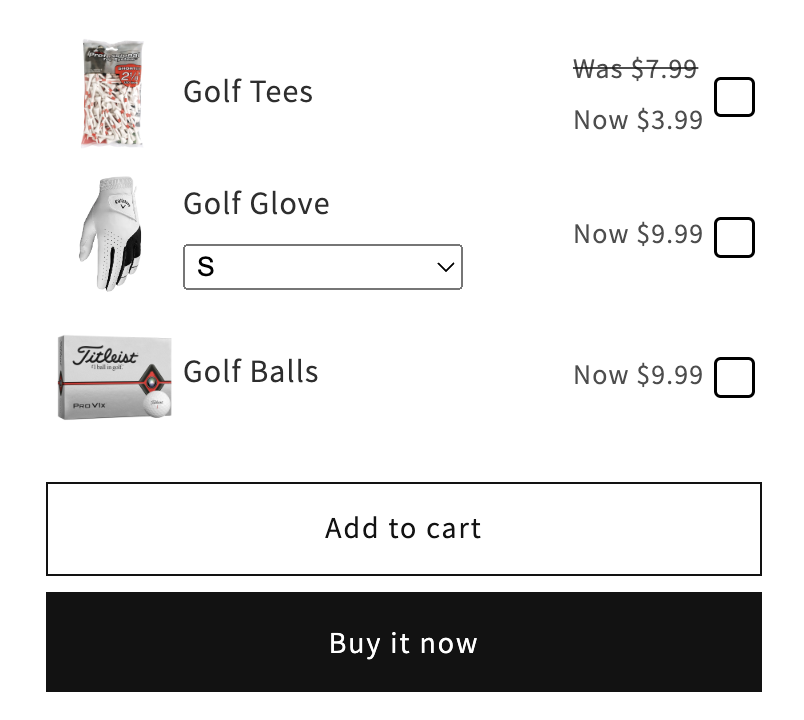
这些应用让顾客只需点击一次就能把多个产品加入购物车,从而显著提升 平均订单金额(AOV)。一键勾选式加购(one-check upsell)也能让流程更顺畅、几乎没有阻力。
选择应用时,重点关注是否符合你的需求:批量下单能力、组合创建、折扣自动化、库存管理以及移动端兼容性。大多数应用都提供免费试用,方便你测试哪种方案最适合你的店铺。