
在你的 Shopify 商店中实现会员专属专区

· Updated
1 分钟阅读
在你的 Shopify 商店中实现会员专属专区
目录

TL;DR

You can implement a members-only section in Shopify using either customer-tag-based theme code or dedicated apps. For most merchants, apps like Locksmith are the best option because they handle hidden products, pages, direct URLs, and customer access with less maintenance. If you want paid memberships rather than simple restricted access, Appstle Memberships or BOLD Memberships are usually better fits than custom code alone.

随着 Shopify 的持续走红,商家在管理庞大的客户群并提供个性化体验时,往往会面临不小的挑战。

一个行之有效的解决方案,是在你的 Shopify 商店中设置会员专属区域。这个专属板块可以让你为特定客户提供差异化功能、折扣与内容,从而提升他们的体验与忠诚度。

在本指南中,我们将探讨 Shopify 商家为什么可能需要会员专属区域,以及如何高效地完成设置。

为什么 Shopify 商家需要会员专属区域

1. 精准触达目标受众:创建会员专属板块,可以让你用定制化的内容、产品与优惠来触达特定人群。例如,与大学相关的商店可以只向本校学生出售笔记和学习资料。

2. 提升客户忠诚度:为部分产品或内容提供专属访问权限,能够增强客户忠诚度。研究显示,85% 的消费者表示忠诚度计划会让他们更愿意持续在某个品牌购物。会员会感到被重视与被认可,从而促进复购。

3. 优化客户体验:会员专属区域能带来更个性化的购物体验,帮助你在竞争激烈的市场中脱颖而出。这种“专属感”也会提升顾客对店铺价值的感知。

4. 提高销量与营收:通过为会员提供专属优惠与折扣,你可以带动更多成交并提升营收。当顾客觉得自己拿到了 专属优惠 时,购买意愿往往更强。

为你的 Shopify 商店建立会员专属区域的两种简单方法

使用第三方应用

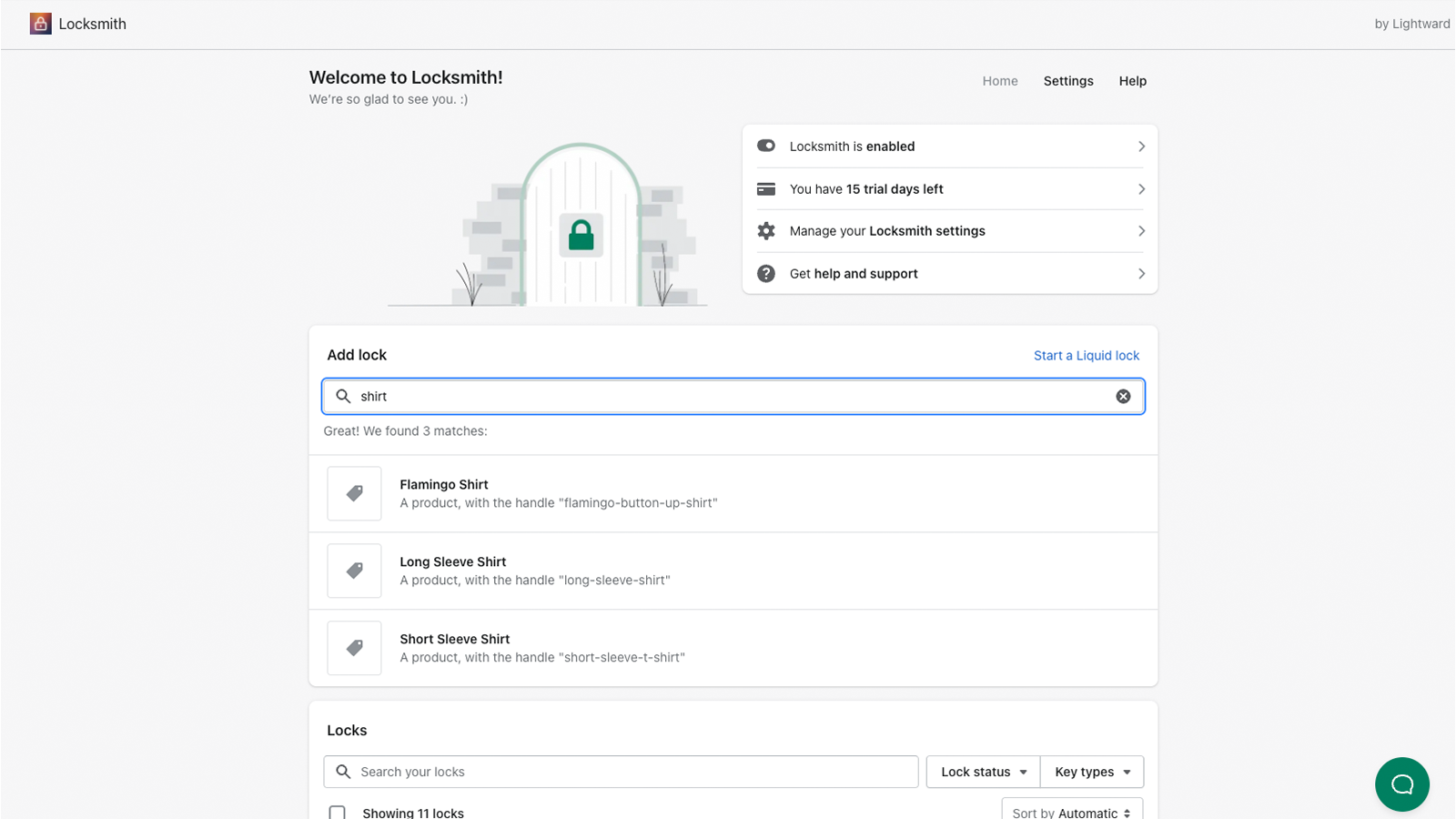
LocksmithBOLD MembershipsAppstle Memberships 这样的第三方应用,能让你轻松创建会员专属板块。这些应用可以为你的商店设置临时“锁定”,并向指定客户开放访问权限。

虽然它们并非 Shopify 官方直接关联的应用,但效果非常出色。Locksmith 依然是热门选择,原因在于其灵活的访问控制,以及独特的“按你觉得合适的价格付费”定价模式。如需支持,请务必联系真正的开发者获取帮助。
使用代码

如果你更偏好亲自动手,也可以通过自定义代码来创建会员专属区域。下面提供两段代码,帮助你快速开始:

1. 设置客户登录访问偏好

这段代码可确保只有已登录的客户才能查看特定内容。

{% if customer %}

   <div>Content for customers who have logged in</div>

{% else %}

   <div>Content for guests</div>

{% endif %}


2. 创建 VIP 通行系统

这段代码允许你创建一个仅对被标记为 VIP 的客户开放的 VIP 专区。

{% if customer.tags contains 'VIP' %}

   <div>Content for customers who have logged in and are tagged with VIP</div>

{% else %}

   <div>Content for guests and customers without a VIP tag</div>

{% endif %}

结论

在你的 Shopify 商店中实现会员专属区域,能够显著提升客户互动、忠诚度以及整体购物体验。

无论你选择使用 Locksmith、BOLD Memberships 或 Appstle Memberships 等第三方应用,还是采用自定义编码,为重要客户打造一个专属板块都能 带动更多销售,并让你的商店在竞争中更具辨识度。

通过运用这些策略,你可以为客户提供更个性化、更有回报感的体验,最终推动店铺的成功与增长。

分享这篇文章

相关文章

How to Add an Image Slider to Products in Shopify

How to Add an Image Slider to Products in Shopify

Adding an image slider to your Shopify products can elevate your online store’s visual appeal and enhance the customer experience. With an image slider, you can showcase multiple product images in a dynamic, engaging way, making it easier for customers to see all the details without navigating away from the product page. Understanding Image Sliders […]

7 min
How to Split Orders into Multiple Shipments in Shopify

How to Split Orders into Multiple Shipments in Shopify

Managing shipments efficiently is crucial for any Shopify store, especially when dealing with orders that need to be split into multiple shipments. This situation often arises in dropshipping scenarios, where different products in a single order may ship from various locations. Ensuring that customers receive accurate tracking information for each shipment is vital for maintaining […]

5 min