


Breadcrumbs on Shopify are small navigation links that show shoppers and search engines where a page sits in your store structure. They help with SEO, improve navigation, and can support richer search result presentation when paired with the right schema markup.
In my experience building Shopify apps and working with a lot of merchant themes, breadcrumbs are one of those small UX details that quietly do a lot of work. They will not magically double your traffic, but they can make your store easier to crawl, easier to use, and easier to understand for both Google and shoppers.
If you run a catalogue with collections, sub-collections, blogs, guides, or filtering-heavy navigation, breadcrumbs are usually worth adding. They are especially useful on product pages where shoppers often land from Google, ads, or social posts and need context fast.
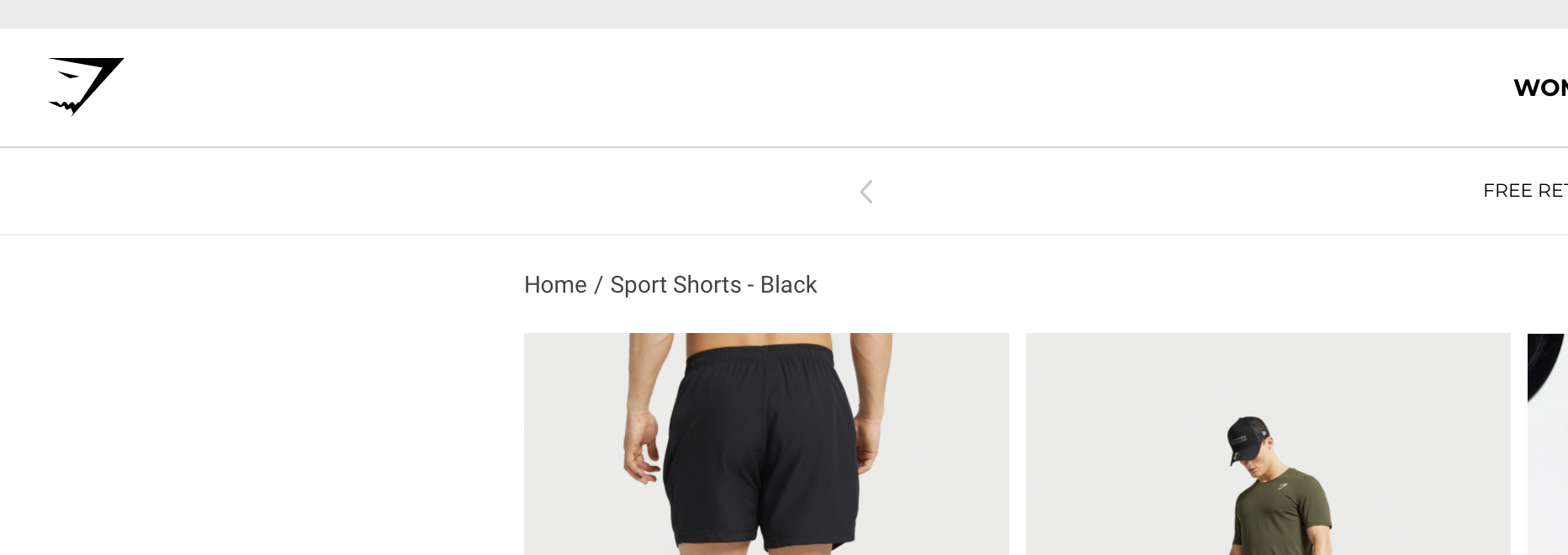
They usually look something like this:
What are breadcrumbs on a Shopify store?
Breadcrumbs are a secondary navigation trail that usually appears near the top of a page, such as Home > Collection > Product. They help users understand their location in your site hierarchy and move back up the structure without relying on the browser back button.
Shopify stores most commonly use hierarchy-based breadcrumbs. These are the most useful for ecommerce because they map neatly to collections, products, blog categories, and content sections.
There are other breadcrumb styles too, such as path-based or attribute-based breadcrumbs, but for most Shopify stores I recommend keeping it simple. Location-based breadcrumbs are the clearest for users and the safest for SEO.
Do breadcrumbs improve SEO on Shopify?
Yes, breadcrumbs can improve Shopify SEO, but mostly in indirect and structural ways. They help search engines understand page relationships, support internal linking, and can contribute to better crawlability and stronger contextual signals.
Breadcrumbs are not a ranking hack. They are a site architecture signal. When implemented properly, they help Google interpret how your products and collections fit together, which is especially useful on larger stores with many categories.
They also improve user experience. In ecommerce benchmarks, better navigation often correlates with lower bounce rates and stronger page depth. Some industry data suggests breadcrumb usage can contribute to 10-20% SEO visibility improvements when combined with structured data and cleaner internal linking, but I would treat that as directional rather than guaranteed.
If you are already working on broader store optimisation, breadcrumbs fit naturally alongside efforts like getting your Shopify store indexed by AI search engines and fixing weak on-site structure.
Why do breadcrumbs matter for shoppers?
Breadcrumbs matter because they reduce friction. A shopper who lands directly on a product page can immediately see what category that product belongs to and click back to browse related items.
That sounds basic, but it matters a lot on mobile and on stores with broad catalogues. Good navigation increases confidence, and confidence usually improves conversion. When I test stores with messy category structures, breadcrumbs often reveal structural issues that need fixing elsewhere too.
Why do breadcrumbs matter for Google?
Breadcrumbs matter for Google because they provide clear hierarchical signals. They help crawlers understand parent-child relationships between pages and can reinforce the topical grouping of collections and products.
With BreadcrumbList schema markup, Google may also use breadcrumb paths in search results instead of raw URLs. That can make listings cleaner and more readable, although Google decides when and whether to show them.
What is the best way to add breadcrumbs to Shopify?
The best way to add breadcrumbs to Shopify depends on your theme and technical confidence. For most merchants, theme settings or the customiser are easiest. For developers or merchants who want full control, manual code is best. Apps are useful when you want quick setup and built-in schema.
Here is the short version. If your theme already supports breadcrumbs, use that first. If it does not, either install a lightweight app or add a custom snippet yourself.
| Method | Time to implement | Cost | SEO control | Best for |
|---|---|---|---|---|
| Theme customiser | 2-5 minutes | Free | Basic to moderate | OS 2.0 themes |
| Shopify app | 5-15 minutes | Free to $10/month | Moderate to high | Beginners and non-coders |
| Manual code | 10-30 minutes | Free | Highest | Developers and custom themes |
In my experience, manual code is the best long-term option if you are comfortable editing Liquid. It keeps your theme lean, avoids app bloat, and gives you more control over how breadcrumbs behave across products, collections, blogs, and pages.
How do I check whether my Shopify theme already has breadcrumbs?
The fastest way to check is to open your theme customiser and inspect a product or collection template. Many modern Shopify themes already include breadcrumb support, but it may be hidden, optional, or only active on certain templates.
Popular Online Store 2.0 themes such as Dawn and similar modern themes often include some breadcrumb functionality, although the exact implementation varies. Some themes place it in the main product section. Others expose it as a block, toggle, or setting.
- Go to Online Store > Themes
- Click Customize on your live theme
- Open a product or collection template in the top dropdown
- Check the sidebar for a Breadcrumbs block, setting, or toggle
- Preview the page on desktop and mobile
- Save if the option exists
If you cannot find anything, your theme may not support breadcrumbs natively. At that point, I would move to either an app or a custom snippet.
How do I add breadcrumbs in Shopify using the theme customiser?
If your theme supports it, the theme customiser is the easiest and safest method. It requires no coding and usually keeps the breadcrumb styling consistent with the rest of your store.
This is the method I recommend first for merchants on Shopify 2.0 themes. It is quick, reversible, and low risk.
- In Shopify admin, go to Online Store > Themes
- Click Customize
- Use the template selector to open Default product or Collection
- Look inside the main section for Add block or a breadcrumb setting
- Move the breadcrumb block above the product title or main content if needed
- Adjust spacing, typography, and colours if your theme allows it
- Click Save
This method is ideal if you want a clean breadcrumb trail without touching Liquid. The limitation is that you get only the options your theme developer included. If you need custom logic, schema control, or special handling for blogs and pages, manual code is often better.
How do I add breadcrumbs to Shopify with an app?
Using an app is the quickest no-code route when your theme lacks built-in breadcrumbs. Breadcrumb apps usually handle display logic, styling, and schema markup for you.
App-based breadcrumbs are helpful for merchants who do not want to edit theme files, but you should still choose carefully. I always suggest looking for lightweight apps with clear schema support, good reviews, and minimal front-end impact.
Some commonly mentioned options in the Shopify ecosystem include Schema & Breadcrumbs, SEO Breadcrumbs, Crumbs - Simple Breadcrumbs, and PH Breadcrumbs. Availability, pricing, and features change often, so always verify current details in the Shopify App Store before installing.
- Open the Shopify App Store
- Search for breadcrumb or breadcrumb schema
- Install a well-reviewed app with the features you need
- Approve permissions and follow the onboarding steps
- Choose where breadcrumbs appear, such as product and collection pages
- Enable structured data or schema if the app offers it
- Preview the store and test on mobile
The trade-off with apps is simple. They are convenient, but they add another dependency. If you already use several apps, I would think carefully before adding one more for a feature that can often be done with a small snippet.
How do I add breadcrumbs to Shopify with custom code?
Adding breadcrumbs with custom code is the most flexible method and usually my preferred option for custom themes. It gives you control over logic, placement, styling, and schema markup without relying on an app.
If you are comfortable with Shopify Liquid, this is not especially difficult. It is mostly a matter of creating a snippet, rendering it in the right template area, and styling it properly.
Shopify provides official Liquid breadcrumb examples, which are a useful starting point. I would still adapt them to your own theme structure rather than pasting blindly.
To simplify things, create a new snippet called breadcrumbs.liquid under the Snippets folder.
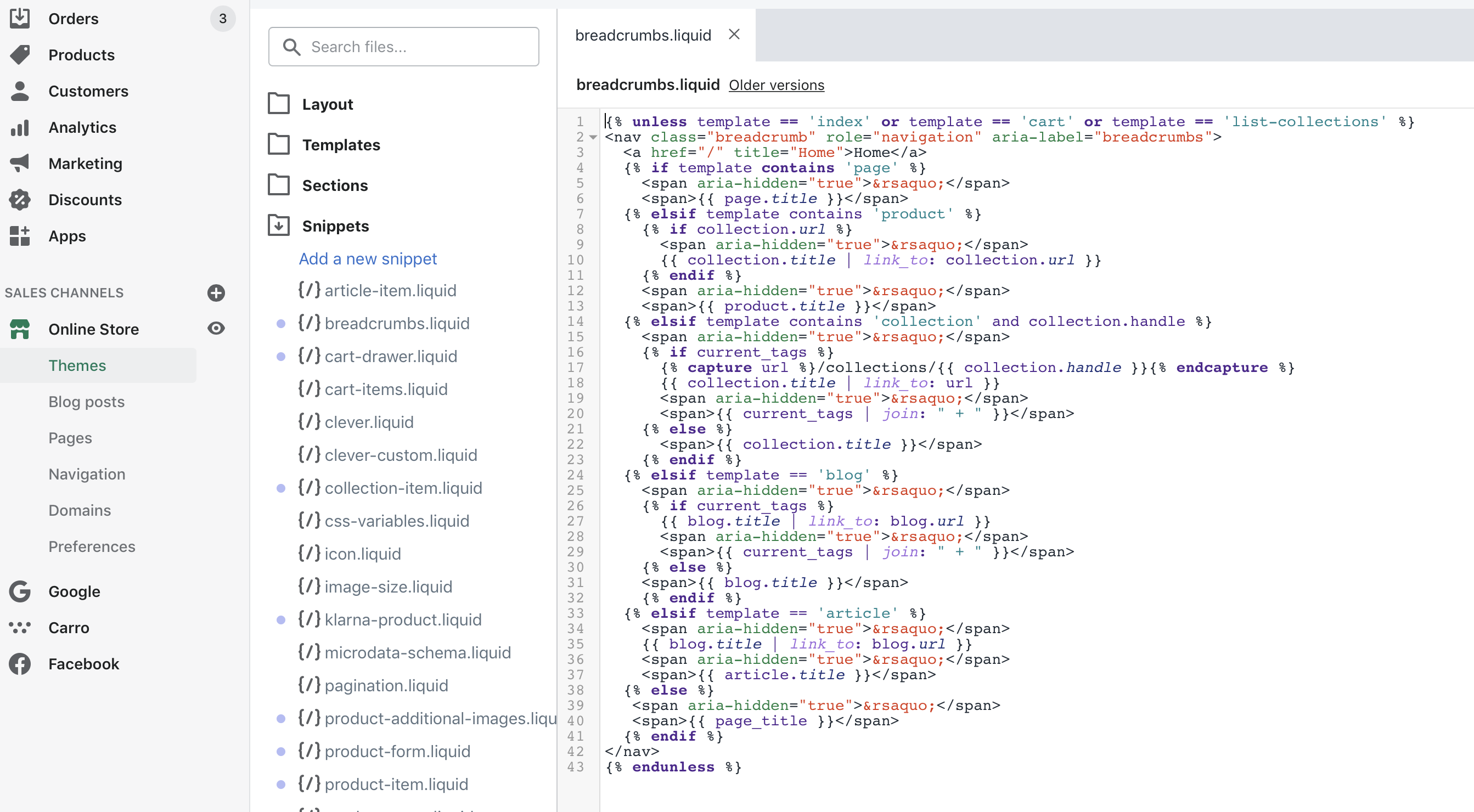
Then render it where you want it to appear. In many themes, that means adding this code inside theme.liquid, a product template, or the main content section:
{% render 'breadcrumbs' %}
Where you place it will dictate where it shows on the page. In most themes, I test it either just after the header or near the top of the main content area. On product pages, placing it above the title is usually the cleanest option.
Basic manual setup steps
The basic setup is straightforward. Create the snippet, render it, style it, then test it across page types.
- Go to Online Store > Themes > Edit code
- Under Snippets, create breadcrumbs.liquid
- Add your Liquid breadcrumb logic
- Render the snippet in theme.liquid, main-product.liquid, or other relevant templates
- Add CSS in base.css, theme.css, or your equivalent stylesheet
- Preview products, collections, blogs, articles, and pages
- Check mobile spacing and wrapping
If your store uses a heavily customised theme, I strongly recommend duplicating the theme before editing. That gives you a rollback point if anything breaks.
Where should I place the breadcrumb snippet?
The best location is usually above the main page title on products, collections, blog articles, and pages. That makes the hierarchy visible immediately without distracting from the primary content.
If you render breadcrumbs globally in theme.liquid, make sure the snippet has logic to avoid showing on the homepage or other irrelevant templates. Otherwise you can end up with awkward output or duplicated navigation.
What should the breadcrumb logic include?
Your breadcrumb logic should include Home and then the most relevant parent path for the current page. On product pages, that often means the current collection if available, then the product title.
This is where Shopify gets a bit messy. Products can belong to multiple collections, and the platform does not always know which collection path is the most meaningful for SEO. In my experience, this is one of the biggest reasons breadcrumb implementations become inconsistent.
A practical approach is to prioritise:
- The current collection if the user arrived from a collection page
- A primary collection defined in your theme logic or metafields
- The product title as the final item
Some advanced stores use metafields to define a preferred breadcrumb path for products. That is a smart workaround when products live in many collections and you want tighter control over SEO and UX.
Do I need breadcrumb schema markup for Shopify SEO?
Yes, if possible you should add BreadcrumbList schema markup. It gives search engines a machine-readable version of your breadcrumb trail and can help Google display breadcrumbs in search results.
Schema is not mandatory for breadcrumbs to be useful, but it is strongly recommended. If you are going to the effort of adding breadcrumbs, you may as well make them understandable to search engines too.
Google documents breadcrumb structured data in its search guidance, and that is the standard I would follow rather than relying on outdated snippets from random blogs. You can review the official documentation here: Google breadcrumb structured data documentation.
Important: your visible breadcrumb trail and your schema should match. If the on-page links say one thing and the structured data says another, you are creating mixed signals.
How do I test breadcrumb schema?
You should test breadcrumb schema with Google's validation tools after implementation. Do not assume it works just because the links display correctly.
- Open your product or collection URL
- Run it through Google's Rich Results Test
- Check for BreadcrumbList detection
- Fix warnings or errors
- Monitor indexing and enhancements in Google Search Console
This is a small step, but it is one many merchants skip. In my experience, validation catches plenty of avoidable mistakes.
What are the best practices for Shopify breadcrumbs?
The best Shopify breadcrumb setup is simple, consistent, and aligned with your real site hierarchy. Avoid overcomplicating it with long paths, duplicate links, or inconsistent collection logic.
If you want breadcrumbs that actually help SEO and UX, these are the rules I follow on client and app-related projects:
- Always include Home as the first item
- Use the most relevant collection path, not every possible path
- Keep the current page as the final item and do not link it unless you have a specific reason
- Match the visible breadcrumbs to the schema markup
- Show breadcrumbs on product, collection, blog, and article pages where relevant
- Make them mobile-friendly with wrapping or truncation if needed
- Do not replace your main navigation with breadcrumbs because they are a supplement, not a substitute
Good breadcrumbs should feel obvious. If users notice them only when they need them, that usually means you got the implementation right.
What are the common breadcrumb mistakes on Shopify?
The most common mistakes are showing the wrong collection path, forgetting schema markup, and creating breadcrumbs that clash with the theme layout. These issues can weaken both usability and SEO clarity.
Here are the mistakes I see most often:
- Products assigned to many collections with no primary path logic
- Breadcrumbs only visible on desktop or broken on mobile
- Schema added incorrectly or not matching the visible trail
- Breadcrumbs hidden too low on the page
- Using an app that injects duplicate markup
- Forgetting blog and article breadcrumbs on content-heavy stores
If your store has complex navigation, collections, or filtered landing pages, breadcrumbs are only one part of the puzzle. You should also review internal linking, template consistency, and crawl paths. That is especially true if you are working on broader content visibility and AI discoverability, which I covered in how to optimise your Shopify store for AI shopping agents.
Should I use metafields for more advanced Shopify breadcrumbs?
Yes, metafields can be a very smart solution if your products belong to multiple collections and you want a cleaner canonical breadcrumb path. Metafields give you more control over hierarchy without hardcoding everything into theme logic.
This approach is becoming more common on larger stores. For example, you might create a product metafield that stores the preferred parent collection or category, then use that value in your breadcrumb snippet.
I would not say every small store needs this. But if you have a broad catalogue or SEO landing pages that create ambiguous paths, metafield-driven breadcrumbs are often worth it.
Are breadcrumbs enough to improve Shopify SEO on their own?
No, breadcrumbs help, but they are only one part of Shopify SEO. They support structure and usability, but they work best alongside stronger collection architecture, internal linking, fast templates, and useful content.
If your product pages are thin, your collections are poorly organised, or your site is slow, breadcrumbs will not solve those bigger issues. Think of them as a supporting component in a wider SEO system.
If you want to improve product page performance more broadly, I would also read how to maximise revenue from your Shopify product pages. If your concern is technical changes harming performance, this piece on Shopify speed optimisation scams is also worth your time.
How do I decide which breadcrumb method is right for my store?
The right method depends on your theme, budget, and confidence with code. Most small stores should start with the theme customiser. Custom themes and SEO-focused stores should usually use manual code.
| If this sounds like you | Best method | Why |
|---|---|---|
| You use a modern Shopify 2.0 theme and want the quickest fix | Theme customiser | Fast, safe, and free |
| You do not want to edit code and need schema support | App | Easy setup and automation |
| You want full control and minimal app reliance | Manual code | Best flexibility and performance |
| Your products live in many collections and paths are messy | Manual code plus metafields | Best for custom hierarchy logic |
If I were advising most merchants today, I would say this: check your theme first, then code it if needed, and only use an app if you want convenience over control.
How do I add breadcrumbs to my Shopify store and improve SEO without breaking anything?
The safest approach is to duplicate your theme, make one change at a time, and validate both the front-end display and schema output. Good breadcrumb implementation is simple, but sloppy implementation causes avoidable issues.
- Duplicate your live theme before editing
- Check for built-in breadcrumb support in the customiser
- If needed, add an app or create a breadcrumb snippet
- Place breadcrumbs above the page title
- Add or verify BreadcrumbList schema
- Test on products, collections, blogs, and mobile
- Validate with Google's Rich Results Test
- Publish only after checking the live preview carefully
That process is enough for most stores. You do not need to over-engineer it.
Final thoughts on Shopify breadcrumbs
Breadcrumbs are one of those features that are easy to underestimate. They are not flashy, but they improve structure, support SEO, and make life easier for shoppers who land deep inside your store.
In my experience, the best breadcrumb setups are the boring ones. They are clear, accurate, lightweight, and consistent. If your theme already supports them, turn them on. If not, add them properly with code or a lightweight app and validate the result.
And if you are already improving your store architecture, this is a good time to review related areas too, including how you manage customer data and how your store is structured for new search behaviour in ChatGPT and AI search engines.


