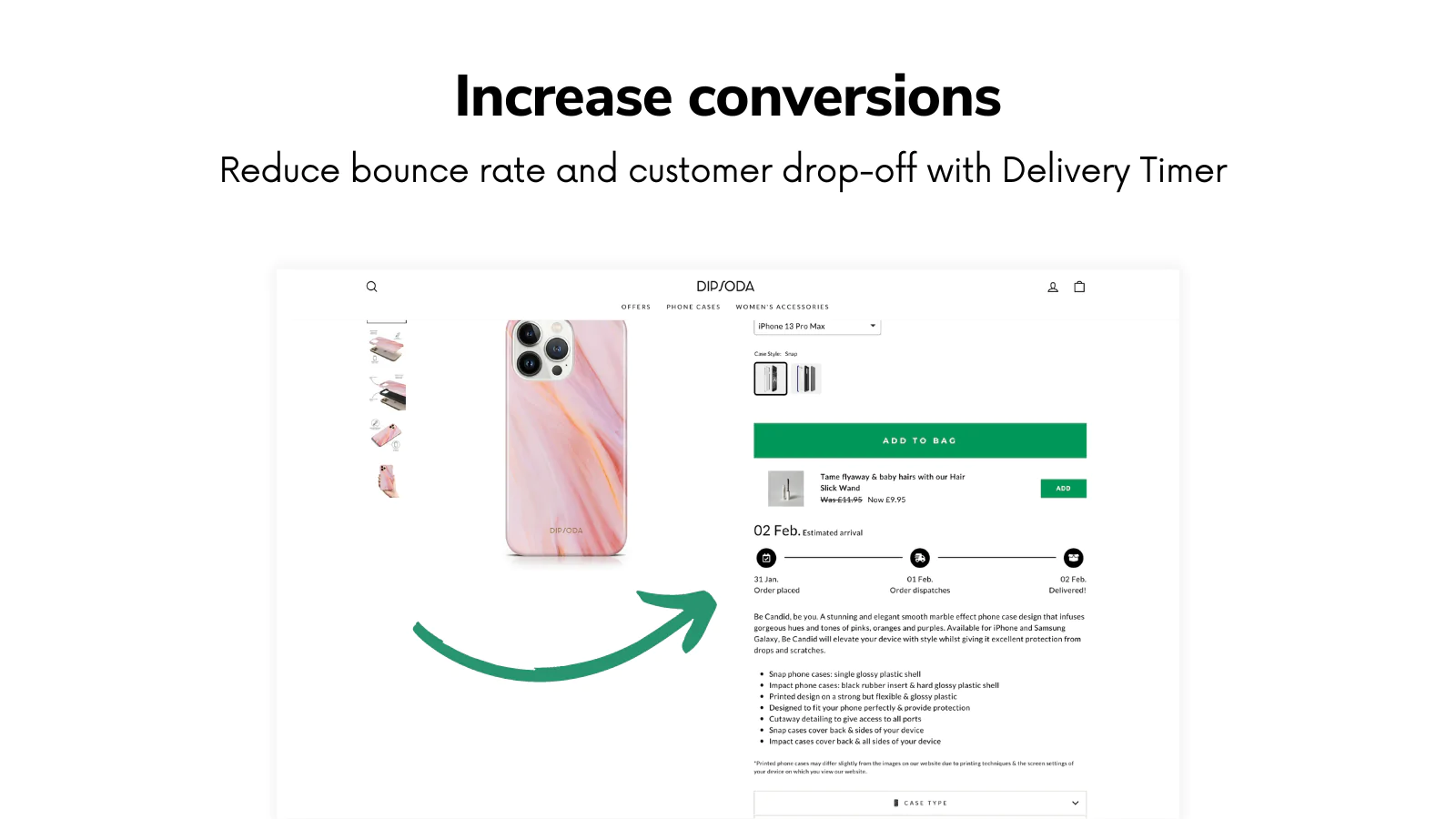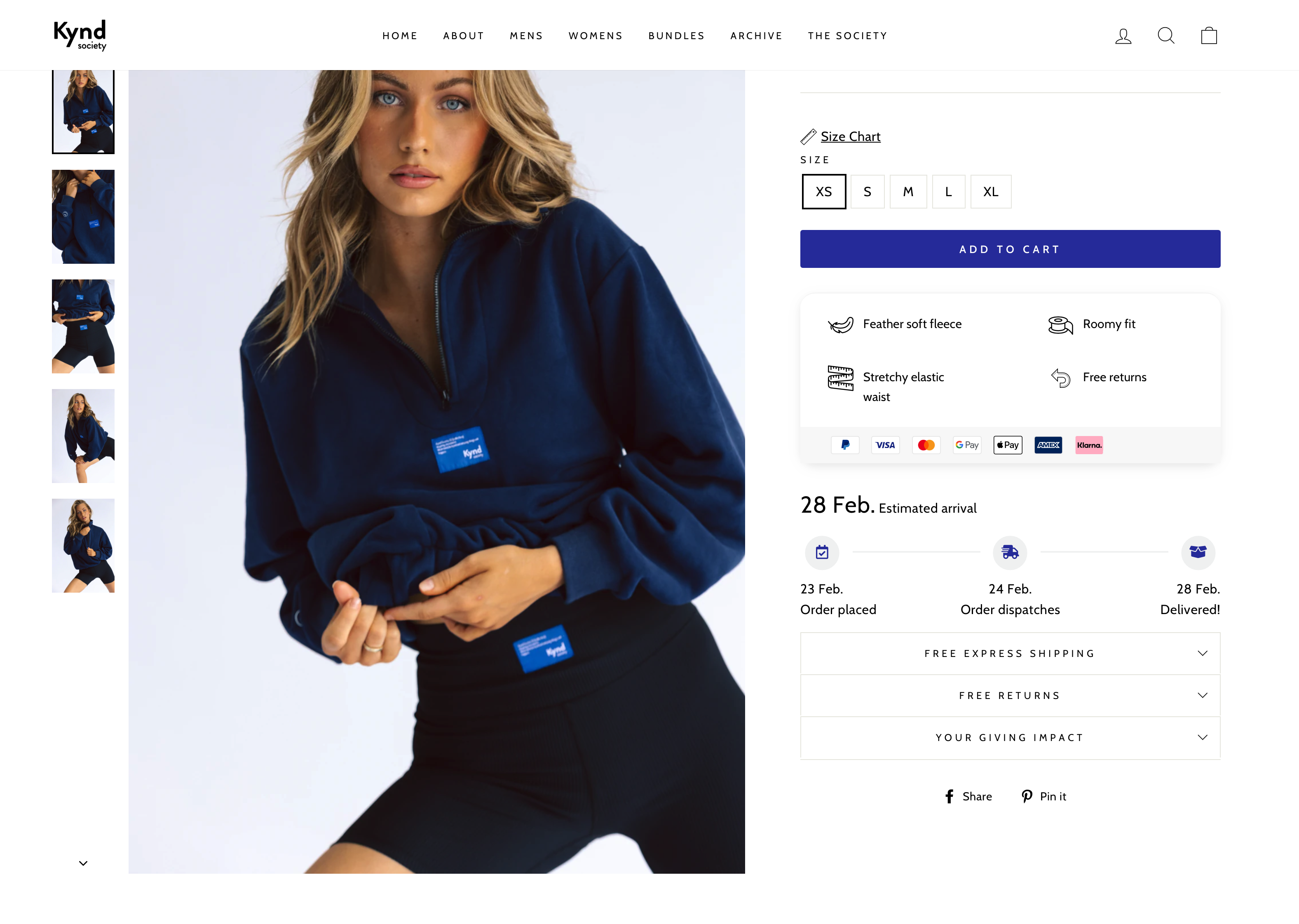
An order timeline on Shopify helps customers understand exactly when an order will be dispatched and delivered, which reduces uncertainty at the point of purchase. In practical terms, that means less checkout friction, fewer abandoned baskets, and more completed orders.
In my experience building Shopify apps for merchants, the stores that convert best are usually not the ones shouting the loudest. They are the ones that make buying feel safe, predictable, and easy. A clear delivery timeline does that brilliantly because it answers one of the biggest pre-purchase questions before the shopper has to ask it.
The search results around this topic are a bit messy right now. Some pages talk broadly about reducing checkout friction, others focus on Shopify checkout itself, and a few mix in fulfilment or reorder workflows. So in this guide, I want to make the topic much more practical: what an order timeline is, where to show it, how to set it up properly, and how to avoid the mistakes that damage trust.
What is an order timeline on Shopify?
An order timeline on Shopify is a way to show the key stages of an order, such as order placed, dispatch window, and estimated delivery date. It can be customer-facing on the storefront or internal inside Shopify admin.
This distinction matters. When most merchants talk about an order timeline for conversion, they mean the customer-facing delivery estimate shown on the product page, cart, or checkout journey. Shopify also has an internal admin timeline for order events, notes, and fulfilment activity, but customers do not see that.
If you want to increase completed orders, the customer-facing version is the one to prioritise. It gives buyers an immediate answer to questions like: Can I get this by Friday? Will this arrive before a birthday? Is this item dispatched quickly?
Why does an order timeline increase orders on Shopify?
An order timeline increases orders because it reduces uncertainty around shipping, delivery speed, and fulfilment expectations. Shoppers are more likely to buy when they know what happens next.
That sounds simple, but it has a big commercial effect. Industry research regularly shows that cart abandonment remains extremely high, often around 70%, and shipping surprises are one of the most common reasons. If a shopper reaches the product page and still cannot work out when the item will arrive, you are asking them to buy on trust alone.
In my experience, delivery messaging works best when it does three jobs at once: builds trust, creates urgency, and sets realistic expectations. A message like Order within the next 11 hours for delivery by Thursday is far more persuasive than a vague line saying fast shipping available.
It also mirrors what large ecommerce brands have trained customers to expect. Amazon made delivery clarity part of the buying decision years ago. Independent Shopify stores can achieve a very similar effect with the right setup, without needing enterprise tooling.
Why is delivery clarity such a major checkout friction point?
Delivery clarity matters because uncertainty kills momentum. If a shopper has to stop and guess when an item will arrive, the path to checkout becomes less certain and less compelling.
That is why so many of the top-ranking results for this topic focus broadly on checkout friction, visible shipping costs, and simplifying the buying journey. Delivery timelines fit directly into that intent. They remove one more unanswered question before the customer gets to checkout.
Shoppers now expect upfront information. Many consumers want same-day, next-day, or two-day delivery, but even when they are willing to wait longer, they still want clarity. In practice, certainty often matters more than pure speed. A realistic estimate that arrives on time usually performs better than an overpromised one that disappoints.
If you are already working on your broader conversion funnel, this sits naturally alongside tactics like improving checkout UX and reducing abandonment. I have covered that in more detail in How to Optimize Shopify Checkout & Increase Conversions: 3 Methods and How to Reduce Abandoned Carts in Shopify: 2026 Guide.
Where should you display an order timeline on Shopify?
The best place to display an order timeline is usually the product page. That is where purchase intent is formed and where delivery timing can tip a shopper from browsing to buying.
The product page is the highest-impact placement because it catches the customer before they add to basket. If they can see a delivery estimate beside the add-to-cart button, it becomes part of the decision rather than a surprise later in the funnel. That is especially useful for gifts, seasonal products, urgent purchases, and high-consideration items.
You can also test timelines in the cart drawer or cart page, but I would not rely on those placements alone. By that point, some shoppers have already hesitated. It is better to answer the delivery question earlier.

For many stores, I recommend a layered approach:
- Product page - primary delivery estimate
- Cart drawer or cart page - reinforce dispatch and arrival timing
- Order status page - maintain confidence after purchase
If you want to improve the post-purchase side as well, my guide on How to Customize the Order Status Page on Shopify: 4 Methods for 2026 is worth reading.
What should a good Shopify order timeline include?
A good Shopify order timeline should include order cutoff time, handling or processing time, and estimated delivery date. It should also reflect the real shipping rules of your business.
The strongest timelines are specific, not generic. Instead of saying Ships soon, show something like Order in the next 4 hours 12 minutes for dispatch tomorrow. Then pair that with a realistic delivery estimate based on your courier and handling time.
At minimum, I recommend including:
- Cutoff time for same-day or next-day dispatch
- Handling time such as 1-2 business days
- Delivery lead time such as 2-4 business days
- Active dispatch days such as Monday to Friday
- Exceptions for holidays, pre-orders, or made-to-order items
- Location logic if delivery times differ by country or region
One of the biggest mistakes I see is merchants showing a polished countdown that is disconnected from actual operations. A timeline only helps conversion if it is believable and accurate.
How do customer-facing timelines differ from Shopify's internal order timeline?
Customer-facing timelines help shoppers buy. Shopify's internal order timeline helps your team manage fulfilment, notes, and order events inside admin.
This is an important distinction because merchants sometimes search for timeline feature on Shopify and land on documentation or admin discussions that are not really about conversion. In Shopify admin, the order timeline records things like payment captured, fulfilment updates, staff comments, and other order events. It is useful operationally, but it does not directly reduce product page friction unless you use that data elsewhere.
Internally, the admin timeline can help your team move faster by giving a clearer lifecycle view of the order. That becomes even more useful when paired with support tools such as Gorgias, where order context can be surfaced for agents without constant tab switching.
For developers and advanced merchants, Shopify's GraphQL Admin API can also be used to analyse order events and automate workflows. That is more of an operations play than a conversion play, but on larger stores the two often overlap.
What is the best way to add an order timeline to a Shopify store?
The easiest way to add an order timeline to Shopify is with a dedicated app that displays delivery estimates on product pages. For most merchants, this is faster and safer than custom theme development.
I usually prefer apps for this because delivery logic gets complicated quickly. Once you factor in business days, cutoffs, handling time, product-specific exceptions, and time zones, a simple theme edit can become brittle. A purpose-built app is easier to maintain and easier for merchants to update without touching code.
Delivery Timer is one of the cleanest options for this use case. It lets merchants show countdown-based delivery messaging like order within X hours, set handling and lead times, and create rules for different products or collections.
![]()
Because I build Shopify apps myself, I pay close attention to how much setup friction an app adds. For a feature like this, the ideal app should be quick to install, theme-friendly, and simple enough for non-technical merchants to configure.
How do you set up Delivery Timer on Shopify?
You can set up Delivery Timer by installing the app, defining your dispatch rules, and matching the messaging to your actual shipping process. The key is to configure it around operational reality, not best-case assumptions.
- Install Delivery Timer from the Shopify App Store.
- Set your cutoff hour for same-day or next-day processing.
- Add your handling time, for example 2 business days.
- Set your delivery lead time, for example 3 business days.
- Choose your active dispatch days, usually weekdays only.
- Create special rules for products with longer fulfilment windows.
- Customise the text, icons, colours, and placement to suit your theme.
- Test it on desktop and mobile before pushing traffic to it.
A lot of stores stop at step three and wonder why support tickets still come in. The real gains usually come from the exception handling. If one supplier takes longer, one warehouse closes on Saturdays, or one product is made to order, the timeline needs to reflect that.
How much can an order timeline improve conversion?
An order timeline can improve conversion by reducing hesitation at the product page and making delivery expectations feel concrete. The exact uplift varies, but the mechanism is strong and easy to test.
You will see different figures quoted online, including claims that visible delivery estimates can lift conversion by up to 8%. I would treat any universal number cautiously because results depend on your traffic quality, shipping offer, product type, and baseline trust signals. That said, in categories where timing matters, the impact can be significant.
In my experience, timelines perform especially well for:
- Giftable products
- Seasonal campaigns
- High-intent paid traffic
- Stores with slower-than-Amazon fulfilment
- Products with a strong need-by date
The easiest way to measure it is with an A/B test or before-and-after analysis. Track add-to-cart rate, checkout initiation rate, conversion rate, and support tickets about shipping. If your timeline is credible and visible, you should usually see a positive movement in at least one of those metrics.
What are the main benefits of displaying an order timeline?
The main benefits are higher trust, lower abandonment, better expectation setting, and fewer delivery-related support questions. It is one of the simplest ways to make a store feel more dependable.
Here are the biggest benefits I have seen across Shopify stores:
- It reduces checkout friction by answering delivery questions before the customer reaches checkout.
- It builds trust because the store feels transparent rather than vague.
- It creates urgency with countdown messaging tied to dispatch cutoffs.
- It lowers disappointment by setting realistic expectations from the start.
- It supports product comparison when shoppers are choosing between similar items.
- It can reduce support load because fewer customers ask when their order will arrive.
- It improves post-purchase confidence when the message shown before purchase matches what happens after.

This also connects with wider trust-building elements on your store. If your product page already has strong reviews, clear returns information, and a believable delivery estimate, the buying decision becomes much easier. That is one reason I often treat delivery messaging as a conversion element, not just a shipping detail.
What mistakes should you avoid when adding a Shopify order timeline?
The biggest mistake is overpromising. A timeline that looks impressive but fails in real life will hurt trust more than having no timeline at all.
Here are the issues I see most often:
- Using calendar days instead of business days without thinking through weekends
- Ignoring warehouse cutoffs and carrier collection times
- Showing the same estimate for every product when fulfilment varies
- Not accounting for pre-orders or personalised items
- Placing the timeline too low on the page where shoppers miss it
- Using vague wording that does not actually answer the delivery question
- Forgetting mobile layout, where product page space is much tighter
In my experience, the safest approach is to underpromise slightly and deliver well. A shopper who receives an order earlier than expected is pleasantly surprised. A shopper who receives it later than promised is much harder to win back.
How do you make an order timeline believable and high-converting?
A believable, high-converting order timeline is one that is specific, visible, and consistent with the rest of your store. It should feel like useful information, not sales fluff.
I recommend these practical tweaks:
- Place it near the add-to-cart button
- Use plain language such as dispatch by tomorrow or delivery by Thursday
- Add a subtle icon to improve visibility
- Match the wording to your shipping policy
- Keep styling native to your theme so it does not look bolted on
- Test urgency carefully rather than making every message feel aggressive
If you are optimising product pages more broadly, this works very well alongside upsells, trust signals, and cart improvements. For related tactics, see How to Create Shopify Cart Drawer Upsells That Boost AOV and How to Optimize Your Conversion Rate on Shopify: 2026 Guide.
Which Shopify order timeline option is best?
The best option depends on whether you need a customer-facing delivery estimate or internal operational tracking. For conversion, a storefront app is usually the right choice.
| Option | Best for | Customer visibility | Pros | Limitations |
|---|---|---|---|---|
| Delivery Timer | Showing delivery estimates on product pages | Yes | Fast to install, countdown urgency, product-specific rules, theme-friendly | Needs accurate setup to avoid overpromising |
| Shopify Admin Timeline | Internal order management | No | Built into Shopify, tracks notes and events, useful for staff workflows | Does not directly improve storefront conversion |
| Custom theme code | Highly bespoke stores | Yes | Full design control | Higher maintenance, harder rule logic, more dev time |
| Gorgias plus Shopify | Support teams handling order queries | Indirectly | Better support context, fewer tab switches | Not a primary storefront timeline tool |
For most small to mid-sized stores, Delivery Timer is the best fit because it targets the actual conversion problem directly. If your goal is to reduce pre-purchase uncertainty, you want the estimate where the buying decision happens.
How does an order timeline fit into a broader Shopify conversion strategy?
An order timeline works best as part of a wider conversion system that includes trust, speed, clear pricing, and a low-friction checkout. It is powerful on its own, but even stronger when the rest of the journey is solid.
Think of it as one answer to the question, Why should I buy now rather than later? The best stores answer that question in several ways at once:
- Clear delivery timing
- Strong product page copy
- Visible reviews and social proof
- Fast-loading pages
- Simple checkout
- Relevant upsells rather than distracting ones
That is why merchants often see the best results when they combine delivery clarity with other CRO work. If your store is slow, confusing, or vague on shipping costs, a timeline alone will not fix everything. But it can remove a surprisingly common source of hesitation.
If you are also trying to lift average order value while improving conversion, these guides will help: How to Increase Your Shopify Store’s Average Order Value in 2026, How to upsell on Shopify in 2026, and Shopify Upsell Case Study: 27% Increase in Average Order Value.
Is adding an order timeline to Shopify worth it in 2026?
Yes, adding an order timeline to Shopify is worth it in 2026 for most stores, especially if delivery timing influences the purchase decision. It is a relatively low-effort change that can improve trust and reduce abandonment.
Shoppers have become more demanding, but also more comparison-driven. They want speed, but they also want certainty. If your store can clearly communicate when an order will arrive, you remove ambiguity that competitors often leave unresolved.
In my experience, this is one of those improvements that feels small from a build perspective but meaningful from a shopper perspective. It does not require a full redesign, a new theme, or a complicated checkout rebuild. It just gives customers a better reason to complete the purchase now.
If you sell products where timing matters even a little, I would absolutely test it. Start with your best-selling product pages, use a realistic dispatch window, and compare conversion data over a few weeks. For many Shopify stores, that is enough to prove the value.
How should you get started today?
The fastest way to get started is to install a delivery estimate app, configure realistic rules, and test the message on your highest-traffic products. You do not need to overhaul your whole store to see whether it works.
My recommended starting checklist is simple:
- Install Delivery Timer.
- Set a real cutoff time based on your actual fulfilment process.
- Add handling and delivery windows that match reality.
- Place the timeline close to the add-to-cart button.
- Create exceptions for slow or custom products.
- Track conversion rate, checkout starts, and shipping-related support queries.
That is the practical version of unlocking the power of an order timeline on Shopify. Not a gimmick, not a trendy feature, just a clear piece of information that helps shoppers feel confident enough to buy.