
Contact form spam is more than an inbox annoyance for Shopify merchants. Automated submissions can hide genuine support requests, waste staff time, distort lead reporting, and introduce risky links into everyday workflows. In my experience building Shopify apps, the best solution is a layered setup that starts with Shopify's built-in hCaptcha, adds lightweight bot checks if needed, and replaces the form entirely when chat is a better fit.
Why does my Shopify contact form receive so much spam?
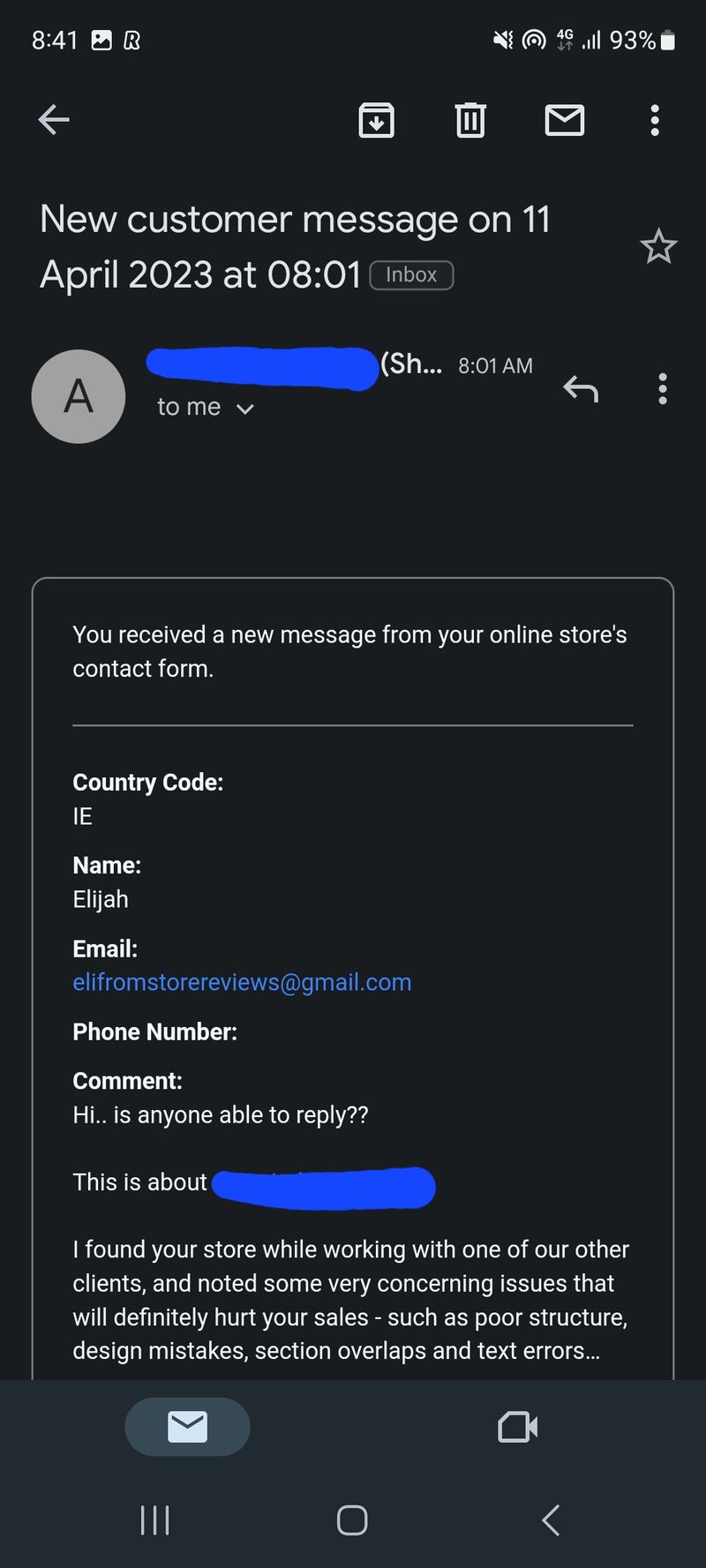
Shopify contact forms receive spam because they are public, predictable, and inexpensive for bots to submit. Most attacks are automated campaigns looking for backlinks, sales prospects, vulnerable websites, or active email addresses.
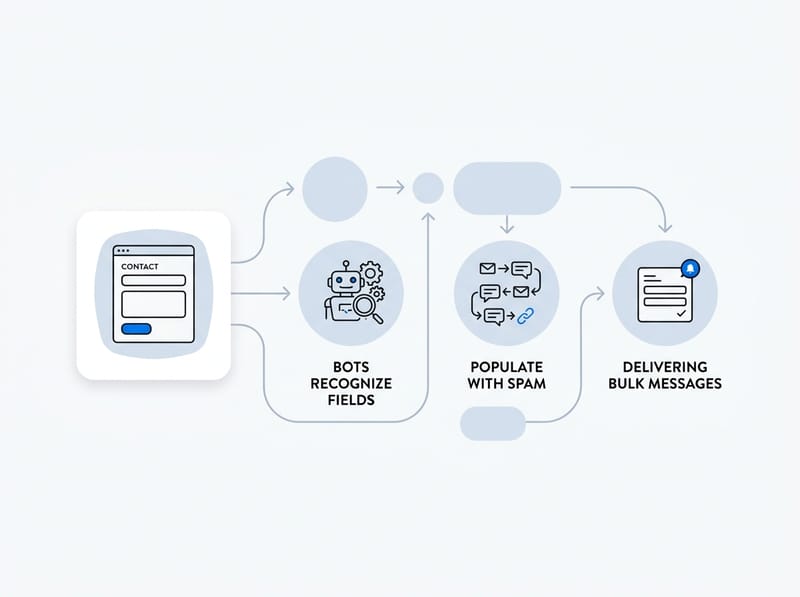
A standard Shopify contact page usually contains familiar fields such as name, email, phone number, and message. Bots recognize these fields, populate them, and submit the form in seconds. They do not necessarily load the page or interact with it like a real customer.
The problem can grow suddenly. A form that received one junk message per week can begin receiving dozens per day after its URL is added to a bot list. Changing the destination email address rarely fixes the underlying issue because the messages are still being submitted through the storefront.
What are the main pain points caused by form spam?
The biggest pain point is that real customer inquiries become harder to identify. If an important wholesale request, order question, or product inquiry is buried between automated messages, delayed responses can directly cost the store a sale.
- Lost support time: Staff must open, inspect, and delete repeated messages.
- Missed customer inquiries: Legitimate messages get buried or incorrectly marked as spam.
- Polluted analytics: Fake leads make contact and conversion reports unreliable.
- Security risks: Spam messages can include phishing links, suspicious attachments, or impersonation attempts.
- Email deliverability problems: Aggressive inbox rules may eventually filter legitimate Shopify notifications.
Contact spam is different from a problematic customer placing orders. Before using customer blocking tools, confirm whether the activity is a form bot or an actual customer account. My guide to blocking or blacklisting Shopify customers explains the distinction and the available options.
What is the best way to stop contact form spam on Shopify?
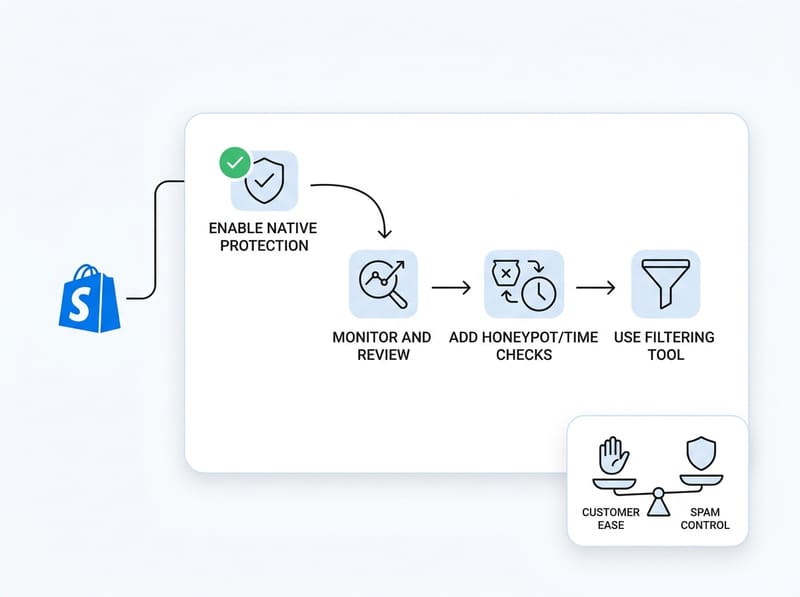
The best way to stop Shopify contact form spam is to use layered protection. Enable Shopify's native spam protection first, monitor the results, add a honeypot and submission-time checks if necessary, and use a dedicated filtering tool only when simpler controls are insufficient.
No single method catches every automated submission. At the same time, adding too many challenges can frustrate customers and lower genuine form completion rates. The goal is to block obvious automation while keeping the customer experience nearly invisible.
| Method | Best for | Customer friction | Main limitation |
|---|---|---|---|
| Shopify hCaptcha | Every Shopify store | Low in most sessions | Advanced bots may still pass |
| Honeypot field | Basic automated spam | None when implemented correctly | Smarter bots can ignore hidden fields |
| Submission-time check | Instant bot submissions | None | Client-side checks can be bypassed |
| Dedicated spam filter | Persistent or high-volume spam | Low to moderate | May create false positives |
| Replace the form with Chatkit | Stores that prefer conversational support | Low | Requires a change in support workflow |
| Email inbox rules | Cleaning up repeated junk | None | Does not stop the original submission |
I recommend changing one layer at a time and measuring the result for at least seven days. This makes it easier to identify what worked and to reverse a rule if legitimate messages disappear.
How do I enable Shopify's built-in spam protection?
Enable Shopify's built-in hCaptcha from the spam protection area in your online store preferences. This should be the first fix for every affected store because it is native, quick to configure, and designed to protect Shopify forms.
- Open your Shopify admin.
- Go to Online Store.
- Select Preferences.
- Find the section labeled Spam protection.
- Enable protection for contact forms and blog comments.
- Save your changes and test the form in a private browser window.
Shopify uses hCaptcha to analyze form submissions and present a challenge when activity appears suspicious. Shopify provides more detail in its official Shopify CAPTCHA documentation.
Do not assume that hCaptcha is broken simply because customers do not see a visible puzzle. Modern CAPTCHA systems often analyze behavior in the background and only challenge higher-risk visitors. Invisible operation is intentional and usually creates less friction than forcing every shopper to solve an image test.
What if the spam protection setting is already enabled?
If Shopify spam protection is already enabled, confirm that messages are coming through the native contact form and not another embedded form, popup, or page builder. Third-party forms may use their own submission endpoints and require separate protection.
Submit a test inquiry and inspect the email format. Compare it with the junk messages, including the subject line, reply-to address, and included fields. This simple check often reveals that the spam is entering through an old landing page or an app form that the merchant forgot was still published.
Shopify's guide to creating and managing contact pages can help you verify which template is assigned to the page. If you need a more detailed walkthrough, I have also published a dedicated guide on preventing spam on a Shopify contact form.
How does a honeypot stop Shopify contact form spam?
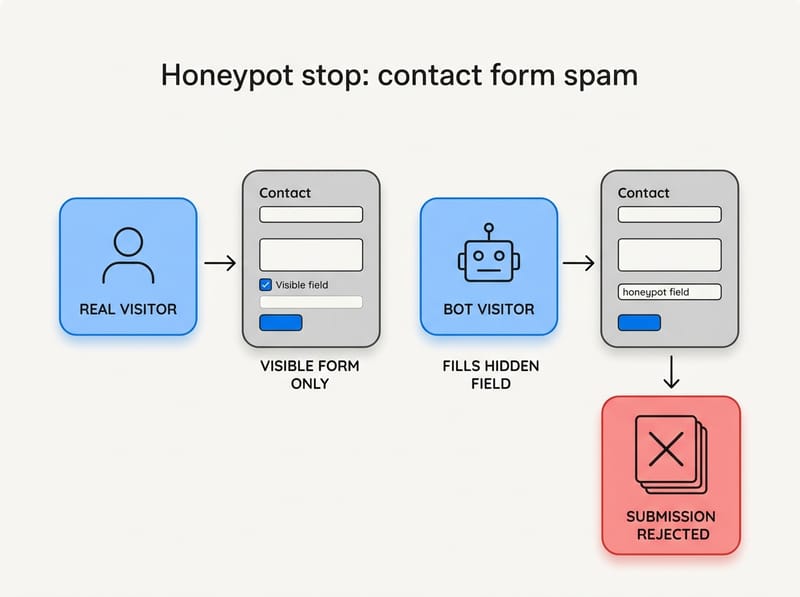
A honeypot is a hidden form field that real visitors leave empty but basic bots fill automatically. When the hidden field contains a value, the submission can be rejected or ignored as likely spam.
Honeypots work because many simple bots attempt to complete every input they find in a page's HTML. A properly configured field remains available to automated tools while staying out of sight and out of the keyboard navigation path for genuine visitors.
How should a Shopify honeypot be implemented?
A Shopify honeypot should use an inconspicuous field name, remain accessible to the validation logic, and avoid confusing assistive technology. It should not rely only on a generic name such as website because advanced bots may already know to skip it.
- Duplicate your live theme before making code changes.
- Locate the contact form section or contact template in the theme editor.
- Add a nonessential field intended only for bot detection.
- Hide it without making it a normal customer input.
- Add validation that prevents processing when the field contains a value.
- Test with desktop, mobile, keyboard navigation, and a screen reader where possible.
Shopify explains how to safely access theme files in its theme code editing documentation. If you are uncomfortable editing Liquid and JavaScript, use a developer or a reviewed anti-spam tool rather than experimenting on a live theme.
A honeypot is not a complete security boundary. A bot can inspect the CSS, recognize hidden fields, or send a request directly to the form endpoint. It remains useful because it cheaply catches unsophisticated automation before heavier filtering becomes necessary.
How do submission-time checks identify bots?
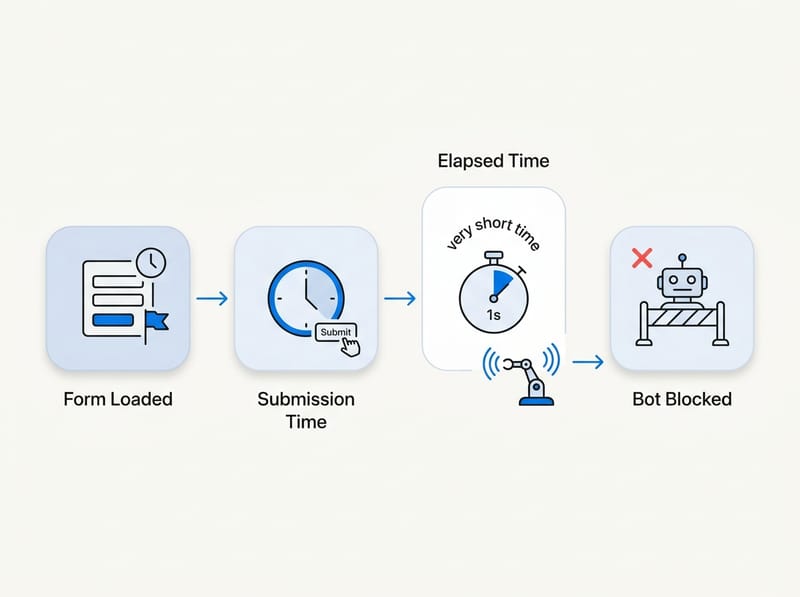
Submission-time checks identify forms completed faster than a human could realistically read and type. A contact form posted within one or two seconds of loading is a strong automation signal.
The implementation records when the form was loaded and compares that timestamp with the submission time. If the elapsed time is below a chosen threshold, the storefront can reject the submission or request another verification step.
In my experience, a threshold around two to three seconds catches obvious scripts without affecting most customers. However, it should be treated as a signal rather than absolute proof because browser autofill and password managers can help real users complete forms quickly.
Can bots bypass a time-based check?
Yes, sophisticated bots can wait before submitting or bypass storefront JavaScript altogether. Time checks are most effective when combined with hCaptcha, a honeypot, and server-side filtering.
This is why I would not invest hours building complex client-side defenses. JavaScript validation helps reduce noise, but anything executed entirely in the visitor's browser can be inspected or skipped. The OWASP Web Security Testing Guide provides broader context on why client-side controls should not be treated as complete protection.
Should I install an anti-spam app?
Install an anti-spam app when native hCaptcha and lightweight theme controls fail to reduce the problem. A dedicated tool is most useful for stores receiving persistent, high-volume, or targeted spam.
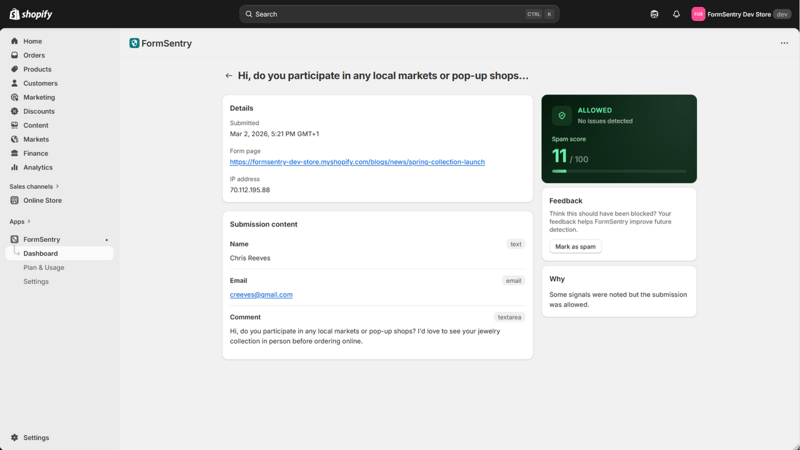
Look for invisible filtering, keyword controls, reputation signals, submission logs, and an option to review blocked inquiries. The review log matters because an aggressive rule may incorrectly flag a short but legitimate message such as a wholesale buyer asking for a price list.
I would favor an app that explains why each submission was blocked. A black-box tool may reduce inbox volume, but it gives you no way to determine whether valuable customer messages disappeared with the spam.
How should I test an anti-spam app?
Test an anti-spam app with realistic customer messages before depending on it. Submit inquiries from different devices, networks, email providers, and message lengths, then confirm that each one reaches the intended inbox.
- Send a short product availability question.
- Send a longer wholesale inquiry with several product names.
- Include an order number and shipping question.
- Test common languages used by your customers.
- Try a message containing a legitimate product URL.
- Review the blocked log daily during the first week.
False positives are the main risk of strict filtering. A solution that blocks all messages containing a URL, for example, may also block a customer sharing a product page or photo link.
Can I remove the contact form and use Chatkit instead?
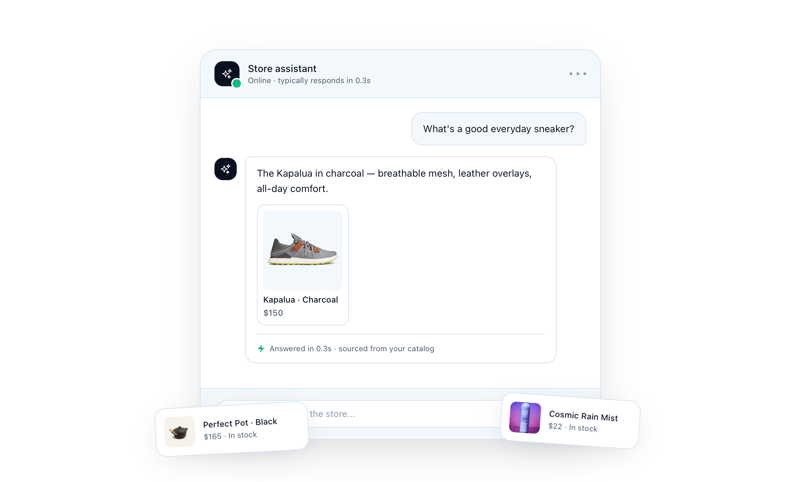
Yes. If your store does not need an email-style form, Chatkit lets you get rid of the contact form altogether and move customer questions into a chat-based workflow. Removing the public form also removes that specific form submission target from your storefront.

You can review Chatkit on the Shopify App Store. This approach is particularly attractive when most contact requests are pre-purchase questions, product questions, or simple support conversations that benefit from a more immediate interface.
From an app developer's perspective, reducing the number of exposed inputs is often cleaner than repeatedly adding filters to an outdated workflow. If the contact page produces almost no valuable leads but generates daily spam, replacing it may be more practical than defending it.
When is replacing the form the right choice?
Replacing the form is the right choice when customers want quick answers and your team can manage conversations consistently. It is less appropriate when the business needs structured applications, detailed file submissions, legal notices, or long-form wholesale requests.
Before removing the form, review the last 30 to 90 days of legitimate inquiries. Categorize them by purpose and check whether chat can handle each category. You may discover that a simple FAQ, order tracking page, and Chatkit can replace most of the old form workload.
Keep at least one clearly published support method and explain expected response times. Removing spam should not make the business harder for genuine customers to contact.
Can inbox filters stop contact form spam?
Inbox filters can organize or delete recurring junk, but they do not prevent bots from submitting the form. Use email rules as a cleanup layer, not as your primary defense.
Create rules for highly specific phrases, repeated sender patterns, or subject lines that never appear in legitimate requests. Send matched messages to a temporary review folder instead of permanently deleting them, especially during the first few weeks.
Avoid broad rules that block entire email domains or common words such as marketing, order, website, or help. Those terms can easily appear in genuine customer inquiries. If spam appears to come from your own domain, also check your email authentication setup using my Shopify DMARC setup guide.
What should I avoid when trying to block spam?
Avoid changes that create more customer friction than protection. Requiring every visitor to solve several puzzles, log into an account, or complete an excessively long form can reduce spam while also reducing valuable leads.
- Do not publish your email address as the only fix. Public addresses can be scraped by different bots.
- Do not block entire countries without evidence. This can exclude customers and travelers.
- Do not rely only on JavaScript. Direct requests may bypass browser checks.
- Do not delete blocked messages immediately. Keep a review period for false positives.
- Do not stack multiple CAPTCHA tools. Overlapping scripts can hurt accessibility and form completion.
- Do not edit the live theme without a backup. A small Liquid error can break the contact page.
If you specifically need a visible or customized challenge, read my guide on adding Google reCAPTCHA to Shopify. In most cases, I would still test Shopify's native protection before introducing another script.
What is the recommended step-by-step plan?
The recommended plan is to begin with the lowest-friction native control and escalate only when spam continues. Most stores should not start with custom code or several overlapping apps.
- Confirm the source. Verify that the messages originate from the native Shopify contact form.
- Enable Shopify hCaptcha. Turn on spam protection for forms and blog comments.
- Monitor for seven days. Record daily spam volume and check for missed customer messages.
- Add a honeypot. Use a theme duplicate and test accessibility carefully.
- Add a timing signal. Flag submissions completed impossibly quickly.
- Evaluate a dedicated filter. Choose one with logs and understandable blocking reasons.
- Consider Chatkit. Remove the contact form altogether if chat better matches how customers ask for help.
- Use inbox rules last. Filter repeated leftovers without broadly blocking genuine inquiries.
When I troubleshoot this type of Shopify issue, I change one variable at a time. That approach may feel slower, but it produces a reliable answer about which layer reduced the spam and whether it affected genuine conversion opportunities.
How do I know whether the solution is working?
Your solution is working when spam volume falls without a corresponding decline in legitimate contact requests. Track both outcomes rather than judging success only by a cleaner inbox.
Record the number of spam messages, genuine inquiries, blocked submissions, and recovered false positives each week. If you normally receive 20 valid inquiries and that number suddenly falls to two after adding a strict rule, investigate before assuming customer demand disappeared.
The ideal setup is nearly invisible to genuine shoppers. For most stores, that means native hCaptcha first, one or two passive bot signals, and a transparent filtering process. If maintaining the form continues to waste time, replacing it with Chatkit can be the cleaner long-term solution.