
Showing recommended products on Shopify in 2026 is easy: you can use Shopify's built-in AI-powered product recommendations in your theme for free, or install a specialist app if you want more control, better targeting, and more placements.
As a Shopify app developer, I have spent years building tools for merchants who want to increase average order value without making their storefront feel cluttered. Product recommendations are one of the simplest ways to do that. When they are relevant, well-placed, and tested properly, they can turn a single-product session into a multi-product order.
The reason this works is straightforward. Shoppers often need a nudge. If you show a matching accessory, an upgrade, a refill, or a product from the same range at the right moment, you reduce decision friction and make it easier for them to buy more.

In practical terms, most stores should start with Shopify's native recommendations on the product page, then expand into cart, drawer cart, homepage, and post-add-to-cart placements if they want stronger results. In my experience, that layered approach is the best balance of simplicity and performance.
How do I show recommended products on Shopify in 2026?
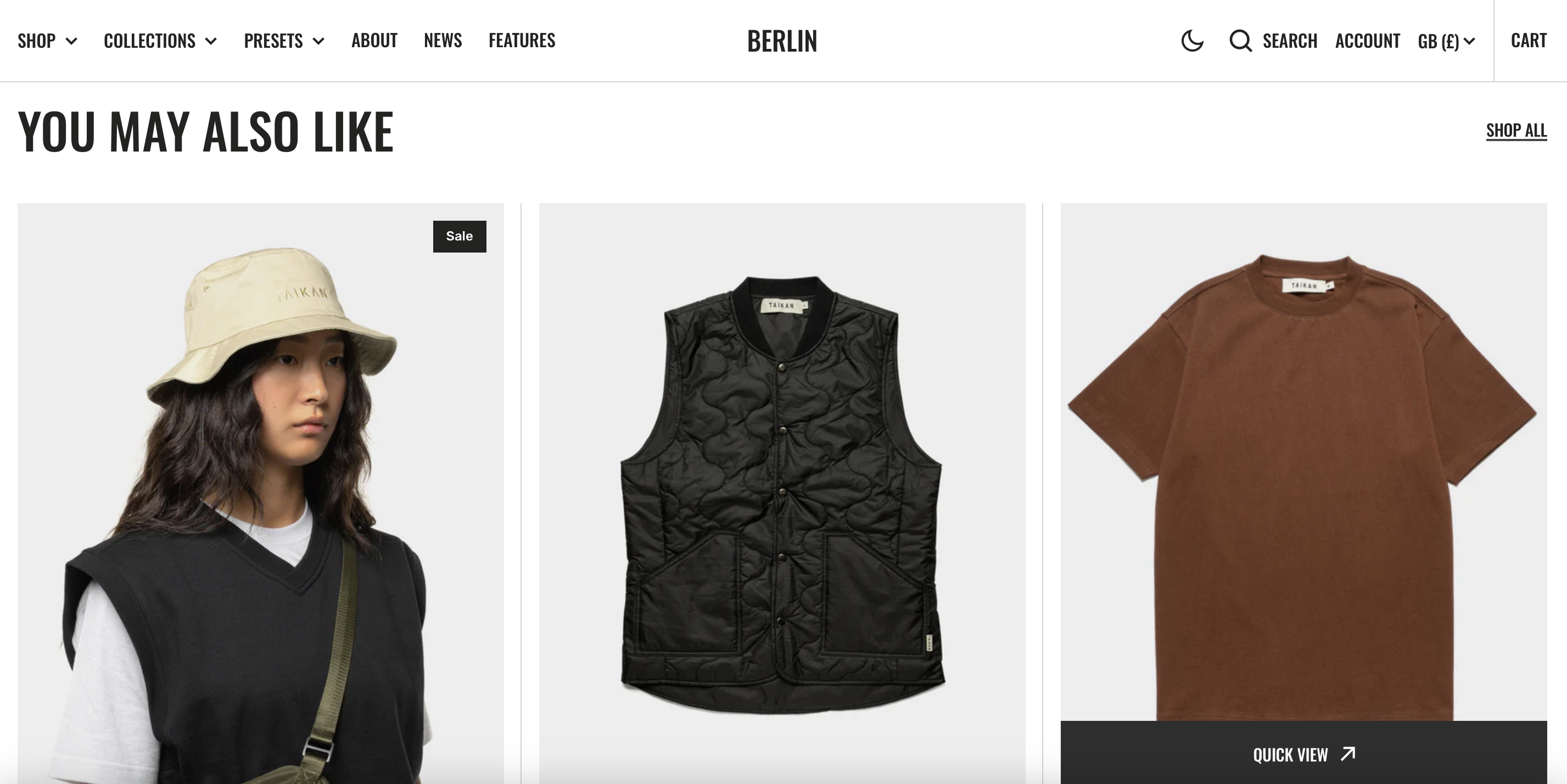
The quickest way to show recommended products on Shopify is to enable the Product Recommendations section in your theme customiser. Most modern Shopify themes support this out of the box, and Shopify uses machine learning and collaborative filtering to decide what to show.
- In Shopify admin, go to Online Store > Themes.
- Click Customize on your live theme.
- Open a Product page template.
- Add or edit the Product recommendations section or block.
- Set the number of products to show, usually 4 to 6 on desktop.
- Choose the layout, such as grid or carousel.
- Save and preview on live product pages.
If your theme supports it, this is the best free starting point. You do not need to write code, and you do not need to install an app just to get basic related products live.
That said, native recommendations are only part of the picture. If you want frequently bought together, manual merchandising, cart upsells, or more advanced logic, you will usually need an app.
What are Shopify recommended products?
Shopify recommended products are product suggestions shown to shoppers based on relevance, purchase behaviour, browsing signals, or manual rules. They are commonly displayed as related products, frequently bought together items, or personalised picks.
You will usually see them on the product page, but they can also appear on the homepage, collection pages, cart page, drawer cart, and even after a product is added to cart. The goal is simple: help shoppers discover something else they are likely to buy.
In my experience building Shopify apps, merchants often lump several different features into the same bucket. Recommended products can mean:
- Related products from the same collection or category
- Frequently bought together bundles
- Cross-sells that complement the main item
- Upsells that push shoppers to a better or bigger version
- Recently viewed products
- Best sellers or trending products
- Quiz-based recommendations based on customer answers
If you want a deeper look at upsell strategy specifically, I would also read How to upsell on Shopify in 2026 and Shopify Upsell on the Product Page.
Why should you show recommended products on Shopify?
You should show recommended products because they increase product discovery, improve conversion paths, and can lift average order value without paying for more traffic. This is one of the few optimisations that helps both shoppers and merchants at the same time.
Research shared across the ecommerce space consistently shows that upselling and cross-selling can lift revenue by 10% to 30% when implemented properly. Competitor content ranking for this topic also highlights that recommendation blocks commonly deliver measurable gains in click-through rate and basket size.
When I test recommendation placements on Shopify stores, the biggest benefit is often not just more revenue per order. It is that shoppers find products they would never have found through navigation alone. That matters even more for stores with larger catalogues, seasonal ranges, or lots of accessories.
How do recommended products increase average order value?
Recommended products increase AOV by presenting useful add-ons and upgrades at the exact point of purchase intent. Instead of asking the shopper to browse again, you bring the next relevant product to them.
For example, if someone is viewing a coffee machine, you can recommend filters, beans, descaler, or a premium model. If someone is buying skincare, you can suggest the matching cleanser, serum, or SPF. These are classic cross-sell and upsell moments.
This is why recommendation blocks work so well alongside free shipping thresholds and cart incentives. If you are trying to push basket size further, see How to Increase Shopify Sales Without Additional Products in 2026.
How do recommended products improve the product page?
Recommended products make the product page more useful by increasing product discovery without forcing the shopper to leave the buying journey. A good product page should answer questions, build trust, and offer the next logical purchase.
In practical terms, recommendation sections help surface more of your catalogue. They are especially useful for stores where shoppers may only land on one product via search, ads, or social. Instead of a dead-end PDP, you create a path to explore more items.
If you are still refining your product page strategy, LaunchTip has a related guide on how best to add Shopify related products to a product page.
What is the best way to show recommended products on Shopify?
The best way is to start with Shopify's native recommendations for the product page, then add an app if you need more placements, more recommendation types, or better control. For many stores, the winning setup is not one method or the other. It is both.
Native recommendations are free, quick to enable, and good enough for many smaller stores. Apps are better if you want to show recommendations in the cart drawer, as a frequently bought together block, or based on more specific rules.
Should you use Shopify's built-in product recommendations?
Yes, if you want a free and simple solution. Shopify's built-in recommendations are a strong starting point and suit merchants who want to launch quickly without adding another app.
Shopify's native system uses machine learning and behaviour data to suggest products. In many themes, setup takes only a few minutes. It tends to work best for stores with enough order history and product relationships for Shopify to learn from.
The main limitation is control. You may not get advanced targeting, custom logic, or broader placements outside theme-supported areas.
When should you use an app instead?
Use an app when you want more than a basic related products block. That includes manual curation, cart upsells, popup recommendations, analytics, A/B testing, or recommendation types like recently viewed and bundles.
As a developer, I usually recommend an app when a merchant says one of these things: "I want to control what shows", "I want recommendations in the cart", or "I want to test what converts best". Those are the situations where the built-in feature starts to feel too limited.
How do you enable Shopify's built-in recommended products section?
To enable Shopify's built-in recommended products, add the section in your theme editor and customise the display settings. On most Online Store 2.0 themes, this is straightforward.
- Go to Online Store > Themes.
- Click Customize.
- From the template picker, choose a product template.
- Look for Product recommendations, You may also like, or a similarly named section.
- Add it if it is not already there.
- Set the heading, product count, and layout.
- Adjust colours, spacing, and card style to match your theme.
- Save and test on several products.
I usually suggest showing 4 products on desktop and 2 to 4 on mobile. If your theme offers a carousel, make sure it loads quickly and is easy to swipe. Mobile clutter kills performance faster than most merchants realise.
Current guidance from the research data suggests that recommendation placements near the buying area can produce 8% to 15% click-through rates for formats like frequently bought together. That is why placement matters as much as the products themselves.
What is the best app for recommended products on Shopify?
The best app depends on the recommendation type you want to show. If you want upsells, cross-sells, and product recommendations in more than one place, SellUp is a practical option and one I know well from the Shopify ecosystem.
For this article, I am focusing on the app data provided, so the clearest app recommendation here is SellUp. It is built for merchants who want to add upsells and related product suggestions without a heavy setup process.


How does SellUp help with Shopify product recommendations?
SellUp helps by letting you place upsell and recommendation offers in high-intent locations where shoppers are already close to buying. That makes it useful for merchants who want more than a simple related-products row.
In my experience, apps like this are most valuable when they reduce friction. If you can launch a recommendation offer in the product page, cart, or post-add-to-cart flow without editing theme files every week, you are much more likely to keep optimising it.
You can explore SellUp on the Shopify App Store here: SellUp product upsell app.
Where should you place recommended products on Shopify?
The best places to show recommended products are the product page, cart or cart drawer, homepage, and post-add-to-cart moments. Each placement serves a different purpose.
One of the biggest mistakes I see is merchants adding recommendations everywhere without thinking about intent. Recommendations work best when the placement matches the shopper's stage in the journey.
Should you show recommended products on the product page?
Yes, this is usually the first place to start. Product page recommendations catch shoppers when they are evaluating a product and still open to comparison, accessories, or add-ons.
The sweet spot is usually below the main product information or close to the Add to Cart area, depending on your theme. If you are using a frequently bought together format, keep the products tightly related and avoid random catalogue fillers.
Should you show recommended products in the cart?
Yes, cart recommendations are excellent for last-minute add-ons. At this stage, the shopper has already committed enough to add something, so complementary products can perform very well.
This is where low-friction items shine: socks with shoes, batteries with electronics, gift wrap, travel-size add-ons, or refill packs. If you are interested in more cart-focused tactics, you may also like 6 of the Best Shopify Add On Apps for Your Store in 2026.
Should you show recommended products on the homepage?
Yes, but homepage recommendations should be broader and more discovery-led. This is a good place for best sellers, trending products, new arrivals, or personalised picks for returning visitors.
I would not rely on the homepage alone for recommendation strategy. It is useful, but the product page and cart are usually much higher-intent placements.
Should you show recommended products after add to cart?
Yes, this can be one of the highest-converting moments. Once a shopper adds an item to cart, they have shown clear purchase intent, and a well-timed recommendation can feel helpful rather than distracting.
This is especially effective in a slide cart, popup, or side cart experience. Keep the offer focused. One to three strong recommendations will usually outperform a bloated list.
How many recommended products should you show?
Most Shopify stores should show 4 to 6 recommended products on desktop and 2 to 4 on mobile. More than that often creates noise rather than increasing clicks.
The right number depends on your theme, product complexity, and screen size. In fashion, beauty, and accessories, a few strong matches often work better than long rows. In larger catalogues, carousels can help, but only if they remain fast and easy to use.
When I test recommendation sections, I care less about the raw number and more about clarity, relevance, and speed. If the section looks crowded or repetitive, performance usually drops.
How do you choose the right products to recommend?
The right recommended products are complementary, relevant, and easy to justify next to the main product. Relevance beats cleverness every time.
A simple framework I use is this:
- Accessories - items that naturally go with the main product
- Upgrades - a better version of what the shopper is viewing
- Bundles - products commonly purchased together
- Refills or repeat buys - useful for consumables
- Style matches - same look, colour family, or collection
If you sell visually coordinated products, the recommendation title matters too. Phrases like Complete the Look, Pair It With, and Customers Also Bought all signal slightly different intent. For styling-led merchandising, this guide on Display Pair It With and Combine It With on Shopify is relevant.
What are the main types of Shopify product recommendations?
The main types are related products, frequently bought together, best sellers, recently viewed, and personalised recommendations. Each one solves a different merchandising problem.
| Recommendation type | Best use case | Where to place it | Best for |
|---|---|---|---|
| Related products | Show similar or complementary items | Product page | Most stores |
| Frequently bought together | Increase basket size with common pairings | Product page, cart | Accessories, consumables, electronics |
| Upsells | Push shoppers to a higher-value option | Product page, add-to-cart flow | Stores with tiered products |
| Recently viewed | Help shoppers return to items they considered | Product page, homepage | Larger catalogues |
| Best sellers or trending | Build trust and improve discovery | Homepage, collection pages | Newer stores or broad audiences |
| Quiz-based picks | Personalise recommendations from answers | Landing pages, PDP, homepage | Beauty, supplements, gifting |
In my experience, frequently bought together is often the fastest win for stores with obvious add-ons, while related products are the easiest baseline for almost everyone.
What are the limitations of Shopify's native recommendations?
Shopify's native recommendations are useful, but they are limited in custom logic, merchandising control, and placement flexibility. That is the trade-off for getting a free built-in feature.
Here are the common limitations:
- Less manual control over which products appear
- Fewer placement options than specialist apps
- Basic styling depending on your theme
- No advanced campaign logic for specific audiences
- Limited analytics compared with dedicated upsell tools
That does not make the native feature bad. It just means you should be realistic about what it is designed to do. For a lot of smaller merchants, it is enough. For stores actively optimising AOV, it is often just the first step.
How do you optimise recommended products for better results?
To optimise recommended products, test placement, titles, product count, and product selection rather than assuming the default setup is best. Small changes can make a noticeable difference.
These are the tweaks I would prioritise first:
- Test the heading - try “You may also like”, “Complete the look”, or “Frequently bought together”.
- Reduce clutter - show fewer, better recommendations.
- Keep products relevant - similarity or complementarity matters more than margin.
- Optimise for mobile - 3 to 4 items is often enough.
- Use strong product cards - clear image, price, rating, and variant clarity.
- Track clicks and conversion - do not judge by impressions alone.
When I review underperforming recommendation widgets, the issue is usually not the concept. It is poor execution. Random products, too many cards, weak titles, or a section pushed too far down the page can all reduce impact.
If conversion rate is your wider goal, I would also read How to Optimize Your Conversion Rate on Shopify: 2026 Guide.
What mistakes should you avoid with Shopify product recommendations?
The biggest mistakes are showing irrelevant products, overloading the page, and treating recommendations as a one-time setup. Recommendation blocks need ongoing tuning.
- Do not recommend random products just to fill space.
- Do not show too many items on mobile.
- Do not place recommendations too low where nobody sees them.
- Do not ignore analytics once the section is live.
- Do not use the same logic everywhere across homepage, PDP, and cart.
Another common mistake is trying to force upsells when a cross-sell would be more natural. If someone wants a phone case, suggesting a matching screen protector makes sense. Suggesting a totally different category rarely does.
Can you show manual recommended products on Shopify?
Yes, you can show manual recommended products on Shopify, but the method depends on your theme or app setup. Some merchants prefer manual curation for gift sets, editorial collections, or high-margin pairings.
Manual recommendations are useful when you know exactly what should be sold together and do not want to rely purely on algorithmic suggestions. I have seen this work especially well in jewellery, fashion, interiors, and gifting stores where visual pairing matters more than purchase history.
If you want even tighter control, apps are usually the easiest route because they let you define offers or product relationships without custom development.
Built-in Shopify recommendations vs app-based recommendations
Built-in recommendations are best for simplicity and cost, while app-based recommendations are best for flexibility and revenue optimisation. Your choice depends on how sophisticated you want to get.
| Option | Cost | Setup speed | Control | Best for |
|---|---|---|---|---|
| Shopify built-in recommendations | Free | Fast | Basic | Newer stores, simple PDP related products |
| App-based recommendations | Varies by app | Fast to moderate | High | Stores wanting cart upsells, bundles, testing, and advanced targeting |
If you are just getting started, I would enable the native section first today. Then, once you know which products pair well and where shoppers respond, layer in an app such as SellUp for broader merchandising.
My recommended setup for most Shopify stores in 2026
For most Shopify stores, the best setup is native recommendations on the product page plus one app-powered upsell or cross-sell placement in the cart or add-to-cart flow. That gives you coverage at the two most commercially important moments.
If I were setting this up from scratch for a typical merchant today, I would do the following:
- Enable Shopify's built-in Product Recommendations on every product page.
- Show 4 products on desktop and 3 on mobile.
- Use a clear title like Frequently bought together or You may also like.
- Add one app-based recommendation placement in the cart or drawer cart.
- Review click and conversion data after 2 to 4 weeks.
- Replace weak pairings with stronger manual or app-driven recommendations.
This is the setup I have seen work repeatedly because it is practical. It does not demand a huge theme rebuild, and it gives you enough data to improve over time.
Final thoughts on showing recommended products on Shopify
The best way to show recommended products on Shopify in 2026 is to start simple, stay relevant, and optimise based on shopper behaviour. You do not need a complicated recommendation engine to get results, but you do need sensible placement and product logic.
Shopify's built-in feature is a solid free option and should be the first thing most merchants try. If you outgrow it, a dedicated app like SellUp gives you more flexibility to test upsells, cross-sells, and recommendation placements across the full buying journey.
In my experience building Shopify apps, recommendation strategy works best when it feels helpful rather than pushy. Show the right products, in the right place, at the right moment, and your store will almost always convert better.