A customer asks ChatGPT, "What's the best lightweight merino base layer under $80 that ships free?" Within seconds, the AI returns three product cards with images, prices, and a buy button. Your product isn't among them, even though it's a perfect match. The problem isn't your product. It's that your store is still optimized for Google's ten blue links, not for the AI shopping agents that are rapidly becoming the new front door to commerce.
Shopping-related queries on generative AI platforms grew 4,700% between July 2024 and July 2025, according to Adobe. ChatGPT now drives referral traffic comparable to 20% of Walmart's total visits. Perplexity has built-in checkout via PayPal. Microsoft Copilot completes purchases for Shopify merchants. And in January 2026, Shopify and Google launched the Universal Commerce Protocol (UCP), an open standard that lets AI agents discover, negotiate, and transact across any merchant, managed from a single toggle in your Shopify admin. Optimizing your Shopify store for AI shopping agents is no longer a future-proofing exercise. It is a right-now revenue opportunity.
This guide walks you through the practical work: structured data, product feed hygiene, metadata strategy, crawler access, and the new Shopify features that connect your catalog to every major AI surface. Think of it as SEO for the post-search era.
Why AI Shopping Agents Require a Different Optimization Approach
Traditional SEO is built around keywords, backlinks, and click-through rates. AI shopping agents operate differently. When someone asks ChatGPT or Perplexity for a product recommendation, the AI doesn't rank a list of web pages. It synthesizes structured product data (titles, prices, attributes, availability, reviews) and generates a direct answer or product card. If your data is thin, ambiguous, or poorly structured, the AI will skip you entirely and recommend a competitor whose catalog it can parse with confidence.
The shift is from being found to being understood. An AI agent processing the query "best sustainable winter coat under $200" isn't matching keywords. It's evaluating whether your product data includes a clear sustainability claim, a price within range, a category that maps to "winter coat," and enough supporting metadata (materials, certifications, reviews) to make a credible recommendation. Every gap in your data is a reason for the AI to look elsewhere.
This new discipline is often called Generative Engine Optimization (GEO), and it complements rather than replaces traditional SEO. Google still drives roughly 80% of search traffic. But the fastest-growing discovery channel is now AI conversation, and the merchants who show up in both will have a compounding advantage.
Step 1: Audit and Fix Your Crawler Access
Before anything else, make sure AI agents can actually reach your store. Each major AI platform operates its own web crawler, and if your robots.txt file blocks them, nothing else you do matters.
Shopify allows all crawlers by default, but there's a catch. In late 2025, Shopify quietly updated the default robots.txt across all stores with language that could restrict certain agentic behaviors. If you've made custom edits to your robots.txt.liquid file at any point, you should verify your configuration manually.
Here's what to check: navigate to yourstore.com/robots.txt and look for rules that might block these user agents:
- OAI-SearchBot : OpenAI's crawler for ChatGPT Shopping
- GPTBot : OpenAI's general training and retrieval crawler
- PerplexityBot : Perplexity's discovery crawler
- ClaudeBot : Anthropic's crawler
- Google-Extended : Google's AI training crawler
- Applebot-Extended : Apple's AI feature crawler
If any of these are blocked, go to Shopify Admin > Online Store > More > Edit Code and open your robots.txt.liquid file. Add explicit allow rules for each AI crawler before Shopify's default group rules. The syntax is straightforward: set the User-agent line, then add a Disallow: line with nothing after it, which tells the crawler it can access everything public.
Pro tip: Don't just allow the crawlers. Make sure your most important content paths are explicitly accessible. Product pages (/products/), collections (/collections/), blog posts (/blogs/), and policy pages (/pages/) should all be open. Block only sensitive areas: /admin/, /cart, /checkout, and /account.
Step 2: Get Your Structured Data Right
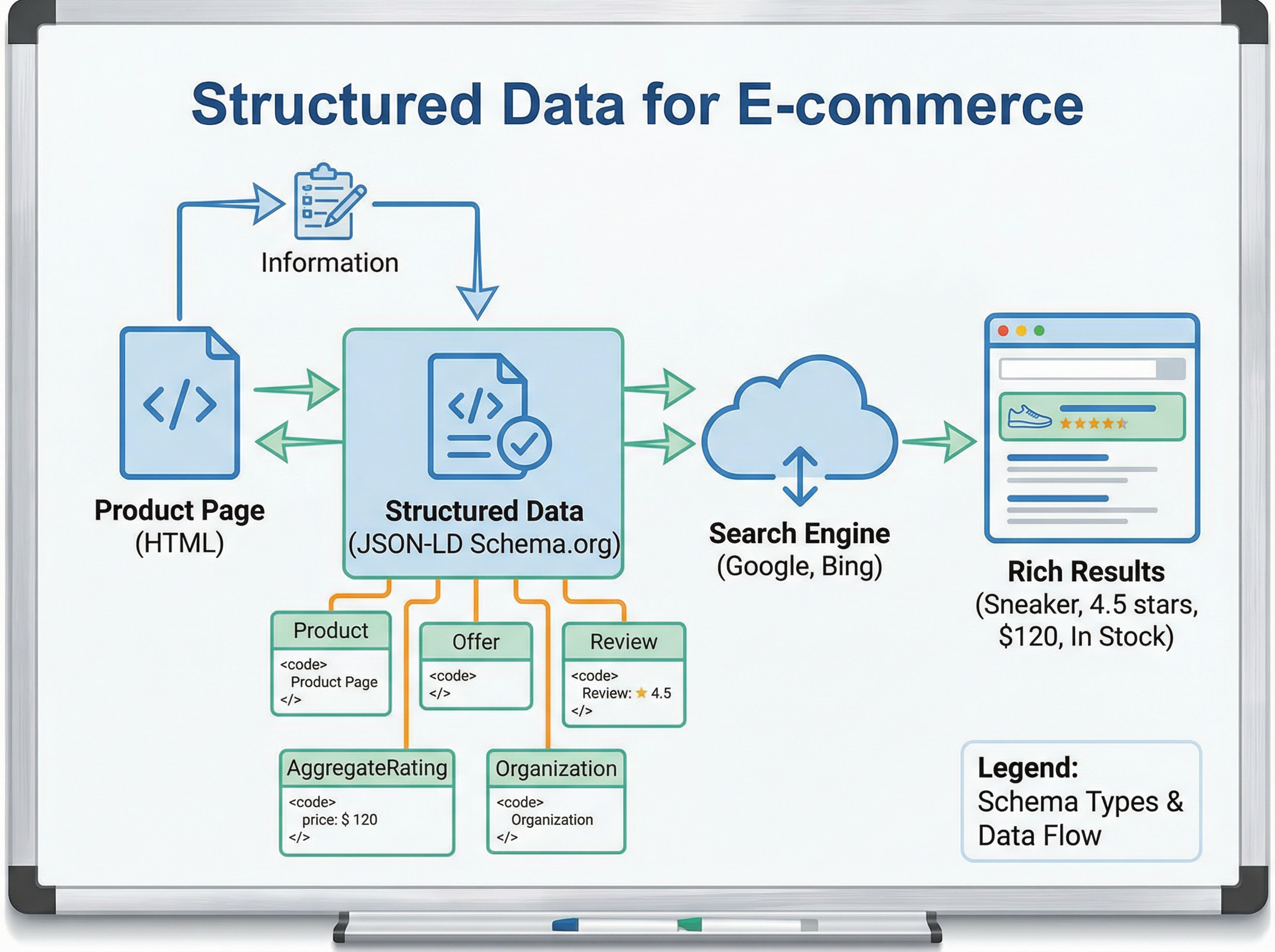
Structured data is the language AI agents speak. When ChatGPT generates a product card with an image, price, and availability badge, that information comes from JSON-LD structured data on your product pages. If your structured data is missing, incomplete, or inaccurate, the AI either skips your product or, worse, shows wrong information that erodes trust.
What Shopify Gives You by Default
Most modern Shopify themes automatically inject basic Product schema (JSON-LD) on product pages. This typically includes the product name, description, price, currency, and availability status. It's a start, but it's rarely enough to compete in AI recommendations.
To verify what your theme currently outputs, use Google's Rich Results Test. Paste a product page URL and review the detected structured data. Look specifically for these fields:
- name : Is it descriptive or generic?
- description : Does it contain substantive product details?
- offers.price and offers.priceCurrency : Are they accurate and present?
- offers.availability : Does it reflect real-time stock status?
- brand.name : Is your brand explicitly declared?
- sku or gtin : Are unique product identifiers included?
- aggregateRating : Are review scores present if you have reviews?
What You Need to Add
To stand out in AI product recommendations, you need richer schema than the default. OpenAI has explicitly stated that ChatGPT Shopping uses structured data fields including price, product type, and description when generating recommendations. Here's what to prioritize:
GTINs (Global Trade Item Numbers): If your products have UPC or EAN barcodes, include them in your structured data via the gtin or gtin13 field. AI agents use GTINs to cross-reference products across databases, verify authenticity, and match your product to known entities. This is especially critical if you sell branded goods. You can add GTINs through Shopify's variant barcode field, and many schema apps will pull them into your JSON-LD automatically.
Product category mapping: Use the category property aligned with Google's product taxonomy. Shopify's product type field should map cleanly to a recognized category. "Mens Navy Blue Oxford Cotton Shirt, Slim Fit" tells an AI agent far more than "Blue Shirt."
AggregateRating and Review: If you're using a reviews app like Judge.me, Loox, or Stamped, ensure it injects AggregateRating schema with ratingValue and reviewCount. AI agents weigh social proof heavily when making recommendations.
FAQ Page schema: Add this to high-intent pages like shipping policy, returns, and sizing guides. When a customer asks an AI agent, "Does this brand offer free returns?" the agent pulls from FAQPage structured data on your policy pages.
If you don't want to edit theme code, Shopify apps like StoreSEO, Smart SEO, or JSON-LD for SEO can handle schema injection. The key is verifying the output. Install the app, then re-test your pages in the Rich Results Test to confirm the fields actually render.
Pro tip: AI agents can't parse information locked inside images. If your sizing chart, ingredient list, or material composition exists only as a graphic on your product page, create a text-based version as well. Put that information in a metafield or in the product description so it becomes part of your structured data.
Step 3: Rewrite Product Metadata for Machines and Humans
Your product titles and descriptions are doing double duty now. They need to convert human shoppers on your product page and give AI agents enough structured context to recommend your product for the right queries.
Product Titles
AI agents match products to queries based on semantic understanding, not keyword density. A title like "The Explorer" tells an AI nothing. A title like "Men's Waterproof Hiking Boot, Full-Grain Leather, Vibram Sole, Wide Fit" gives the agent six distinct attributes to match against: gender, waterproof capability, product type, material, sole brand, and fit. The formula for AI-friendly product titles is: [Audience] + [Key Attribute] + [Product Type] + [Differentiating Detail].
You don't need to stuff every possible keyword. Be specific and accurate. AI agents penalize ambiguity more than brevity.
Product Descriptions
Write descriptions that answer the questions an AI agent would ask on behalf of a shopper. These include: What is this product made of? Who is it for? What problem does it solve? How does it compare to alternatives? What are the specifications?
Structure your descriptions with clear, parseable information. Lead with a benefit-oriented summary sentence, follow with specifications and materials, and close with use-case context. Avoid marketing fluff that adds words without adding data. "Revolutionize your morning routine" tells an AI nothing. "Brews 12 oz in 90 seconds using single-serve pods or ground coffee" tells it everything.
Metafields: Your Secret Weapon
Shopify metafields let you attach structured attributes to products beyond the standard title, description, and tags. For AI optimization, metafields are extraordinarily valuable because they translate directly into machine-readable data.
Go to Shopify Admin > Settings > Custom Data > Products and create metafields for attributes that matter in your category. For apparel, that might include fabric composition, care instructions, country of origin, and sustainability certifications. For electronics, think wattage, compatibility, warranty length, and included accessories. For food and beverage, consider allergens, nutritional claims, shelf life, and certifications.
The AI agents pulling from Shopify Catalog and Agentic Storefronts use these metafields to match products to highly specific queries. The more semantic density your product data has, the more queries it can match.
Step 4: Activate Shopify's Agentic Storefronts
In January 2026, Shopify launched Agentic Storefronts, a centralized feature in your Shopify admin that syndicates your product catalog to AI platforms including ChatGPT, Google AI Mode, Gemini, Microsoft Copilot, and Perplexity. This is the most direct path to getting your products into AI shopping conversations.
Here's how it works: you configure your catalog data once in Shopify, then toggle on the AI platforms where you want to sell. Shopify's Catalog infrastructure uses specialized language models to standardize and enrich your product data so AI agents can surface it accurately. Orders placed through AI conversations flow back into your Shopify admin with full channel attribution, so you can see exactly which AI platform drove each sale.
To get started, look for the Agentic Discovery channel in your Shopify admin. Enable it and review your product data in the context of how it will appear to AI agents. Shopify's Knowledge Base feature lets you define brand voice, FAQs, and policies that AI agents can reference when answering customer questions about your products, including shipping timelines, return windows, and sizing guidance.
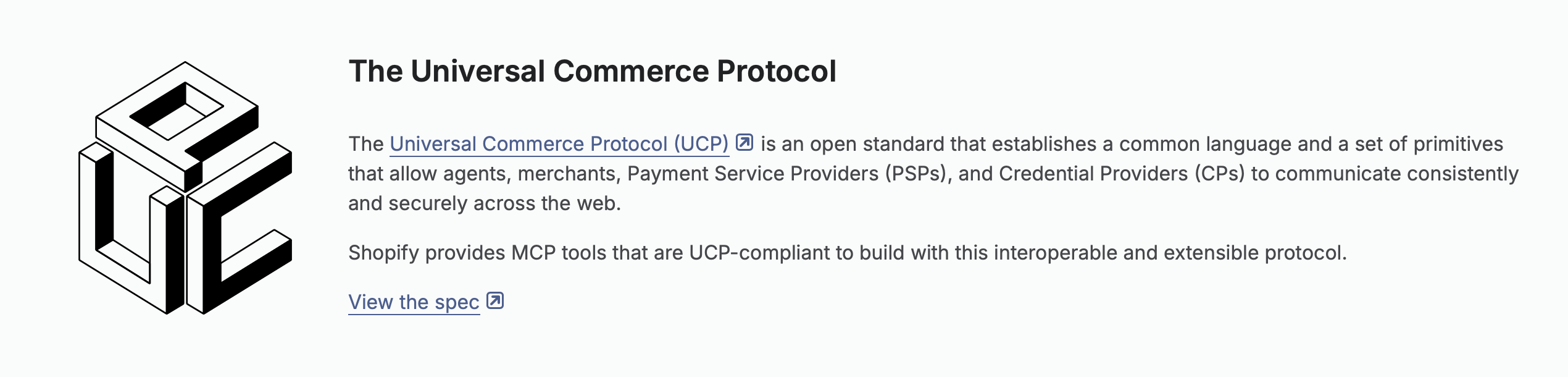
The underlying technology is the Universal Commerce Protocol (UCP), co-developed by Shopify and Google. UCP standardizes how AI agents interact with merchant checkout flows, pricing rules, and fulfillment requirements. It supports REST, Model Context Protocol (MCP), and Agent Payments Protocol (AP2), so agents on different platforms can all transact with your store through one integration. You don't need to understand the protocol details. Shopify abstracts this for you. But you do need to ensure your product data is clean and complete, because that's what gets syndicated.
Step 5: Clean Up Your Product Feed
Your Google Merchant Center feed is more important than ever, because several AI shopping agents, including ChatGPT, pull product data from Google's product index. A messy feed means messy AI recommendations, or no recommendations at all.
Feed Hygiene Checklist
| Field | Common Problem | Fix |
|---|---|---|
| Title | Generic or brand-only titles | Use the attribute-rich formula described above |
| GTIN/Barcode | Missing or incorrect | Add via variant barcode field in Shopify |
| Product type | Inconsistent or overly broad | Map to Google's product taxonomy |
| Availability | Stale stock status | Ensure real-time inventory sync is active |
| Price | Mismatch between feed and site | Audit after every sale or price change |
| Images | Low resolution or lifestyle-only | Include at least one clean product-on-white image |
| Description | Duplicate or thin | Write unique, spec-rich descriptions per product |
If you're using a feed management app like DataFeedWatch, Feedonomics, or the native Shopify Google channel, run a feed diagnostic monthly. Pay particular attention to disapprovals. A product disapproved in Google Merchant Center is effectively invisible to any AI agent that relies on Google's index.
Perplexity has also shown the ability to ingest clean product feeds directly. Brands like Ulta have used feed management platforms to push structured data into Perplexity for accurate, real-time pricing and attribute matching. If your catalog is large, investing in a proper feed management tool pays for itself in AI discoverability alone.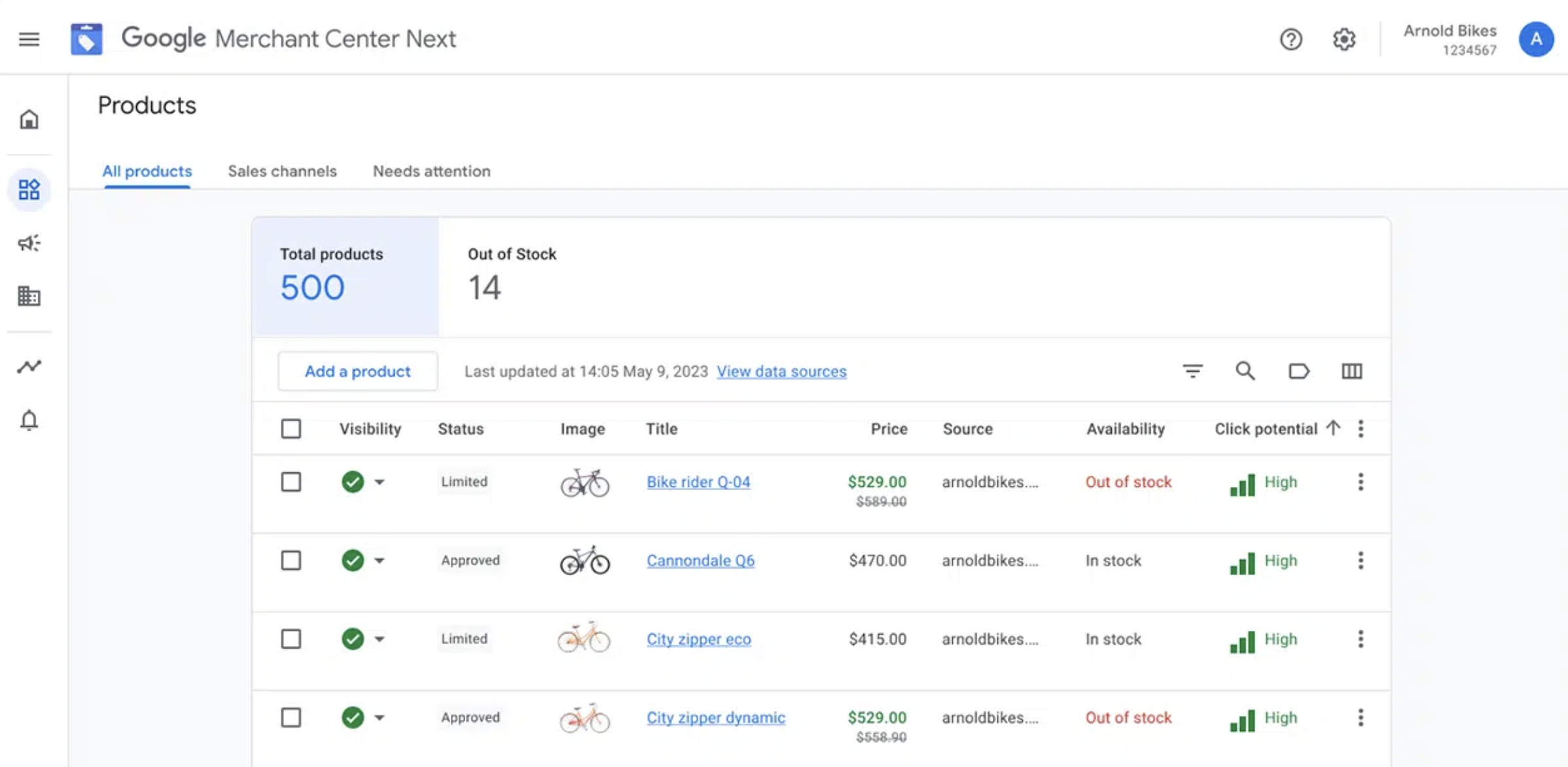
Step 6: Build Trust Signals AI Agents Rely On
AI shopping agents don't just parse product data. They evaluate store credibility before making a recommendation. An agent deciding between two comparable products will favor the store that presents clearer trust signals. Here's what to prioritize:
Reviews and ratings: Display customer reviews prominently and ensure they're marked up with proper schema. Volume matters. A product with 200 reviews will be recommended over an identical product with 3 reviews, all else being equal.
Policy pages: Your shipping, returns, and privacy policy pages should contain specific, parseable information. "Easy returns" is vague. "Free returns within 30 days, prepaid label included, refund processed in 3-5 business days" gives an AI agent concrete data to share with a shopper who asks about your return policy mid-conversation.
About page and contact information: AI agents assess merchant legitimacy. A complete About page with your physical address, founding story, and contact details signals credibility. Make sure your Organization schema includes your logo, founding date, and contact points.
Secure checkout and payment trust: Shopify handles this well by default with SSL and Shop Pay, but ensure your payment badges and security indicators are visible on your site for any AI agents that evaluate page content.
Step 7: Measure AI-Driven Traffic and Iterate
You can't optimize what you can't measure. Fortunately, AI referral traffic is trackable in Google Analytics 4. Go to Traffic Acquisition and look for these sources in your referral or organic data:
- chat.openai.com or chatgpt.com : ChatGPT referrals
- perplexity.ai : Perplexity referrals
- copilot.microsoft.com : Copilot referrals
- gemini.google.com : Gemini referrals
Create a custom channel group in GA4 for "AI Referrals" that consolidates these sources. Track not just sessions, but downstream metrics: add-to-cart rate, conversion rate, and average order value. Early data from some merchants suggests AI-referred traffic has higher purchase intent, though this varies significantly by category and price point.
In your Shopify admin, orders placed through Agentic Storefronts will include channel attribution, so you can see revenue from each AI platform directly in your order dashboard. Use this data to identify which products AI agents are recommending, and double down on optimizing similar products in your catalog.
Pro tip: Test your own store by asking ChatGPT, Perplexity, and Gemini questions that your ideal customer would ask. "Best [your product category] under [your price point] for [your target use case]." If your products don't appear, compare the winners' product data to yours. The gaps will tell you exactly what to fix.
The Priority Order for Shopify Merchants
If you're starting from scratch, here's the sequence that delivers the fastest impact:
- Check your robots.txt : takes five minutes and unblocks everything else.
- Enable Agentic Storefronts : Shopify has built the integration layer for you. Turn it on.
- Audit your structured data : run your top 20 products through Google's Rich Results Test and fix gaps.
- Rewrite titles and descriptions for your top 50 products using the attribute-rich approach.
- Add metafields for category-specific attributes.
- Clean your product feed in Google Merchant Center.
- Strengthen trust pages : shipping, returns, about, and contact.
- Set up measurement in GA4 and start tracking AI referral performance.
You don't need to do all of this in a week. But you do need to start. AI shopping agents are live, they're processing real transactions through Shopify checkout, and the merchants whose product data is cleanest and most complete are the ones getting recommended. The rules of discovery have expanded. Your job is to make sure your store speaks the language of every agent in the room, not just Google's.