New
Christmas Shipping Deadline Banner
Last order dates for each delivery method, with a live countdown to the next one.
"Order within 3h 12m to get it Thu 16 – Mon 19 Oct", worked out from your cut-off and transit times.
Important: Before making any changes to your theme, duplicate it in Online Store > Themes so you have a backup.
A delivery date is more persuasive than a delivery time. This section works out when an order placed now will arrive, using your daily cut-off, processing days, transit times, weekends and closed dates, and shows a countdown to today's cut-off.
Order within 3h 12m to get it Thu 16 Oct – Mon 19 Oct
Preview with the default settings. Colours, text and layout can all be changed in the theme editor.
In Shopify admin go to Online Store > Themes. Next to the theme you want to edit, click the three dots and choose Edit code.
In the Sections folder click Add a new section, name it lt-estimated-delivery-date, delete the placeholder code, paste in the code below and click Save.
Click Customize, go to Products > Default product, click Add section and choose Estimated delivery date.
Change the settings in the sidebar, drag the section where you want it, and click Save.
{%- comment -%}
  Estimated delivery date by LAUNCHTIP
  https://launchtip.com/free-shopify-sections-code
{%- endcomment -%}
{%- style -%}
  #lt-{{ section.id }} { padding: {{ section.settings.padding }}px 0; }
  #lt-{{ section.id }} .lt-edd { display: flex; gap: 10px; align-items: flex-start; padding: 12px 14px; border: 1px solid {{ section.settings.border_color }}; border-radius: 8px; background: {{ section.settings.background }}; color: {{ section.settings.text_color }}; }
  #lt-{{ section.id }} .lt-edd svg { width: 22px; height: 22px; flex-shrink: 0; }
  #lt-{{ section.id }} .lt-edd p { margin: 0; line-height: 1.45; }
  #lt-{{ section.id }} .lt-edd strong { color: {{ section.settings.accent }}; }
  #lt-{{ section.id }} .lt-edd__count { font-variant-numeric: tabular-nums; }
{%- endstyle -%}

<div
  id="lt-{{ section.id }}"
  class="page-width"
  data-offset="{{ section.settings.utc_offset }}"
  data-cutoff="{{ section.settings.cutoff_hour }}"
  data-processing="{{ section.settings.processing_days }}"
  data-min="{{ section.settings.min_transit }}"
  data-max="{{ section.settings.max_transit }}"
  data-ship-weekends="{{ section.settings.ship_weekends }}"
  data-deliver-weekends="{{ section.settings.deliver_weekends }}"
  data-holidays="{{ section.settings.holidays | escape }}"
  data-before="{{ section.settings.message_before | escape }}"
  data-after="{{ section.settings.message_after | escape }}"
>
  <div class="lt-edd">
    {%- if section.settings.show_icon -%}
      <svg xmlns="http://www.w3.org/2000/svg" fill="none" viewBox="0 0 24 24" stroke-width="1.5" stroke="currentColor" aria-hidden="true"><path stroke-linecap="round" stroke-linejoin="round" d="M8.25 18.75a1.5 1.5 0 0 1-3 0m3 0a1.5 1.5 0 0 0-3 0m3 0h6m-9 0H3.375a1.125 1.125 0 0 1-1.125-1.125V14.25m17.25 4.5a1.5 1.5 0 0 1-3 0m3 0a1.5 1.5 0 0 0-3 0m3 0h1.125c.621 0 1.129-.504 1.09-1.124a17.902 17.902 0 0 0-3.213-9.193 2.056 2.056 0 0 0-1.58-.86H14.25M16.5 18.75h-2.25m0-11.177v-.958c0-.568-.422-1.048-.987-1.106a48.554 48.554 0 0 0-10.026 0 1.106 1.106 0 0 0-.987 1.106v7.635m12-6.677v6.677m0 4.5v-4.5m0 0h-12"/></svg>
    {%- endif -%}
    <p aria-live="polite">{{ section.settings.fallback }}</p>
  </div>
</div>

<script>
  (function () {
    var root = document.getElementById('lt-{{ section.id }}');
    if (!root || root.dataset.ready) return;
    root.dataset.ready = '1';

    var DAY = 86400000;
    var data = root.dataset;
    var offsetMs = Number(data.offset) * 3600000;
    var holidays = (data.holidays || '').split(/[\s,]+/).filter(Boolean);
    var output = root.querySelector('p');
    var lang = document.documentElement.lang || undefined;

    // Work in "shop time": a Date shifted by the offset and read with UTC getters.
    function shopNow() { return new Date(Date.now() + offsetMs); }
    function iso(d) { return d.toISOString().slice(0, 10); }
    function isWeekend(d) { return d.getUTCDay() === 0 || d.getUTCDay() === 6; }
    function isOpen(d, weekends) { return (weekends || !isWeekend(d)) && holidays.indexOf(iso(d)) === -1; }
    function startOfDay(d) { return new Date(Date.UTC(d.getUTCFullYear(), d.getUTCMonth(), d.getUTCDate())); }

    function addDays(from, count, weekends) {
      var d = new Date(from.getTime());
      while (count > 0) {
        d = new Date(d.getTime() + DAY);
        if (isOpen(d, weekends)) count--;
      }
      return d;
    }

    function format(d) {
      return new Intl.DateTimeFormat(lang, { weekday: 'short', day: 'numeric', month: 'short', timeZone: 'UTC' }).format(d);
    }

    function escapeHtml(text) {
      var div = document.createElement('div');
      div.textContent = text;
      return div.innerHTML;
    }

    function render() {
      var now = shopNow();
      var today = startOfDay(now);
      var shipWeekends = data.shipWeekends === 'true';
      var cutoff = new Date(today.getTime() + Number(data.cutoff) * 3600000);
      var shipsToday = isOpen(today, shipWeekends) && now < cutoff;

      var dispatch = shipsToday ? today : addDays(today, 1, shipWeekends);
      dispatch = addDays(dispatch, Number(data.processing), shipWeekends);

      var deliverWeekends = data.deliverWeekends === 'true';
      var earliest = addDays(dispatch, Number(data.min), deliverWeekends);
      var latest = addDays(dispatch, Math.max(Number(data.max), Number(data.min)), deliverWeekends);
      var dates = iso(earliest) === iso(latest) ? format(earliest) : format(earliest) + ' – ' + format(latest);

      var left = cutoff - now;
      var hours = Math.floor(left / 3600000);
      var minutes = Math.floor((left % 3600000) / 60000);
      var count = (hours ? hours + 'h ' : '') + minutes + 'm';

      var template = shipsToday ? data.before : data.after;
      output.innerHTML = escapeHtml(template)
        .replace('[countdown]', '<strong class="lt-edd__count">' + count + '</strong>')
        .replace('[dates]', '<strong>' + dates + '</strong>');
    }

    render();
    setInterval(render, 30000);
  })();
</script>

{% schema %}
{
  "name": "Estimated delivery date",
  "tag": "section",
  "class": "lt-edd-section",
  "settings": [
    {
      "type": "text",
      "id": "message_before",
      "label": "Message before the cut-off",
      "default": "Order within [countdown] to get it [dates]",
      "info": "[countdown] is the time left today. [dates] is the delivery date or range."
    },
    {
      "type": "text",
      "id": "message_after",
      "label": "Message after the cut-off",
      "default": "Order now to get it [dates]"
    },
    {
      "type": "text",
      "id": "fallback",
      "label": "Text shown before the script runs",
      "default": "Fast, tracked delivery on every order."
    },
    {
      "type": "range",
      "id": "cutoff_hour",
      "label": "Daily order cut-off",
      "min": 0,
      "max": 23,
      "step": 1,
      "unit": "h",
      "default": 14,
      "info": "24-hour clock. 14 means orders placed before 2pm ship today."
    },
    {
      "type": "range",
      "id": "processing_days",
      "label": "Processing days",
      "min": 0,
      "max": 10,
      "step": 1,
      "default": 0,
      "info": "Extra days to pick and pack before dispatch."
    },
    {
      "type": "range",
      "id": "min_transit",
      "label": "Fastest delivery (days)",
      "min": 0,
      "max": 30,
      "step": 1,
      "default": 2
    },
    {
      "type": "range",
      "id": "max_transit",
      "label": "Slowest delivery (days)",
      "min": 0,
      "max": 30,
      "step": 1,
      "default": 4
    },
    {
      "type": "checkbox",
      "id": "ship_weekends",
      "label": "Dispatch at weekends",
      "default": false
    },
    {
      "type": "checkbox",
      "id": "deliver_weekends",
      "label": "Carrier delivers at weekends",
      "default": false
    },
    {
      "type": "textarea",
      "id": "holidays",
      "label": "Closed dates",
      "default": "2026-12-25, 2026-12-26, 2027-01-01",
      "info": "YYYY-MM-DD, separated by commas. No dispatch or delivery on these days."
    },
    {
      "type": "range",
      "id": "utc_offset",
      "label": "Your time zone (UTC offset)",
      "min": -12,
      "max": 14,
      "step": 1,
      "unit": "h",
      "default": 0
    },
    {
      "type": "checkbox",
      "id": "show_icon",
      "label": "Show truck icon",
      "default": true
    },
    {
      "type": "color",
      "id": "background",
      "label": "Background",
      "default": "#f8fafc"
    },
    {
      "type": "color",
      "id": "text_color",
      "label": "Text colour",
      "default": "#111111"
    },
    {
      "type": "color",
      "id": "accent",
      "label": "Highlight colour",
      "default": "#15803d"
    },
    {
      "type": "color",
      "id": "border_color",
      "label": "Border colour",
      "default": "#e2e8f0"
    },
    {
      "type": "range",
      "id": "padding",
      "label": "Vertical padding",
      "min": 0,
      "max": 40,
      "step": 2,
      "unit": "px",
      "default": 8
    }
  ],
  "presets": [
    {
      "name": "Estimated delivery date"
    }
  ]
}
{% endschema %}
| Setting | Default |
|---|---|
| Message before the cut-off [countdown] is the time left today. [dates] is the delivery date or range. | Order within [countdown] to get it [dates] |
| Message after the cut-off | Order now to get it [dates] |
| Text shown before the script runs | Fast, tracked delivery on every order. |
| Daily order cut-off 24-hour clock. 14 means orders placed before 2pm ship today. | 14h |
| Processing days Extra days to pick and pack before dispatch. | 0 |
| Fastest delivery (days) | 2 |
| Slowest delivery (days) | 4 |
| Dispatch at weekends | Off |
| Carrier delivers at weekends | Off |
| Closed dates YYYY-MM-DD, separated by commas. No dispatch or delivery on these days. | 2026-12-25, 2026-12-26, 2027-01-01 |
| Your time zone (UTC offset) | 0h |
| Show truck icon | On |
| Background | #f8fafc |
| Text colour | #111111 |
| Highlight colour | #15803d |
| Border colour | #e2e8f0 |
| Vertical padding | 8px |
Further reading: The complete guide to delivery dates on Shopify
No. It uses your time zone, set with the UTC offset, so the cut-off is the same moment for everyone.
This section shows one estimate for everyone. For per-country or per-product dates you need an app.
The section doesn't check stock. Hide it on pre-order or made-to-order products by using a separate product template.

Delivery Timer does this with custom rules per product, estimates based on the shopper's location, and a visual order-to-delivery timeline, with no code to maintain.
Try Delivery TimerLast order dates for each delivery method, with a live countdown to the next one.
Delivery, returns and international shipping answers in tidy rows with icons.
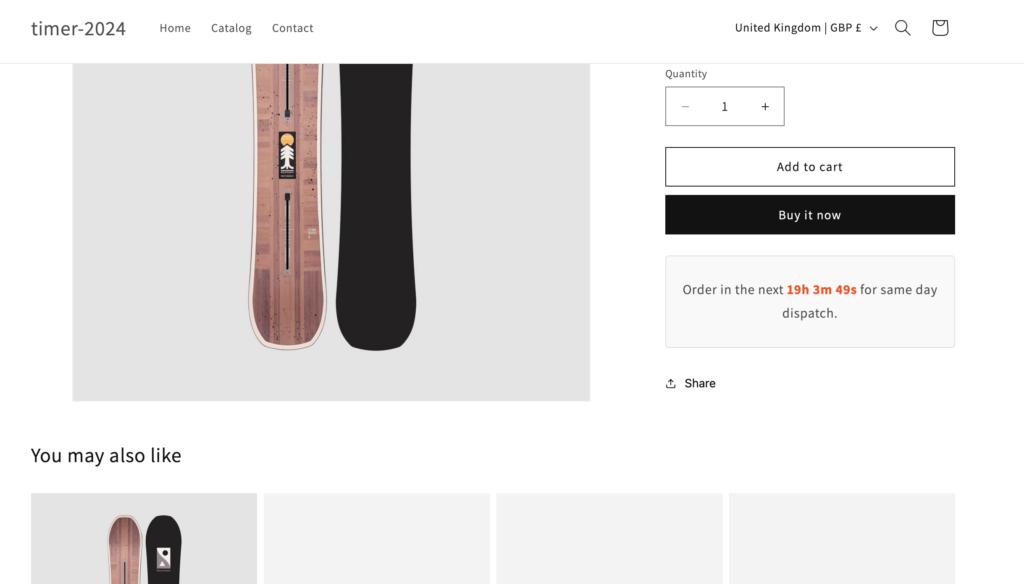
Inform customers of delivery information and create urgency with this countdown timer.
Discover more code snippets to enhance your Shopify store.
View All Sections