New
Estimated Delivery Date
"Order within 3h 12m to get it Thu 16 – Mon 19 Oct", worked out from your cut-off and transit times.
Last order dates for each delivery method, with a live countdown to the next one.
Important: Before making any changes to your theme, duplicate it in Online Store > Themes so you have a backup.
"Will it arrive before Christmas?" is the question that stops December orders. This banner answers it before it's asked: it lists your last order date for each shipping method, counts down to the next one, and switches to a closed message after the last deadline.
Order in time for Christmas
Order within 5d 4h 12m for Christmas delivery with Standard
Preview with the default settings. Colours, text and layout can all be changed in the theme editor.
In Shopify admin go to Online Store > Themes. Next to the theme you want to edit, click the three dots and choose Edit code.
In the Sections folder click Add a new section, name it lt-christmas-shipping-banner, delete the placeholder code, paste in the code below and click Save.
Click Customize, go to the header area of any page, click Add section and choose Christmas shipping banner.
Change the settings in the sidebar, drag the section where you want it, and click Save.
{%- comment -%}
  Christmas shipping deadline banner by LAUNCHTIP
  https://launchtip.com/free-shopify-sections-code
  Dates use the format YYYY-MM-DD and times use 24-hour HH:MM, in the
  time zone set by the UTC offset setting.
{%- endcomment -%}
{%- style -%}
  #lt-{{ section.id }} { background: {{ section.settings.background }}; color: {{ section.settings.text_color }}; padding: {{ section.settings.padding }}px 16px; text-align: center; }
  #lt-{{ section.id }}[hidden] { display: none; }
  #lt-{{ section.id }} .lt-xmas__heading { margin: 0 0 4px; font-weight: 700; font-size: 1.05em; }
  #lt-{{ section.id }} .lt-xmas__next { margin: 0; }
  #lt-{{ section.id }} .lt-xmas__count { font-weight: 700; color: {{ section.settings.accent }}; font-variant-numeric: tabular-nums; }
  #lt-{{ section.id }} .lt-xmas__list { list-style: none; margin: 10px 0 0; padding: 0; display: flex; flex-wrap: wrap; justify-content: center; gap: 6px 18px; font-size: 0.9em; }
  #lt-{{ section.id }} .lt-xmas__list li.is-past { text-decoration: line-through; opacity: 0.55; }
{%- endstyle -%}

<div
  id="lt-{{ section.id }}"
  data-offset="{{ section.settings.utc_offset }}"
  data-hide-after="{{ section.settings.hide_after }}"
  data-template="{{ section.settings.next_message | escape }}"
  data-closed="{{ section.settings.closed_message | escape }}"
  role="region"
  aria-label="{{ section.settings.heading | escape }}"
>
  {%- if section.settings.heading != blank -%}
    <p class="lt-xmas__heading">{{ section.settings.heading }}</p>
  {%- endif -%}
  <p class="lt-xmas__next" aria-live="polite"></p>
  {%- if section.settings.show_list -%}
    <ul class="lt-xmas__list">
      {%- for block in section.blocks -%}
        <li data-date="{{ block.settings.date }}" data-time="{{ block.settings.time }}" data-method="{{ block.settings.method | escape }}" {{ block.shopify_attributes }}>
          <strong>{{ block.settings.method }}:</strong>
          {{ block.settings.date | date: section.settings.date_format }}
        </li>
      {%- endfor -%}
    </ul>
  {%- else -%}
    {%- for block in section.blocks -%}
      <span hidden data-date="{{ block.settings.date }}" data-time="{{ block.settings.time }}" data-method="{{ block.settings.method | escape }}"></span>
    {%- endfor -%}
  {%- endif -%}
</div>

<script>
  (function () {
    var root = document.getElementById('lt-{{ section.id }}');
    if (!root || root.dataset.ready) return;
    root.dataset.ready = '1';

    var offsetMs = Number(root.dataset.offset) * 3600000;
    var next = root.querySelector('.lt-xmas__next');

    function shopTime(date, time) {
      var d = (date || '').split('-').map(Number);
      var t = (time || '23:59').split(':').map(Number);
      if (d.length !== 3 || !d[0]) return null;
      return Date.UTC(d[0], d[1] - 1, d[2], t[0] || 0, t[1] || 0) - offsetMs;
    }

    var deadlines = Array.prototype.map.call(root.querySelectorAll('[data-date]'), function (el) {
      return { el: el, method: el.dataset.method, at: shopTime(el.dataset.date, el.dataset.time) };
    }).filter(function (d) { return d.at; }).sort(function (a, b) { return a.at - b.at; });

    var hideAfter = shopTime(root.dataset.hideAfter, '23:59');

    function countdown(ms) {
      var s = Math.floor(ms / 1000);
      var days = Math.floor(s / 86400);
      var hours = Math.floor((s % 86400) / 3600);
      var minutes = Math.floor((s % 3600) / 60);
      var seconds = s % 60;
      return (days ? days + 'd ' : '') + hours + 'h ' + minutes + 'm ' + (days ? '' : seconds + 's');
    }

    function escapeHtml(text) {
      var div = document.createElement('div');
      div.textContent = text;
      return div.innerHTML;
    }

    function tick() {
      var now = Date.now();
      if (hideAfter && now > hideAfter) { root.hidden = true; return; }
      var upcoming = null;
      deadlines.forEach(function (d) {
        var past = now > d.at;
        if (d.el.tagName === 'LI') d.el.classList.toggle('is-past', past);
        if (!past && !upcoming) upcoming = d;
      });
      if (upcoming) {
        next.innerHTML = escapeHtml(root.dataset.template)
          .replace('[method]', '<strong>' + escapeHtml(upcoming.method) + '</strong>')
          .replace('[countdown]', '<span class="lt-xmas__count">' + countdown(upcoming.at - now) + '</span>');
      } else {
        next.textContent = root.dataset.closed;
      }
    }

    tick();
    setInterval(tick, 1000);
  })();
</script>

{% schema %}
{
  "name": "Christmas shipping banner",
  "tag": "section",
  "class": "lt-xmas-section",
  "settings": [
    {
      "type": "text",
      "id": "heading",
      "label": "Heading",
      "default": "Order in time for Christmas"
    },
    {
      "type": "text",
      "id": "next_message",
      "label": "Countdown message",
      "default": "Order within [countdown] for Christmas delivery with [method]",
      "info": "[countdown] and [method] are replaced with the next deadline."
    },
    {
      "type": "text",
      "id": "closed_message",
      "label": "Message after the last deadline",
      "default": "Christmas shipping has closed. Orders placed now ship from 27 December."
    },
    {
      "type": "checkbox",
      "id": "show_list",
      "label": "Show every deadline",
      "default": true
    },
    {
      "type": "select",
      "id": "date_format",
      "label": "Date format",
      "options": [
        { "value": "%a %-d %b", "label": "Thu 18 Dec" },
        { "value": "%A %-d %B", "label": "Thursday 18 December" },
        { "value": "%a, %b %-d", "label": "Thu, Dec 18" },
        { "value": "%A, %B %-d", "label": "Thursday, December 18" }
      ],
      "default": "%a %-d %b"
    },
    {
      "type": "range",
      "id": "utc_offset",
      "label": "Your time zone (UTC offset)",
      "min": -12,
      "max": 14,
      "step": 1,
      "unit": "h",
      "default": 0,
      "info": "London is 0 in December, New York -5, Los Angeles -8, Sydney 11."
    },
    {
      "type": "text",
      "id": "hide_after",
      "label": "Hide the banner after",
      "default": "2026-12-25",
      "info": "YYYY-MM-DD. Leave blank to keep showing the closed message."
    },
    {
      "type": "color",
      "id": "background",
      "label": "Background",
      "default": "#7f1d1d"
    },
    {
      "type": "color",
      "id": "text_color",
      "label": "Text colour",
      "default": "#ffffff"
    },
    {
      "type": "color",
      "id": "accent",
      "label": "Countdown colour",
      "default": "#fde68a"
    },
    {
      "type": "range",
      "id": "padding",
      "label": "Vertical padding",
      "min": 4,
      "max": 40,
      "step": 2,
      "unit": "px",
      "default": 14
    }
  ],
  "blocks": [
    {
      "type": "deadline",
      "name": "Deadline",
      "settings": [
        {
          "type": "text",
          "id": "method",
          "label": "Shipping method",
          "default": "Standard"
        },
        {
          "type": "text",
          "id": "date",
          "label": "Last order date",
          "default": "2026-12-18",
          "info": "YYYY-MM-DD"
        },
        {
          "type": "text",
          "id": "time",
          "label": "Cut-off time",
          "default": "14:00",
          "info": "24-hour HH:MM"
        }
      ]
    }
  ],
  "presets": [
    {
      "name": "Christmas shipping banner",
      "blocks": [
        { "type": "deadline", "settings": { "method": "Standard", "date": "2026-12-18", "time": "14:00" } },
        { "type": "deadline", "settings": { "method": "Express", "date": "2026-12-21", "time": "14:00" } },
        { "type": "deadline", "settings": { "method": "Next day", "date": "2026-12-23", "time": "12:00" } }
      ]
    }
  ]
}
{% endschema %}
| Setting | Default |
|---|---|
| Heading | Order in time for Christmas |
| Countdown message [countdown] and [method] are replaced with the next deadline. | Order within [countdown] for Christmas delivery with [method] |
| Message after the last deadline | Christmas shipping has closed. Orders placed now ship from 27 December. |
| Show every deadline | On |
| Date format | Thu 18 Dec |
| Your time zone (UTC offset) London is 0 in December, New York -5, Los Angeles -8, Sydney 11. | 0h |
| Hide the banner after YYYY-MM-DD. Leave blank to keep showing the closed message. | 2026-12-25 |
| Background | #7f1d1d |
| Text colour | #ffffff |
| Countdown colour | #fde68a |
| Vertical padding | 14px |
Add, remove and reorder these inside the section:
Further reading: Add an estimated delivery date to Shopify
Yes. Update each deadline block once a year. The preset comes with example dates, so replace them with your carriers' real last posting dates.
The countdown is replaced with your closed message, for example telling shoppers when orders will ship after Christmas.
Yes. Change the heading and messages for Mother's Day, Black Friday or any date-driven deadline.

Delivery Timer shows a get-it-by date and cut-off countdown on every product, with holiday messaging, non-working days and estimates based on the shopper's location.
Try Delivery Timer"Order within 3h 12m to get it Thu 16 – Mon 19 Oct", worked out from your cut-off and transit times.
Delivery, returns and international shipping answers in tidy rows with icons.
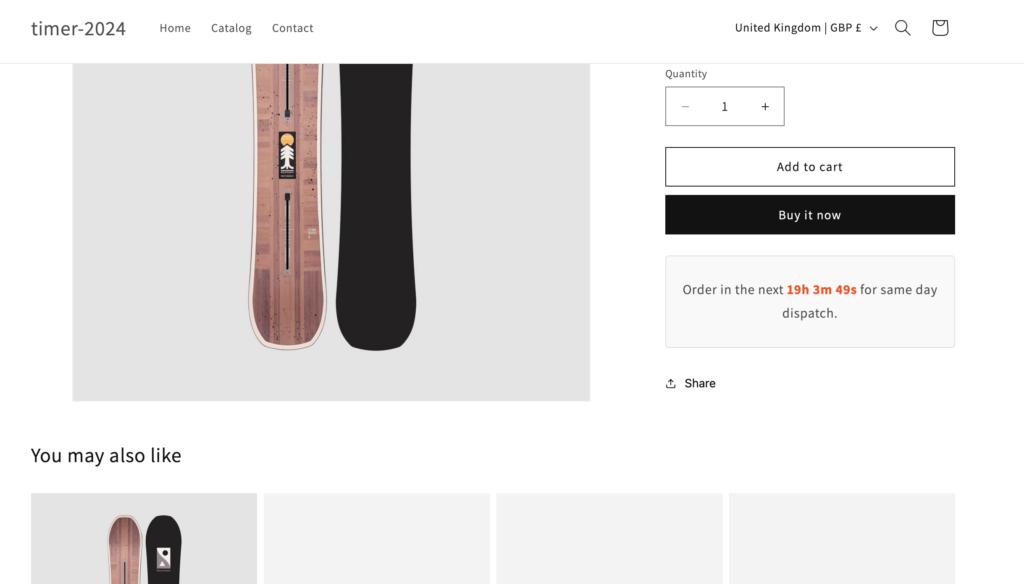
Inform customers of delivery information and create urgency with this countdown timer.
Discover more code snippets to enhance your Shopify store.
View All Sections