
Starting a Shopify store is easier than it used to be, but knowing which apps to install first is still where most beginners get stuck. The best beginner Shopify apps help you launch faster, avoid expensive mistakes, and improve conversions without needing a developer.
In my experience building Shopify apps and reviewing hundreds of app listings, new merchants usually install either too many apps too early or the wrong apps for their stage. A beginner store does not need a bloated stack. It needs a handful of tools that cover the basics: design, trust, marketing, support, and conversion optimisation.
This guide is my updated take on the 10 best Shopify apps for beginners in 2026. I have kept still-relevant picks from the original article, removed outdated advice, and added newer beginner-friendly options that better match what small stores actually need today.
What are the best Shopify apps for beginners?
The best Shopify apps for beginners are the ones that solve core ecommerce problems with minimal setup and free or low-cost plans. For most new stores, that means using apps for page building, reviews, email capture, upsells, SEO, support, and product sourcing.
If I were launching a fresh store today, I would shortlist PageFly, Judge.me, Omnisend, SellUp, and Plug in SEO first. Those five cover a surprising amount of what a beginner actually needs to start selling.
How did I choose these Shopify apps for beginners?
I chose these apps based on ease of use, free plan availability, strong review volume, and whether they solve a real early-stage problem. Beginner merchants need apps that work out of the box, not tools that require weeks of setup.
I also looked at current search intent and the apps that keep coming up in real merchant discussions. Reddit threads, App Store reviews, and merchant support conversations all point to the same thing: beginners want apps that are simple, affordable, and proven.
If you are very early on, you may also want to read How Many Apps Should a Shopify Store Use?. One of the quickest ways to slow down a new store is installing ten apps before you have your first ten orders.
Which Shopify apps should a beginner install first?
A beginner should install apps in priority order, not all at once. Start with the apps that help you launch the storefront, build trust, and capture revenue before adding extra marketing tools.
Here is the order I usually recommend:
- Store design and landing pages
- Reviews and trust signals
- Email capture and abandoned cart recovery
- Upsells and average order value tools
- SEO and speed optimisation
- Support and product discovery tools
- Traffic channels like TikTok or Meta
Best Shopify apps for beginners compared
The table below gives you a quick comparison of the best beginner-friendly Shopify apps covered in this article. These are the apps I would most confidently recommend to a new merchant who wants to get live quickly.
| App | Best for | Free plan | Starting price | My verdict |
|---|---|---|---|---|
| PageFly | No-code page building | Yes | From $18/month | Best for customising a new store fast |
| Judge.me | Product reviews and social proof | Yes | Free core features | Best free trust-building app |
| Omnisend | Email and SMS marketing | Yes | Varies by contact volume | Best for beginner lifecycle marketing |
| SellUp | Upsells and add-ons | Yes | Low-cost paid tiers | Best for increasing AOV early |
| Plug in SEO | SEO checks and fixes | Yes | Paid upgrades available | Best simple SEO starting point |
| Inbox | Customer support chat | Yes | Free | Best free support app |
| Search & Discovery | Site search and merchandising | Yes | Free | Best native Shopify utility app |
| Spocket | Dropshipping | Trial or entry options | Paid plans available | Best for beginners testing dropshipping |
| Printful | Print on demand | Yes | Pay when you sell | Best low-risk product model |
| Page speed/SEO optimiser such as TinyIMG | Speed and image optimisation | Yes | From $14/month | Best for image-heavy stores |
1. Why is PageFly one of the best Shopify apps for beginners?
PageFly is one of the best Shopify apps for beginners because it lets you build high-converting pages without touching code. It is especially useful if your theme feels limiting and you want better homepages, landing pages, and product sections quickly.

PageFly keeps appearing on beginner app lists for a reason. The app has a free plan available, a huge number of reviews, and a drag-and-drop builder that is much easier to work with than editing Liquid files when you are new to Shopify.
When I test beginner stores, design is often the first weak point. Merchants pick a decent theme, then realise they cannot create a proper sales page, collection landing page, or seasonal campaign page. PageFly fills that gap without forcing you to hire a freelancer on day one.
It is also useful if you are running paid traffic. A dedicated landing page usually converts better than sending visitors to a generic homepage. If you are building a one-product brand, this works especially well alongside the ideas in 8 Useful Apps for a One Product Store on Shopify in 2026.
- Best for: beginners who want custom pages without coding
- Pricing: free plan available, paid from $18/month
- Why I like it: fast setup, templates, and strong conversion-focused layouts
2. Is Judge.me the best free review app for a new Shopify store?
Judge.me is one of the best free review apps for a new Shopify store because it gives you core review features without a big monthly cost. Reviews are one of the fastest ways to build trust when you have little brand recognition.

Judge.me is a staple recommendation of mine for beginners. Most new stores struggle with the same issue: visitors do not know whether to trust the products, the brand, or the checkout. Adding visible product reviews solves part of that immediately.
The reason I rate Judge.me so highly is simple. The free version is genuinely useful, setup is straightforward, and you can start collecting social proof early rather than waiting until you can afford a premium reviews platform.
If you are selling products with repeat purchase potential, reviews also improve your product pages over time. They add unique content, answer buyer objections, and often increase conversion rate more than a flashy design tweak ever will.
- Best for: social proof and trust
- Pricing: free core features
- Why I like it: excellent value, easy setup, and strong trust impact
3. How can SellUp help beginners increase average order value?
SellUp helps beginners increase average order value by showing relevant upsell and add-on offers before and after purchase. It is one of the simplest ways to make each order worth more without increasing ad spend.
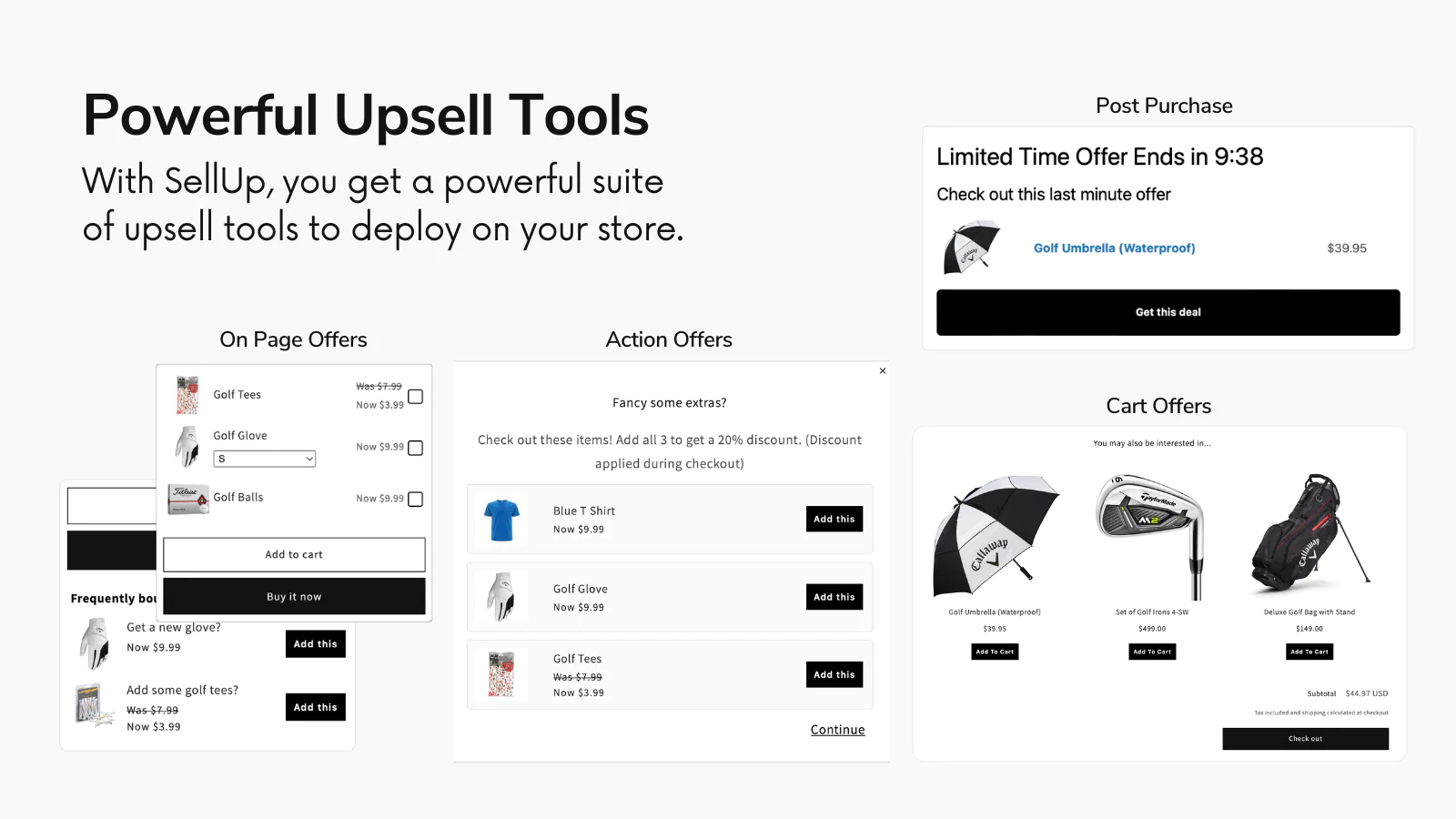

SellUp is one I know particularly well because I built it to solve a common merchant problem. New stores focus so heavily on getting the first sale that they forget how important average order value is to profitability.
In practice, beginners do best with simple upsells. Think warranty add-ons, bundle suggestions, or a complementary item shown in-cart or post-purchase. You do not need an enterprise funnel builder to get results. You need offers that make sense.
When I have reviewed small stores using upsells properly, even a modest improvement in AOV can make paid acquisition much more sustainable. If this is the area you want to improve, you should also read The 3 Best One-Click Upsell Apps for Shopify.
- Best for: boosting AOV with minimal setup
- Pricing: beginner-friendly tiers
- Why I like it: practical upsells, low friction, and useful for small stores
4. Should beginners use Spocket for dropshipping?
Spocket is a good choice for beginners who want to test dropshipping without managing inventory. It is best suited to merchants who want a curated supplier marketplace and easier product importing into Shopify.
Spocket was in the original version of this article, and it is still relevant. For beginners, dropshipping remains attractive because it lowers upfront risk. You can test products and niches without buying stock in bulk.
That said, I think beginners should go into dropshipping with realistic expectations. Product sourcing is only one part of the puzzle. You still need a good offer, clear shipping expectations, and decent branding if you want to compete.
Spocket is most useful when you want to browse suppliers, import products quickly, and avoid the operational headache of holding inventory. If you are deciding between business models, compare this with print on demand before committing.
- Best for: beginner dropshippers
- Pricing: paid plans and entry-level options available
- Why I like it: easy sourcing workflow and lower startup risk
5. Is Printful a better beginner option than classic dropshipping?
Printful can be a better beginner option than classic dropshipping if you want more control over branding and product uniqueness. Print on demand is often easier to differentiate because you are selling your own designs rather than the same catalogue as everyone else.
While the verified app data provided here does not include a direct App Store URL for Printful, it remains one of the most widely used beginner-friendly fulfilment options in Shopify. The appeal is simple: no upfront inventory cost and you only pay when an item sells.
In my experience, print on demand works well for creators, niche brands, and stores built around a specific audience. It is not always the highest-margin model, but it can be a very practical way to validate demand before investing in stock.
If you are choosing between dropshipping and POD, I would say this: dropshipping is often faster to launch, while print on demand is often easier to brand. Beginners usually do better when they can explain why their product is different.
- Best for: creators and niche brands
- Pricing: pay when you sell
- Why I like it: low risk and better brand differentiation
6. What is the best email marketing app for Shopify beginners?
Omnisend is one of the best email marketing apps for Shopify beginners because it is easier to get running than many advanced alternatives. It covers the essentials like popups, welcome emails, and abandoned cart recovery without overwhelming new merchants.

Omnisend is the app I recommend when a beginner asks for something more approachable than a heavy-duty ESP. Email is still one of the most important owned channels in ecommerce, and beginners should set it up early even if their list is tiny.
The key automations are simple. A welcome flow, browse abandonment, cart abandonment, and post-purchase follow-up will cover a lot of ground. You do not need dozens of segments and advanced logic in month one.
For stores that want an easier route to lead capture and retention, Omnisend is a strong fit. If you want more options in this category, our posts on Free CRM Apps for Shopify: 5 Best Options and Best 6 Shopify CRM Apps to Grow Your Business in 2025 are also worth a look.
- Best for: email and SMS basics
- Pricing: free plan available
- Why I like it: beginner-friendly automation and solid ROI potential
7. Do beginners still need an SEO app like Plug in SEO?
Yes, beginners still benefit from an SEO app because Shopify themes and product pages are rarely fully optimised out of the box. An SEO app helps you catch technical issues early and build better habits from the start.
Plug in SEO is a sensible starting point for new merchants who want guidance without hiring an SEO consultant. It helps identify issues around metadata, speed, structured content, and other common setup problems.
I would not tell a beginner to obsess over SEO before they have validated their products. But I would absolutely tell them to avoid basic mistakes that hurt discoverability later. A simple SEO checklist now is much easier than a site-wide cleanup six months from now.
If your store is image-heavy, pairing an SEO app with an image optimiser can help too. TinyIMG is commonly recommended for that reason, especially for stores with lots of product photography.
- Best for: early SEO hygiene
- Pricing: free and paid options
- Why I like it: useful guidance for non-technical merchants
8. What is the best free customer support app for beginners?
Shopify Inbox is the best free customer support app for many beginners because it is built by Shopify, easy to install, and good enough for handling pre-sale questions. Fast answers often mean more sales, especially for new brands that have not built trust yet.
Inbox is one of those apps I think more beginners should use from day one. Customers ask about sizing, delivery times, returns, and product compatibility all the time. If they cannot get an answer quickly, many of them simply leave.
The beauty of Inbox is that it does not add much complexity. It gives you a direct support channel and helps reduce friction in the buying journey. For a new store, that matters more than having a complicated helpdesk suite.
If your products need explanation, support becomes even more valuable. I have seen stores improve conversion just by answering common objections faster and more clearly.
- Best for: live chat and pre-sale support
- Pricing: free
- Why I like it: simple, native, and effective
9. Why should beginners use Search & Discovery?
Search & Discovery helps beginners improve how shoppers find products on site. It is a free Shopify app that can make collections, filters, and search results more useful, which directly improves product discovery.
This is not the flashiest app on the list, but it is one of the most practical. Once a store grows beyond a handful of products, bad search and filtering start to hurt conversion. Shoppers need to narrow down options quickly.
I like recommending native Shopify apps where they are strong because they usually come with less setup friction and fewer compatibility headaches. Search & Discovery fits that pattern well. For a beginner catalogue, it can quietly improve the shopping experience without adding another monthly bill.
- Best for: navigation, filters, and search relevance
- Pricing: free
- Why I like it: practical utility with low maintenance
10. Which traffic apps should beginners use first: TikTok, Facebook, PushOwl, or Instafeed?
The best traffic app depends on your channel strategy, but beginners should usually start with one primary acquisition channel and one retention channel. For many stores, that means TikTok or Facebook for traffic, then email or web push for follow-up.
For retention, PushOwl is worth considering if you want browser push notifications for abandoned carts and campaigns. It can work well for stores that are not ready to rely entirely on email yet.
For social proof and visual merchandising, Instafeed can help bring your Instagram content into the storefront. I would not treat it as a must-have before launch, but it can support brand credibility for visual niches like fashion, beauty, and home decor.
As for paid traffic, the older recommendation in this article around Clever is now outdated. The Clever: Google Ads & Shopping app is no longer available on the Shopify App Store, so I would not build your setup around it. If Google Ads is your main channel, look at current feed and ads tools instead, but only once your product pages and tracking are solid.
- Best for: adding traffic and retention layers after launch
- Pricing: free and paid options depending on app
- Why I like them: useful once your store fundamentals are already in place
What beginner Shopify app stack would I install on a brand new store?
If I were launching a brand new Shopify store today, I would start with a very lean stack. The goal is to launch quickly, measure results, and only add complexity when the data justifies it.
| Store type | Recommended starter stack |
|---|---|
| General beginner store | PageFly, Judge.me, Omnisend, Inbox, Search & Discovery |
| Dropshipping store | Spocket, PageFly, Judge.me, SellUp, Omnisend |
| Print on demand store | Printful, PageFly, Judge.me, Omnisend, Plug in SEO |
| One-product brand | PageFly, SellUp, Judge.me, Delivery Timer, Omnisend |
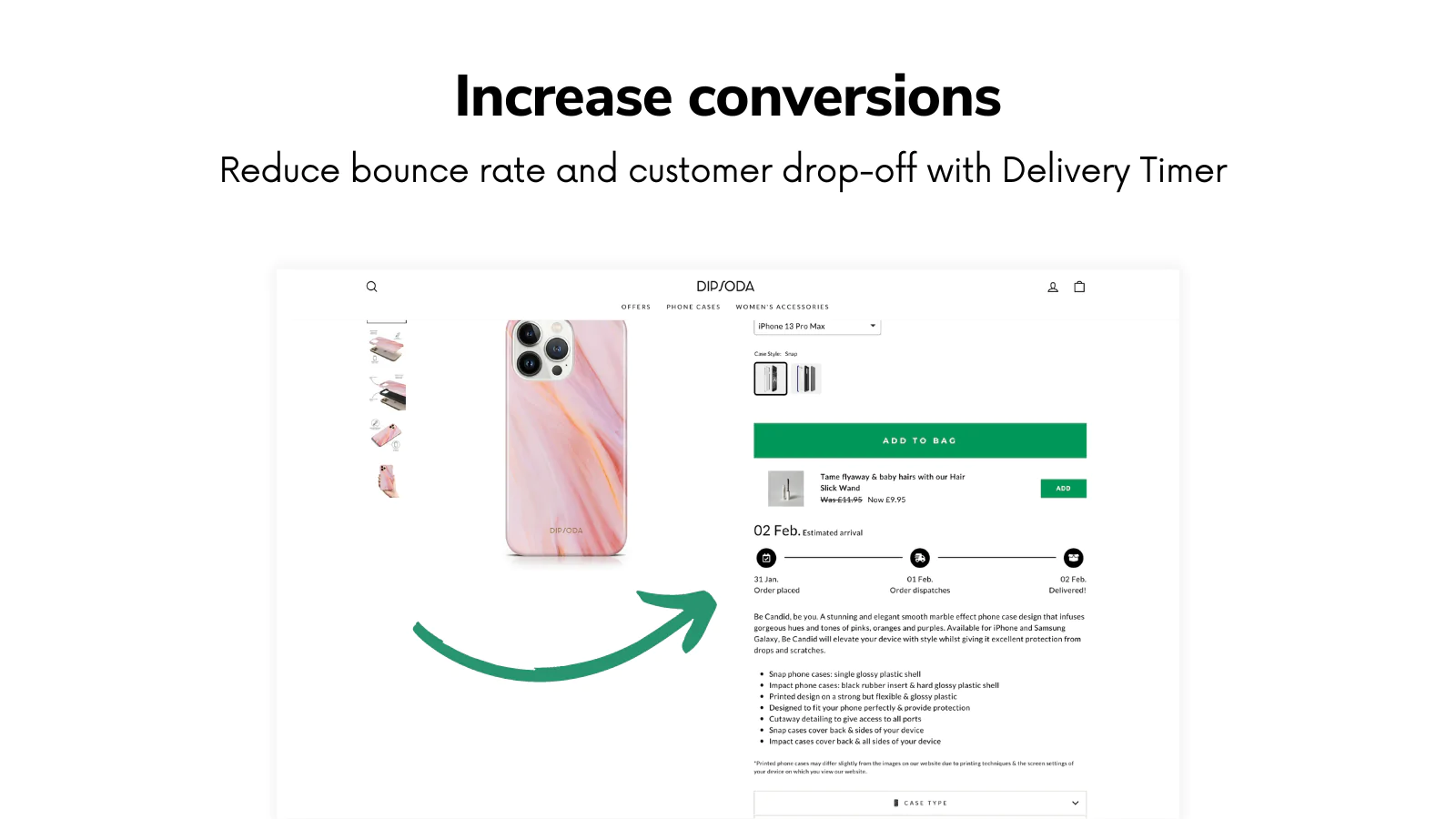
For urgency and shipping clarity, I would also seriously consider Delivery Timer. Showing order deadlines and estimated delivery messaging can reduce hesitation, especially for gift purchases and time-sensitive orders.
What mistakes do beginners make when choosing Shopify apps?
The biggest mistake beginners make is installing too many apps before they understand their actual bottlenecks. More apps do not automatically mean more sales. They often mean more cost, more scripts, and more things to configure badly.
Here are the errors I see most often:
- Installing multiple apps that do the same job
- Paying for premium plans before validating demand
- Ignoring site speed and app bloat
- Choosing flashy apps over trust and conversion basics
- Running paid traffic before email capture and reviews are in place
In my experience building Shopify apps, the merchants who win early are not the ones with the most tools. They are the ones with the clearest offer, the best product page, and a small app stack that actually supports the customer journey.
How do I choose the right Shopify apps for my niche?
The right Shopify apps depend on your catalogue, traffic source, and how customers buy from you. A one-product brand, a florist, and a subscription business should not use the exact same stack.
For example, if you sell gifts or bundles, you may need gifting tools and merchandising support earlier. If you sell subscriptions, recurring billing matters more than page design tweaks. If you run a content-heavy store, blog tools become more important. That is why I always recommend choosing apps based on the next bottleneck, not a generic top-10 list.
If you want more niche-specific recommendations, these guides may help:
- Top 10 Must-Have Apps for New Shopify Stores
- 10 Best PDP Product Detail Page Apps for Shopify for 2026
- Creating Custom Gift Sets in Your Shopify Store
Are free Shopify apps good enough for beginners?
Yes, free Shopify apps are often good enough for beginners, at least for the first stage of growth. Many of the best beginner apps offer free plans that are perfectly usable until you have steady traffic or repeat orders.
Judge.me, Inbox, Search & Discovery, and entry-level versions of page builders or email tools can carry a new store surprisingly far. I usually tell merchants to upgrade only when a paid feature directly supports revenue, saves meaningful time, or replaces two separate apps.
That is also why app consolidation matters. A slightly more expensive app that replaces three smaller tools can be the cheaper and cleaner choice overall.
Final thoughts on the best Shopify apps for beginners
The best Shopify apps for beginners are not necessarily the most advanced ones. They are the ones that help you launch with confidence, build trust quickly, and improve the basics of conversion before you start scaling.
If you want my honest shortlist, start with PageFly, Judge.me, Omnisend, SellUp, and either Spocket or Printful depending on your business model. Then add support, SEO, and traffic tools once you know where your biggest bottleneck is.
That approach is less exciting than installing every app that looks clever, but it is usually how beginners get to their first consistent sales faster.