
I've previously been a Shopify merchant for over ten years, and for some of that time some version of Shopify online store chat has been sitting in the bottom-right corner of some new storefronts. I've watched it evolve from the old Shopify Chat app into Shopify Inbox, answered thousands of "where is my order?" messages at 11pm, and eventually became a Shopify Partner building tools to fix the gaps I kept running into.
This guide covers everything I wish someone had told me earlier: what Shopify online store chat actually is, how to set it up properly, where it quietly costs you sales, the edge cases nobody writes about, and how to upgrade it into a genuine revenue channel with an AI chatbot.
What Is Shopify Online Store Chat?
"Online store chat" is the official name for the chat widget that Shopify Inbox adds to your storefront. Shopify Inbox is Shopify's free, first-party messaging app. Install it, toggle on the online store chat channel, and shoppers get a chat bubble on every page of your store. Their messages land in the Inbox app on your phone or desktop, alongside conversations from the Shop app.
It's free, it's native, and it takes about five minutes to switch on. For a brand-new store, it's a sensible default. But "free and native" is not the same as "good enough" and after a decade of using it, I can tell you exactly where the line is.
How to Add Online Store Chat to Your Shopify Store
If you haven't set it up yet, here's the short version:
- From your Shopify admin, go to Settings > Apps and sales channels and install Shopify Inbox (or grab it from the App Store).
- Open Inbox and go to Appearance to set the chat button colour, position, and greeting so it matches your theme.
- Set up instant answers (saved replies) for your most common questions: shipping times, returns, sizing.
- Turn on notifications in the Shopify Inbox mobile app so messages don't sit unanswered.
- Send yourself a test message from an incognito window before you trust it with real customers.
That's the setup. The harder part is what happens after; because a chat widget is a promise. The moment it appears on your store, shoppers expect someone (or something) competent on the other end.
The Pain Points Nobody Warns You About
These are the problems that made me start looking beyond the default Shopify live chat setup. If you've run online store chat for more than a few months, at least three of these will feel familiar.
1. You are the chatbot
Shopify Inbox has basic automated features, but the heavy lifting is you. Every nuanced question: "will this fit a 6ft person?", "can I ship half the order to a different address?" needs a human reply. When I was a one-person operation, that meant answering chats from the sofa, the school run, and once, memorably, a wedding.
2. After-hours messages are lost sales, not delayed ones
My chat logs showed a pattern for years: a big share of messages arrived between 8pm and midnight; prime browsing time, and by the time I replied the next morning, most of those shoppers were gone. They weren't waiting for my answer; they'd bought elsewhere. Research backs this up: customers now expect near-instant replies, and 62% of CX leaders admit they're behind on delivering the instant experiences customers expect.
3. "Where is my order?" eats your day
WISMO (where is my order) queries were consistently 40–60% of my chat volume. Every one of them followed the same script: ask for the order number, look it up, paste the tracking link.
4. Instant answers are too rigid for real questions
Inbox's instant answers are keyword-triggered saved replies. They work for "what's your returns policy?" and fall apart the moment a customer phrases something slightly differently, asks two things at once, or asks about a specific product. Shoppers notice, and it feels like talking to a vending machine.
5. The chat can't sell
This is the big one. Online store chat is a support tool, not a sales tool. It can recommend products but thats about it. It struggles to suggest complementary items, surface on-the-fly bundles, or walk a shopper from "I'm looking for a gift under $50" to an add-to-cart. Every one of those conversations is a conversion opportunity the default widget leaves on the table.
Niche Edge Cases Where Default Chat Really Struggles
Beyond the everyday pain points, there are scenarios where I've seen Shopify online store chat genuinely break down for merchants I now work with as a Partner:
- Large catalogues. If you carry 500+ SKUs, shoppers use chat as a search engine — "do you have this in navy, in a 42?" A human can't answer that fast enough at scale, and Inbox has no product-aware intelligence to do it for you.
- Multi-language storefronts. Selling into the EU with Shopify Markets? Messages arrive in German, French, and Dutch. Unless your team speaks all three, response quality collapses exactly where you're trying to grow.
- BFCM and sale spikes. Chat volume during Black Friday can be 5–10x normal. That's precisely when replies matter most and precisely when your team is buried. Slow chat during a sale is a refund and a lost customer, not just a delay.
- Pre-orders and backorders. "When will this ship?" on a pre-order product needs a specific, policy-aware answer. Generic saved replies get this wrong and create support debt that lands two weeks later as an angry email.
- B2B and wholesale hybrid stores. Wholesale buyers ask about minimums, tiered pricing, and lead times. Retail shoppers ask about sizing. One saved-reply library can't serve both audiences without confusing each.
- Digital and regulated products. Licence keys, download links, age-restricted goods — these need precise answers pulled from your actual policies, because a wrong answer isn't just unhelpful, it's a liability.
- Time-zone mismatch. UK store, US customers (or vice versa): your entire overnight is their peak shopping window. A chat widget that's only as awake as you are guarantees your best traffic gets the worst service.
What the 2026 Numbers Say About Chat and Chatbots in Ecommerce
When I moved from merchant to Partner, I started paying attention to the data behind what I'd felt anecdotally for years. The 2026 picture is stark:
- 51% of consumers say they prefer interacting with bots over humans when they want immediate service (Zendesk). The stigma is gone — speed wins.
- The same Zendesk research found 68% of consumers expect chatbots to have the same level of expertise as skilled human agents — which is exactly why keyword-triggered saved replies now feel broken.
- One 2026 analysis found shoppers who engage with an AI chatbot convert at 12.3% versus 3.1% for those who don't — roughly a 4x lift.
- Stores using AI-powered recommendation chat report average order value increases of 8–20% from in-chat upsell and cross-sell, plus 10–15% revenue recapture from abandoned-cart conversations.
- 94% of customers now expect 24/7 chat availability — always-on has shifted from differentiator to baseline.
- Retail brands using AI agents routinely deflect half or more of incoming queries without a human touching them, and the global AI-in-retail market is forecast to grow from $9.4 billion to $85.1 billion by 2032 (Fortune Business Insights).
Read those together and the conclusion is hard to avoid: shoppers expect an intelligent, always-on conversation, and merchants who provide one convert meaningfully better. The default Shopify online store chat provides the conversation, but not the intelligence or the always-on.
The Upgrade: An AI Chatbot That Actually Knows Your Store
This is the part I wish had existed ten years ago. After trying most of the chat apps in the ecosystem — some bloated, some priced like enterprise software, some just Inbox with a coat of paint — the approach I now recommend to merchants is Chatkit, a conversational AI chatbot built specifically for Shopify.
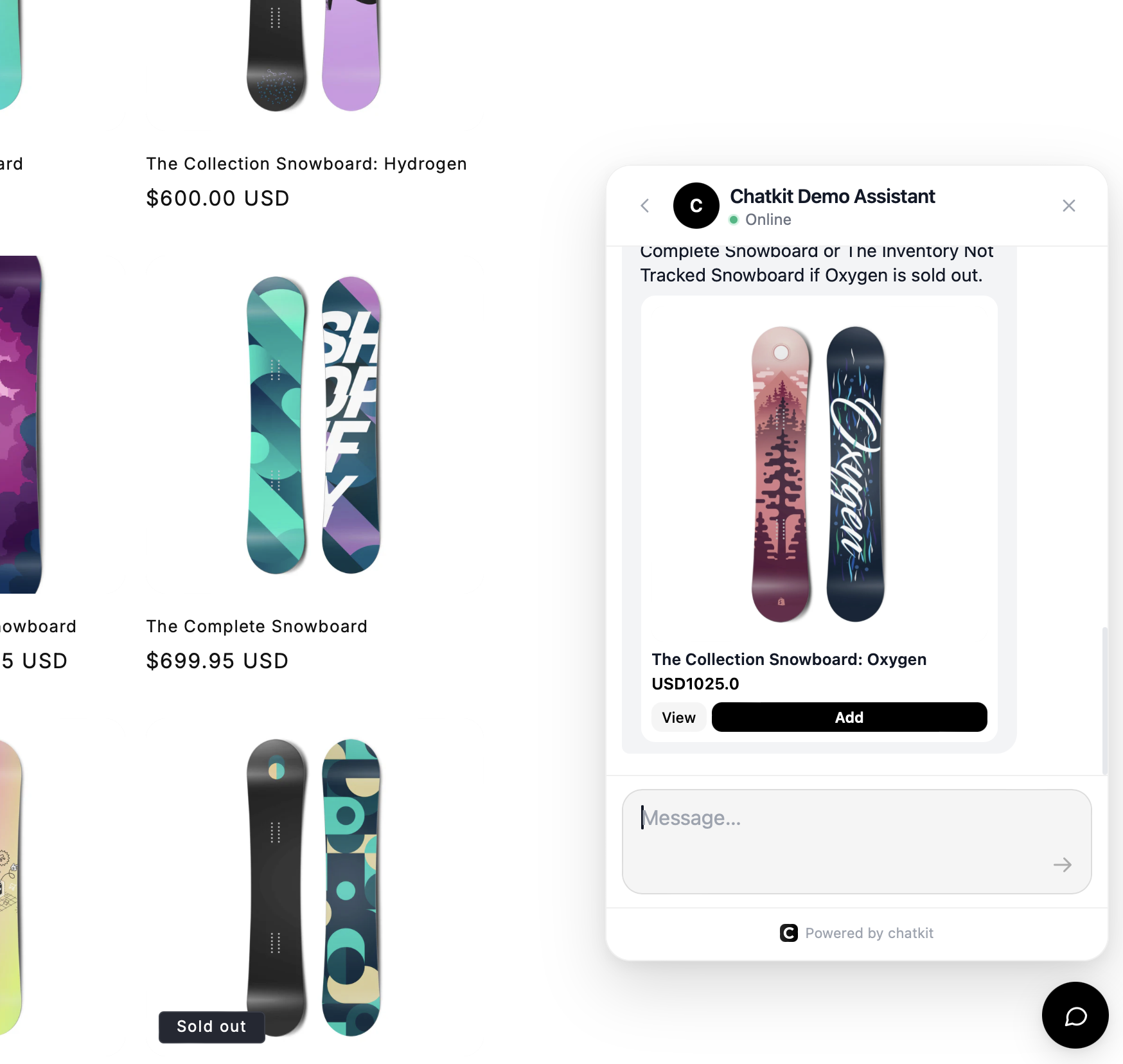
The core difference from default online store chat: shoppers can ask, browse, and buy inside the same conversation. Chatkit is built on your actual products, policies, and store information, so instead of keyword-matched canned replies, it:
- Turns browsing into buying. A shopper asks "something waterproof for hiking under £100" and gets real product suggestions from your catalogue, in the chat, with the path to purchase right there.
- Lifts cart size. It suggests complementary items, bundles, and promotions mid-conversation — the upsell moments a support-only widget never touches.
- Deflects the majority of support questions, 24/7. Shipping, returns, sizing, product specs — answered instantly from your shop's information and supporting knowledge, at 3am on a Sunday, in your customer's peak browsing window.
- Handles WISMO automatically. Live order tracking sits in the same thread, so "where is my order?" resolves itself without you looking anything up.
- Knows when to hand off. When a conversation genuinely needs a human, handoff happens in the same thread — the AI covers the journey from first question to delivery, and you step in only where you add value.
- Matches your brand. The widget is styled to your store, so it feels like part of your site rather than a bolted-on tool.
Setup is genuinely easy. It reads your products and policies rather than making you build decision trees, and there's a free plan, so you can test it against your current chat with zero risk. As someone who has manually answered five-figure volumes of chat messages: the time it gives back is the point.
Shopify Inbox vs. an AI Chatbot: Quick Comparison
| Capability | Shopify Inbox (online store chat) | Chatkit (AI chatbot) |
|---|---|---|
| Price to start | Free | Free plan available |
| Answers after hours | Only via rigid instant answers | Full AI answers, 24/7 |
| Product recommendations in chat | Basic: Limited | Yes — discovery, bundles, promotions |
| Order tracking in chat | Manual lookup by you | Live, automatic, in-thread |
| Understands natural questions | Keyword-triggered replies | Yes — built on your products and policies |
| Human handoff | Everything is human by default | In-thread handoff when needed |
| Best for | Brand-new stores, very low chat volume | Stores that want chat to drive revenue, not just answer it |
My Recommended Setup in 2026
If I were starting a store today, here's exactly what I'd do. Keep Shopify Inbox installed if you like having the Shop app channel. Add Chatkit as your storefront chat and let the AI handle discovery, recommendations, and the support long tail. Review the conversation transcripts weekly, they're the best free market research you'll ever get, because customers tell the chatbot things they'd never put in an email. Step into conversations personally only where a human closes the deal.
That setup gives you what a decade of manually answering online store chat taught me matters most: every shopper gets an instant, accurate, on-brand answer, and you get your evenings back.
FAQ: Shopify Online Store Chat
Is Shopify online store chat free?
Yes. Online store chat is a feature of Shopify Inbox, which is free on all Shopify plans. AI chatbot upgrades like Chatkit also offer a free plan, so you can run intelligent chat without upfront cost.
How do I add live chat to my Shopify store?
Install Shopify Inbox from the App Store and enable the online store chat channel, or install an AI chat app like Chatkit from the Shopify App Store. Either way, the widget appears on your storefront within minutes — no code required.
What's the difference between Shopify Inbox and a Shopify chatbot?
Shopify Inbox is a messaging tool — it routes customer messages to you and offers basic saved replies. An AI chatbot like Chatkit answers autonomously: it understands natural questions, recommends products from your catalogue, tracks orders, and hands off to you only when a human is needed.
Can a chatbot really answer questions about my specific products?
Yes, if it's built on your store's data. Chatkit ingests your products, policies, and supporting knowledge, so its answers reflect your actual inventory and rules rather than generic scripts.
Will an AI chatbot hurt my brand's personal touch?
In my experience, the opposite. The AI absorbs the repetitive 80% of conversations, which means when you do step in, via human handoff in the same thread, you have time to be genuinely personal. And with 51% of consumers preferring a bot when they want immediate service, speed is part of the brand experience now.
The Bottom Line
Shopify online store chat was a fine answer to a 2016 problem: give shoppers a way to reach you. The 2026 problem is different: shoppers expect an intelligent conversation that helps them find, choose, and buy, at any hour, and they convert dramatically better when they get one. Your store can have that conversation for free. Try Chatkit on the Shopify App Store: the free plan takes minutes to set up, and your chat widget stops being a message box and starts being a salesperson.