Shopify chatbot human handoff is the process of letting AI handle routine support first, then transferring the conversation to a real agent when the issue becomes complex, emotional, or high-value. In 2026, this is no longer a nice extra. It is the support model I see working best for Shopify stores that want fast response times without trapping customers in a frustrating bot loop.
In my experience building Shopify apps and working with merchants, the biggest support mistake is not using AI. It is using AI without a clear escape path. Customers are happy to let a bot answer order tracking, shipping windows, and return policy questions, but the second a damaged order, billing issue, or angry message shows up, they want a person who can actually make a judgment call.
If you get the handoff right, you reduce ticket volume, protect CSAT, and give your team more time for the conversations that matter. If you get it wrong, you create the exact kind of support experience that makes shoppers leave and never come back.
What is a Shopify chatbot human handoff?
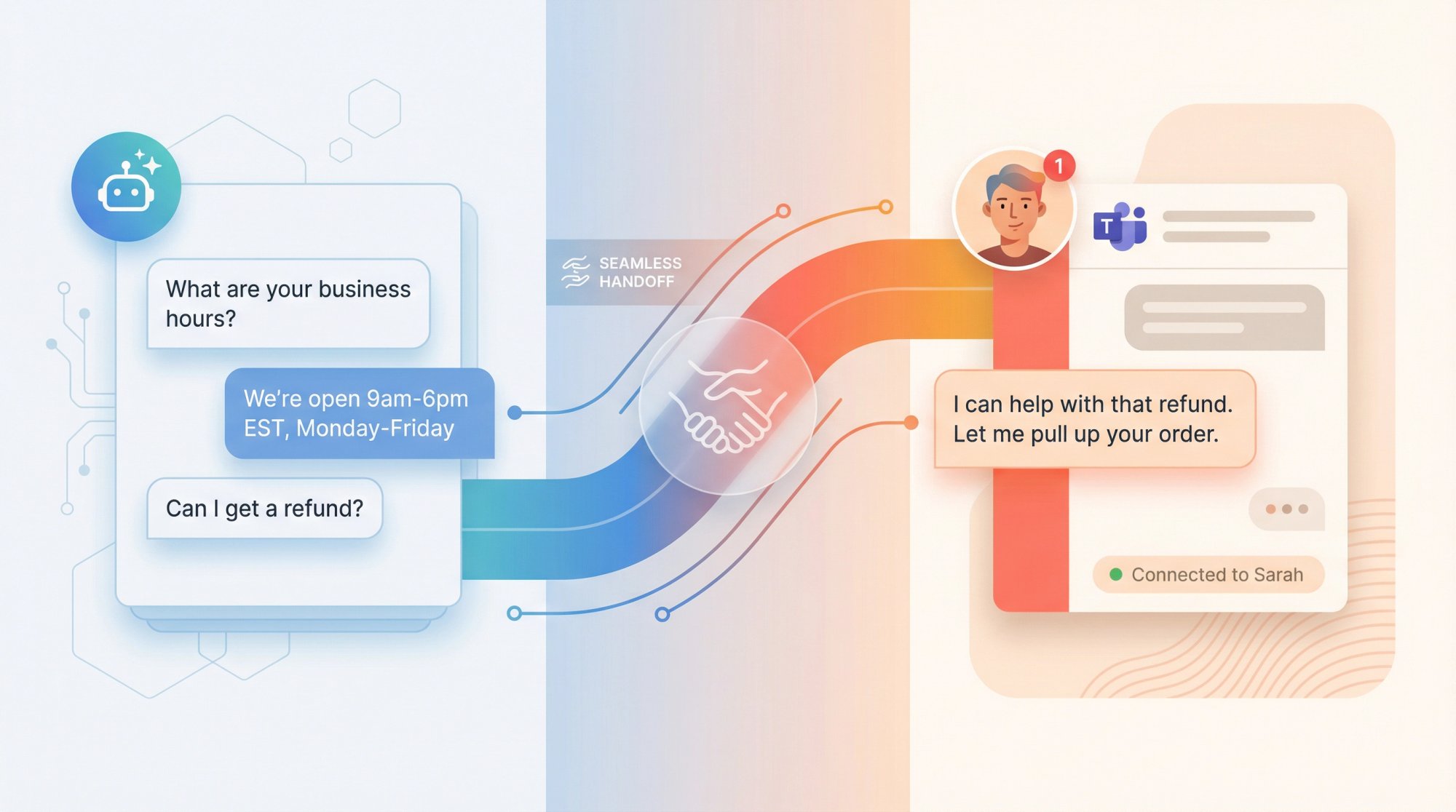
A Shopify chatbot human handoff is a support workflow where an AI chatbot handles the first part of a customer conversation, then passes it to a human agent with full context when needed. The best handoffs are fast, invisible, and context-rich.
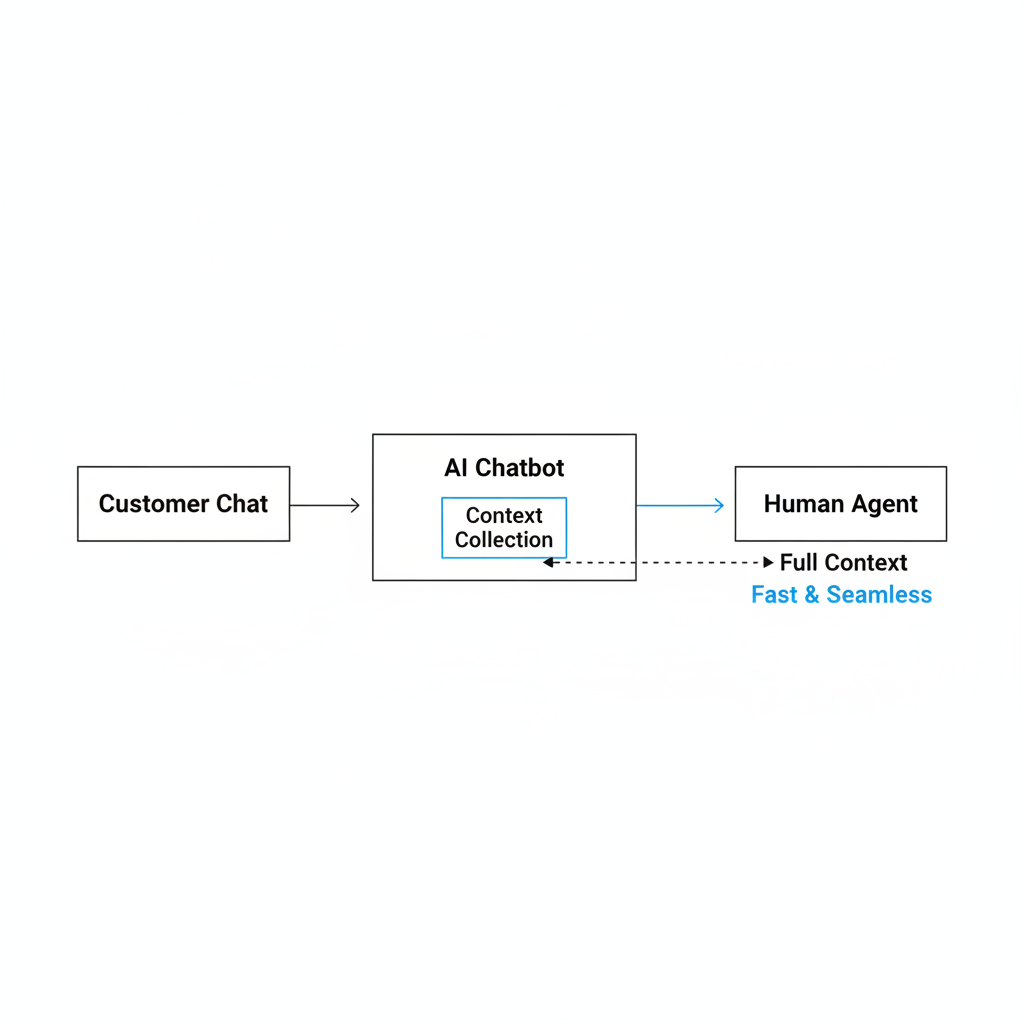
That last part matters most. A handoff is not just a button that says, “talk to support.” A proper handoff includes the full chat transcript, customer intent, order details, sentiment, and any actions already attempted by the bot. When I test support flows, the worst experience is having to repeat everything after escalation.
For Shopify stores, this usually means the bot starts by checking order status, answering policy questions, surfacing product info, or collecting issue details. If the issue crosses a predefined threshold, the conversation moves to a human with enough context to continue naturally.
Why does hybrid support work better than bot-only or human-only support?
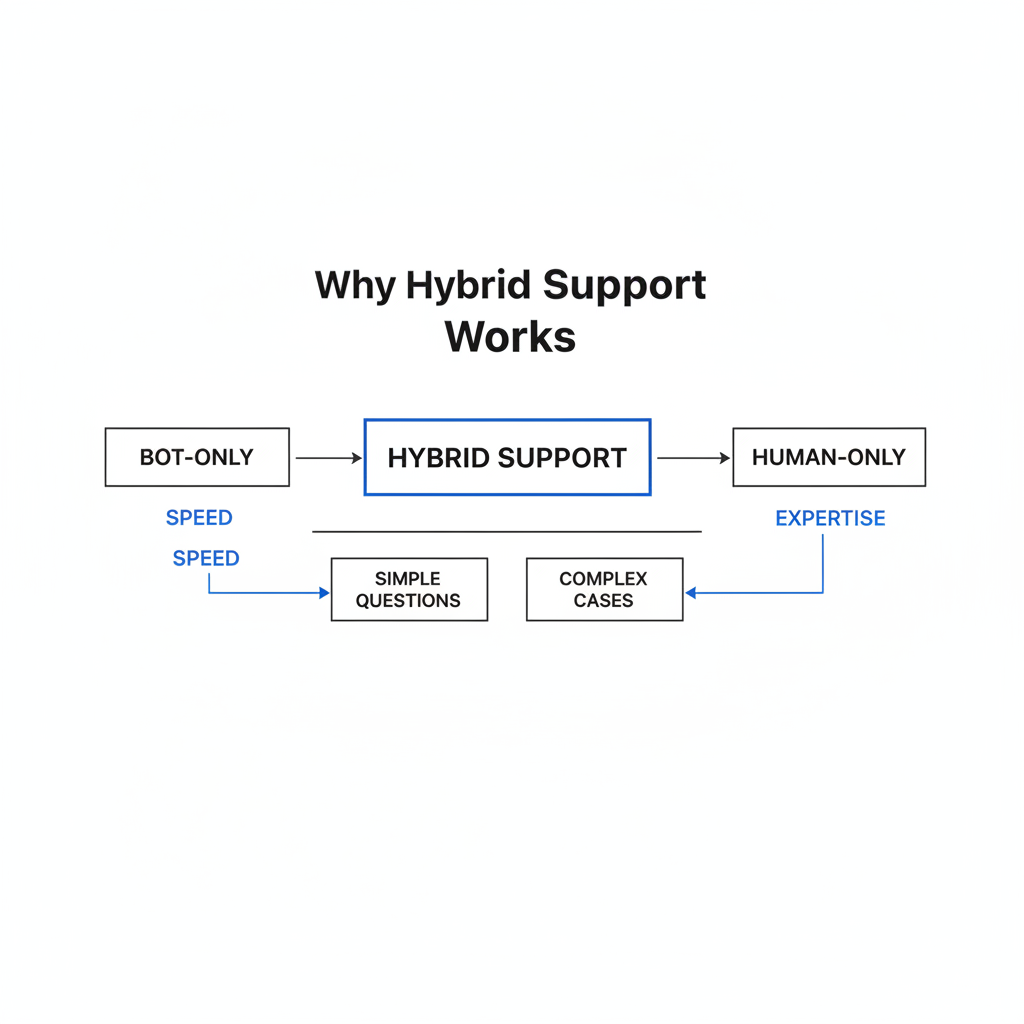
Hybrid support works better because customers want both speed and expertise. Research shows 82% of consumers prefer an immediate chatbot response for simple questions, but they still want a human available for more difficult cases.
That matches what I see in ecommerce. Most support volume is repetitive and predictable. WISMO tickets, shipping windows, return policy questions, account access, and simple product recommendations can often be handled automatically. But emotion, exceptions, and edge cases still need a real person.
There is also a cost angle. AI-native support can cost around $1.00 to $3.00 per resolution, while agent-assisted contacts average $13.50. That is a huge efficiency gap. But if you force everyone through automation forever, you lose the savings anyway because 53% of customers would switch to a competitor if they are stuck in a bot-only loop.
| Support model | Best use case | Main strength | Main weakness |
|---|---|---|---|
| Bot-only | Very simple stores with predictable support volume | Low cost and 24/7 speed | Poor for emotional or complex issues |
| Human-only | Luxury, high-touch, low-volume support | Empathy and judgment | Expensive and slower to scale |
| Hybrid chatbot + human handoff | Most Shopify stores | Balances speed, scale, and customer trust | Needs thoughtful routing and setup |
How much of Shopify support should a chatbot automate?
A chatbot should usually automate 70% to 80% of routine inquiries, then escalate the rest. That is the sweet spot for most Shopify support teams in 2026.
In practice, I would not chase maximum automation just because the vendor demo says you can. The goal is not to make the bot answer everything. The goal is to let the bot handle the repetitive work so your team can spend time where human support actually changes the outcome.
Research also shows that when chatbots handle repetitive questions, 64% of agents can focus on complex problem solving, compared with 50% without that support. That is a meaningful operational improvement, especially for lean DTC teams.
What should a Shopify chatbot automate?
A Shopify chatbot should automate routine, low-risk, high-volume questions. These are the requests where customers care most about speed, not nuance.
- Order tracking and status updates
- Shipping timelines and delivery estimates
- Return policy and exchange rules
- Password resets and account access help
- Product recommendations and catalog search
- Abandoned cart recovery prompts
- Basic discount or promotion questions
These are also the kinds of interactions where Shopify AI tools can create a measurable conversion lift. If you are also using AI for merchandising and upsells, my posts on how to upsell on Shopify leveraging AI and AI-powered upsells pair nicely with a support chatbot strategy.
What should always escalate to a human?
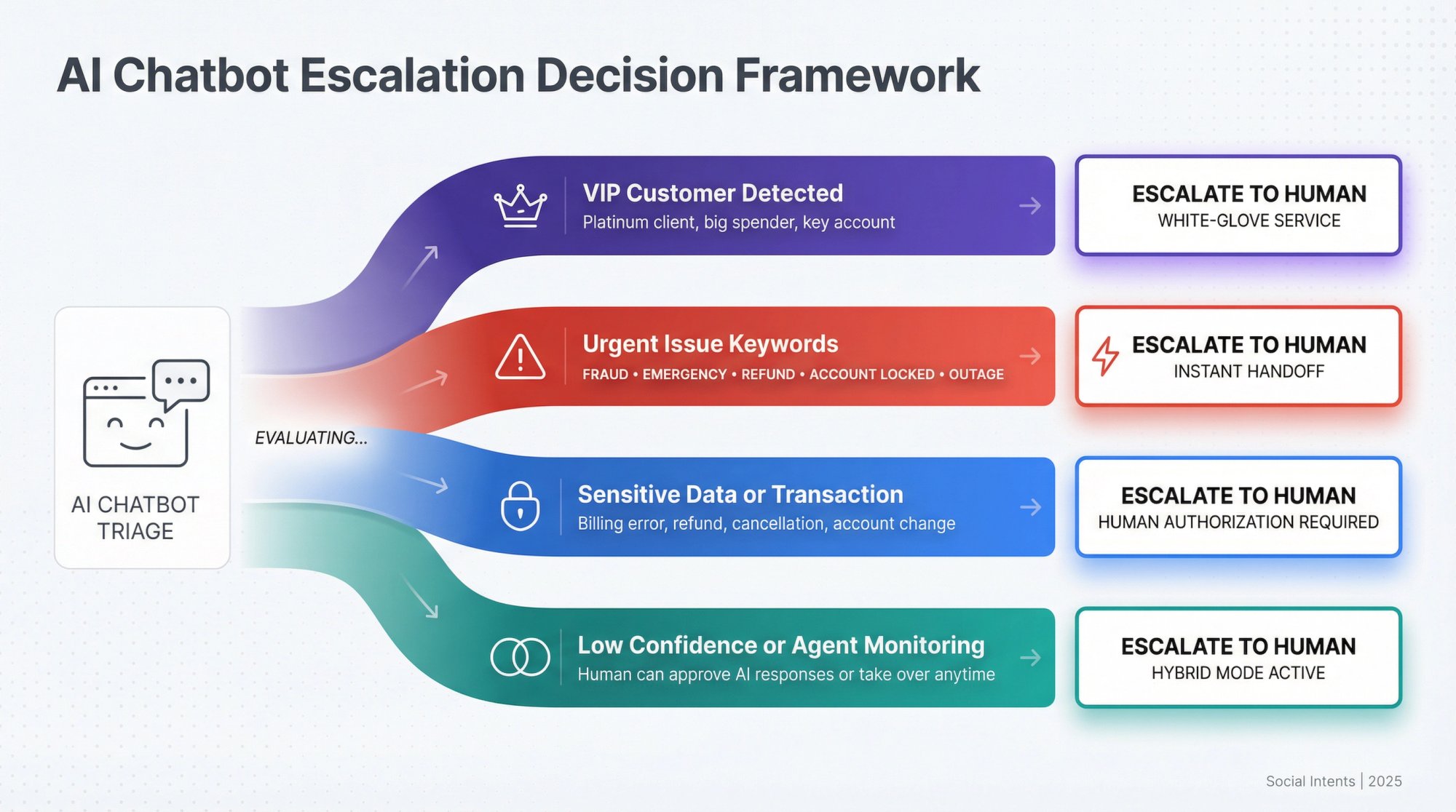
Complex, emotional, or high-risk issues should escalate early. This is where many stores over-automate and damage trust.
- Damaged product complaints
- Double charges or billing disputes
- Subscription cancellations with edge cases
- Custom sizing or specialized product advice
- Technical integration issues
- Angry or frustrated customers
- VIP, wholesale, or high-LTV customer requests
My rule of thumb is simple. If the issue requires judgment, empathy, negotiation, or policy exception handling, let a human take over.
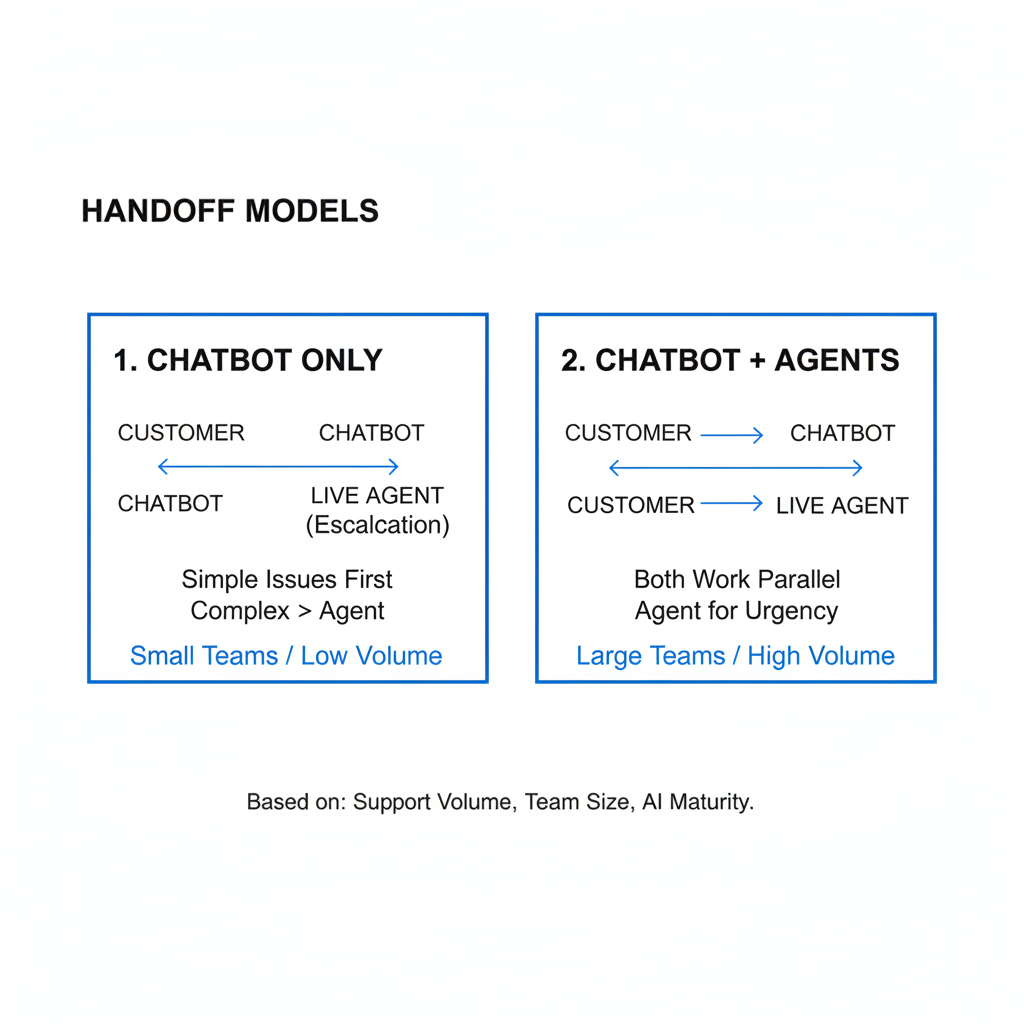
What are the two main handoff models for Shopify stores?
The two main handoff models are chatbot only until escalation and chatbot + agents in parallel. The best choice depends on your support volume, team size, and how mature your AI setup is.
I have seen both models work. The wrong choice is usually not technical. It is choosing a model that does not match your staffing reality.
| Handoff mode | How it works | Best for | Tradeoff |
|---|---|---|---|
| Chatbot only until escalation | AI handles the chat first and escalates only when triggers fire | Lean teams that want maximum automation | Needs strong trigger logic to avoid bad loops |
| Chatbot + agents hybrid | Bot responds while agents monitor chats in real time and can step in anytime | Brands that want higher-touch support or are training a new bot | Requires more staffing coverage |
For most growing Shopify brands, I recommend starting with the second model during setup and training. Once the bot proves it can resolve predictable tickets well, you can move more volume into the first model.
How do I design a seamless Shopify chatbot human handoff?
A seamless handoff needs three things: clear escalation triggers, full context transfer, and smart routing. If any one of those is missing, the customer feels the friction immediately.
This is the section I would spend the most time on if I were implementing support from scratch today. The bot itself matters, but the handoff design is where good support systems become great ones.
1. Set explicit escalation triggers
Escalation triggers are the rules that tell the bot when to stop and bring in a human. The best triggers combine intent, sentiment, and business value.
- Keywords like refund, charged twice, cancel my order, or broken
- Negative sentiment such as repeated frustration or all-caps messages
- Two failed bot responses in a row
- Requests from VIP customers or large order accounts
- Any issue involving policy exceptions
One practical tip: never make the customer beg for a human. If they type “agent,” “person,” or “human,” the bot should comply immediately.
2. Transfer full context to the agent
Full context transfer means the human sees everything needed to continue the chat without making the customer repeat themselves. This is the single most important part of a successful handoff.
The handoff package should include:
- Conversation transcript
- AI summary of the issue
- Customer sentiment or urgency flag
- Order number, fulfillment status, and tracking details
- Customer tags such as VIP, repeat buyer, subscription customer, or wholesale
- Actions already attempted by the bot
When I test support tools, I look for this exact handoff quality. If an agent has to ask, “Can you explain the issue again?” the setup is not ready.
3. Route the chat to the right team
Smart routing sends the customer to the person most likely to solve the issue quickly. This improves resolution speed and lowers internal back-and-forth.
For example:
- Refund or double charge goes to Billing
- App or integration problem goes to Technical Support
- Sizing advice goes to Product Specialist
- Wholesale pricing goes to Sales or Account Management
This sounds obvious, but a lot of stores still route every escalation into one shared inbox. That creates delays the chatbot was supposed to prevent.
How do I implement hybrid support on Shopify step by step?
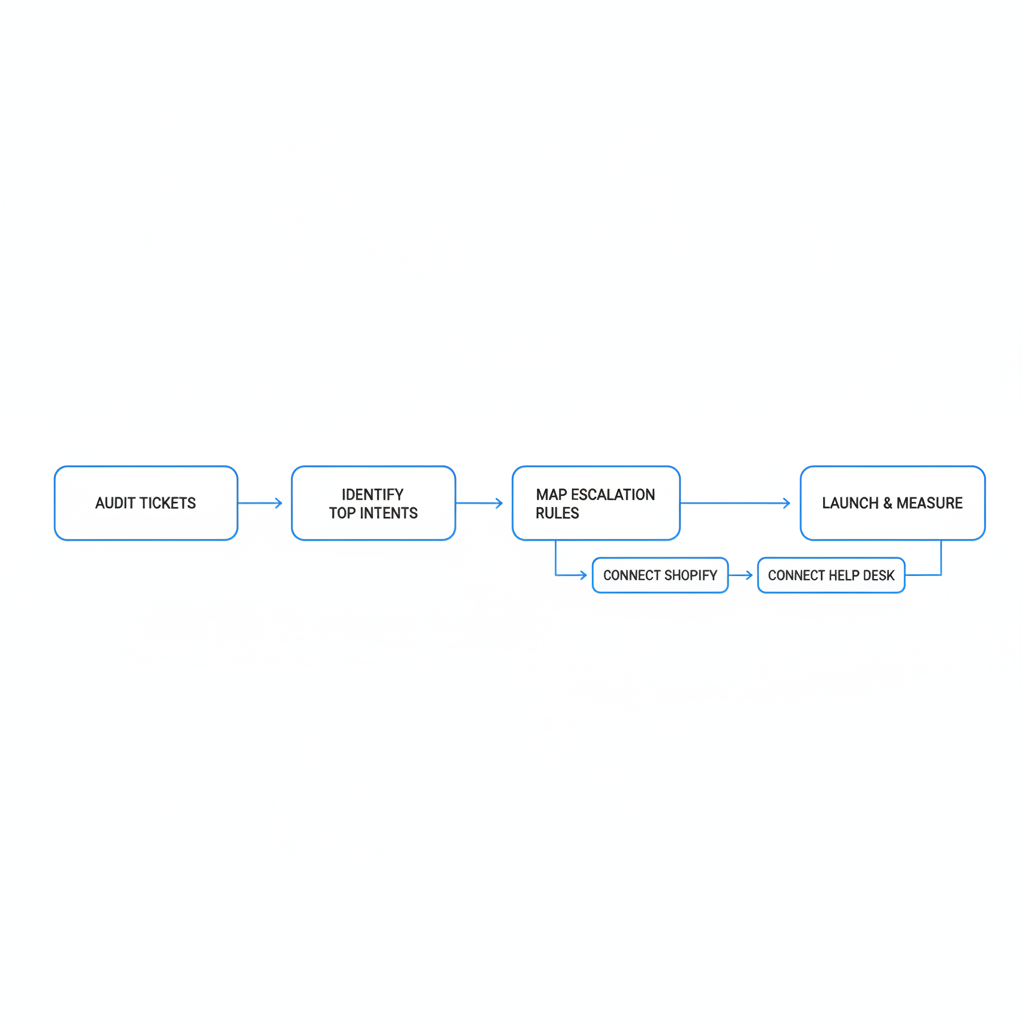
The best way to implement hybrid support is to start with your highest-volume support intents, map escalation rules, then connect your chatbot to Shopify and your help desk. Keep the first version narrow and measurable.
- Audit your last 30 to 90 days of tickets. Group them by topic, complexity, and resolution path.
- Identify the top automatable intents. Usually order tracking, shipping, returns, and product FAQs come first.
- Define escalation rules. Include keywords, sentiment, failed attempts, and customer value signals.
- Connect Shopify data. The bot should pull order status, customer profile, and policy content in real time.
- Connect your help desk or live chat tool. Make sure transcripts and summaries transfer automatically.
- Train on real store content. Use your shipping policy, return policy, FAQ, product pages, and previous solved tickets.
- Launch on limited flows first. Do not automate every path on day one.
- Review failed conversations weekly. This is where the real optimization happens.
If you are also thinking about broader AI adoption in your store, my guides on optimizing for AI shopping agents and getting your Shopify store into ChatGPT cover the discovery side of the same trend.
What is the best app stack for Shopify chatbot human handoff?
The best app stack depends on whether you want support-first automation, sales-first conversational AI, or a more customizable workflow. For most stores, I would evaluate Intercom, Tidio, Gorgias, and specialized AI chatbot tools that integrate with Shopify.
I am careful with “best app” claims because support setup is highly store-specific. A fashion brand with heavy sizing questions needs something different from a supplements store dealing with subscriptions and shipping exceptions.
| Tool | Best for | Strength | Link |
|---|---|---|---|
| Gorgias | Ecommerce help desk workflows | Strong Shopify support operations and macros | Visit site |
| Intercom | AI support with agent collaboration | Good hybrid chat and routing setup | Visit site |
| Tidio | SMBs and lean support teams | Easier setup for smaller stores | Visit site |
| Botpress | Custom AI workflows | Flexible if you want more control | See example |
| Chatkit | Knowledge-based AI assistants | Fast setup from docs and site content | Visit site |
| Zipchat | Shopify-focused AI chat | Sales and support blend | Visit site |
For stores comparing broader support tooling, I would also read my guide to the best apps to manage customer service on your Shopify store.
What metrics should I track for chatbot handoff performance?
You should track automation rate, escalation rate, first response time, resolution time, CSAT, and repeat contact rate. A hybrid system is only good if it improves both efficiency and customer outcomes.
The most common reporting mistake is celebrating bot containment while ignoring whether escalated customers had a worse experience. I would rather see a slightly lower automation rate with better CSAT than a flashy dashboard hiding poor handoffs.
| Metric | What it tells you | Why it matters |
|---|---|---|
| Automation rate | % of chats resolved by AI | Shows efficiency gains |
| Escalation rate | % of chats passed to humans | Shows where AI confidence should stop |
| First response time | How quickly customers get help | Critical for perceived support quality |
| Resolution time | Total time to solve the issue | Measures handoff efficiency |
| CSAT after escalation | Customer satisfaction for human-touched chats | Reveals whether handoffs feel smooth |
| Repeat contact rate | Whether customers come back for the same issue | Highlights bad resolutions or poor summaries |
What mistakes should I avoid with Shopify chatbot human handoff?
The biggest mistakes are over-automation, weak routing, and making customers repeat themselves. These are the problems that turn a helpful AI assistant into a conversion killer.
- Hiding the human option behind too many bot steps
- Escalating too late after customer frustration is obvious
- Passing no context to the agent
- Using generic bot copy that sounds robotic during sensitive issues
- Automating exceptions that need human judgment
- Not reviewing failed chats every week
In my experience, over-automation is the most expensive error because it looks efficient on paper while quietly hurting retention. If a customer is upset about a damaged order, they do not want a clever AI answer. They want confidence that someone is taking ownership.
A good chatbot reduces effort. A bad chatbot adds another layer of it.
How do I write better handoff messaging for Shopify support?
Good handoff messaging should reassure the customer, confirm what was understood, and explain what happens next. The best copy sounds calm and competent, not overly clever.
Here are a few examples I like:
- Order issue: “I found your order and gathered the details. I’m bringing in a support specialist now so you do not need to repeat anything.”
- Billing issue: “This looks like a billing question that needs a human review. I’ve passed your conversation and order details to our billing team.”
- Frustrated customer: “I’m sorry this has been frustrating. I’m escalating this to a support agent now with the full conversation so they can help faster.”
That small reassurance matters. It tells the customer the handoff is intentional, not a failure.
Is hybrid support worth it for small Shopify stores?
Yes, hybrid support is worth it for small Shopify stores if you keep the scope tight and automate only the most repetitive requests first. It is often best for small stores because it gives a tiny team more coverage without hiring immediately.
For a one-person or two-person support setup, I would start with order tracking, shipping FAQs, and return policy answers. That alone can remove a large chunk of repetitive tickets. Then add human handoff for everything else.
Small stores should be especially careful not to chase enterprise complexity too early. You do not need a huge CX stack on day one. You need a bot that can answer the obvious questions well and route the rest cleanly.
What is my recommended hybrid support setup for 2026?
My recommended setup is simple: let AI handle the repetitive first layer, escalate early for emotion or complexity, and make sure humans receive a full summary with Shopify context. That is the version of shopify chatbot human handoff that actually improves customer experience.
If I were setting this up for a Shopify merchant today, I would aim for 70% automation on routine tickets, immediate escalation on billing or damaged order issues, and weekly review of failed bot conversations. I would also make sure the chatbot is connected to live order data, not just a static FAQ.
Hybrid support is not about replacing your team. It is about protecting their time for the conversations where people still outperform AI by a mile. In 2026, that is the practical middle ground that wins.
For more on support operations and customer data workflows, you may also find these useful: Shopify CRM strategies to reduce order errors and how to manage Shopify customer data without losing sales.
Useful external references on this topic include Botpress on Shopify chatbots, Certainly's hybrid support playbook, Social Intents on AI chatbot handoff, and Shopify itself for platform context.