
Yes, you can redirect customers to a page after payment in Shopify, but the best method in 2026 depends on whether you want a simple thank you page link, an automatic redirect, or a full post-purchase upsell flow. In most cases, Checkout Extensibility is now the correct foundation, because Shopify has deprecated the old Additional Scripts approach for Thank You and Order Status pages.
In my experience building Shopify apps, this is one of those tasks that sounds simple but quickly gets messy if you use the wrong method. Merchants often ask for a redirect to an onboarding page, a digital download page, a booking form, a course portal, or an external upsell URL. The good news is that it is still possible. The bad news is that the old JavaScript hack is no longer a future-proof option.
If you are searching for the best way to redirect customers after payment in Shopify, this guide covers what still works, what Shopify has deprecated, and which option makes sense for your store size and technical setup.
Can Shopify redirect customers to a custom page after payment?
Yes, Shopify can redirect customers after payment, but not in the same way it used to. The modern options are Order Status Page extensions, checkout-compatible apps, or a controlled post-purchase flow rather than direct legacy script injection.
That distinction matters. A lot of forum threads and older tutorials still mention editing Additional Scripts under checkout settings, but Shopify has been moving merchants towards Checkout Extensibility for a while now. If you build on the old setup today, you are effectively creating technical debt for yourself.
For most merchants, the practical answer is this:
- Use an app if you want the easiest route
- Use a Checkout Extensibility app extension if you need something tailored
- Use a button-based redirect if you want the safest user experience
- Avoid relying on Additional Scripts unless you are dealing with a temporary legacy store setup
What changed with Shopify checkout customisation?
Shopify replaced legacy checkout script customisation with Checkout Extensibility. That means the old Thank You page and Order Status page script injection workflow is deprecated and should not be treated as a long-term solution.
Shopify has been steadily tightening control over checkout for performance, security, and upgradeability. From a platform point of view, I understand why. As an app developer, I have seen too many stores break core checkout behaviour because of small snippets pasted into legacy script boxes years ago and then forgotten.
Important update: the old Additional Scripts method on Thank You and Order Status pages is now deprecated. Merchants who still see that box in admin should treat it as legacy only. Shopify's current direction is documented through its developer resources and checkout upgrade guidance, and the safe assumption is that extensions, pixels, and approved app blocks are the future.
If you are also trying to optimise the wider checkout journey, my guide on The Shopify Checkout Guide: Everything You Need to Know is a good companion read.
What is the best way to redirect customers after payment in Shopify?
The best way to redirect customers after payment in Shopify is to use a Checkout Extensibility-compatible method, usually either an Order Status Page extension or a dedicated app. For most non-technical merchants, an app is the fastest and safest option.
There is no single best method for every store, because the use case changes the answer. Redirecting to a simple internal thank you resource page is different from redirecting buyers of one specific product to an external membership portal. Likewise, redirecting all orders is different from redirecting only customers who bought a particular SKU.
Here is the comparison I would use if I were choosing for a client or for one of my own Shopify app properties.
| Method | How it works | Pros | Cons | Best for |
|---|---|---|---|---|
| Order Status Page extension | Uses Checkout Extensibility to customise the post-purchase experience | Native, upgrade-friendly, flexible, can support button or guided redirect flows | Usually requires app development or technical help | Custom workflows, onboarding, digital fulfilment, branded post-purchase journeys |
| Shopify app | Installs a managed redirect or post-purchase flow | Easy to set up, low maintenance, often no coding | Monthly cost, feature limits vary by app | Most merchants who want a quick solution |
| Custom pixel | Uses customer events for tracking or limited logic | Useful for event-based workflows and analytics | Not a direct replacement for old top-level redirect scripts | Developers with specific event handling needs |
| Additional Scripts | Legacy JavaScript on order status page | Simple in older stores | Deprecated, unreliable long-term, should be migrated away from | Short-term legacy reference only |
How do I redirect customers after checkout using an app?
Using an app is the easiest way to redirect customers after payment in Shopify. It is usually the best choice if you want a working setup quickly without building your own checkout extension.
One app worth looking at is Thank You Redirect. This type of app is useful when you want to send customers to a custom page after checkout, whether that is a branded thank you page, a special offer page, or an onboarding destination.

In the Shopify ecosystem, I generally recommend apps when the merchant wants one of these outcomes:
- Redirect all customers to one page after payment
- Redirect buyers of specific products to a different destination
- Send customers to an external URL after purchase
- Run post-purchase upsells before or after the thank you page
Depending on the store's goal, you may also want to evaluate apps focused on post-purchase upsells rather than pure redirects. Community discussions often mention tools like ReConvert and AfterSell for post-purchase flows, especially where the redirect is part of a broader upsell strategy rather than just navigation.
My practical advice: if the redirect has commercial value, such as sending customers to a one-time offer or bundle page, use a post-purchase app built for conversion. If the redirect is operational, such as sending customers to a booking form or onboarding page, a dedicated redirect app is usually cleaner.
How do I set up a redirect app in Shopify?
Most redirect apps are straightforward to set up. You install the app, choose the destination URL, define any conditions, and test the flow with a real or test order.
- Install a compatible app such as Thank You Redirect
- Open the app settings in your Shopify admin
- Choose your target URL, such as an onboarding page or offer page
- Set conditions if supported, for example by product, order value, or collection
- Save and publish the configuration
- Place a test order and verify the post-payment behaviour
Always test on mobile as well as desktop. In my experience, merchants often validate the redirect on desktop only, then discover that the mobile browser handles the transition differently.
How do I redirect customers after payment using Checkout Extensibility?
The most future-proof custom method is to use an Order Status Page extension built on Checkout Extensibility. This is Shopify's preferred route for post-purchase page customisation.
If you are a developer, or working with one, this gives you the most control. You can add content blocks, buttons, messaging, and conditional logic based on the order context. In some cases, a button-based redirect is better than an automatic redirect because it reduces confusion and gives the customer a clear action.
Shopify's developer documentation for checkout customisation is here: Shopify Checkout Extensibility. For many stores, the ideal implementation is not a forced redirect the second payment completes. It is a post-purchase block with a clear message like "Your order is confirmed. Click here to access your onboarding page".
That approach tends to be more robust for:
- Digital products
- Course access
- Appointment booking after payment
- Warranty registration
- B2B order follow-up flows
If you sell subscriptions, services, or custom products, this route is often better than a hard redirect because it keeps the order confirmation context visible while still guiding the customer to the next step.
Should I use an automatic redirect or a button on the thank you page?
A button-based redirect is usually safer, while an automatic redirect is more aggressive. The best option depends on whether you prioritise user clarity or funnel control.
I generally prefer a button if the customer may need to review order details, save the confirmation, or return later. An automatic redirect can feel abrupt, especially if the destination is external. It can also create support tickets when customers think their order confirmation page disappeared too quickly.
Automatic redirects still make sense in some cases, such as:
- Single-purpose funnels
- One-product offers
- Dedicated upsell sequences
- Closed-loop onboarding flows where the next step must happen immediately
If your real goal is to increase order value after checkout, you may also want to review broader upsell mechanics. I have covered related tactics in How to Optimize Shopify Checkout & Increase Conversions.
Can I redirect customers to different pages based on what they bought?
Yes, product-specific redirects are possible, but they are much easier with an app or a custom extension than with legacy code. This is one of the most common use cases I see.
For example, you might want:
- Customers who buy Product A to go to a setup guide
- Customers who buy Product B to go to a booking page
- Customers who buy a digital product to go to a download portal
- Customers who buy from a specific collection to go to a matching upsell page
Older code snippets often checked line item product IDs and then redirected if there was a match. That worked in the legacy era, but today I would strongly avoid building a new store workflow around deprecated checkout script logic. If you need conditional routing, use a managed app or build it properly with Shopify's newer framework.
This is especially important if you are also using custom cart links or pre-filled carts in your funnel. If that is part of your setup, my guide on creating a unique URL to add a product to Shopify cart can help connect the pre-purchase and post-purchase journey.
Can I redirect customers to an external URL after payment?
Yes, Shopify can send customers to an external URL after payment, but you should handle it carefully. External redirects are common for membership sites, course platforms, booking tools, and third-party fulfilment or registration systems.
From a technical point of view, this is possible through apps or custom implementations. From a user experience point of view, it needs a bit more thought. If a customer lands on a completely different domain immediately after paying, it can feel jarring unless the messaging is clear.
When I test these flows, I look for three things:
- Does the customer still understand their order succeeded?
- Is the destination branded and expected?
- Can the customer get back to their order confirmation if needed?
If the answer to any of those is no, I usually recommend a thank you page message plus a button rather than an instant redirect. That is often the better balance between conversion and trust.
What about Custom Pixels in Shopify?
Custom Pixels are useful for customer events and tracking, but they are not a like-for-like replacement for old redirect scripts. They can support parts of your logic, but they are not the first method I would choose for a straightforward post-payment redirect.
Shopify's customer events system lives under Settings > Customer events. Developers can use it for analytics, attribution, and event handling. However, because of how pixels run, including iframe and sandbox constraints, you cannot assume an old top-level redirect snippet will behave the same way there.
In practice, I see Custom Pixels as useful for:
- Tracking successful purchases
- Sending conversion events to ad platforms
- Triggering downstream workflows outside Shopify
I do not see them as the best primary answer for merchants who simply want customers sent to a page after payment.
Is the old Additional Scripts redirect method still usable?
No, not as a long-term solution. The legacy Additional Scripts method is deprecated and should only be referenced so you can identify and replace old code still sitting in your store.
That matters because many older blog posts, Stack Overflow answers, and community snippets still surface in search results. Some of them are technically correct for older stores, but they are no longer the right recommendation for a merchant setting this up today.
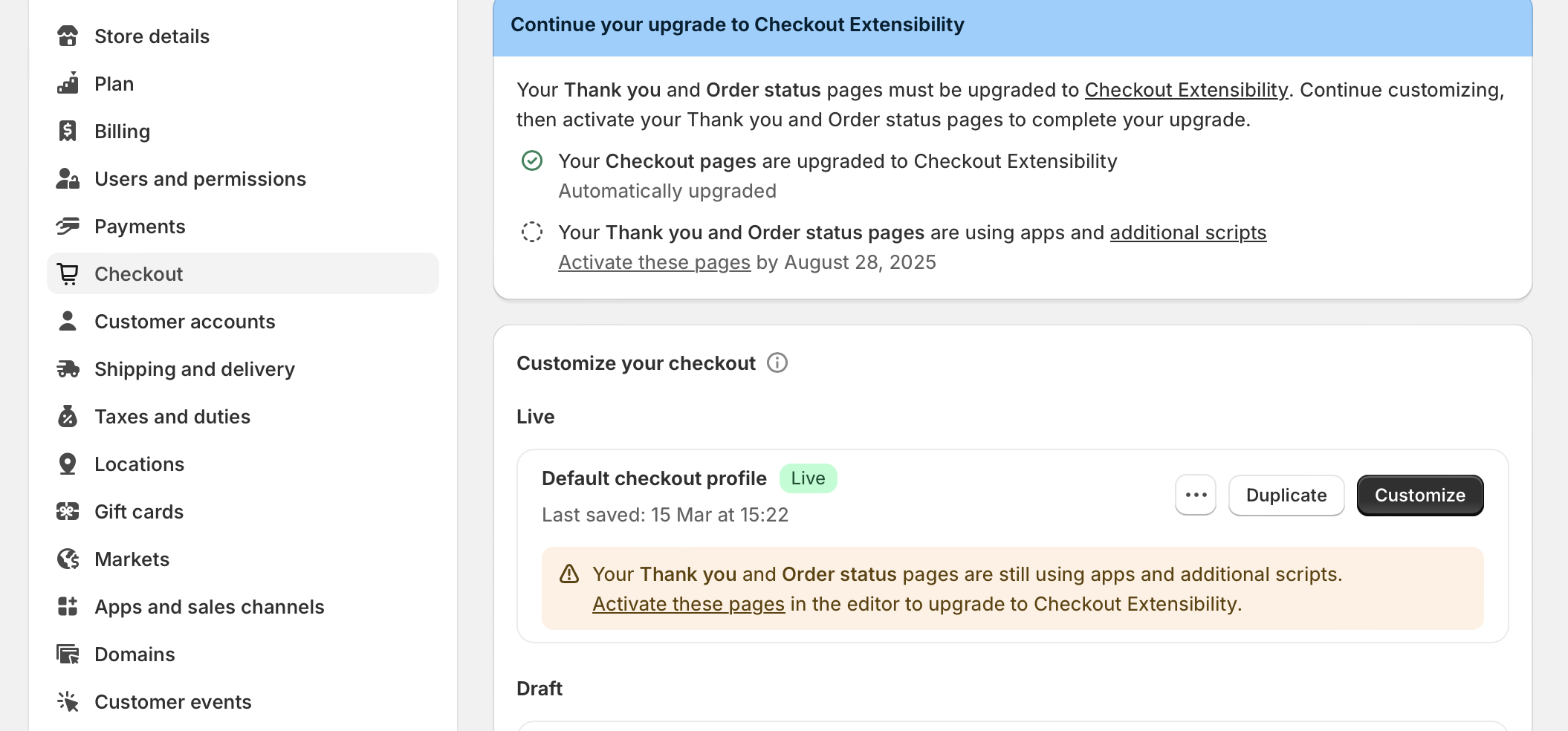
Previously, merchants would go to Settings > Checkout and paste JavaScript into Additional Scripts on the order status page. That approach was attractive because it was quick, but it was also fragile.
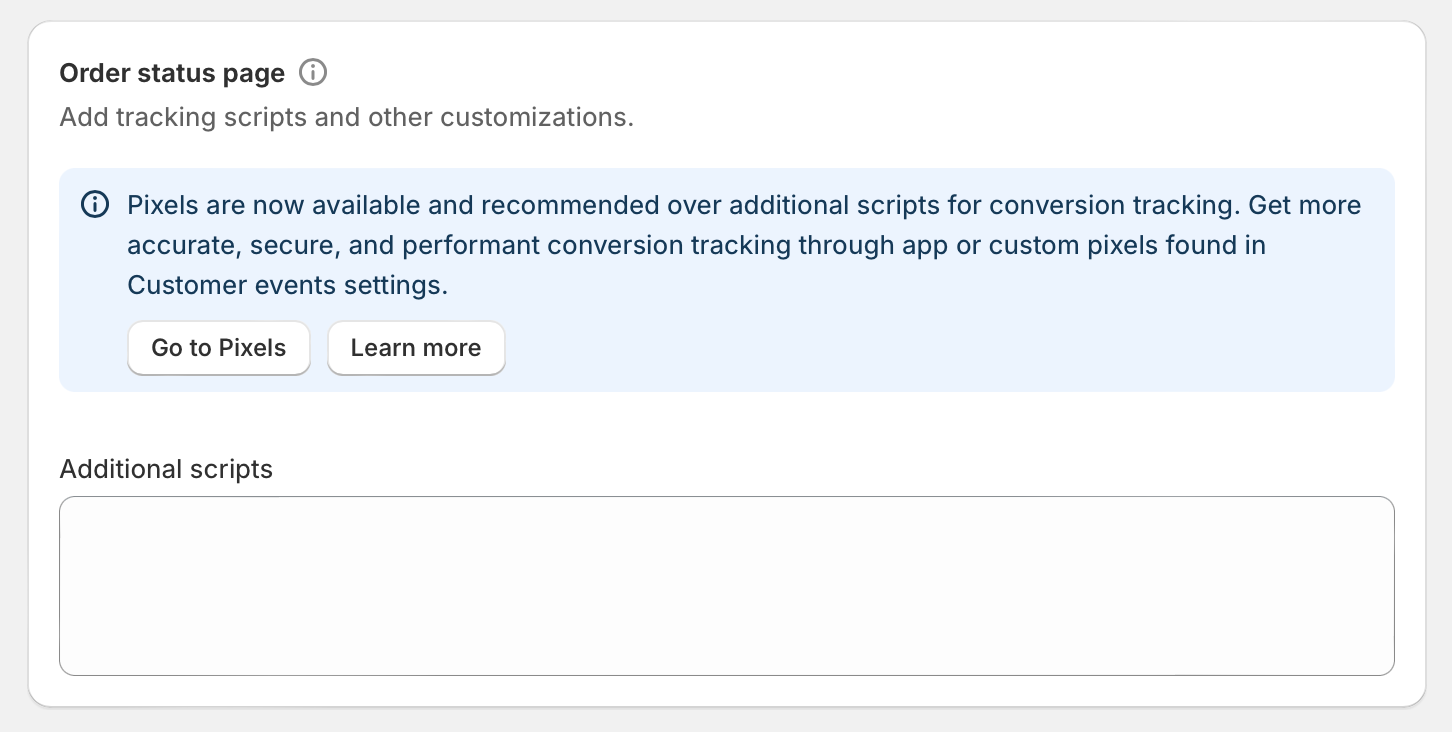
try {
   let redirect_url = 'https://example-page-link.com/your-page';
   let redirect_prod_ids = [1651456314292, 1651496847236];
   let order_line_items = Shopify.checkout.line_items;
   for( var i=0; i<order_line_items.length; i++ ){
      if( redirect_prod_ids.includes( order_line_items[i].product_id ) ){
         window.top.location.href = redirect_url;
      }
   }
}catch(err){
   //if errors happen in the above code, do nothing
}
This code is legacy only. It is included here because merchants still encounter it in old tutorials and inherited store setups, not because I recommend implementing it in 2026.
If you are auditing an older store, search for snippets like window.location.href, window.top.location.href, or checks against Shopify.checkout.line_items. Those are signs you likely have a migration job to do.
How do I migrate from legacy redirect scripts to a modern Shopify setup?
The best migration path is to replace old Additional Scripts logic with either an app or a Checkout Extensibility-based solution. The exact route depends on whether your redirect is simple, conditional, or part of a larger post-purchase funnel.
- Audit your current setup and identify any legacy redirect snippets
- List the redirect rules, such as all orders, specific products, or external destinations
- Choose the new method - app for speed, extension for flexibility
- Build or configure the new flow in a test environment
- Run test orders across desktop, mobile, and different payment methods
- Remove the old script logic once the new flow is confirmed
In my experience, the biggest migration mistake is not documenting the old logic first. Merchants often remember they had a redirect, but forget it only applied to one product, one country, or one campaign. Write down the exact behaviour before replacing anything.
If your current setup also relies on custom checkout links or direct-to-checkout flows, you may want to review how to skip the cart and go straight to checkout on Shopify so the full journey stays consistent.
What are the common mistakes when redirecting customers after payment?
The most common mistakes are using deprecated methods, redirecting too aggressively, and failing to test real checkout scenarios. These are avoidable, but they show up often.
- Using outdated tutorials that rely on Additional Scripts
- Forcing an external redirect without clear messaging
- Not testing accelerated payment methods like Shop Pay
- Ignoring mobile behaviour and browser differences
- Breaking analytics by redirecting before key events are captured
- Failing to preserve access to order confirmation details
This last point is especially important. The thank you page is not just a conversion page. It is also a reassurance page. If your redirect removes that reassurance too quickly, you may gain a click but lose trust.
What should I use for different Shopify post-purchase scenarios?
The right redirect method depends on the business goal. If you match the method to the use case, implementation is much easier.
| Scenario | Recommended method | Why |
|---|---|---|
| Send all customers to a branded thank you page | Redirect app | Fast to launch and easy for non-developers |
| Show a post-purchase upsell | Upsell app | Built for AOV growth and conversion tracking |
| Send buyers of a specific product to onboarding | Conditional app or custom extension | Supports product-level logic |
| Send customers to an external portal | App or extension with clear CTA | Better trust and fewer support issues |
| Complex B2B or service workflow | Order Status Page extension | Most flexible and maintainable |
What do I recommend as a Shopify app developer?
I recommend avoiding any new dependency on legacy checkout scripts and choosing either a managed app or a proper Checkout Extensibility build. That is the most sustainable answer for 2026 and beyond.
When I look at this through the lens of app development, the priority is not just making the redirect work today. It is making sure it still works after Shopify updates checkout again. That is why I favour solutions aligned with Shopify's current architecture, even if they take a little more setup.
If you want the shortest route, start with Thank You Redirect and test whether it covers your exact use case. If your needs are more advanced, especially if you need product-specific or branded post-purchase logic, invest in a custom extension or a specialist post-purchase app.
And if your real objective is not just redirection but conversion optimisation, make sure the post-purchase page is part of a bigger system. Redirects, upsells, custom cart links, and checkout design all work together. For related setup work, you may also find these useful:
- How to Add a Free Gift to Shopify Cart
- How Best to Add Shopify Related Products to a Product Page
- Shopify URL redirect documentation
- Shopify Community discussion on custom URL redirects after checkout
If you are setting this up today, the best answer is simple: use a modern, checkout-compatible method and test it properly. That will save you time, protect the customer experience, and keep your store aligned with where Shopify is heading.