New
Order Tracking Help Page
A Track your order page with steps, carrier links, common questions and a help box.
A contact form with a honeypot, a time check and link blocking to stop spam.
Important: Before making any changes to your theme, duplicate it in Online Store > Themes so you have a backup.
Shopify contact forms attract a steady stream of bot spam. This form keeps Shopify's own protection and adds three more layers: the form has no address to post to until JavaScript runs, a hidden honeypot field catches bots that fill in everything, and messages sent too quickly or full of links are stopped.
Get in touch
Name
Message
Preview with the default settings. Colours, text and layout can all be changed in the theme editor.
In Shopify admin go to Online Store > Themes. Next to the theme you want to edit, click the three dots and choose Edit code.
In the Sections folder click Add a new section, name it lt-spam-protected-contact-form, delete the placeholder code, paste in the code below and click Save.
Click Customize, go to Pages > Contact, click Add section and choose Spam-proof contact form.
Change the settings in the sidebar, drag the section where you want it, and click Save.
{%- comment -%}
  Spam-protected contact form by LAUNCHTIP
  https://launchtip.com/free-shopify-sections-code
  Three layers on top of Shopify's own spam checks:
  1. The form has no action until JavaScript runs, so simple bots that read
     the HTML and post directly have nowhere to send it.
  2. A hidden honeypot field that people never see but bots fill in.
  3. A minimum time on the page before the form can be sent.
  Optionally, messages containing links are rejected.
{%- endcomment -%}
{%- style -%}
  #lt-{{ section.id }} { padding: {{ section.settings.padding }}px 0; }
  #lt-{{ section.id }} .lt-cf { max-width: 640px; margin: 0 auto; }
  #lt-{{ section.id }} .lt-cf__grid { display: grid; gap: 14px; }
  @media (min-width: 750px) { #lt-{{ section.id }} .lt-cf__grid--two { grid-template-columns: 1fr 1fr; } }
  #lt-{{ section.id }} label { display: block; font-size: 0.9em; font-weight: 600; margin-bottom: 6px; }
  #lt-{{ section.id }} input, #lt-{{ section.id }} textarea, #lt-{{ section.id }} select { width: 100%; padding: 12px; border: 1px solid {{ section.settings.border_color }}; border-radius: 6px; font: inherit; background: #fff; color: #111; }
  #lt-{{ section.id }} textarea { min-height: 140px; resize: vertical; }
  #lt-{{ section.id }} .lt-cf__hp { position: absolute; left: -10000px; width: 1px; height: 1px; overflow: hidden; }
  #lt-{{ section.id }} .lt-cf__submit { margin-top: 16px; background: {{ section.settings.button_color }}; color: {{ section.settings.button_text }}; border: 0; border-radius: 6px; padding: 13px 24px; font: inherit; font-weight: 600; cursor: pointer; }
  #lt-{{ section.id }} .lt-cf__notice { padding: 12px 14px; border-radius: 6px; margin-bottom: 16px; }
  #lt-{{ section.id }} .lt-cf__notice--ok { background: #f0fdf4; color: #166534; }
  #lt-{{ section.id }} .lt-cf__notice--error { background: #fef2f2; color: #991b1b; }
  #lt-{{ section.id }} .lt-cf__notice--error[hidden] { display: none; }
  #lt-{{ section.id }} .lt-cf__small { font-size: 0.8em; opacity: 0.7; margin-top: 10px; }
{%- endstyle -%}

{%- capture contact_form -%}
  {%- form 'contact', id: 'lt-contact-form' -%}
    {%- if form.posted_successfully? -%}
      <p class="lt-cf__notice lt-cf__notice--ok" role="status">{{ section.settings.success_message }}</p>
    {%- elsif form.errors -%}
      <div class="lt-cf__notice lt-cf__notice--error" role="alert">{{ form.errors | default_errors }}</div>
    {%- endif -%}
    <p class="lt-cf__notice lt-cf__notice--error" role="alert" data-error hidden></p>

    <div class="lt-cf__grid lt-cf__grid--two">
      <div>
        <label for="lt-cf-name-{{ section.id }}">{{ section.settings.name_label }}</label>
        <input id="lt-cf-name-{{ section.id }}" type="text" name="contact[name]" autocomplete="name" value="{{ form.name }}" required>
      </div>
      <div>
        <label for="lt-cf-email-{{ section.id }}">{{ section.settings.email_label }}</label>
        <input id="lt-cf-email-{{ section.id }}" type="email" name="contact[email]" autocomplete="email" autocapitalize="off" spellcheck="false" value="{{ form.email }}" required>
      </div>
    </div>

    <div class="lt-cf__grid" style="margin-top: 14px;">
      {%- if section.settings.show_order_number -%}
        <div>
          <label for="lt-cf-order-{{ section.id }}">{{ section.settings.order_label }}</label>
          <input id="lt-cf-order-{{ section.id }}" type="text" name="contact[Order number]" value="{{ form['Order number'] }}">
        </div>
      {%- endif -%}
      {%- if section.settings.topics != blank -%}
        {%- assign topics = section.settings.topics | split: ',' -%}
        <div>
          <label for="lt-cf-topic-{{ section.id }}">{{ section.settings.topic_label }}</label>
          <select id="lt-cf-topic-{{ section.id }}" name="contact[Topic]">
            {%- for topic in topics -%}
              <option value="{{ topic | strip | escape }}">{{ topic | strip }}</option>
            {%- endfor -%}
          </select>
        </div>
      {%- endif -%}
      <div>
        <label for="lt-cf-body-{{ section.id }}">{{ section.settings.message_label }}</label>
        <textarea id="lt-cf-body-{{ section.id }}" name="contact[body]" required>{{ form.body }}</textarea>
      </div>
    </div>

    <div class="lt-cf__hp" aria-hidden="true">
      <label for="lt-cf-hp-{{ section.id }}">Leave this field empty</label>
      <input id="lt-cf-hp-{{ section.id }}" type="text" name="contact[company_website]" tabindex="-1" autocomplete="off">
    </div>

    <button type="submit" class="lt-cf__submit">{{ section.settings.button_label }}</button>
    {%- if section.settings.small_print != blank -%}
      <p class="lt-cf__small">{{ section.settings.small_print }}</p>
    {%- endif -%}
  {%- endform -%}
{%- endcapture -%}

<div
  id="lt-{{ section.id }}"
  class="page-width"
  data-min-seconds="{{ section.settings.min_seconds }}"
  data-block-links="{{ section.settings.block_links }}"
  data-too-fast="{{ section.settings.too_fast_message | escape }}"
  data-links-message="{{ section.settings.links_message | escape }}"
>
  <div class="lt-cf">
    {%- if section.settings.heading != blank -%}
      <h2 class="h2">{{ section.settings.heading }}</h2>
    {%- endif -%}
    {%- if section.settings.intro != blank -%}
      <div>{{ section.settings.intro }}</div>
    {%- endif -%}
    {{ contact_form | replace: ' action="', ' data-lt-action="' }}
  </div>
</div>

<script>
  (function () {
    var root = document.getElementById('lt-{{ section.id }}');
    if (!root || root.dataset.ready) return;
    root.dataset.ready = '1';

    var form = root.querySelector('form');
    if (!form) return;
    var error = form.querySelector('[data-error]');
    var honeypot = form.querySelector('[name="contact[company_website]"]');
    var body = form.querySelector('[name="contact[body]"]');
    var started = null;

    function start() { if (!started) started = Date.now(); }
    form.addEventListener('focusin', start);
    form.addEventListener('input', start);

    function fail(message) {
      error.textContent = message;
      error.hidden = false;
    }

    form.addEventListener('submit', function (event) {
      var seconds = started ? (Date.now() - started) / 1000 : 0;
      if (honeypot && honeypot.value) {
        event.preventDefault();
        return;
      }
      if (seconds < Number(root.dataset.minSeconds)) {
        event.preventDefault();
        fail(root.dataset.tooFast);
        return;
      }
      if (root.dataset.blockLinks === 'true' && /(https?:\/\/|www\.)/i.test(body.value)) {
        event.preventDefault();
        fail(root.dataset.linksMessage);
        return;
      }
      form.setAttribute('action', form.dataset.ltAction);
    });
  })();
</script>

{% schema %}
{
  "name": "Spam-proof contact form",
  "tag": "section",
  "class": "lt-cf-section",
  "settings": [
    {
      "type": "text",
      "id": "heading",
      "label": "Heading",
      "default": "Get in touch"
    },
    {
      "type": "richtext",
      "id": "intro",
      "label": "Intro",
      "default": "<p>We reply within one working day.</p>"
    },
    {
      "type": "text",
      "id": "name_label",
      "label": "Name label",
      "default": "Name"
    },
    {
      "type": "text",
      "id": "email_label",
      "label": "Email label",
      "default": "Email"
    },
    {
      "type": "checkbox",
      "id": "show_order_number",
      "label": "Ask for an order number",
      "default": true
    },
    {
      "type": "text",
      "id": "order_label",
      "label": "Order number label",
      "default": "Order number (optional)"
    },
    {
      "type": "text",
      "id": "topic_label",
      "label": "Topic label",
      "default": "What's it about?"
    },
    {
      "type": "text",
      "id": "topics",
      "label": "Topics",
      "default": "Order status, Returns and exchanges, Product question, Something else",
      "info": "Separated by commas. Leave blank to hide the topic menu."
    },
    {
      "type": "text",
      "id": "message_label",
      "label": "Message label",
      "default": "Message"
    },
    {
      "type": "text",
      "id": "button_label",
      "label": "Button label",
      "default": "Send message"
    },
    {
      "type": "text",
      "id": "success_message",
      "label": "Success message",
      "default": "Thanks, we've got your message and will reply soon."
    },
    {
      "type": "text",
      "id": "small_print",
      "label": "Small print"
    },
    {
      "type": "header",
      "content": "Spam protection"
    },
    {
      "type": "range",
      "id": "min_seconds",
      "label": "Minimum seconds before sending",
      "min": 0,
      "max": 15,
      "step": 1,
      "unit": "s",
      "default": 4
    },
    {
      "type": "text",
      "id": "too_fast_message",
      "label": "Too fast message",
      "default": "That was quick! Please check your message and press send again."
    },
    {
      "type": "checkbox",
      "id": "block_links",
      "label": "Block messages that contain links",
      "default": true
    },
    {
      "type": "text",
      "id": "links_message",
      "label": "Link blocked message",
      "default": "Please remove any links from your message and try again."
    },
    {
      "type": "color",
      "id": "button_color",
      "label": "Button colour",
      "default": "#111111"
    },
    {
      "type": "color",
      "id": "button_text",
      "label": "Button text colour",
      "default": "#ffffff"
    },
    {
      "type": "color",
      "id": "border_color",
      "label": "Field border colour",
      "default": "#d4d4d4"
    },
    {
      "type": "range",
      "id": "padding",
      "label": "Vertical padding",
      "min": 0,
      "max": 100,
      "step": 4,
      "unit": "px",
      "default": 40
    }
  ],
  "presets": [
    {
      "name": "Spam-proof contact form"
    }
  ]
}
{% endschema %}
| Setting | Default |
|---|---|
| Heading | Get in touch |
| Intro | We reply within one working day. |
| Name label | Name |
| Email label | |
| Ask for an order number | On |
| Order number label | Order number (optional) |
| Topic label | What's it about? |
| Topics Separated by commas. Leave blank to hide the topic menu. | Order status, Returns and exchanges, Product question, Something else |
| Message label | Message |
| Button label | Send message |
| Success message | Thanks, we've got your message and will reply soon. |
| Small print | — |
| Minimum seconds before sending | 4s |
| Too fast message | That was quick! Please check your message and press send again. |
| Block messages that contain links | On |
| Link blocked message | Please remove any links from your message and try again. |
| Button colour | #111111 |
| Button text colour | #ffffff |
| Field border colour | #d4d4d4 |
| Vertical padding | 40px |
Further reading: Add a chatbot to your Shopify store
No. The form only gets its address when JavaScript runs, which is what stops simple bots. Almost every real shopper has JavaScript on.
To your store's sender email, the same as Shopify's standard contact form.
Yes. Any input named contact[Field name] is included in the email Shopify sends you.

Chatkit answers most questions in chat before a shopper reaches the contact form, and only real conversations reach your inbox.
Try ChatkitA Track your order page with steps, carrier links, common questions and a help box.
A size chart popup with a how-to-measure image and a "Not sure which size?" prompt.
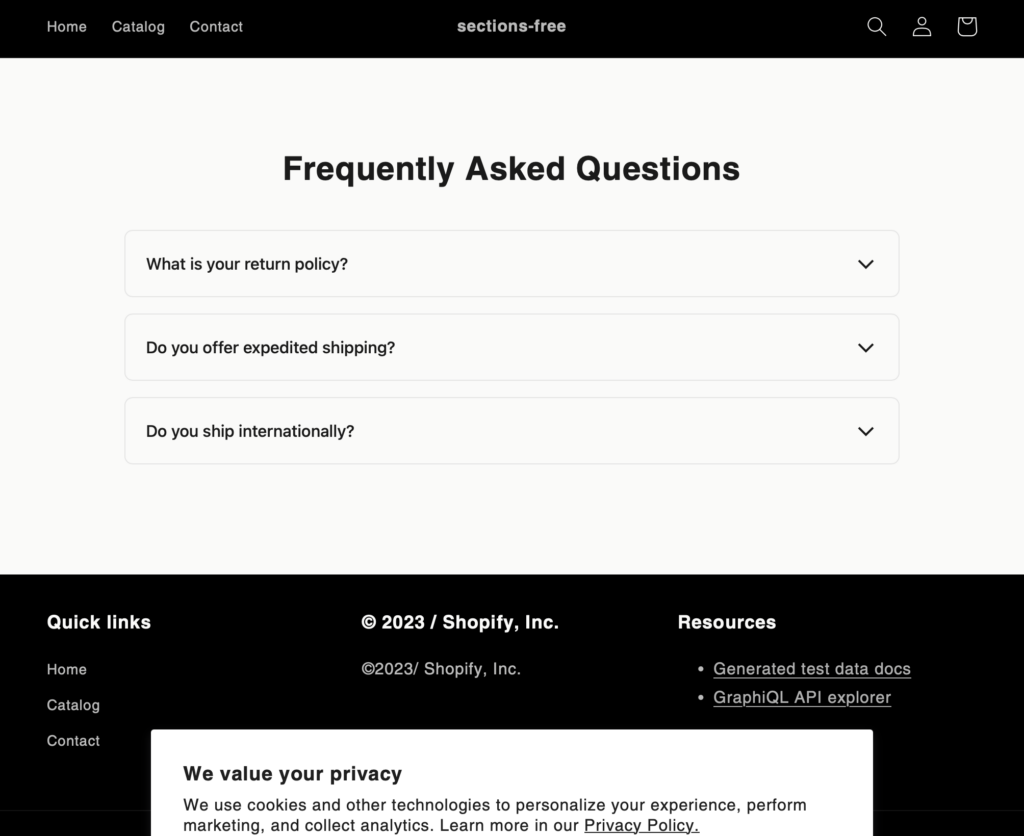
Inform customers of store information and policies with this clean FAQ section.
Discover more code snippets to enhance your Shopify store.
View All Sections