

Editor’s Note (2025): This article covers Accelerated Mobile Pages (AMP), a technology that has significantly declined in relevance since its introduction. As of 2025, implementing AMP is no longer recommended for most Shopify stores. Google now prioritizes Core Web Vitals over AMP, and modern mobile optimization techniques provide better results without AMP’s limitations. If you’re looking to improve your Shopify store’s mobile performance in 2025, focus on Core Web Vitals optimization, responsive design, and the techniques mentioned at the end of this article instead.
You’ve come to the right place if you want to know how to create accelerated mobile pages (AMP) for your Shopify store.
In today’s fast-paced digital world, speed is everything. Your Shopify store’s loading time can make or break the user experience, directly impacting your sales and search engine ranking. Accelerated Mobile Pages (AMP) emerged as a solution for faster mobile loading, ensuring sites load almost instantaneously on mobile devices. But what if you could implement AMP on your Shopify store without the added cost and complexity of an app?
Creating AMP pages for your Shopify store without an app might sound daunting, but it’s entirely achievable with the right approach. This guide will walk you through the essentials, from understanding the basics of AMP to implementing it on your Shopify site, step by step.
Important Note: While this guide explains how to implement AMP, be aware that as of 2025, AMP is no longer necessary for search engine visibility or mobile optimization. Google removed AMP as a requirement for Top Stories in 2020 and now prioritizes Core Web Vitals metrics instead. Consider focusing on modern performance optimization techniques rather than implementing AMP for new projects.
Understanding AMP and Its Current Status for E-commerce
The Basics of AMP
Accelerated Mobile Pages (AMP) is an open-source project designed to make the web faster and more accessible on mobile devices. Originally spearheaded by Google and launched in 2015, this initiative aimed to significantly reduce webpage loading times, ensuring that content loads almost instantly. At its core, AMP accomplishes this by using a simplified version of HTML, known as AMP HTML, which strips away elements that typically slow down web pages, such as JavaScript and third-party scripts.
For e-commerce platforms like Shopify, AMP was once considered a strategic move to stay ahead. Given the increasing prevalence of mobile shopping, ensuring your store’s pages load quickly on smartphones and tablets remains essential. However, the approach to achieving this has evolved significantly since AMP’s introduction.
AMP’s Declining Relevance in 2025
While AMP was once promoted as a way to boost performance, the landscape has changed dramatically. In May 2020, Google removed the AMP requirement for appearing in Top Stories and eliminated the AMP badge from search results. As of 2025, Google now prioritizes Core Web Vitals—metrics that measure page speed, interactivity, and visual stability—over the AMP format itself.
This means you can achieve excellent mobile performance and search engine rankings without implementing AMP. In fact, many major publishers and platforms have migrated away from AMP since 2021, as modern web development practices can deliver fast-loading pages without AMP’s restrictive limitations. Focus on optimizing your regular Shopify pages for speed through image optimization, efficient code, and responsive design rather than maintaining separate AMP versions.
Preparing Your Shopify Store for Mobile Optimization
Creating fast mobile pages for your Shopify store involves more than just a few tweaks. It requires a thorough preparation phase to ensure that your optimization delivers the expected benefits without hindering your store’s current functionalities. Whether you choose to implement AMP or focus on modern performance optimization, understanding your baseline is crucial.
Analyzing Your Store’s Current Performance
Before diving into any optimization strategy, you need to understand where your store stands in terms of performance. Analyzing your Shopify store’s current performance is the first step to identifying areas that need improvement. Tools like Google’s PageSpeed Insights can offer valuable insights into your store’s loading time, mobile responsiveness, and overall performance. Look for Core Web Vitals metrics such as Largest Contentful Paint (LCP), Interaction to Next Paint (INP), and Cumulative Layout Shift (CLS).
Understanding these metrics provides a baseline for comparison after implementing optimizations. It’s critical to note specific pages that are underperforming or have a high bounce rate, as these should be your primary candidates for improvement.
Setting Goals for Mobile Performance
With a clear understanding of your store’s performance, the next step is to set concrete goals for optimization. In 2025, the primary objectives should focus on Core Web Vitals and overall mobile user experience:
- Enhance Mobile User Experience: Aim to provide a seamless, engaging browsing experience for mobile users. This includes faster loading times, streamlined navigation, and simplified checkout processes.
- Improve Search Engine Visibility: Since Google prioritizes Core Web Vitals, one of your goals should be to achieve good scores on LCP (under 2.5 seconds), INP (under 200ms), and CLS (under 0.1). This could mean higher rankings for your store’s pages, potentially leading to increased organic traffic.
- Increase Conversion Rates: Faster load times and an improved user experience can lead to higher conversion rates. Research shows that a one-second improvement in site speed can boost mobile conversions by up to 27%. Identify current conversion rates to set a measurable goal for improvement.
- Reduce Bounce Rates: High bounce rates can be a sign of poor user experience. By optimizing for speed and mobile performance, aim to reduce bounce rates, especially on mobile versions of your store.
Setting clear, measurable goals for mobile optimization allows you to track progress and quantify the impact of your efforts. Remember, every store is unique, so tailor your goals to fit your specific needs and customer expectations.
Step-by-Step Guide to Create AMP Pages Manually
Important: Before following these steps, consider whether AMP is the right solution for your store in 2025. Most e-commerce sites will benefit more from optimizing their standard mobile pages for Core Web Vitals rather than implementing AMP. If you decide to proceed with AMP, here’s how to do it manually.
Step 1: Building a Basic AMP HTML Template
Begin by constructing a simple AMP HTML template. AMP HTML is a subset of HTML with specific tags and a unique approach designed to render fast mobile pages. Start with a basic structure that includes the mandatory AMP HTML tag in the head of your document. Including <meta charset="utf-8">, <script async src="https://cdn.ampproject.org/v0.js"></script>, and the <link rel="canonical" href="your-page-link-here"> is imperative. Use the AMP project’s official website as a resource for understanding the essential components needed for a valid AMP HTML page.
Step 2: Customizing Your Template for Shopify
After setting up a basic AMP template, customize it for your Shopify store’s unique needs. Incorporate elements such as your brand’s logo, product images, descriptions, and prices. For Shopify-specific elements, utilize Liquid, Shopify’s templating language, to dynamically insert product or collection details into your AMP pages. Ensure your template aligns with your brand’s style guide, including colors and font choices, to provide a consistent user experience across your site. Remember to keep your code as clean and minimal as possible, optimizing for speed and compliance with AMP standards.
Step 3: Implementing the AMP Template on Your Product Pages
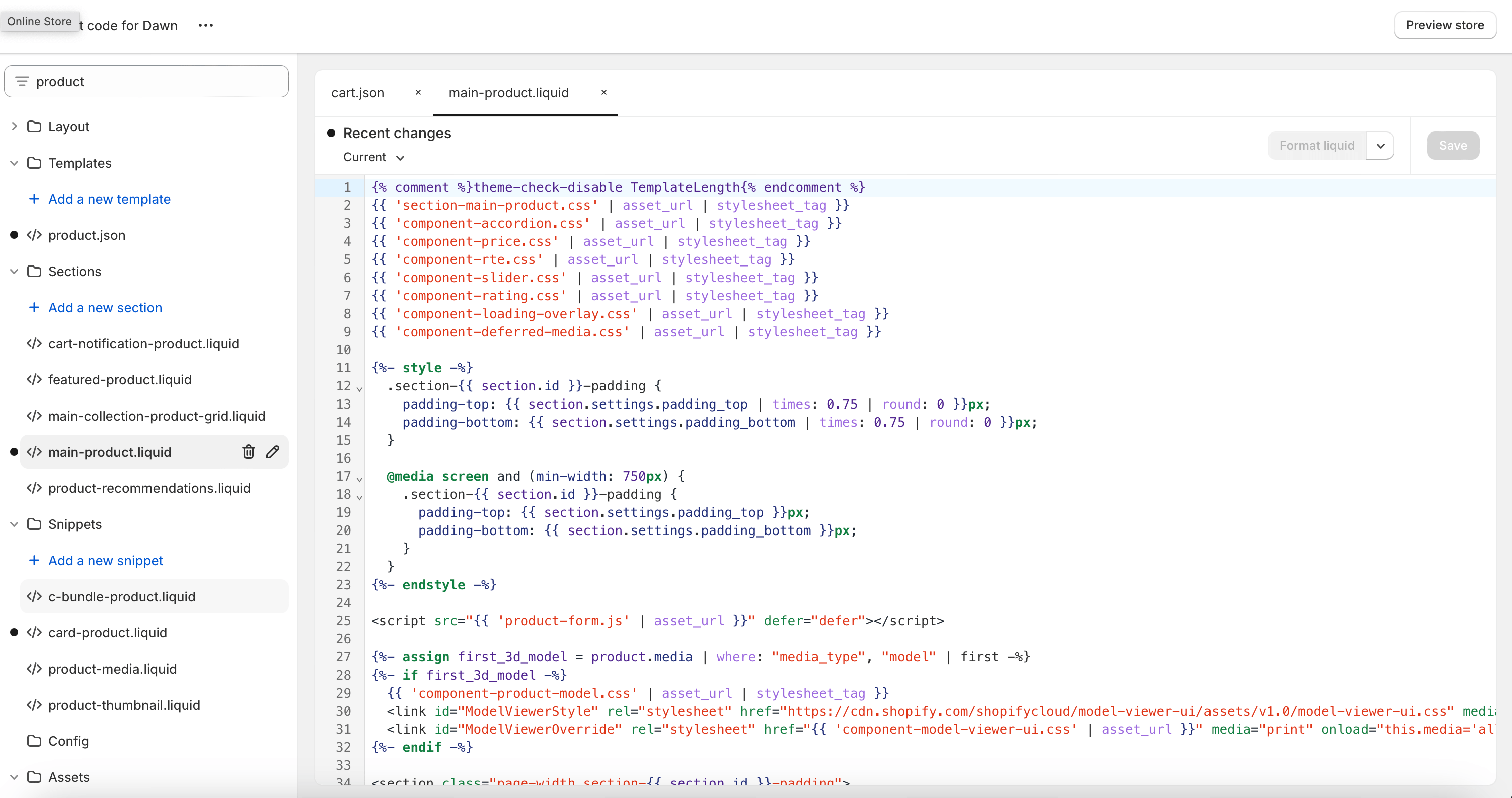
Once your AMP template is ready and customized for Shopify, implement it on your product pages. To do this, you’ll need to access your Shopify store’s theme files. In the Shopify admin, go to “Online Store” > “Themes” and choose “Edit code” from the Actions menu of the theme you wish to edit. Insert your AMP template into the theme files, ideally creating a new template for AMP pages for cleaner management. Name it appropriately, for example, “product.amp.liquid,” to distinguish it from non-AMP templates. Link to your AMP product pages using <link rel="amphtml" href="your-amp-page-url"> in the head of the non-AMP versions. Regularly test your AMP pages with tools like Google’s AMP Test to ensure they’re validated and functioning correctly on mobile devices.
Following these steps will allow you to integrate AMP into your Shopify store. However, keep in mind that in 2025, focusing on Core Web Vitals optimization for your standard pages may provide better results with less maintenance overhead.
Validating and Testing Your AMP Pages
If you’ve decided to implement Accelerated Mobile Pages on your Shopify store, validating and testing these pages is paramount. Ensuring your AMP pages meet the required standards can help maintain their functionality, though it’s important to note that AMP compliance no longer provides SEO advantages as it did in the past.
Using Google’s AMP Test Tool
One of the most efficient methods to validate your Shopify store’s AMP pages is by using Google’s AMP Test Tool. This tool checks the validity of your AMP pages and provides insightful feedback on errors and areas for improvement. Here’s how to use it:
- Navigate to the AMP Test Tool: Access Google’s AMP Test Tool by searching for it online or visiting the direct URL.
- Enter Your AMP Page URL: Input the URL of the AMP page you’d like to validate in the provided field.
- Analyze the Results: Upon submission, the tool will analyze your page and display either a successful validation message or list the errors detected. Errors often come with suggestions for fixes, which are crucial for maintaining the technical integrity of your AMP pages.
This step is critical, especially after making any significant changes to your AMP templates or adding new content to ensure continuous compliance with AMP standards.
Monitoring the Performance and User Engagement
After validating the AMP pages for your Shopify store, monitoring their performance and how users interact with them is essential. Performance metrics can give insights into how well your pages are contributing to your store’s objectives. For monitoring, use tools like Google Analytics and Google Search Console, focusing on:
- Loading Speed: Track how quickly your pages load on various mobile devices. In 2025, aim for Core Web Vitals targets: LCP under 2.5 seconds, INP under 200ms, and CLS under 0.1.
- Traffic: Measure the amount of traffic directed to your optimized pages. An increase in traffic can indicate successful optimization and visibility.
- User Engagement: Evaluate engagement metrics such as bounce rates, time spent on page, and conversion rates. Lower bounce rates and higher time spent can signify engaging content, while higher conversion rates may point to effective calls-to-action (CTAs) and user experience.
Monitoring these performance metrics regularly helps identify areas for improvement and adjust your strategy accordingly to ensure your mobile pages continue to contribute to your Shopify store’s success effectively.
Modern Alternatives to AMP for Mobile Optimization
Creating AMP pages for your Shopify store involves coding skills and a good grasp of AMP HTML. However, as of 2025, this approach is no longer the recommended path for most stores. Understanding the current state of AMP and modern alternatives helps you make an informed decision that best suits your Shopify store’s needs.
Current Status of AMP Apps and Solutions
AMP apps were designed to simplify the process of creating AMP versions of your pages. However, their relevance has declined significantly. Here’s what you need to know in 2025:
Why AMP is Less Relevant Now:
- No SEO Advantage: Since May 2020, Google has not provided preferential treatment to AMP pages in search results or Top Stories.
- Limited Functionality: AMP’s restrictive nature limits design flexibility, customization options, and interactive features that modern e-commerce requires.
- Maintenance Overhead: Maintaining separate AMP and non-AMP versions of pages doubles your workload without providing corresponding benefits.
- Industry Migration: Major publishers and platforms have moved away from AMP since 2021, with Twitter discontinuing support and browsers like Brave automatically bypassing AMP pages.
When AMP Might Still Be Considered:
- Existing Implementation: If you already have AMP pages that are performing well and receiving traffic, there’s no urgent need to remove them immediately.
- Quick Fix for Slow Sites: For sites with severe performance issues, AMP can provide a temporary solution while you work on comprehensive optimization.
- News Publishers: Some news publishers may still see marginal benefits for Top Stories placement, though this advantage has significantly decreased.
Modern Optimization Solutions for 2025
Instead of implementing AMP, consider these modern approaches that deliver better results:
- Core Web Vitals Optimization: Focus on Google’s current ranking factors—Largest Contentful Paint (LCP), Interaction to Next Paint (INP), and Cumulative Layout Shift (CLS). These metrics matter more than AMP in 2025.
- Responsive Design: Implement mobile-first, responsive design that works seamlessly across all devices without maintaining separate versions.
- Image Optimization: Use WebP format, implement lazy loading, compress images, and serve appropriately sized images for different devices.
- Performance Apps: Consider using Shopify apps specifically designed for speed optimization, such as image compressors and code minifiers, rather than AMP apps.
- Theme Selection: Choose lightweight, fast-loading Shopify themes optimized for mobile performance from the start.
- Professional Optimization: For stores with complex requirements, work with Shopify experts who specialize in Core Web Vitals optimization rather than AMP implementation.
In essence, modern mobile optimization techniques offer more viable paths to improving your Shopify store’s performance than AMP. The right choice hinges on your store’s specific requirements, but for most stores in 2025, focusing on Core Web Vitals and responsive design will provide better results than implementing AMP. Regularly testing and monitoring your page performance remains paramount for improving search engine visibility, user experience, and ultimately, conversions and revenue.
Conclusion
While AMP was once promoted as a strategic advantage for Shopify stores, the mobile optimization landscape has evolved significantly. As of 2025, Google prioritizes Core Web Vitals over the AMP format, and most industry experts recommend against implementing AMP for new projects. Whether you choose to maintain existing AMP pages or focus on modern optimization techniques, the goal remains the same: to provide a seamless, fast-loading mobile experience.
For stores considering mobile optimization in 2025, focus on Core Web Vitals metrics, responsive design, image optimization, and choosing lightweight themes. These approaches provide better results without the limitations and maintenance overhead of AMP. Remember, the path you choose should align with current best practices, your technical abilities, and your growth plans. Regularly testing and monitoring your mobile performance will ensure your pages continue to meet both Google’s standards and your customers’ expectations. By prioritizing speed and user experience through modern optimization techniques, you’re not just optimizing for search engines; you’re building a foundation for increased conversions and revenue in today’s mobile-first shopping environment.


