Changing the country in which your Shopify store is based is possible, but it affects more than just the address shown in your admin. In most cases, you can update it in Settings > General > Store details, but if Shopify Payments is active, you may need to disable it first before the country field becomes editable.
I have worked on Shopify stores and apps for years, and this is one of those settings merchants assume is cosmetic when it is not. Your store country can affect payments, taxes, shipping setup, currency expectations, and Shopify Markets, so it is worth planning properly before you change anything.
Can I change the country in which my Shopify store is based?
Yes, you can usually change your Shopify store country from the admin, but there are restrictions. The biggest one is that Shopify Payments often locks the country field until you deactivate it, because payment eligibility is tied to your legal business location.
This is where many merchants get stuck. They go to the settings page, see the country field greyed out, and assume Shopify has removed the option. In reality, Shopify still allows the change in many cases, but it wants your payments and compliance setup to match the new country.
If your move is a genuine business relocation, the process is straightforward enough. If you are trying to switch countries purely to access a different payment setup without having the right business registration, bank account, and tax details, you will usually run into verification issues later.
How do I change my Shopify store country step by step?
To change your Shopify store country, go to Settings > General, find the Store address or store details section, and select your new country. If the field is unavailable, check whether Shopify Payments is active and disable it first if needed.
These are the exact steps I would follow before touching anything live.
- Log in to your Shopify admin.
- Go to Settings in the bottom-left corner.
- Open General.
- Scroll to the Store address section.
- Change the Country/Region dropdown to the new country.
- Click Save.
That is the core change, but it is only the start. Once the country is updated, you should review shipping zones, tax settings, payment providers, markets, and store currency so the rest of your setup matches your new base.
If you want Shopify's own documentation around language and regional formatting, Shopify also explains how account language and region settings work. That is separate from your store country, which is an important distinction merchants often miss.
What should I do before changing my Shopify store country?
Before changing your store country, back up your key store data, document your current settings, and check the impact on payments and tax compliance. The change itself takes minutes, but the surrounding clean-up can take much longer if you are unprepared.
In my experience building Shopify apps, the merchants who have the smoothest migrations are the ones who treat this like an operational change, not a simple dropdown update. Even if your products and theme stay the same, your backend rules and customer expectations may change overnight.
Create a simple pre-change checklist
A pre-change checklist helps you avoid missing something obvious. At minimum, I would document the following before making the switch.
- Current store address and legal entity details
- Active payment gateways and payout accounts
- Shipping zones and rates
- Tax registrations and collection rules
- Primary market and international market settings
- Store currency and any localised pricing rules
- Theme content mentioning delivery times, origin, or regional promises
If you are actively optimising international conversion, you should also review how visitors see currency and delivery messaging. I have covered that in more detail in how to auto change currency based on customers location in Shopify and show delivery estimate based on customer location in Shopify.
Why would a merchant change the country their Shopify store is based in?
The most common reasons are business relocation, legal restructuring, expansion into a new primary market, or a mismatch between the original setup and the real business location. It is usually a practical decision, not a marketing one.
The older advice around this topic often framed it mostly as a trust signal. That still matters, but today the bigger issue is operational accuracy. If your store says one thing while your payments, fulfilment, taxes, and shipping timelines suggest another, customers notice quickly.
- You moved countries and need your admin and business details to match
- You formed a new company in another jurisdiction
- You are changing your main market and want your setup aligned
- You originally opened the store with the wrong country
- You need accurate tax and payment eligibility for your actual business entity
Honesty matters here. If you market products as local, handmade, or shipped domestically, your business details should not create doubt. Customers are more informed than they were a few years ago, and they cross-check reviews, delivery estimates, and support details before buying.
What changes after I update my Shopify store country?
Changing your store country can affect payments, taxes, shipping, markets, and customer expectations. The address field is only one part of the setup, so you should review every country-sensitive setting immediately after the change.
This is the part most short guides skip. The dropdown update is easy. The knock-on effects are where stores either stay compliant and convert well, or become messy.
Payments
Payment providers are country-specific, and Shopify Payments eligibility depends on your business location and supporting documents. If you change countries, you may need to set up a new payment provider account or re-verify your business.
In practice, this is often the biggest friction point. If you disable Shopify Payments to unlock the country field, be prepared for a temporary reconfiguration period. Make sure you know what happens to payouts, chargebacks, and saved payment settings before you proceed.
Taxes
Tax obligations vary by country, so your store settings need to reflect the new jurisdiction. After the change, go to Settings > Taxes and duties and review registrations, VAT or sales tax rules, and any product-specific tax behaviour.
If you are unsure, get advice from an accountant familiar with ecommerce. Shopify can help with settings, but it cannot tell you what your legal obligations are in every market.
Shipping
Shipping zones and rates should be reviewed immediately after changing your store country. Your default origin, carrier rates, delivery times, and restricted destinations may all need updating.
This matters for both margin and trust. If you base the store in one country but still use rates or delivery promises from another, customers will see the mismatch. If shipping rules are part of your wider setup, my guide on restricting shipping countries on certain products or collections in Shopify can help.
Currency and localisation
Your store country does not automatically solve all localisation issues. You may still need to update your store currency, market pricing, language, and checkout experience for the new audience.
If you sell internationally, country and currency should work together. For multilingual stores, you may also want to review how to change the language of email templates in Shopify and how to automatically switch checkout language in Shopify.
What is the difference between store country, account region, and primary market?
Store country is your business location in Shopify settings, account region controls how dates, times, and numbers appear in your admin, and primary market determines your main customer market in Shopify Markets. They are related, but they are not the same setting.
I see this confusion constantly. Merchants change one of these and expect the others to follow automatically, but Shopify separates them for good reason.
| Setting | What it controls | Where to change it | Important note |
|---|---|---|---|
| Store country | Your business location and store address | Settings > General | Can affect payments, taxes, and compliance |
| Account region | Admin date, time, currency, and number formats | Profile settings | Does not change storefront language by itself |
| Primary market | Your main selling market in Shopify Markets | Settings > Markets | Affects localisation and market-specific setup |
Shopify's help docs explain the account language and region side clearly, but many ranking articles blur these settings together. If you are changing countries because you are entering a new main audience, you will probably need to review all three.
How do I change my default primary market in Shopify?
To change your default primary market, go to Settings > Markets, create or configure the market you want to use, and then set it as the primary market if Shopify allows it in your current setup. This is separate from changing your store address.
For international stores, this can be just as important as the country setting itself. Your primary market affects how Shopify thinks about your default customer audience.

In many cases, you need to add another market first before switching the primary one.
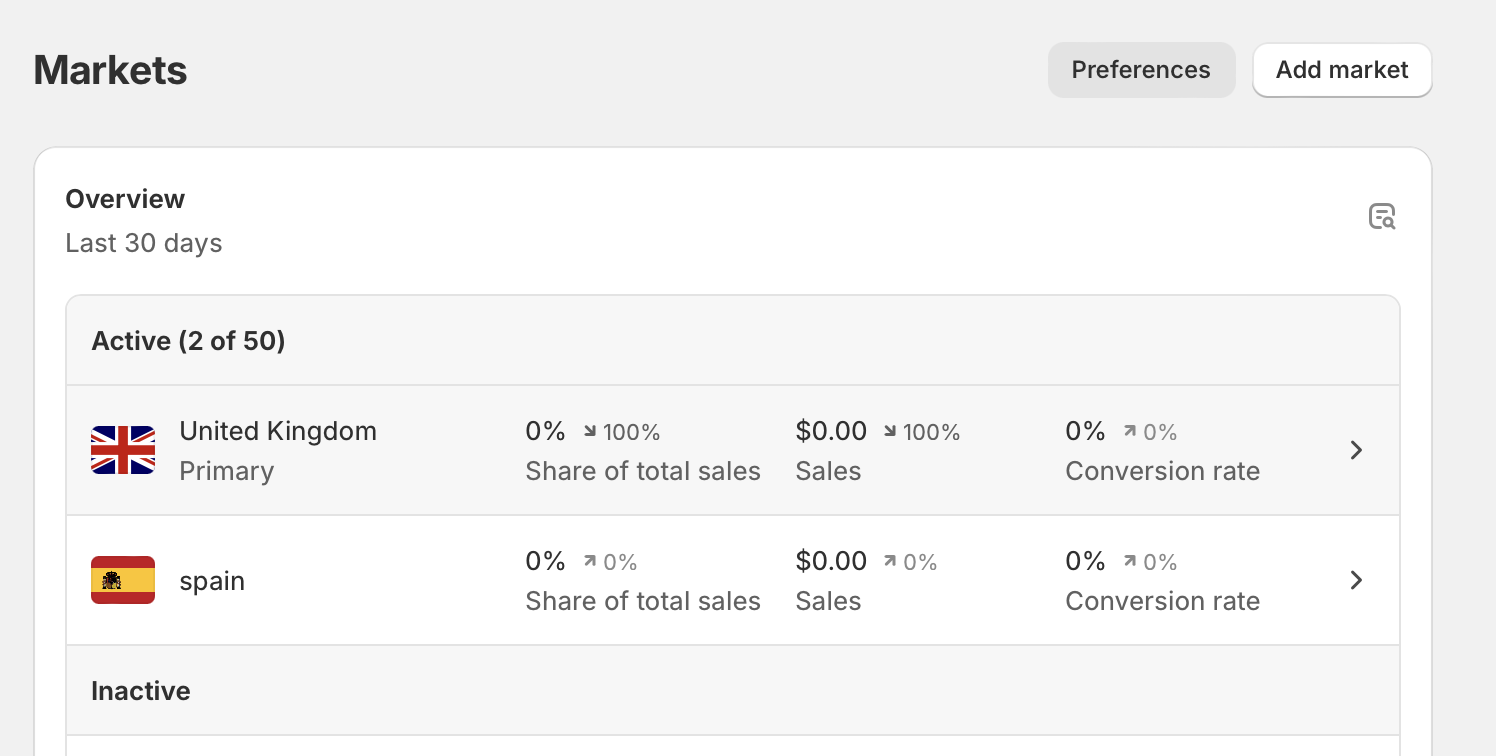
Once that market exists, you can usually make it the primary market and remove the old one if it is no longer needed.

This is especially relevant if your store is moving from one core audience to another. For example, a merchant moving operations from the UK to the US may need to review pricing, domains, currency display, shipping estimates, and checkout language, not just the address field.
What happens if the country field is greyed out in Shopify?
If the country field is greyed out, the most common reason is that Shopify Payments is active. Disable Shopify Payments first, then return to the store details page and try changing the country again.
This matches what Shopify community answers and current guides consistently report. It is also what I have seen in real store setups. The platform wants to avoid conflicts between your verified payment entity and your new declared country.
- Go to Settings > Payments.
- Review your active Shopify Payments setup.
- If appropriate, deactivate Shopify Payments.
- Return to Settings > General.
- Update the Country/Region field.
- Reconfigure payments based on the new country.
Be careful here. Deactivating payments is not something I would do casually in the middle of a busy trading day. Plan around live orders, payout timing, and customer support coverage.
For extra context, the Shopify Community thread on changing a store's country setting is still one of the most visible search results because it answers this exact issue in a straightforward way.
How should I update shipping, tax, and payment settings after the change?
After changing your store country, review Shipping and delivery, Taxes and duties, and Payments immediately. These are the three settings areas most likely to create operational problems if left unchanged.
When I test Shopify stores, I usually use a simple post-change audit like this:
| Area | What to check | Why it matters |
|---|---|---|
| Payments | Gateway availability, payout bank account, verification documents | Avoid failed checkouts or payout holds |
| Taxes | VAT, sales tax, registrations, product tax categories | Stay compliant and charge correctly |
| Shipping | Origin address, zones, rates, carrier rules, delivery times | Prevent margin loss and customer complaints |
| Markets | Primary market, local pricing, domains, language | Match the new target audience |
| Storefront content | Policies, FAQs, banners, product pages, contact page | Keep customer messaging accurate |
If you use carrier logic or delivery promises heavily, also test them on mobile and desktop. A surprising number of stores update the backend country but forget the frontend copy that still says things like ships from London or US delivery in 2-4 days.
Does changing my Shopify store country help with trust and SEO?
Yes, displaying accurate location information can improve trust, and it may support local relevance signals for SEO, but it is not a magic ranking tactic. The main benefit is that it keeps your store honest and consistent across policies, fulfilment, and customer messaging.
The original version of this article focused heavily on trust, and I still think that point matters. If your brand suggests local fulfilment, local manufacturing, or domestic support, your country information should not contradict that. Customers notice these details quickly, especially when comparing multiple stores.
For SEO, I would think of this as a supporting signal rather than a primary one. Accurate business details, localised content, country-specific shipping information, and relevant market targeting all help. If you are trying to improve broader organic visibility, Shopify's own SEO guidance is worth reviewing alongside your market setup.
And if your move involves a different domain or subdomain structure, make sure you handle that properly. I have written about related setup issues in how to configure subdomains for Shopify Store.
What mistakes should I avoid when changing the country in which my Shopify store is based?
The biggest mistakes are changing the country without checking payments, forgetting taxes and shipping, and assuming Shopify Markets updates everything automatically. A country change is easy to make, but easy to mishandle.
- Do not change it during peak sales hours
- Do not assume your payment gateway will keep working
- Do not leave old shipping rates in place
- Do not forget policy pages and contact details
- Do not confuse admin region with store country
- Do not claim a country presence you cannot support legally
In my experience, the stores that struggle most are the ones trying to shortcut country eligibility rules. If your business is genuinely established in the new country, the process is manageable. If not, the problems tend to appear later during verification, payouts, disputes, or tax filing.
What is the best way to tell customers about a country change?
The best approach is to communicate only what affects the customer, such as shipping times, returns address, currency, support hours, or product availability. Most shoppers do not need a formal announcement unless the change alters their buying experience.
If the shift affects delivery windows or support response times, update your FAQ, shipping policy, contact page, and any announcement bars. Keep it practical and clear. Customers mainly want to know whether prices, shipping, duties, and returns are changing.
Good customer communication is specific. If your relocation changes dispatch origin, say so plainly and update the expected delivery timeframe everywhere it appears.
Final thoughts on changing the country in which your Shopify store is based
Changing the country in which your Shopify store is based is simple at the settings level, but the real work is making the rest of your store match. Update the country in Settings > General, then immediately review payments, taxes, shipping, currency, and markets.
From what I have seen working on Shopify stores and building apps in the ecosystem, this is one of those tasks that goes smoothly when it reflects a real business change and gets messy when merchants treat it as a workaround. If your business has genuinely moved or expanded, the key is consistency. Make sure your legal details, operational setup, and customer-facing messaging all point in the same direction.
For official guidance on legal and compliance topics, Shopify's compliance documentation is also worth bookmarking. It will not replace professional advice, but it is a useful starting point when you are reviewing what your move means in practice.