Yes, you can exclude products from free shipping in Shopify, but the best method depends on how your free shipping offer is set up. For most stores, the simplest fix is to use custom shipping profiles. For promotional free shipping, you may need discount codes tied to collections or a shipping rules app.
I build Shopify apps for a living, and this is one of those questions that comes up again and again because Shopify still does not natively let you exclude specific products from a cart-wide free shipping rule in the neat, obvious way merchants expect. If you run a store with bulky items, fragile products, supplier-shipped lines, or low-margin add-ons, that limitation matters a lot.
In this guide, I’ll show you the exact ways to exclude products from free shipping in Shopify in 2026, when each method works best, and where merchants usually get caught out when testing mixed carts.
Why would you exclude certain products from free shipping?
You should exclude products from free shipping when shipping costs would wipe out margin or create fulfilment problems. The most common examples are oversized items, heavy products, supplier-fulfilled goods, and products that need special packaging.
Free shipping is still one of the strongest conversion levers in ecommerce. It can lift checkout completion and average order value, but only if the offer is financially sustainable. In my experience building Shopify apps, merchants usually start with a broad free shipping offer, then realise a handful of products are making the promotion unprofitable.
- Heavy or bulky items with unusually high courier costs
- Fragile products that need special packing materials
- Low-margin items where shipping eats most of the profit
- Dropshipped or print-on-demand products with separate supplier shipping fees
- Region-restricted items where delivery costs vary sharply
- Cold-chain or hazardous products that require specialist handling
If your issue is broader than free shipping alone, you may also want to read Restrict Shipping Countries on Certain Products / Collections in Shopify. That becomes relevant when excluded products should not ship to certain destinations at all.
Can Shopify natively exclude specific products from free shipping?
Not directly, no. Shopify does not natively let you say “this product should never count towards free shipping” inside every built-in free shipping setup. That is why so many merchants end up on Shopify Community threads looking for workarounds.
As of current Shopify behaviour discussed across recent merchant threads, flat-rate free shipping and discount-based free shipping generally apply at cart level, not line-item level. So if you want precise exclusions, you usually need one of these approaches:
- Custom shipping profiles for excluded products
- Discount codes limited to eligible collections
- Weight-based shipping rules in niche cases
- Shipping apps for more granular logic
- Shopify Functions or custom development on advanced setups
This is the big gap many ranking pages only mention briefly. The real answer is not just “yes, use a profile”. It is which type of free shipping are you using, and how do mixed carts behave afterwards?
What is the easiest way to exclude products from free shipping in Shopify?
The easiest method for most stores is to create a custom shipping profile for the products you want to exclude. This works especially well when you have a small number of products, a specific vendor, or one collection that should always carry a shipping charge.
This is also the solution most often recommended in current Shopify Community discussions, and for good reason. It is built into Shopify, does not require code, and works reliably when set up correctly.
How do custom shipping profiles work?
Shipping profiles let you separate products into different shipping rule groups. Your main profile can offer free shipping, while the excluded products live in a separate profile with paid shipping rates.
When a customer buys from both profiles in one order, Shopify combines the rates. In practical terms, that means eligible items can ship free while excluded items still add a charge. That is the key behaviour you want.
How do I set up a shipping profile to exclude products from free shipping?
Go to Settings, then Shipping and delivery, then create a new profile for the products you want excluded. Add only those products to the profile and assign paid shipping rates to that profile.
- In Shopify admin, go to Settings > Shipping and delivery.
- Under Shipping, click Manage or Manage profiles.
- Create a new shipping profile.
- Add the products you want to exclude from free shipping.
- For that profile, create paid shipping rates such as a flat rate like £4.99 or £9.99.
- Leave your main shipping profile with your normal free shipping threshold, such as free shipping over £50.
- Test carts with only eligible items, only excluded items, and a mix of both.
For example, if your store sells candles and concrete planters, you could keep candles in your general profile with free shipping over £40 and move planters into a separate profile with a fixed courier fee. A mixed cart would still charge for the planter even if the rest of the basket qualifies for free shipping.
If you need to show delivery messaging before checkout, this pairs nicely with How to Show Shipping on the Product Page in Shopify, especially for bulky or excluded products.
What are the limitations of shipping profiles?
Shipping profiles are best for straightforward exclusions, but they are not perfect. They can become fiddly if you have lots of edge cases, supplier-based rules, or thresholds that should only count eligible products.
- Manual setup can get messy across large catalogues
- Threshold logic is limited if you only want some products to count towards free shipping qualification
- Mixed-cart testing is essential because rate combinations can surprise merchants
- Vendor-based logic may need collections, tags, or apps for cleaner control
That last point matters a lot. A profile solves the shipping charge itself, but it does not always solve promotional logic in the way merchants imagine.
How do I exclude products from a free shipping discount code in Shopify?
If you use a free shipping discount rather than shipping rates, the best workaround is to apply the discount only to eligible collections. This method is better for promotions and campaigns than for permanent shipping policy rules.
Instead of making free shipping automatic across the whole cart, you create a discount code and limit it to products or collections that should qualify. That gives you more control over what gets the benefit.
How do collection-based free shipping discounts work?
You create a collection of products that are allowed to receive free shipping, then apply the discount only to that collection. Products outside the collection are excluded from the offer.
- Create a collection such as Free Shipping Eligible.
- Add products manually or by rules using tags, vendor, product type, or collection conditions.
- Go to Discounts in Shopify admin.
- Create a Free shipping discount code.
- Set Applies to: Collections and choose the eligible collection.
- Optionally set a minimum purchase amount.
- Test the code on eligible-only and mixed carts.
This works well if you want something like FREESHIP to apply only to selected brands, seasonal collections, or products with enough margin to absorb delivery costs.
One thing to watch closely is the threshold. In some setups, merchants assume a mixed cart subtotal will qualify based only on eligible products, but the actual behaviour can differ depending on how the discount is configured and what else is in the basket. Always test with real products and a real address.
If you are also managing discount exclusions elsewhere, my guide on How to Exclude Certain Products from Discounts on Shopify in 2026 covers the same principle from the discount side.
Can I exclude products from free shipping by weight?
Yes, in some cases. Weight-based rules can work if the products you want excluded are consistently heavier, or if the products you want included have zero or very low weight.
This is more of a workaround than a perfect solution. I would only use it when there is a clear physical distinction in your catalogue, such as digital products, sample packs, or lightweight accessories versus larger goods.
- Set free shipping only for orders under or over a specific weight threshold
- Use 0 kg products strategically for digital or non-shippable items
- Exclude bulky products by ensuring they push the order outside the free shipping band
The downside is obvious: weight is a blunt instrument. It does not understand margin, vendor, dimensions, or packaging complexity. If you need precision, use profiles or apps instead.
What is the best app to exclude products from free shipping in Shopify?
The best app depends on how complex your shipping rules are. If you need granular control by product, variant, vendor, dimensions, postcode, or combined cart logic, a shipping app is usually the cleanest answer.
I have seen merchants outgrow Shopify’s native shipping setup very quickly, especially in stores with multiple suppliers or mixed fulfilment models. Once you need logic like “free shipping on collection A, but never on vendor B unless the postcode is local”, native settings start to feel cramped.
Which Shopify apps are worth considering?
Three solid options are Intuitive Shipping, Better Shipping, and Advanced Shipping Rules. Each one can help you exclude certain products from free shipping, but they suit slightly different setups.
| App | Best for | Key strength | Potential drawback |
|---|---|---|---|
| Intuitive Shipping | Complex shipping logic | Very flexible conditions and rate control | Can take longer to configure |
| Better Shipping | Simple per-product rules | Easy product and variant-level shipping setup | Less advanced than enterprise-style tools |
| Advanced Shipping Rules | Vendor and scenario-based shipping | Strong rule combinations and restrictions | Best value comes with more complex needs |
Is Intuitive Shipping a good option?
Yes, Intuitive Shipping is one of the strongest options if your exclusions are part of a broader shipping strategy. It is particularly good when rates depend on multiple conditions rather than a single product flag.
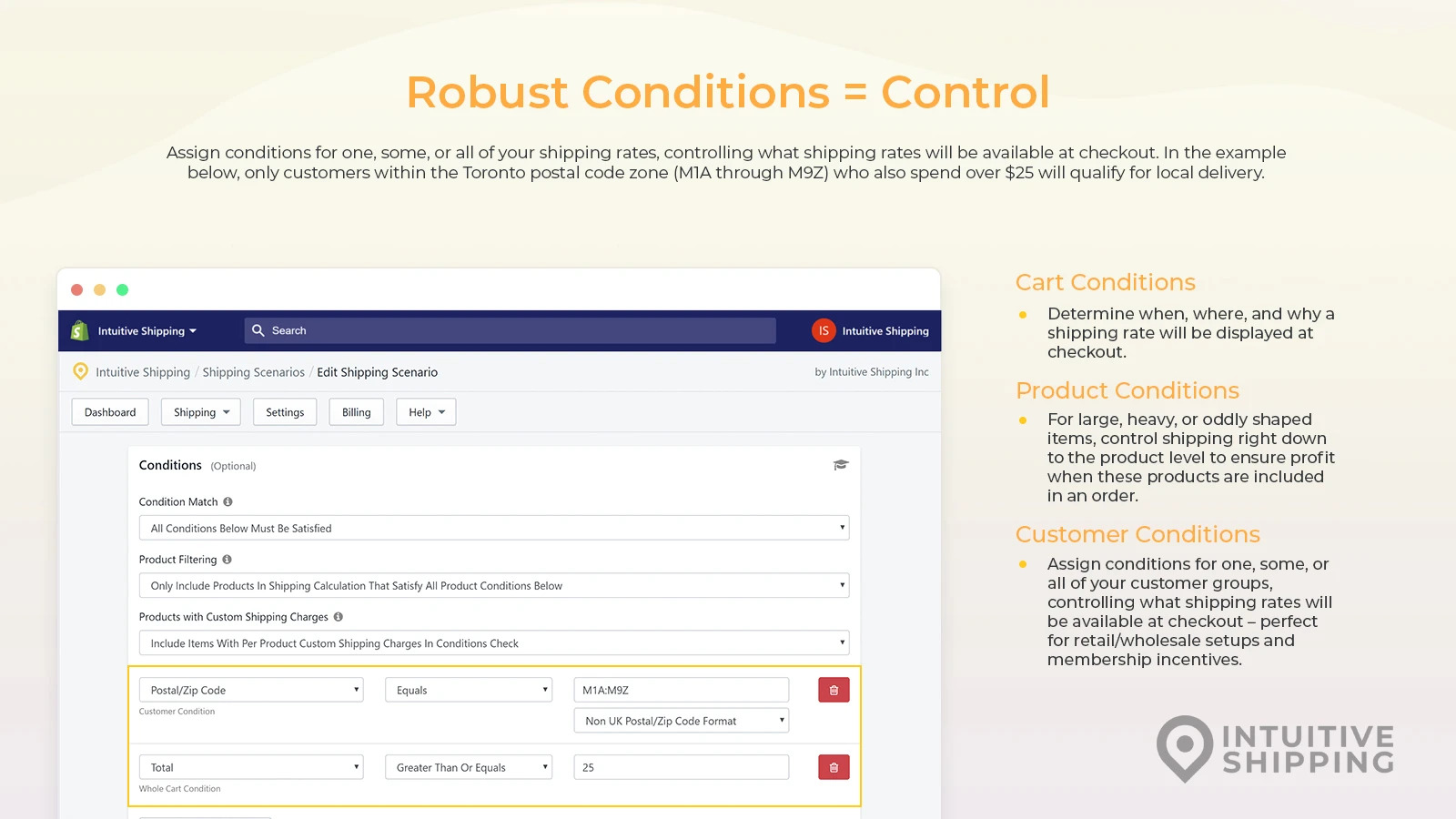

Intuitive Shipping lets you build shipping logic around conditions such as product groups, customer tags, destinations, cart contents, and rate rules. That makes it a strong fit if you want to exclude specific items from free shipping while still keeping nuanced checkout options.
One feature I like is that it is built for merchants who have outgrown simple flat rates. If you are dealing with box sizes, dimensional logic, or mixed-cart scenarios, it gives you much more room than Shopify’s native settings. Best for stores with operational complexity.
Is Better Shipping good for excluding individual products?
Yes, Better Shipping is a solid option if you want straightforward product or variant-based shipping rates. It is usually easier to grasp than more advanced shipping engines.
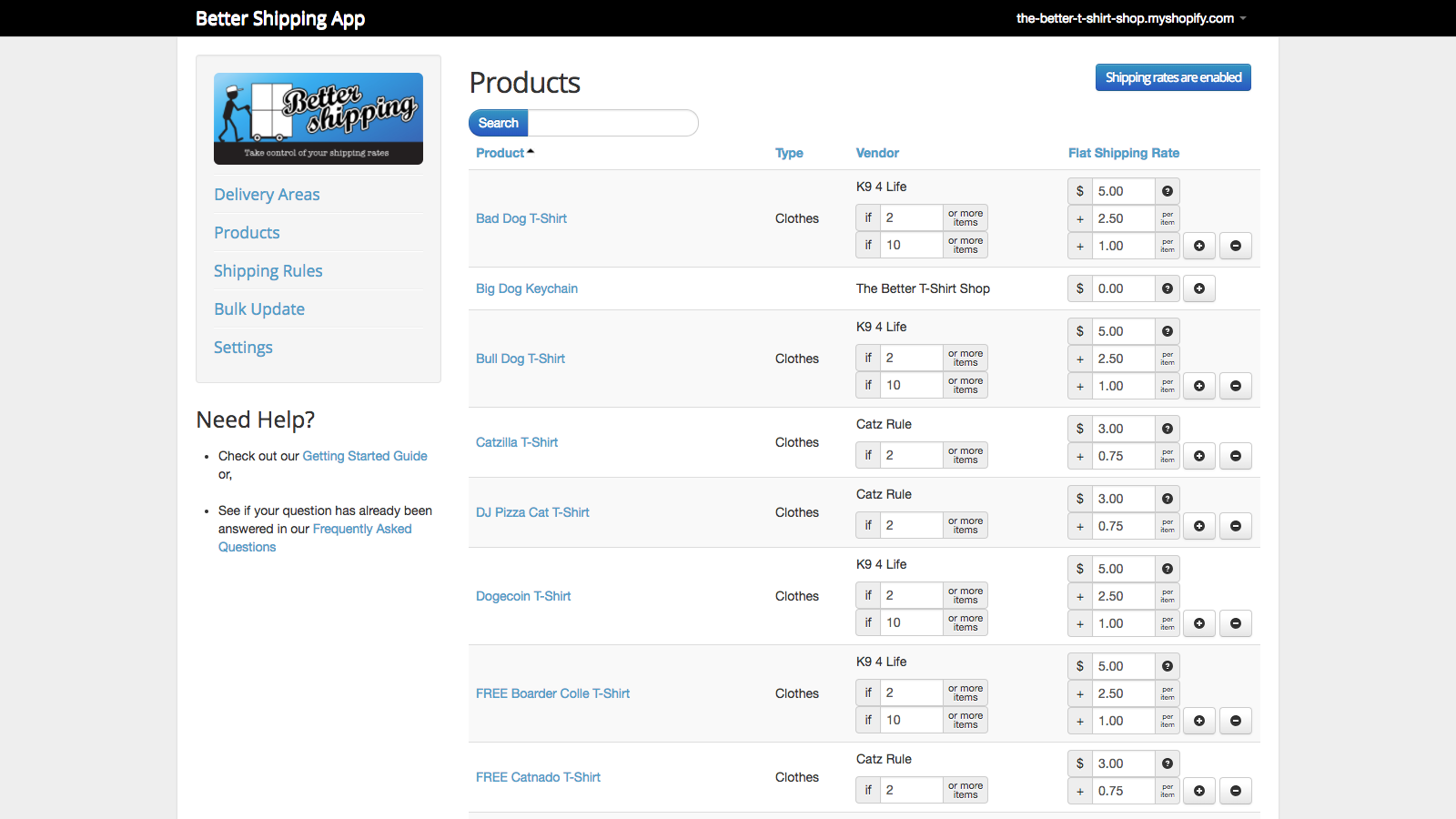

Better Shipping allows you to set rates by product, variant, and destination. If your goal is simply “these products should always carry shipping”, this can be a very practical route.
I would put this in the best for small to mid-sized catalogues bucket. It is especially useful when the exclusion list is stable and you do not need lots of layered conditions.
Is Advanced Shipping Rules worth it?
Advanced Shipping Rules is worth considering if you need vendor, postcode, package, or blended rule logic. It is aimed at merchants who need more than basic per-product rates.
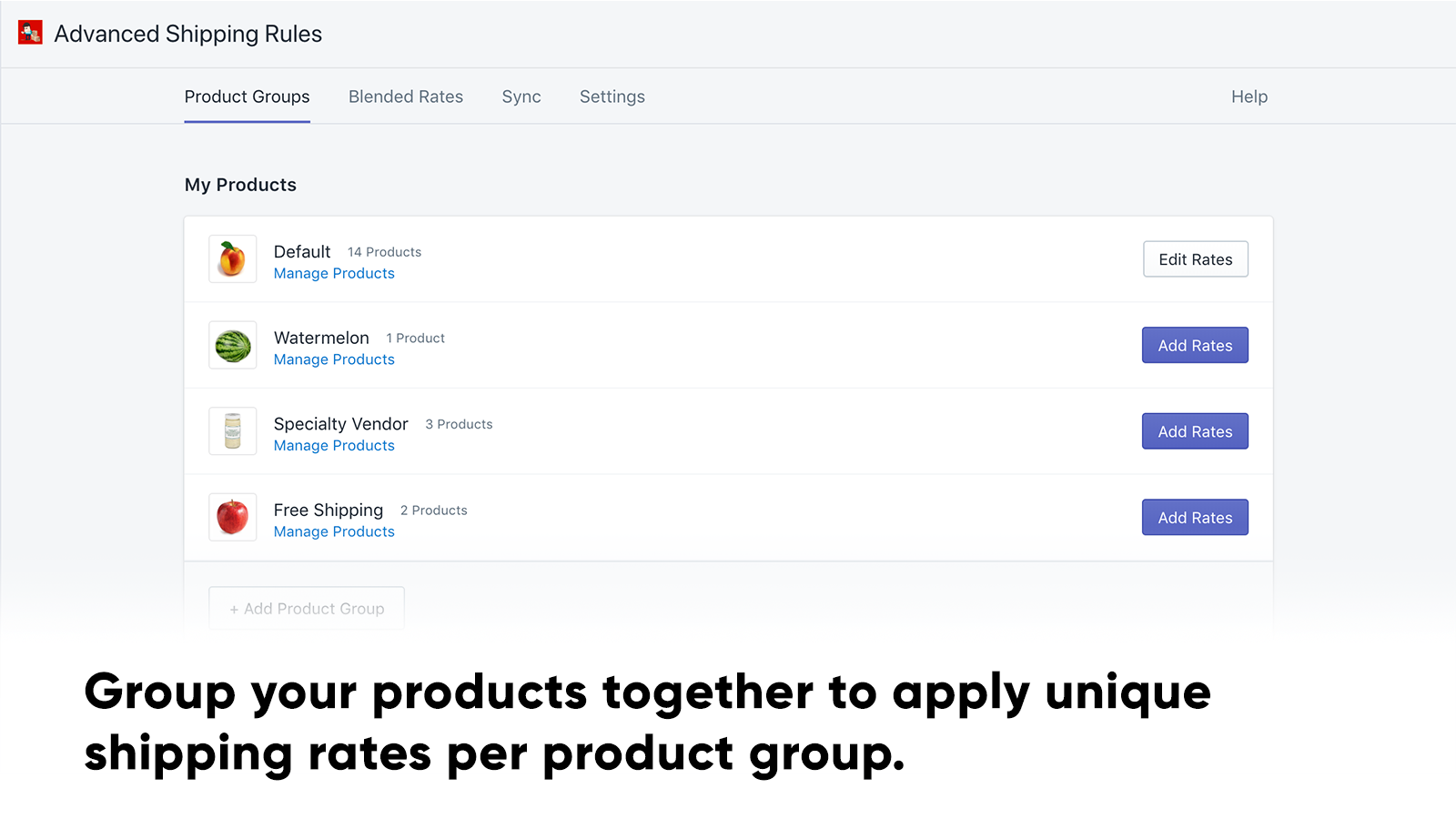

Advanced Shipping Rules lets you configure shipping based on products, vendors, zones, package dimensions, customs and duties, and more. That makes it useful when free shipping exclusions are only one part of a wider fulfilment setup.
In my experience, this sort of app becomes worthwhile when a merchant has already tried profiles and found them too limited. Not worth it unless your shipping logic is genuinely multi-layered.
Which method is best for your store?
The best method depends on whether you need a permanent shipping rule, a promotion, or highly customised logic. Most stores should start with the simplest option that matches their catalogue.
| Method | Best for | Pros | Cons | Cost |
|---|---|---|---|---|
| Custom shipping profiles | Excluding a few products or collections | Native, reliable, no app needed | Manual and limited for complex rules | Free |
| Collection-based free shipping discounts | Promotional free shipping codes | Good control over eligible items | Usually requires code use and careful testing | Free |
| Weight-based rules | Very specific catalogue structures | Simple workaround | Imprecise for most stores | Free |
| Shipping apps | Complex vendor or mixed-cart logic | Most flexible option | Monthly cost and setup time | Paid |
| Shopify Functions / custom development | Advanced or Plus-style setups | Maximum control | Developer effort required | Custom |
If I were advising most LaunchTip readers, I would say this:
- Use shipping profiles if you just need to exclude a handful of products
- Use collection-based discount codes if this is a promotion rather than a policy
- Use an app if your rules involve vendors, dimensions, multiple warehouses, or edge cases
How do Shopify Plus and Shopify Functions change this?
Shopify Functions can give advanced stores more control over shipping and discount logic. If you are on a more custom setup, a developer can build logic that only counts eligible line items towards free shipping thresholds.
This is not the first route I would recommend for a typical small store. But if you are already using custom checkout logic, Shopify Functions can be a cleaner long-term solution than stacking multiple apps. Shopify’s developer documentation is the right place to start for this route: Shopify Developers.
For most merchants, though, this is overkill. Profiles or apps solve the problem faster.
How should I test excluded free shipping products in Shopify?
You should always test three cart scenarios before going live: eligible-only carts, excluded-only carts, and mixed carts. Most shipping mistakes appear in mixed carts, not simple ones.
When I test shipping logic for app builds and merchant setups, I use a checklist like this:
- Add only eligible products and confirm free shipping appears as expected.
- Add only excluded products and confirm shipping is charged.
- Create a mixed cart and confirm the excluded products still trigger a charge.
- Test multiple shipping addresses and zones.
- Check mobile and desktop checkout flows.
- Review how shipping messaging appears on product pages and in cart.
Also watch for customer confusion. If a product is excluded from free shipping, say so clearly on the product page, cart, or shipping policy. Hidden shipping charges are one of the quickest ways to hurt conversion.
If you are refining the cart experience more broadly, you may also find How to Skip the Cart and Redirect to Checkout on Shopify and How to Add a Free Gift to Shopify Cart When Checkout Total Is Over $25 useful, especially when promotions and shipping incentives overlap.
What mistakes should you avoid when excluding products from free shipping?
The biggest mistakes are assuming Shopify handles line-item exclusions natively, not testing mixed carts, and forgetting customer messaging. Those three issues cause most of the confusion I see.
- Do not assume a cart-wide free shipping rule can intelligently ignore one product
- Do not skip testing with real addresses and mixed baskets
- Do not hide the rule from customers if specific items carry shipping
- Do not overcomplicate things with an app if a profile will do
- Do not underbuild with a profile if you really need vendor or dimensional logic
A related mistake is treating shipping and discounts as the same problem. They overlap, but they are not identical. A shipping profile controls shipping rates. A free shipping discount controls a promotion. The right fix depends on which one is creating the issue in your store.
So, what is the best way to exclude products from free shipping in Shopify?
For most Shopify stores, the best way is to create a custom shipping profile for the excluded products. It is the simplest native option, and it aligns with what current top-ranking discussions are recommending.
If your goal is promotional free shipping, use a discount code limited to eligible collections. If your store has more complex fulfilment logic, use an app like Intuitive Shipping, Better Shipping, or Advanced Shipping Rules.
That is the practical answer in 2026. Shopify can do this, but not with a single built-in toggle. Choose the method that matches your catalogue complexity, then test it properly before customers ever see it.