

The difference between sessions and visitors on your Shopify store is simple: a session is one visit to your store, while a visitor is one unique person or device that may generate multiple visits. In practice, this means your session count is usually higher than your visitor count.
I have seen this confuse plenty of merchants, especially when they open Shopify Analytics and spot numbers that do not quite line up with what they expected. In my experience building Shopify apps and helping store owners interpret performance data, this is one of the most common analytics questions because both metrics look similar at first glance, but they answer different business questions.
If you want the short version, visitors tell you how many unique people reached your store, while sessions tell you how often your store was visited. Once you understand that distinction, your traffic reports become much easier to analyse.
What is the difference between sessions and visitors on your Shopify store?
Sessions measure visits. Visitors measure unique people or devices. A single visitor can create multiple sessions if they come back later, leave for more than 30 minutes, switch devices, or return on a different day.
Shopify tracks both metrics using cookies, which are small files stored on a visitor's device. According to Shopify's analytics documentation, a session starts when someone lands on your store and ends after 30 minutes of inactivity or at midnight UTC. A visitor is the distinct user behind those visits, identified as best Shopify can through browser and device data.
This is why you might see something like 500 visitors and 820 sessions in a report. That does not mean your analytics are broken. It usually means some people came back more than once, which can actually be a positive sign if your traffic is qualified.
What is a session in Shopify?
A Shopify session is a single continuous visit to your online store. It begins when someone lands on any page and ends after 30 minutes of inactivity or at midnight UTC.
During one session, a customer might view several products, use search, add something to cart, read your shipping page, and even complete checkout. All of that can still count as one session as long as they remain active and do not cross the inactivity threshold.
Shopify sessions are useful because they show traffic volume and visit frequency. If your sessions are rising, it usually means more people are landing on your store or existing visitors are returning more often. If sessions rise but sales do not, that points to a conversion problem rather than a traffic problem.
That is where session data becomes genuinely useful. It is not just a vanity metric. It helps you spot whether the issue is acquisition, product-market fit, pricing, trust, or checkout friction.
When does a Shopify session end?
A Shopify session ends after 30 minutes of inactivity or at midnight UTC. Those are the two main reset points merchants need to remember.
So if someone visits your store at 11:50pm UTC and keeps browsing after midnight, Shopify can count that as a new session once the date changes. Likewise, if they leave your site and come back after more than 30 minutes, that is generally another session as well.
In real reporting, this matters because your session count can rise even when your visitor count stays fairly flat. I have seen merchants panic over this, but often it just means people are returning to compare products, check reviews, or revisit the cart before buying.
What can happen during a session?
A session can include multiple actions. It is not limited to one page view or one click.
Typical actions inside a single session include:
- Viewing product and collection pages
- Using site search
- Adding items to cart
- Starting checkout
- Completing a purchase
- Triggering analytics events
- Interacting with referral or campaign links
That is why sessions are often a better engagement metric than raw page views. One visitor can rack up lots of page views without real buying intent, but a healthy number of sessions combined with solid conversion rate usually tells a more complete story.
What is a visitor in Shopify?
A visitor in Shopify is a unique person or device that comes to your store within the selected reporting period. If that same person returns multiple times, Shopify still tries to count them as one visitor for that timeframe.
Visitors are about unique reach. This metric answers the question: how many distinct people did my store attract? That makes it especially helpful when you are evaluating channel performance, campaign reach, or brand awareness.
For example, if a Facebook ad campaign brings 1,000 visitors, that tells you the campaign reached roughly 1,000 distinct users or devices. If those same users generated 1,700 sessions, that suggests people came back again, which may indicate stronger intent or a longer buying cycle.
Visitors are not perfect because they rely heavily on cookies and device-level tracking. If someone clears cookies, uses another browser, or switches from mobile to desktop, they may be counted as a different visitor.
How does Shopify identify visitors?
Shopify identifies visitors primarily through cookies stored on the user's device. That means visitor counts are best viewed as a practical estimate, not an exact headcount of human beings.
This is important because one real person can appear as multiple visitors if they browse from their phone at lunch and then from their laptop in the evening. Equally, privacy settings, cookie blockers, and browser restrictions can all affect how cleanly analytics tools identify users.
In my experience, the right mindset is to use visitor data for trend analysis rather than obsessing over perfect precision. If your visitor count jumps 40% week on week, that signal matters, even if the exact absolute number is not flawless.
How do sessions and visitors compare side by side?
The easiest way to compare them is this: sessions count visits, while visitors count unique users. If one person visits three times, that is 3 sessions and 1 visitor.
Here is a straightforward comparison table you can use when checking Shopify Analytics.
| Metric | Sessions | Visitors |
|---|---|---|
| What it measures | Number of visits to your store | Number of unique people or devices |
| Can one person count multiple times? | Yes | Usually no, not within the same reporting period on the same device |
| How it resets | After 30 minutes inactivity or midnight UTC | When cookie identity changes, device changes, or period changes |
| Usually higher? | Yes | No |
| Best used for | Engagement frequency, repeat visits, traffic intensity | Audience size, reach, acquisition analysis |
As a rule of thumb, if your sessions are only slightly above visitors, your audience may be less engaged or more one-and-done. If sessions are much higher than visitors, you may have strong repeat interest, but you need to pair that with conversion data to know whether that is good or bad.
Can one visitor create multiple sessions?
Yes, one visitor can absolutely create multiple sessions. This is the normal behaviour behind the difference between the two metrics.
That can happen in several common situations:
- The person leaves and returns after more than 30 minutes
- The person comes back later the same day
- The person visits again after midnight UTC
- The person switches from mobile to desktop
- The person clears cookies or uses a different browser
For stores with longer consideration cycles, such as furniture, jewellery, supplements, or higher-ticket products, it is normal to see a bigger gap between sessions and visitors. People often need several visits before they feel ready to buy.
What is an example of sessions vs visitors in Shopify?
The clearest example is this: if one person visits your store, leaves, and comes back later, that can still be one visitor but multiple sessions.
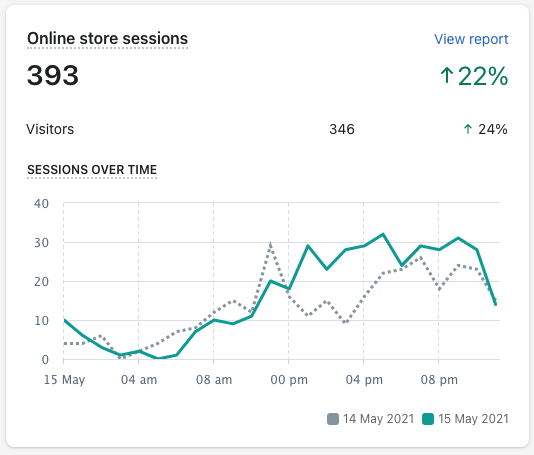
Here are a few simple examples:
| Scenario | Sessions | Visitors |
|---|---|---|
| A customer browses for 20 minutes, leaves, then returns 2 hours later | 2 | 1 |
| A customer visits for 10 minutes, leaves, then returns after 15 minutes | 1 | 1 |
| A customer visits on mobile, then later on desktop | 2 | Often 2 |
| A customer visits at 11:55pm UTC and continues after midnight | Often 2 | 1 |
This is why the old retail analogy works well: sessions are how many times the shop door opened, while visitors are how many distinct people came in. It is simple, but it is accurate enough for day-to-day analysis.
Why are my Shopify sessions higher than visitors?
Your Shopify sessions are usually higher than visitors because the same person can visit more than once. In most stores, that is completely normal.
There are a few common reasons behind a larger gap:
- Returning traffic from email, ads, or direct visits
- Longer buying journeys where people compare products before purchasing
- Cart abandonment and return visits
- Multi-device browsing
- Midnight UTC resets affecting session counts
In my experience, the number itself is not the issue. The important question is whether those extra sessions are turning into revenue. If you have lots of repeat sessions but poor conversion, that often points to weak product pages, poor trust signals, confusing shipping costs, or friction at checkout.
If that sounds familiar, it is worth reviewing your funnel and checkout setup. I covered that in more detail in The Shopify Checkout Guide: Everything You Need to Know.
Do admin visits count in Shopify sessions?
No, Shopify does not count logged-in admin activity as online store sessions in the same way customer traffic is counted. That change has been in place for years and helps keep analytics cleaner.
Shopify updated this behaviour back in 2017, so when you are logged in as a Shopify admin on a device, your own actions in the storefront should not inflate session totals in the normal way. That said, merchants still sometimes get confused by traffic from agencies, team members, or testing across non-admin sessions.
If you are trying to keep reports as clean as possible, I also recommend reading Excluding Your Own IP Address from Shopify Stats. It is especially useful if you or your team check the storefront frequently.
What do sessions and visitors actually tell you about store performance?
Sessions tell you about visit frequency and engagement, while visitors tell you about audience size and reach. You need both to understand whether your store is growing in a healthy way.
Here is how I use them when looking at a store:
- Visitors up, sessions up - traffic growth is likely healthy
- Visitors flat, sessions up - existing audience is returning more often
- Visitors up, sessions flat - more reach, but weaker repeat interest
- Sessions high, sales low - likely conversion or offer problem
- Visitors low, conversion high - good store performance, but traffic acquisition needs work
On their own, neither metric tells the full story. The real value comes when you analyse them alongside conversion rate, average order value, bounce rate, and top landing pages.
If you want to understand what visitors are doing once they arrive, have a look at Discovering Visitor Behavior on Your Shopify Store. Behaviour data often explains why sessions rise without a matching lift in sales.
Why am I getting lots of sessions on Shopify but no sales?
Lots of sessions but no sales usually means you have a conversion problem, not a traffic-counting problem. People are arriving, but something is stopping them from buying.
In my experience, the most common causes are:
- Low-intent traffic from broad ads or poor SEO targeting
- Weak product pages with unclear benefits or poor images
- Unexpected shipping costs or slow delivery messaging
- Lack of trust signals such as reviews, policies, and contact details
- A clunky mobile experience
- Checkout friction or too many steps
I see this a lot with stores that focus heavily on top-of-funnel traffic. They celebrate the rising session count, but they have not optimised product pages, cart flows, or post-click experience. Traffic without intent or trust rarely converts.
If your issue is getting people in the door but not turning them into customers, you may also want to review The Essential Guide to Getting Valuable Traffic to Your Shopify Store in 2025. The keyword there is valuable. Not all traffic is worth paying for.
Where can you find sessions and visitors in Shopify Analytics?
You can find sessions and visitors in Shopify Analytics under the Overview dashboard and acquisition-related reports. The exact layout can vary slightly depending on your plan and Shopify's interface updates.
Start with Shopify Analytics and look for your Online store sessions and Visitors metrics in the main dashboard or reports. Shopify's help documentation on analytics and acquisition reports is still the best source for the platform's official definitions.
Useful references include Shopify Analytics overview and Shopify acquisition reports. If you use Google Analytics alongside Shopify, compare trends rather than expecting exact one-to-one matching, because attribution models and tracking logic differ.
What metrics should you check alongside sessions and visitors?
The best metrics to check alongside sessions and visitors are conversion rate, average session duration, bounce rate, checkout completion, and revenue by channel. These give context to your traffic numbers.
Here is the combination I usually recommend merchants watch weekly:
| Metric | Why it matters |
|---|---|
| Conversion rate | Shows whether traffic is turning into orders |
| Average order value | Shows how much revenue each converted customer generates |
| Bounce rate | Helps identify poor landing page relevance or UX issues |
| Average session duration | Useful for understanding engagement quality |
| Add to cart rate | Shows whether product pages are doing their job |
| Checkout completion rate | Highlights friction after cart |
For ecommerce, average session duration benchmarks often land around the 2 to 3 minute range depending on niche and traffic source, but I would not obsess over benchmark averages in isolation. A short session that converts is better than a long session that wanders nowhere.
Are sessions and visitors always accurate?
No analytics platform is perfectly accurate, and Shopify is no exception. Sessions and visitors are directionally very useful, but they are still influenced by cookies, browsers, privacy settings, and device switching.
That means your numbers can be affected by:
- Cookie rejection or deletion
- Safari and browser privacy restrictions
- Ad blockers or tracking prevention tools
- Users switching devices or browsers
- Differences between Shopify and third-party analytics tools
In my experience, merchants get the best results when they treat analytics as a decision-making system, not a courtroom standard of proof. You are looking for patterns, trends, and leaks in the funnel, not perfect mathematical purity.
How should you use sessions and visitors to make better decisions?
Use visitors to judge reach and sessions to judge repeat engagement. Then compare both against sales to see whether your store is attracting the right people and converting them efficiently.
A practical way to use these metrics is:
- Check whether visitors are growing month on month
- Check whether sessions per visitor are rising or falling
- Compare both against conversion rate and revenue
- Review top landing pages and device splits
- Optimise the weakest stage of the funnel first
If visitors are growing but conversion is falling, your traffic quality may be slipping. If visitors are flat but sessions per visitor are climbing, your audience may be interested but unconvinced. That is often where stronger reviews, better offers, clearer delivery messaging, and more relevant product recommendations can help.
For stores trying to improve conversion from returning traffic, this is exactly why I built apps around onsite merchandising and customer experience. The gap between a session and a sale is where most stores either win or lose.
What is the best way to remember sessions vs visitors?
The best way to remember it is this: visitors are people, sessions are visits. If the same person comes back three times, you still have one visitor but three sessions.
That one line is usually enough to make Shopify analytics click. Once you have that mental model, the rest of the report becomes much easier to interpret.
So when you next open your dashboard, do not ask only, How much traffic did I get? Ask How many unique people came, how often did they return, and did those visits turn into sales? That is the point where sessions and visitors stop being abstract metrics and start becoming genuinely useful ecommerce signals.
For further reading, Shopify's official documentation is worth bookmarking: Analytics overview dashboard, acquisition reports, and the broader Shopify conversion rate guidance. I also like comparing store-side findings with broader ecommerce benchmarks from Databox.