Product Promotion Banner
Display eye-catching discount codes on your product pages with a click-to-copy promotion banner.
Important: Before making any changes to your theme, create a backup first.
This handy little code snippet drops right into a simple "Custom Liquid" block in your theme. You can edit the colours and discount code (make sure you have this discount active in your Shopify store).
What You'll Build
Save 20% on your order
BCFM20
Click to copy
Live preview - click the code to test the copy function
How to Add This to Your Store
-
1
Go to Shopify Admin > Online Store > Themes and click "Customize"
-
2
Copy the code from the section below
-
3
Add a new "Custom Liquid" block to your theme's product page in the Customizer
-
4
Paste the code. Position the block. Make any changes to the code (e.g. discount code, colors etc). Click Save.
Important: Make sure the discount code is active in your store.
Copy This Code
<div class="discount-promo">
  <div class="promo-content">
    <div class="promo-left">
      <span class="promo-label">Limited Time Offer</span>
      <p class="promo-text">Save 20% on your order</p>
    </div>
    <div class="code-container">
      <code class="discount-code">BCFM20</code>
      <span class="copy-hint">Click to copy</span>
    </div>
  </div>
</div>

<style>
.discount-promo {
  background: linear-gradient(135deg, #059669 0%, #0d9488 100%);
  border-radius: 8px;
  padding: 16px 20px;
  margin: 16px 0;
  box-shadow: 0 4px 6px -1px rgba(0, 0, 0, 0.1);
}

.promo-content {
  display: flex;
  align-items: center;
  justify-content: space-between;
  flex-wrap: wrap;
  gap: 12px;
}

.promo-left {
  text-align: left;
}

.promo-label {
  display: inline-block;
  background: rgba(255, 255, 255, 0.2);
  color: white;
  font-size: 11px;
  font-weight: 600;
  padding: 4px 8px;
  border-radius: 4px;
  margin-bottom: 6px;
  text-transform: uppercase;
  letter-spacing: 0.5px;
}

.promo-text {
  color: white;
  font-weight: 500;
  font-size: 15px;
  margin: 0;
}

.code-container {
  display: flex;
  flex-direction: column;
  align-items: center;
  gap: 4px;
  cursor: pointer;
}

.discount-code {
  background: white;
  color: #059669;
  font-weight: 700;
  padding: 10px 20px;
  border-radius: 6px;
  font-size: 18px;
  letter-spacing: 2px;
  transition: background 0.2s;
}

.code-container:hover .discount-code {
  background: #ecfdf5;
}

.copy-hint {
  color: rgba(255, 255, 255, 0.8);
  font-size: 11px;
}

@media (max-width: 480px) {
  .promo-content {
    flex-direction: column;
    text-align: center;
  }
  .promo-left {
    text-align: center;
  }
}
</style>

<script>
document.querySelector('.code-container').addEventListener('click', function() {
  const code = document.querySelector('.discount-code').textContent;
  navigator.clipboard.writeText(code).then(function() {
    const hint = document.querySelector('.copy-hint');
    hint.textContent = 'Copied!';
    setTimeout(function() {
      hint.textContent = 'Click to copy';
    }, 2000);
  });
});
</script>Make It Your Own
Easily customize the banner by changing these values in the code:
Discount Code
BCFM20
Change to your actual discount code
Discount Amount
Save 20% on your order
Update to match your offer
Background Gradient
#059669, #0d9488
Change colors to match your brand
Label Text
Limited Time Offer
Try "Flash Sale" or "Exclusive Deal"
The click-to-copy functionality works automatically. When customers click the code, it copies to their clipboard for easy use at checkout.
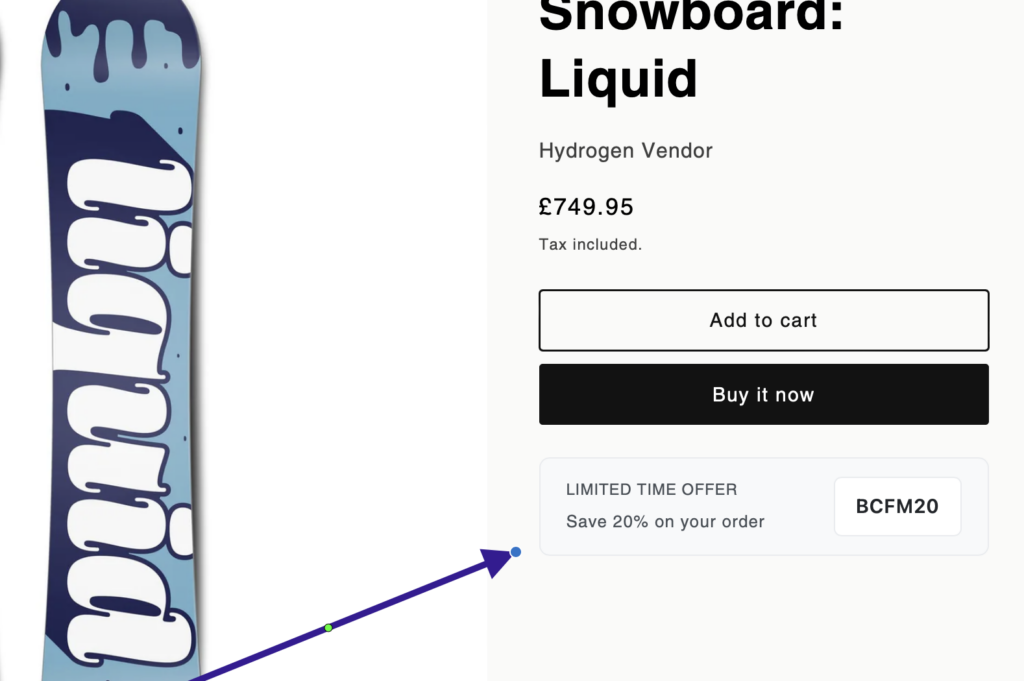
How It Looks
Explore More Free Sections
Discover more code snippets to enhance your Shopify store.
View All Sections