Scrolling Announcement Bar
Display multiple messages in a smooth, animated header bar that catches your customers' attention.
Important: Backup your theme first. We suggest working on a draft, not your published theme.
Ready to add a touch of dynamism to your store's header? This scrolling announcement bar allows you to showcase multiple messages in a single space, perfect for highlighting promotions, shipping info, or any other important announcements.
What You'll Build
Live preview - hover to pause
Update Your Announcement Bar Liquid File
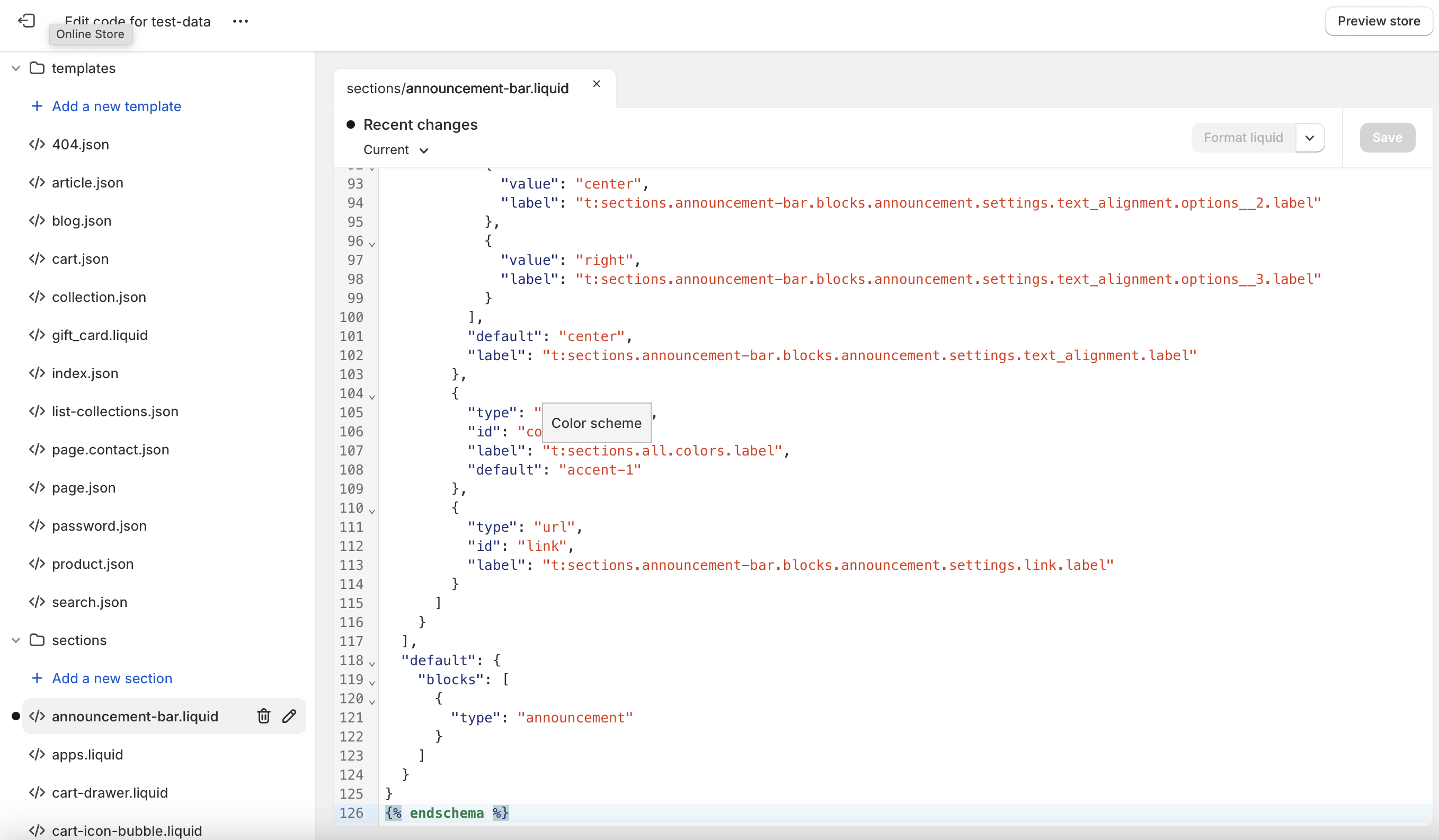
First, we need to replace the contents of your announcement-bar.liquid file.
- Go to your Shopify admin
- Navigate to "Online Store" > "Themes"
- Click "Actions" > "Edit code"
- Navigate to Sections, find and click on
announcement-bar.liquid - Replace all existing code with the following and save
{%- for block in section.blocks -%}
  {%- case block.type -%}
    {%- when 'announcement' -%}
      <div class="announcement-bar color-{{ block.settings.color_scheme }} gradient" role="region" aria-label="{{ 'sections.header.announcement' | t }}" {{ block.shopify_attributes }}>
        {%- if block.settings.message_one != blank -%}
          {%- if block.settings.link != blank -%}
            <a href="{{ block.settings.link }}" class="announcement-bar__link link link--text focus-inset animate-arrow">
          {%- endif -%}
              <div class="page-width marquee enable-animation marquee--hover-pause">

  <ul style="list-style: none" class="marquee__content">
      <li class="announcement-bar__message {{ block.settings.text_alignment }} h5">
                  {{ block.settings.message_one | escape }}
                  {%- if block.settings.link != blank -%}
                    {% render 'icon-arrow' %}
                  {%- endif -%}
                </li>
      <li class="announcement-bar__message {{ block.settings.text_alignment }} h5">
                  {{ block.settings.message_two | escape }}
                  {%- if block.settings.link != blank -%}
                    {% render 'icon-arrow' %}
                  {%- endif -%}
                </li>
       <li class="announcement-bar__message {{ block.settings.text_alignment }} h5">
                  {{ block.settings.message_three | escape }}
                  {%- if block.settings.link != blank -%}
                    {% render 'icon-arrow' %}
                  {%- endif -%}
                </li>
      <li class="announcement-bar__message {{ block.settings.text_alignment }} h5">
                  {{ block.settings.message_four | escape }}
                  {%- if block.settings.link != blank -%}
                    {% render 'icon-arrow' %}
                  {%- endif -%}
                </li>
       <li class="announcement-bar__message {{ block.settings.text_alignment }} h5">
                  {{ block.settings.message_five | escape }}
                  {%- if block.settings.link != blank -%}
                    {% render 'icon-arrow' %}
                  {%- endif -%}
                </li>
  </ul>

        <ul style="list-style: none" aria-hidden="true" class="marquee__content">
                <li class="announcement-bar__message {{ block.settings.text_alignment }} h5">
                  {{ block.settings.message_one | escape }}
                  {%- if block.settings.link != blank -%}
                    {% render 'icon-arrow' %}
                  {%- endif -%}
                </li>
            <li class="announcement-bar__message {{ block.settings.text_alignment }} h5">
                  {{ block.settings.message_two | escape }}
                  {%- if block.settings.link != blank -%}
                    {% render 'icon-arrow' %}
                  {%- endif -%}
                </li>
              <li class="announcement-bar__message {{ block.settings.text_alignment }} h5">
                  {{ block.settings.message_three| escape }}
                  {%- if block.settings.link != blank -%}
                    {% render 'icon-arrow' %}
                  {%- endif -%}
                </li>
            <li class="announcement-bar__message {{ block.settings.text_alignment }} h5">
                  {{ block.settings.message_four | escape }}
                  {%- if block.settings.link != blank -%}
                    {% render 'icon-arrow' %}
                  {%- endif -%}
                </li>
           <li class="announcement-bar__message {{ block.settings.text_alignment }} h5">
                  {{ block.settings.message_five | escape }}
                  {%- if block.settings.link != blank -%}
                    {% render 'icon-arrow' %}
                  {%- endif -%}
                </li>
        </ul>

              </div>
          {%- if block.settings.link != blank -%}
            </a>
          {%- endif -%}
        {%- endif -%}
      </div>
  {%- endcase -%}
{%- endfor -%}

{% schema %}
{
  "name": "t:sections.announcement-bar.name",
  "max_blocks": 12,
  "blocks": [
    {
      "type": "announcement",
      "name": "t:sections.announcement-bar.blocks.announcement.name",
      "settings": [
        {
          "type": "text",
          "id": "message_one",
          "default": "Message one",
          "label": "Announcement one"
        },
        {
          "type": "text",
          "id": "message_two",
          "default": "Message two",
          "label": "Announcement two"
        },
        {
          "type": "text",
          "id": "message_three",
          "default": "Message three",
          "label": "Announcement three"
        },
        {
          "type": "text",
          "id": "message_four",
          "default": "Message four",
          "label": "Announcement four"
        },
        {
          "type": "text",
          "id": "message_five",
          "default": "Message five",
          "label": "Announcement five"
        },
        {
          "type": "select",
          "id": "text_alignment",
          "options": [
            {
              "value": "left",
              "label": "t:sections.announcement-bar.blocks.announcement.settings.text_alignment.options__1.label"
            },
            {
              "value": "center",
              "label": "t:sections.announcement-bar.blocks.announcement.settings.text_alignment.options__2.label"
            },
            {
              "value": "right",
              "label": "t:sections.announcement-bar.blocks.announcement.settings.text_alignment.options__3.label"
            }
          ],
          "default": "center",
          "label": "t:sections.announcement-bar.blocks.announcement.settings.text_alignment.label"
        },
        {
          "type": "color_scheme",
          "id": "color_scheme",
          "label": "t:sections.all.colors.label",
          "default": "accent-1"
        },
        {
          "type": "url",
          "id": "link",
          "label": "t:sections.announcement-bar.blocks.announcement.settings.link.label"
        }
      ]
    }
  ],
  "default": {
    "blocks": [
      {
        "type": "announcement"
      }
    ]
  }
}
{% endschema %}Add the CSS
Add this CSS to your theme's CSS file or to the Theme Customizer CSS section. This makes the announcement bar scroll smoothly.
.marquee {
  --gap: 1rem;
  position: relative;
  display: flex;
  overflow: hidden;
  user-select: none;
  gap: var(--gap);
}

.marquee__content {
  flex-shrink: 0;
  display: flex;
  justify-content: space-around;
  gap: var(--gap);
  min-width: 100%;
  list-style: none;
  margin: 0;
  padding: 0;
}

@keyframes scroll {
  from {
    transform: translateX(0);
  }
  to {
    transform: translateX(calc(-100% - var(--gap)));
  }
}

.enable-animation .marquee__content {
  animation: scroll 20s linear infinite;
}

.marquee--hover-pause:hover .marquee__content {
  animation-play-state: paused;
}

@media (prefers-reduced-motion: reduce) {
  .marquee__content {
    animation-play-state: paused !important;
  }
}

.announcement-bar__message {
  padding: 10px 0;
  margin: 0;
}Customize Your Announcement Bar
Now comes the fun part – customizing your announcement bar!
- Go back to your Shopify admin panel
- Navigate to "Online Store" > "Themes"
- Click "Customize"
- Look for the "Header" section
- You should see an option to add an "Announcement bar" – click it!
- Add up to five different messages, change alignment, pick colors, and add a link
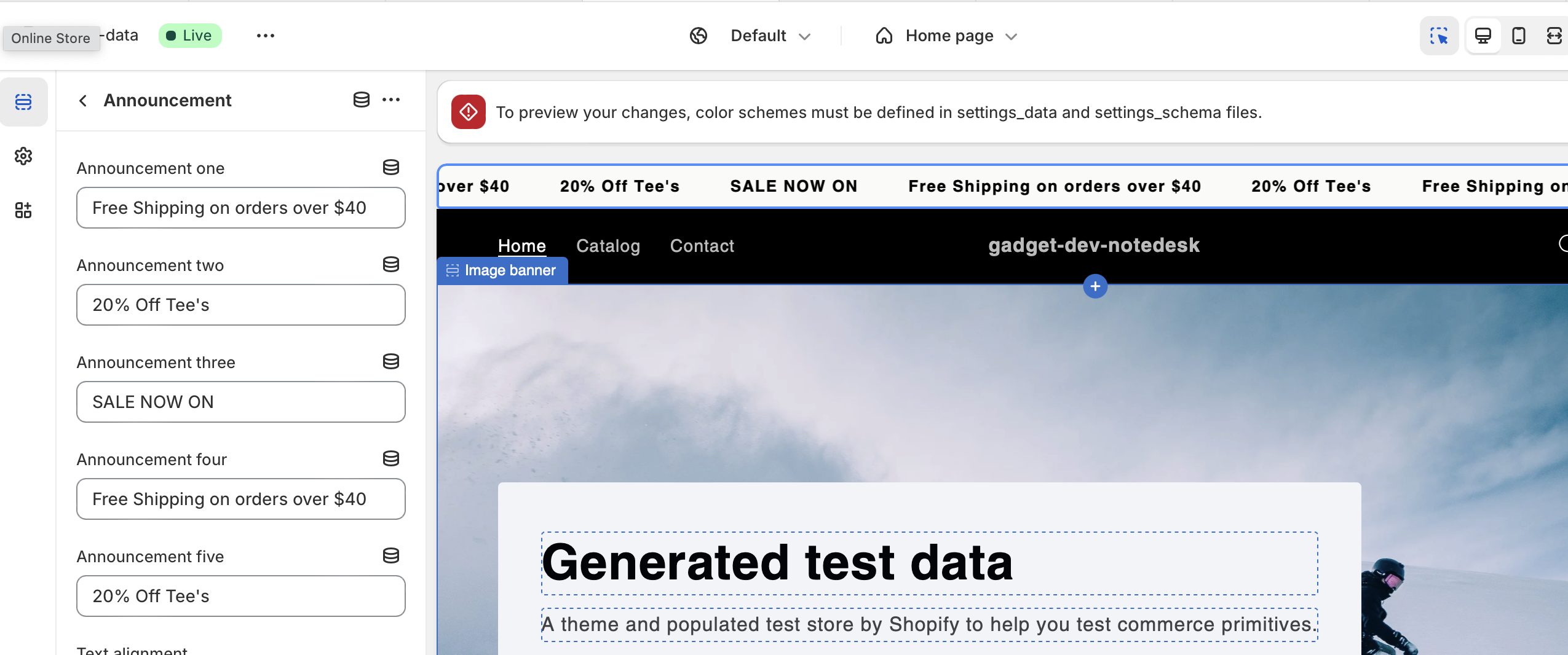
Pro tip: Keep your messages short and sweet for the best effect!
What Makes It Awesome
Smooth Scrolling
Your messages scroll seamlessly, creating a dynamic header.
Pause on Hover
Customers can easily read a message by hovering over the bar.
Responsive Design
Looks great on all devices, from mobile to desktop.
Accessibility
Includes ARIA labels and respects reduced motion preferences.
Explore More Free Sections
Discover more code snippets to enhance your Shopify store.
View All Sections