Last Updated on by Dan S
Originally Published June 17, 2021.


One of the most effective ways for your customers to become members is to offer them discounts. But how do you tag certain customers so that the discounts are only available for them? Is it even possible?

Here are a few ways to incentivize your members with discounts and apply them to tagged customers.

The benefits of Automatic Discounts VS Discount Codes

For Shopify merchants aiming to elevate their customer experience, applying automatic discounts to tagged customers presents a seamless solution.

While distributing discount codes may seem straightforward, it’s all too common for customers to forget these codes, leading to frustration when they realize they’ve missed out on savings. Furthermore, there’s always the risk of these codes being shared with non-members, allowing them to enjoy discounts meant exclusively for your loyal clientele.

To avoid these pitfalls, automating the discount process ensures your valued customers enjoy their benefits effortlessly, without the need for manual code entry.

Does Shopify let you apply discounts to tagged customers?

Yes! As of August 2025, Shopify now natively supports automatic discounts for tagged customers and customer segments. This was a major update that allows you to specify whether your automatic discount applies to all customers, selected segments, or individual customers.

Previously, Shopify didn’t have a native feature for you to give automatic discounts to certain tagged customers. However, with the August 2025 update, this is now possible within Shopify’s built-in discount system.

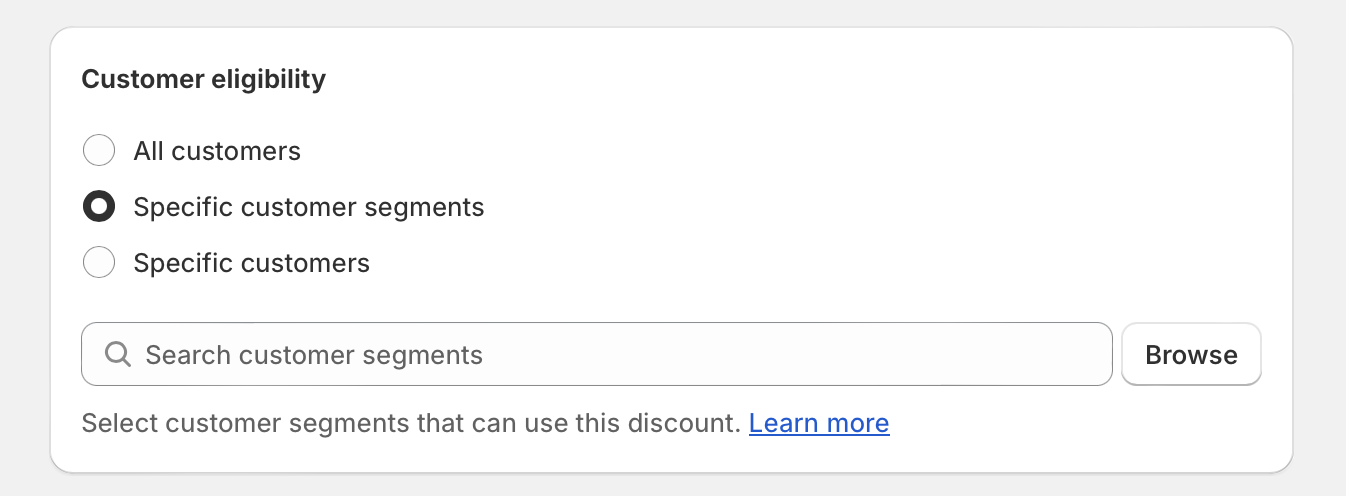
When creating an automatic discount, you can now choose customer eligibility options including:

  • All customers
  • Specific customer segments (up to 5 segments per automatic discount)
  • Individual customers

This makes it easy to run targeted promotions for VIPs, loyalty-program members, wholesale customers, and more – all without requiring customers to enter discount codes.

How to Set Up Automatic Discounts for Tagged Customers

To create automatic discounts for tagged customers in Shopify:

  1. First, create your customer segment based on tags. Go to Customers > Segments in your Shopify admin.
  2. Create a new segment using the filter format: customer_tags CONTAINS ‘your_tag’ (replace with your actual tag name like ‘VIP’ or ‘Wholesale’)
  3. Navigate to Discounts and click Create Discount
  4. Select Automatic Discount as your method
  5. Configure your discount settings (percentage, fixed amount, or free shipping)
  6. In the Customer Eligibility section, select Specific customer segments and choose your tagged segment
  7. Save your discount

The discount will now automatically apply at checkout for customers in your selected segment – no code entry required!

Using apps for advanced features

While Shopify’s native automatic discount features now support customer segments, third-party apps can still provide additional functionality such as:

  • Displaying discounted prices on product pages (not just at checkout)
  • More complex discount rules and combinations
  • Location-based or market-specific targeting
  • Tiered pricing and volume discounts
  • POS-only discounts

Popular apps for advanced discount features include:

Conclusion

In conclusion, leveraging discounts as an incentive for customer loyalty and membership can significantly enhance the shopping experience on your Shopify store. With Shopify’s August 2025 update, merchants can now apply automatic discounts directly to tagged customers and customer segments using the platform’s native features.

This game-changing update means you can create personalized shopping experiences for VIPs, loyalty-program members, and wholesale customers without requiring them to remember or enter discount codes. For merchants needing even more advanced features like product page price displays or complex discount rules, third-party apps remain valuable tools to further tailor your discount strategies.

By ensuring that discounts are seamlessly and exclusively applied to your loyal customers, you elevate the overall customer experience, encouraging repeat business and fostering a strong sense of community among your clientele.