Trust Box & Payment Icons
Add professional trust badges and payment method icons to boost credibility and increase conversions.
Important: Before making any changes to your theme, create a backup first.
Why Trust Badges Matter
Trust badges and payment icons remain critical for e-commerce success. Research shows that trust badges can increase conversions by up to 42%, while nearly 61% of customers won't complete a purchase if the site lacks trust signals.
- Reduces customer anxiety and builds immediate credibility
- Shows accepted payment methods so customers know their options
- Highlights service guarantees like free shipping and support
- Lightweight SVG icons won't impact your page load speed
What You'll Build
Accepted Payment Methods
Live preview - this is exactly how it will look on your store
Step-by-Step Installation
-
1
Open Your Theme Customizer
- Log into your Shopify Admin dashboard
- Click "Online Store" in the left sidebar
- Select "Themes" from the submenu
- Find your active theme and click "Customize"
-
2
Navigate to Product Template
- Click the dropdown menu at the top (usually shows "Home page")
- Select "Product pages" from the list
-
3
Add Custom Section
- Look for the "Add section" button
- Click it to open the section menu
- Scroll down and select "Custom liquid"
-
4
Insert the Code
Copy the complete code below, paste it into the Custom liquid content box, and drag the section to your desired position.
-
5
Save and Publish
- Click "Save" to store your changes
- Use "Preview" to check on both desktop and mobile
- When satisfied, exit the customizer
What the Code Looks Like
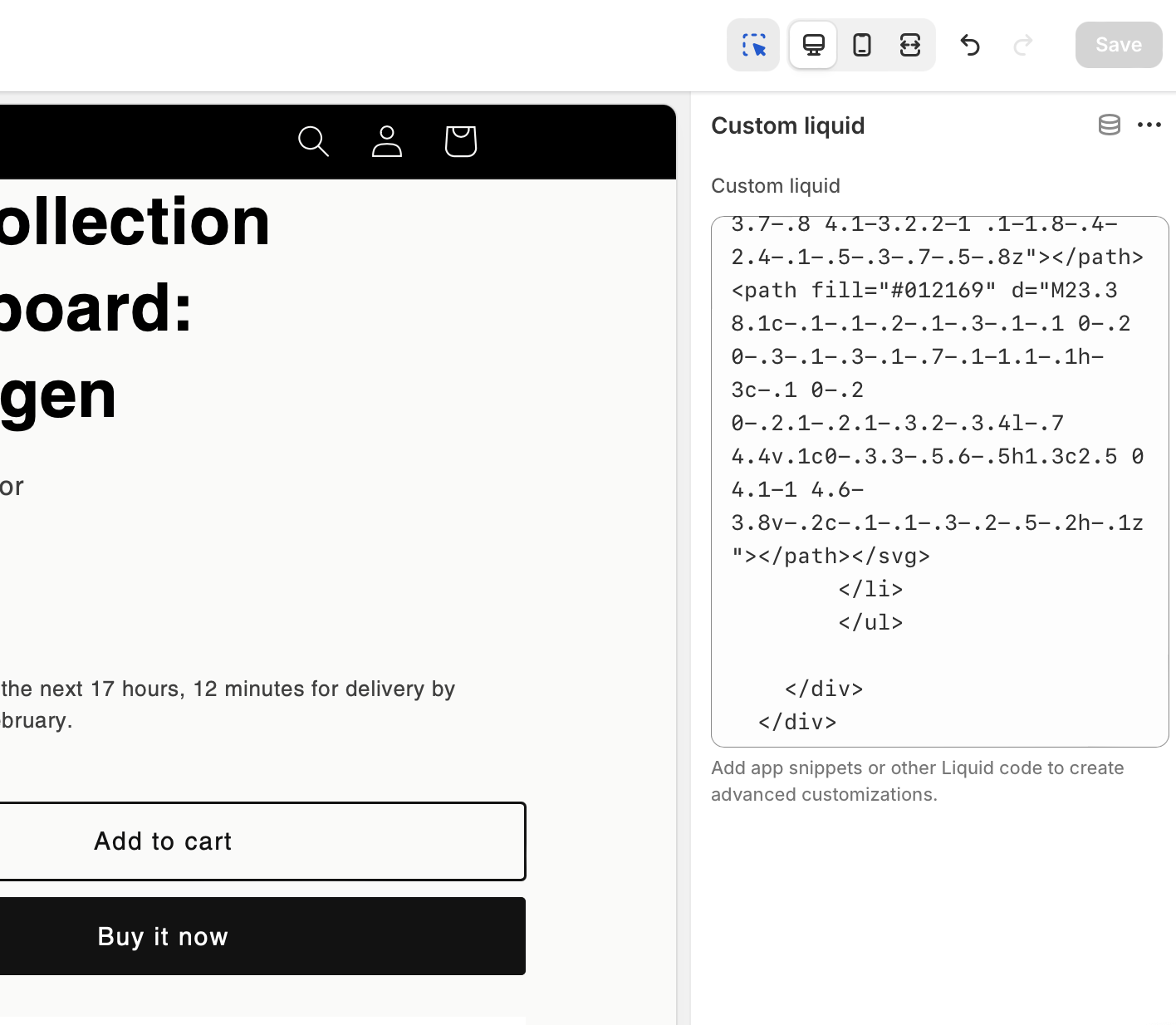
The code pasted into a Custom Liquid section in Shopify
Copy This Code
<!-- Trust Points Section -->
<div style="padding: 2rem 0; background: #ffffff;">
  <div style="margin: 0 auto; padding: 0 1rem; max-width: 1200px;">
    <!-- Trust Points - Fixed Horizontal Layout -->
    <div style="display: grid; grid-template-columns: repeat(3, 1fr); gap: 1rem;">
      <div style="text-align: center; padding: 0.75rem;">
        <svg xmlns="http://www.w3.org/2000/svg" class="mx-auto mb-2" width="24" height="24" viewBox="0 0 24 24" fill="none" stroke="currentColor" stroke-width="2" stroke-linecap="round" stroke-linejoin="round">
          <path d="M5 8h14M5 8a2 2 0 110-4h14a2 2 0 110 4M5 8v10a2 2 0 002 2h10a2 2 0 002-2V8"/>
          <path d="M3 8l2-4h14l2 4"/>
        </svg>
        <div style="font-weight: 600; margin-bottom: 0.25rem; font-size: 1rem;">Free Shipping</div>
        <div style="color: #666; font-size: 0.875rem;">On orders over $50</div>
      </div>

      <div style="text-align: center; padding: 0.75rem;">
        <svg xmlns="http://www.w3.org/2000/svg" class="mx-auto mb-2" width="24" height="24" viewBox="0 0 24 24" fill="none" stroke="currentColor" stroke-width="2" stroke-linecap="round" stroke-linejoin="round">
          <rect width="18" height="11" x="3" y="11" rx="2" ry="2"/>
          <path d="M7 11V7a5 5 0 0110 0v4"/>
        </svg>
        <div style="font-weight: 600; margin-bottom: 0.25rem; font-size: 1rem;">Secure Payment</div>
        <div style="color: #666; font-size: 0.875rem;">256-bit SSL Security</div>
      </div>

      <div style="text-align: center; padding: 0.75rem;">
        <svg xmlns="http://www.w3.org/2000/svg" class="mx-auto mb-2" width="24" height="24" viewBox="0 0 24 24" fill="none" stroke="currentColor" stroke-width="2" stroke-linecap="round" stroke-linejoin="round">
          <path d="M21 15a2 2 0 01-2 2H7l-4 4V5a2 2 0 012-2h14a2 2 0 012 2z"/>
        </svg>
        <div style="font-weight: 600; margin-bottom: 0.25rem; font-size: 1rem;">24/7 Support</div>
        <div style="color: #666; font-size: 0.875rem;">Live chat or email</div>
      </div>
    </div>

    <!-- Payment Icons -->
    <div style="text-align: center; margin-top: 3rem;">
      <h3 style="margin-bottom: 2rem; font-size: 1.4rem; font-weight: 500;">Accepted Payment Methods</h3>

      <ul style="display: flex; justify-content: center; gap: 1rem; flex-wrap: wrap; list-style: none; padding: 0; margin: 0;">
        <li style="margin: 0;">
          <svg class="icon icon--full-color" viewBox="0 0 38 24" xmlns="http://www.w3.org/2000/svg" role="img" width="38" height="24" aria-labelledby="pi-visa"><title id="pi-visa">Visa</title><path opacity=".07" d="M35 0H3C1.3 0 0 1.3 0 3v18c0 1.7 1.4 3 3 3h32c1.7 0 3-1.3 3-3V3c0-1.7-1.4-3-3-3z"></path><path fill="#fff" d="M35 1c1.1 0 2 .9 2 2v18c0 1.1-.9 2-2 2H3c-1.1 0-2-.9-2-2V3c0-1.1.9-2 2-2h32"></path><path d="M28.3 10.1H28c-.4 1-.7 1.5-1 3h1.9c-.3-1.5-.3-2.2-.6-3zm2.9 5.9h-1.7c-.1 0-.1 0-.2-.1l-.2-.9-.1-.2h-2.4c-.1 0-.2 0-.2.2l-.3.9c0 .1-.1.1-.1.1h-2.1l.2-.5L27 8.7c0-.5.3-.7.8-.7h1.5c.1 0 .2 0 .2.2l1.4 6.5c.1.4.2.7.2 1.1.1.1.1.1.1.2zm-13.4-.3l.4-1.8c.1 0 .2.1.2.1.7.3 1.4.5 2.1.4.2 0 .5-.1.7-.2.5-.2.5-.7.1-1.1-.2-.2-.5-.3-.8-.5-.4-.2-.8-.4-1.1-.7-1.2-1-.8-2.4-.1-3.1.6-.4.9-.8 1.7-.8 1.2 0 2.5 0 3.1.2h.1c-.1.6-.2 1.1-.4 1.7-.5-.2-1-.4-1.5-.4-.3 0-.6 0-.9.1-.2 0-.3.1-.4.2-.2.2-.2.5 0 .7l.5.4c.4.2.8.4 1.1.6.5.3 1 .8 1.1 1.4.2.9-.1 1.7-.9 2.3-.5.4-.7.6-1.4.6-1.4 0-2.5.1-3.4-.2-.1.2-.1.2-.2.1zm-3.5.3c.1-.7.1-.7.2-1 .5-2.2 1-4.5 1.4-6.7.1-.2.1-.3.3-.3H18c-.2 1.2-.4 2.1-.7 3.2-.3 1.5-.6 3-1 4.5 0 .2-.1.2-.3.2M5 8.2c0-.1.2-.2.3-.2h3.4c.5 0 .9.3 1 .8l.9 4.4c0 .1 0 .1.1.2 0-.1.1-.1.1-.1l2.1-5.1c-.1-.1 0-.2.1-.2h2.1c0 .1 0 .1-.1.2l-3.1 7.3c-.1.2-.1.3-.2.4-.1.1-.3 0-.5 0H9.7c-.1 0-.2 0-.2-.2L7.9 9.5c-.2-.2-.5-.5-.9-.6-.6-.3-1.7-.5-1.9-.5L5 8.2z" fill="#142688"></path></svg>
        </li>
        <li style="margin: 0;">
          <svg class="icon icon--full-color" viewBox="0 0 38 24" xmlns="http://www.w3.org/2000/svg" role="img" width="38" height="24" aria-labelledby="pi-master"><title id="pi-master">Mastercard</title><path opacity=".07" d="M35 0H3C1.3 0 0 1.3 0 3v18c0 1.7 1.4 3 3 3h32c1.7 0 3-1.3 3-3V3c0-1.7-1.4-3-3-3z"></path><path fill="#fff" d="M35 1c1.1 0 2 .9 2 2v18c0 1.1-.9 2-2 2H3c-1.1 0-2-.9-2-2V3c0-1.1.9-2 2-2h32"></path><circle fill="#EB001B" cx="15" cy="12" r="7"></circle><circle fill="#F79E1B" cx="23" cy="12" r="7"></circle><path fill="#FF5F00" d="M22 12c0-2.4-1.2-4.5-3-5.7-1.8 1.3-3 3.4-3 5.7s1.2 4.5 3 5.7c1.8-1.2 3-3.3 3-5.7z"></path></svg>
        </li>
        <li style="margin: 0;">
          <svg class="icon icon--full-color" viewBox="0 0 38 24" xmlns="http://www.w3.org/2000/svg" width="38" height="24" role="img" aria-labelledby="pi-paypal"><title id="pi-paypal">PayPal</title><path opacity=".07" d="M35 0H3C1.3 0 0 1.3 0 3v18c0 1.7 1.4 3 3 3h32c1.7 0 3-1.3 3-3V3c0-1.7-1.4-3-3-3z"></path><path fill="#fff" d="M35 1c1.1 0 2 .9 2 2v18c0 1.1-.9 2-2 2H3c-1.1 0-2-.9-2-2V3c0-1.1.9-2 2-2h32"></path><path fill="#003087" d="M23.9 8.3c.2-1 0-1.7-.6-2.3-.6-.7-1.7-1-3.1-1h-4.1c-.3 0-.5.2-.6.5L14 15.6c0 .2.1.4.3.4H17l.4-3.4 1.8-2.2 4.7-2.1z"></path><path fill="#3086C8" d="M23.9 8.3l-.2.2c-.5 2.8-2.2 3.8-4.6 3.8H18c-.3 0-.5.2-.6.5l-.6 3.9-.2 1c0 .2.1.4.3.4H19c.3 0 .5-.2.5-.4v-.1l.4-2.4v-.1c0-.2.3-.4.5-.4h.3c2.1 0 3.7-.8 4.1-3.2.2-1 .1-1.8-.4-2.4-.1-.5-.3-.7-.5-.8z"></path><path fill="#012169" d="M23.3 8.1c-.1-.1-.2-.1-.3-.1-.1 0-.2 0-.3-.1-.3-.1-.7-.1-1.1-.1h-3c-.1 0-.2 0-.2.1-.2.1-.3.2-.3.4l-.7 4.4v.1c0-.3.3-.5.6-.5h1.3c2.5 0 4.1-1 4.6-3.8v-.2c-.1-.1-.3-.2-.5-.2h-.1z"></path></svg>
        </li>
      </ul>
    </div>
  </div>
</div>Best Practices
Keep it subtle
Avoid bright colors that distract from your product
Be accurate
Ensure your free shipping threshold matches your policy
Position wisely
Place where customers naturally pause during purchase
Avoid overload
Focus on 3-5 most impactful trust signals
Performance Note: This code uses lightweight SVG icons and inline styles, loading in less than 30kb. It won't impact your page speed and is responsive across all devices.
How It Looks
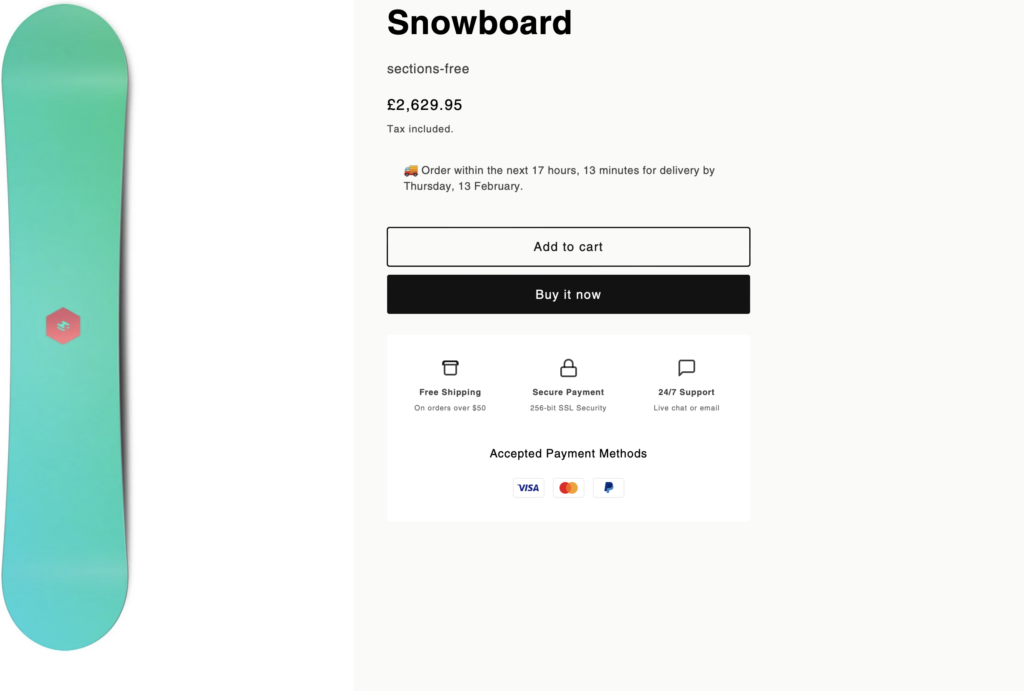
Explore More Free Sections
Discover more code snippets to enhance your Shopify store.
View All Sections