Next Drop - Hype Countdown
The perfect code snippet to create hype for an incoming product or collection. Use it with a CTA to get signups.
Important: Before making any changes to your theme, create a backup first.
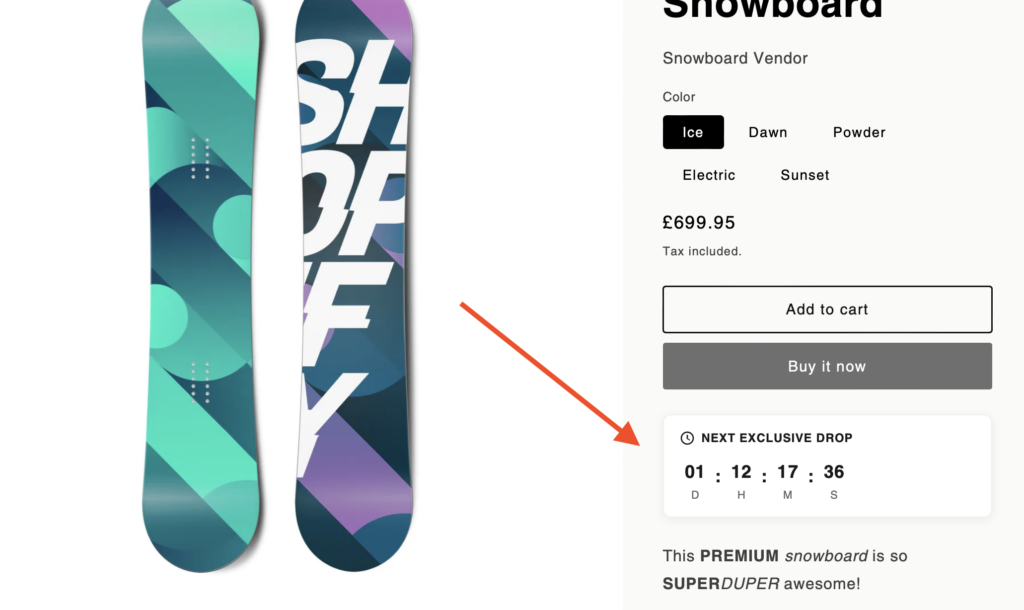
Build anticipation for your next product launch or collection drop with this stylish countdown timer. Perfect for creating urgency and driving email signups before a big release.
What You'll Build
Live preview - timer counts down in real-time
How to Add This to Your Store
-
1
Go to Shopify Admin > Online Store > Themes and click "Customize"
-
2
Copy the code from the section below
-
3
Add a new "Custom Liquid" block to your theme's product page in the Customizer
-
4
Paste the code. Position the block. Make any changes to the code (e.g. countdown time, colors etc). Click Save.
Important: Make sure to disable the block after reaching the end date.
Copy This Code
<div class="next-drop-countdown">
  <div class="countdown-content">
    <div class="countdown-header">
      <svg viewBox="0 0 24 24" width="16" height="16" class="countdown-icon">
        <path d="M12 2C6.486 2 2 6.486 2 12s4.486 10 10 10 10-4.486 10-10S17.514 2 12 2zm0 18c-4.411 0-8-3.589-8-8s3.589-8 8-8 8 3.589 8 8-3.589 8-8 8z"/>
        <path d="M13 7h-2v6l4.5 2.7.75-1.23-3.25-1.97z"/>
      </svg>
      <span>NEXT EXCLUSIVE DROP</span>
    </div>
    <div class="countdown-timer">
      <div class="time-block">
        <span class="days">00</span>
        <label>D</label>
      </div>
      <div class="time-separator">:</div>
      <div class="time-block">
        <span class="hours">00</span>
        <label>H</label>
      </div>
      <div class="time-separator">:</div>
      <div class="time-block">
        <span class="minutes">00</span>
        <label>M</label>
      </div>
      <div class="time-separator">:</div>
      <div class="time-block">
        <span class="seconds">00</span>
        <label>S</label>
      </div>
    </div>
  </div>
</div>

<style>
.next-drop-countdown {
  background: #171717;
  border-radius: 8px;
  padding: 24px;
  margin: 16px 0;
  text-align: center;
}

.countdown-content {
  display: flex;
  flex-direction: column;
  align-items: center;
  gap: 16px;
}

.countdown-header {
  display: flex;
  align-items: center;
  gap: 8px;
  color: #a3a3a3;
  font-size: 11px;
  font-weight: 500;
  letter-spacing: 2px;
  text-transform: uppercase;
}

.countdown-icon {
  fill: currentColor;
}

.countdown-timer {
  display: flex;
  align-items: center;
  gap: 8px;
}

.time-block {
  text-align: center;
}

.time-block span {
  display: block;
  font-size: 36px;
  font-weight: 700;
  color: white;
  line-height: 1;
}

.time-block label {
  display: block;
  font-size: 10px;
  color: #737373;
  text-transform: uppercase;
  margin-top: 4px;
}

.time-separator {
  color: #525252;
  font-size: 24px;
  font-weight: 300;
  margin-top: -12px;
}

@media (max-width: 480px) {
  .time-block span {
    font-size: 28px;
  }
  .time-separator {
    font-size: 20px;
  }
}
</style>

<script>
(function() {
  // Set your target date here (Year, Month (0-11), Day, Hour, Minute, Second)
  const targetDate = new Date(2025, 0, 15, 0, 0, 0); // January 15, 2025

  function updateCountdown() {
    const now = new Date();
    const diff = targetDate - now;

    if (diff <= 0) {
      document.querySelector('.days').textContent = '00';
      document.querySelector('.hours').textContent = '00';
      document.querySelector('.minutes').textContent = '00';
      document.querySelector('.seconds').textContent = '00';
      return;
    }

    const days = Math.floor(diff / (1000 * 60 * 60 * 24));
    const hours = Math.floor((diff % (1000 * 60 * 60 * 24)) / (1000 * 60 * 60));
    const minutes = Math.floor((diff % (1000 * 60 * 60)) / (1000 * 60));
    const seconds = Math.floor((diff % (1000 * 60)) / 1000);

    document.querySelector('.days').textContent = String(days).padStart(2, '0');
    document.querySelector('.hours').textContent = String(hours).padStart(2, '0');
    document.querySelector('.minutes').textContent = String(minutes).padStart(2, '0');
    document.querySelector('.seconds').textContent = String(seconds).padStart(2, '0');
  }

  updateCountdown();
  setInterval(updateCountdown, 1000);
})();
</script>Make It Your Own
Easily customize the countdown by changing these values in the code:
Target Date
new Date(2025, 0, 15, 0, 0, 0)
Format: Year, Month (0-11), Day, Hour, Min, Sec
Header Text
NEXT EXCLUSIVE DROP
Change to match your event
Background Color
#171717
Dark neutral - change to match your brand
Text Color
white / #a3a3a3
Numbers are white, labels are gray
Tip: Pair this countdown with an email signup form to capture leads before your product drop. You can add a CTA button below the timer.
How It Looks
Explore More Free Sections
Discover more code snippets to enhance your Shopify store.
View All Sections