Free FAQ Section
Add a professional, accordion-style FAQ section to your Shopify store. Fully responsive and easy to maintain.
Important: Before making any changes to your theme, create a backup first.
Why Your Store Needs a Custom FAQ Section
- Reduces support inquiries – 70% of consumers prefer using a website to get answers instead of contacting support
- Boosts SEO – FAQ questions can appear in Google's "People Also Ask" sections
- Increases conversions – Address common concerns and remove barriers to purchase
- Brand consistency – Fully customizable styling to match your store
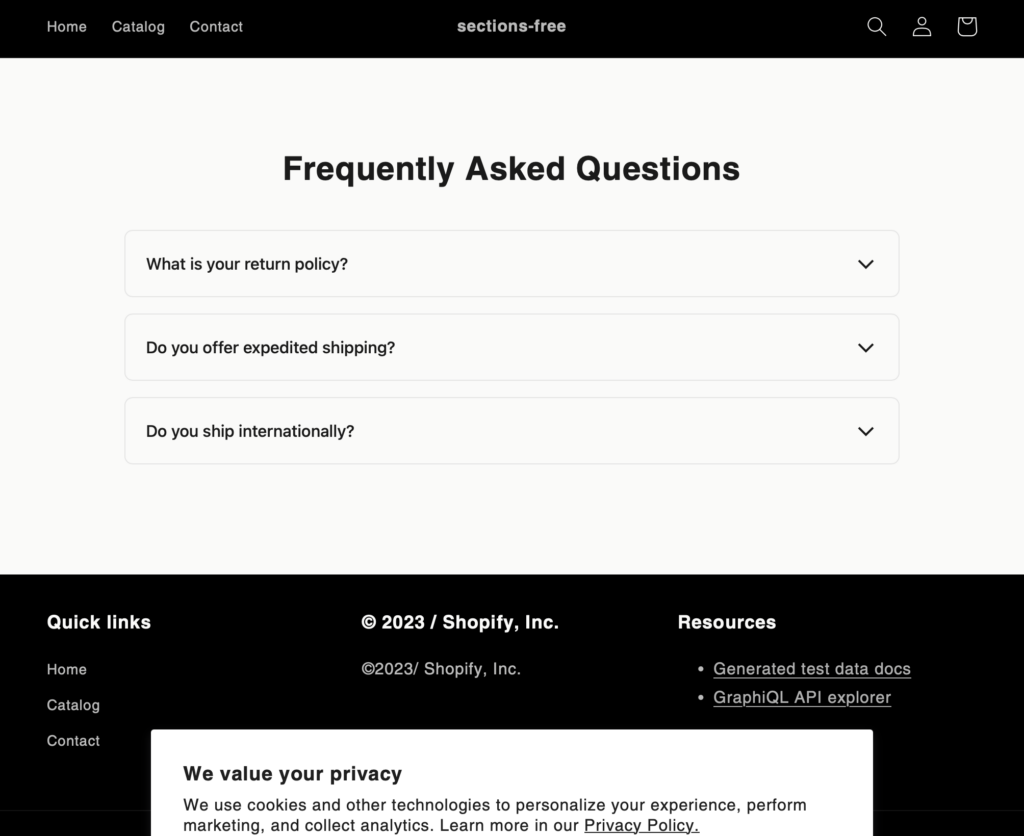
What You'll Build
Frequently Asked Questions
Live preview - click questions to expand
How to Add This to Your Store
-
1
Create the FAQ Section File
- Go to your Shopify admin
- Navigate to Online Store > Themes
- Click "Actions" > "Edit code"
- In the Sections folder, click "Add a new section"
- Name your file "faq-section.liquid"
-
2
Add the Code
Copy the complete code from below and paste it into your new section file.
-
3
Customize Your FAQ Content
- Go to your theme customizer
- Find the "FAQ Section" in the sections list
- Click "Add FAQ Item" to create new questions
- Fill in your questions and answers
- Use the rich text editor to format your answers
Copy This Code
This code includes the schema settings, HTML structure, CSS styling, and JavaScript for smooth interactions. Paste it all into your faq-section.liquid file.
{% schema %}
{
  "name": "FAQ Section by LAUNCHTIP",
  "settings": [
    {
      "type": "text",
      "id": "title",
      "label": "Section Title",
      "default": "Frequently Asked Questions"
    }
  ],
  "blocks": [
    {
      "type": "faq",
      "name": "FAQ Item",
      "settings": [
        {
          "type": "text",
          "id": "question",
          "label": "Question",
          "default": "What is your return policy?"
        },
        {
          "type": "richtext",
          "id": "answer",
          "label": "Answer",
          "default": "<p>We offer a 30-day return policy for all unused items in original packaging.</p>"
        }
      ]
    }
  ],
  "presets": [
    {
      "name": "FAQ Section",
      "blocks": [
        {
          "type": "faq"
        },
        {
          "type": "faq"
        },
        {
          "type": "faq"
        }
      ]
    }
  ]
}
{% endschema %}

<div class="faq-section">
  <div class="faq-container">
    <h2 class="faq-title">{{ section.settings.title }}</h2>
    <div class="faq-list">
      {% for block in section.blocks %}
        <div class="faq-item" {{ block.shopify_attributes }}>
          <button class="faq-question">
            {{ block.settings.question }}
            <svg class="faq-icon" viewBox="0 0 24 24" width="24" height="24">
              <path d="M19 8.5L12 15.5L5 8.5" stroke="currentColor" fill="none" stroke-width="2"/>
            </svg>
          </button>
          <div class="faq-answer">
            {{ block.settings.answer }}
          </div>
        </div>
      {% endfor %}
    </div>
  </div>
</div>

<style>
.faq-section {
  padding: 60px 20px;
  max-width: 800px;
  margin: 0 auto;
}

.faq-title {
  text-align: center;
  margin-bottom: 40px;
  font-size: 32px;
  font-weight: 600;
  color: #1a1a1a;
}

.faq-list {
  display: flex;
  flex-direction: column;
  gap: 16px;
}

.faq-item {
  border: 1px solid #e5e5e5;
  border-radius: 8px;
  overflow: hidden;
}

.faq-question {
  width: 100%;
  padding: 20px;
  display: flex;
  justify-content: space-between;
  align-items: center;
  background: none;
  border: none;
  text-align: left;
  font-size: 16px;
  font-weight: 500;
  color: #1a1a1a;
  cursor: pointer;
  transition: all 0.3s ease;
}

.faq-question:hover {
  background-color: #f8f9fa;
}

.faq-icon {
  transition: transform 0.3s ease;
  flex-shrink: 0;
}

.faq-item.active .faq-icon {
  transform: rotate(180deg);
}

.faq-answer {
  max-height: 0;
  overflow: hidden;
  transition: max-height 0.3s ease-out;
  padding: 0 20px;
}

.faq-item.active .faq-answer {
  max-height: 500px;
  padding: 0 20px 20px;
}

.faq-answer p {
  margin: 0;
  font-size: 15px;
  line-height: 1.6;
  color: #4a4a4a;
}

@media screen and (max-width: 768px) {
  .faq-section {
    padding: 40px 16px;
  }

  .faq-title {
    font-size: 28px;
    margin-bottom: 32px;
  }

  .faq-question {
    padding: 16px;
    font-size: 15px;
  }

  .faq-item.active .faq-answer {
    padding: 0 16px 16px;
  }
}
</style>

<script>
document.querySelectorAll('.faq-question').forEach(button => {
  button.addEventListener('click', () => {
    const faqItem = button.closest('.faq-item');
    const wasActive = faqItem.classList.contains('active');

    // Close all FAQ items
    document.querySelectorAll('.faq-item').forEach(item => {
      item.classList.remove('active');
    });

    // Toggle clicked item
    if (!wasActive) {
      faqItem.classList.add('active');
    }
  });
});
</script>Best Practices for Your FAQ Section
Keep questions clear
Use natural language that matches your customers' queries
Group related questions
Organize into categories for easier navigation
Update regularly
Add new questions based on customer feedback
Include keywords
Add relevant keywords naturally for SEO benefits
SEO Tip: FAQ schema markup can help your questions appear in Google's "People Also Ask" sections, increasing visibility and click-through rates.
How It Looks
Explore More Free Sections
Discover more code snippets to enhance your Shopify store.
View All Sections